- Thread starter
- #1
Hi folks,
Appealing here for help since a trip to the dealer was a waste of time....
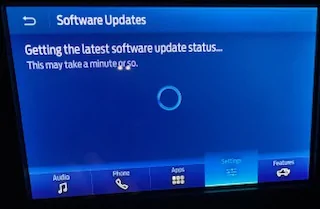
I took my '23 Base, which is driven sparingly, to the dealer for an appointment last Wednesday. The issues were that the auto stop/start was not functioning, and when going to software updates on the screen I get the following message which never resolves - it just stays that way until I back out of the screen. I left very explicit notes detailing both issues with the vehicle.
With regard to the auto stop/start, I figured it was probably just a case of a low battery charge, or failing battery.
When I went to pick up the Bronco this afternoon, I was told that the battery charge was low, it was recharged over the weekend, and all was well.... I pulled out of the service bay, stopped, and checked the software update screen and sure enough, it was doing the same thing as before, as depicted in the attached image. The service advisor told me to come home and try again hooked up to wi-fi, which I did, and still get the same thing. I have been scheduled for another service appointment next week. Ugh.
Has anyone had experience seeing this screen that will not resolve and if so, what was the ultimate fix?
Thanks for any help.

Appealing here for help since a trip to the dealer was a waste of time....
I took my '23 Base, which is driven sparingly, to the dealer for an appointment last Wednesday. The issues were that the auto stop/start was not functioning, and when going to software updates on the screen I get the following message which never resolves - it just stays that way until I back out of the screen. I left very explicit notes detailing both issues with the vehicle.
With regard to the auto stop/start, I figured it was probably just a case of a low battery charge, or failing battery.
When I went to pick up the Bronco this afternoon, I was told that the battery charge was low, it was recharged over the weekend, and all was well.... I pulled out of the service bay, stopped, and checked the software update screen and sure enough, it was doing the same thing as before, as depicted in the attached image. The service advisor told me to come home and try again hooked up to wi-fi, which I did, and still get the same thing. I have been scheduled for another service appointment next week. Ugh.
Has anyone had experience seeing this screen that will not resolve and if so, what was the ultimate fix?
Thanks for any help.
Sponsored