Sponsored

Issue with software updates - "getting the latest software update status"....

LS2GTO

Base
Well-Known Member
First Name
Gene
Joined
Aug 17, 2020
Threads
12
Messages
279
Reaction score
714
Location
Tennessee
Vehicle(s)
05 gto 00 f-250 03 t-bird 70 chevelle 59 tr-3..
Your Bronco Model
Base
Clubs
 
Hi folks,

Appealing here for help since a trip to the dealer was a waste of time....

I took my '23 Base, which is driven sparingly, to the dealer for an appointment last Wednesday. The issues were that the auto stop/start was not functioning, and when going to software updates on the screen I get the following message which never resolves - it just stays that way until I back out of the screen. I left very explicit notes detailing both issues with the vehicle.

With regard to the auto stop/start, I figured it was probably just a case of a low battery charge, or failing battery.

When I went to pick up the Bronco this afternoon, I was told that the battery charge was low, it was recharged over the weekend, and all was well.... I pulled out of the service bay, stopped, and checked the software update screen and sure enough, it was doing the same thing as before, as depicted in the attached image. The service advisor told me to come home and try again hooked up to wi-fi, which I did, and still get the same thing. I have been scheduled for another service appointment next week. Ugh.

Has anyone had experience seeing this screen that will not resolve and if so, what was the ultimate fix?

Thanks for any help.


Ford Bronco Issue with software updates - "getting the latest software update status".... bronco_screen
Sponsored


Brian_B

Big Bend
Well-Known Member
First Name
Brian
Joined
Sep 14, 2023
Threads
60
Messages
8,230
Reaction score
14,570
Location
Central CA
Vehicle(s)
'23 BB 4dr 7MT, '22 BSport OBX, '87 B-II XL
Your Bronco Model
Big Bend
Clubs
 
That's a new one for me. Watching

May be worth pulling the battery cable for a few minutes to let everything clear and reboot, see if that changes anything.
 
OP
OP

LS2GTO

Base
Well-Known Member
First Name
Gene
Joined
Aug 17, 2020
Threads
12
Messages
279
Reaction score
714
Location
Tennessee
Vehicle(s)
05 gto 00 f-250 03 t-bird 70 chevelle 59 tr-3..
Your Bronco Model
Base
Clubs
 
That's a new one for me. Watching

May be worth pulling the battery cable for a few minutes to let everything clear and reboot, see if that changes anything.
So I just ran to the store. Guess what? No auto stop/start. I guess I have a failing battery. Five days at the dealership and absolutely nothing was accomplished.
 

Dreamer

Badlands
Well-Known Member
First Name
Kevin
Joined
Sep 15, 2023
Threads
9
Messages
249
Reaction score
322
Location
Connecticut
Vehicle(s)
Ford Mustang GT convertible
Your Bronco Model
Badlands
Clubs
 
Very timely post. . Starting this week, my vehicle says the auto start stop is not working due to battery charging. I charged the AGM battery using a charger overnight. Still getting the same error message. ASS not working due to charging. Wonder if they did something with the last Update that caused this problem. Either that or I have a bad battery or…. something else.

Will be calling the dealer to make an appointment . Good luck.
 

Ducati1098

Wildtrak
Well-Known Member
Joined
Jul 14, 2020
Threads
25
Messages
9,545
Reaction score
21,992
Location
Midwest
Vehicle(s)
2022 Bronco Wildtrak, 2006 Corvette Z06, 2012 Ford Fusion
Your Bronco Model
Wildtrak
Clubs
 
So I just ran to the store. Guess what? No auto stop/start. I guess I have a failing battery. Five days at the dealership and absolutely nothing was accomplished.
While it certainly could be the battery, there’s lots of reasons why auto start stop may not be working. The instrument cluster will tell you the reason it isn’t working if you go through the menu to the right spot
 

Sponsored

Kesker

Badlands
Well-Known Member
First Name
Kesker
Joined
Nov 6, 2024
Threads
16
Messages
151
Reaction score
132
Location
New York
Vehicle(s)
2024 Bronco Badlands
Your Bronco Model
Badlands
Clubs
 
I experienced this before on a high end German car! I basically drove 5 miles a day, after a year towed to the dealer twice. Third time it happen I asked the mechanic directly WTF! He basically stated you need to drive the car. You’re not driving it enough! Now have 2024 Badlands for 6 months with 7k miles not an issue driving to trails! My advice enjoy your Bronco
 

rugedraw

Well-Known Member
First Name
Javier
Joined
Jan 9, 2024
Threads
0
Messages
372
Reaction score
319
Location
Miami, FL
Vehicle(s)
2021 Ford F150 Platinum FX4 EB/2023 Bronco Sport Badlands/1991 Mustang 5.0 coupe
Your Bronco Model
Undecided
That's a new one for me. Watching

May be worth pulling the battery cable for a few minutes to let everything clear and reboot, see if that changes anything.
This is 100% the fix for the screen getting hung up on the "checking for updates" screen. Disconnect the negative battery cable for 20 minutes, reconnect it and check again and it will eventually say "up to date" or reflect the info of the last OTA the vehicle received.

With FORScan, you can try rebooting the GWM and TCU, but even pulling the fuses for these modules directly has shown to not resolve the issue. A 20 minute battery pull is the more sure-fire way to fix it.
 
OP
OP

LS2GTO

Base
Well-Known Member
First Name
Gene
Joined
Aug 17, 2020
Threads
12
Messages
279
Reaction score
714
Location
Tennessee
Vehicle(s)
05 gto 00 f-250 03 t-bird 70 chevelle 59 tr-3..
Your Bronco Model
Base
Clubs
 
Hi folks,

Appealing here for help since a trip to the dealer was a waste of time....

I took my '23 Base, which is driven sparingly, to the dealer for an appointment last Wednesday. The issues were that the auto stop/start was not functioning, and when going to software updates on the screen I get the following message which never resolves - it just stays that way until I back out of the screen. I left very explicit notes detailing both issues with the vehicle.

With regard to the auto stop/start, I figured it was probably just a case of a low battery charge, or failing battery.

When I went to pick up the Bronco this afternoon, I was told that the battery charge was low, it was recharged over the weekend, and all was well.... I pulled out of the service bay, stopped, and checked the software update screen and sure enough, it was doing the same thing as before, as depicted in the attached image. The service advisor told me to come home and try again hooked up to wi-fi, which I did, and still get the same thing. I have been scheduled for another service appointment next week. Ugh.

Has anyone had experience seeing this screen that will not resolve and if so, what was the ultimate fix?

Thanks for any help.
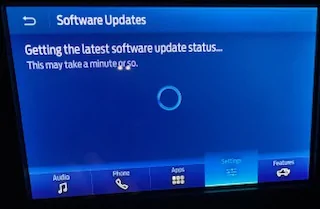

bronco_screen.jpg
Appreciate the comments and moral support.

So here's an update.

I called Ford customer support today and asked to speak to someone regarding my hunch that the software is not updating due to the screen getting hung up in settings/software updates.

I was connected with a very nice young lady in technical support. I explained the issue, and also told her that auto stop/start was not working, and that the vehicle had just left the shop for these issues yesterday afternoon.

She was able to look at my vehicle's information online and relay to me that my last OTA software update was in December. Since that time, a new update has attempted to load twice unsuccessfully. She was also able to tell me that the state of charge of my battery at the time of our conversation was 75% (it was 100% yesterday when I left the dealership - it had just been removed from the trickle charger)....

Most importantly, she informed me that the software will not update if the state of battery charge is less than 90%.

So, five days in the shop, scheduled to return next week, same issues with no resolution or information provided by dealership, and some digging on my part with the help of Ford customer support.

The very first time that the auto stop/start failed to operate, my immediate reaction was "the battery is dying". While the issue could indeed lie elsewhere, my bet is still on the battery.
 

rugedraw

Well-Known Member
First Name
Javier
Joined
Jan 9, 2024
Threads
0
Messages
372
Reaction score
319
Location
Miami, FL
Vehicle(s)
2021 Ford F150 Platinum FX4 EB/2023 Bronco Sport Badlands/1991 Mustang 5.0 coupe
Your Bronco Model
Undecided
Which update failed to install and what was the reason it failed?
 
OP
OP

LS2GTO

Base
Well-Known Member
First Name
Gene
Joined
Aug 17, 2020
Threads
12
Messages
279
Reaction score
714
Location
Tennessee
Vehicle(s)
05 gto 00 f-250 03 t-bird 70 chevelle 59 tr-3..
Your Bronco Model
Base
Clubs
 
Don’t know which update; since both failures were in Jan and my stop/start issues have been going on for a few weeks, I’m assuming it failed because the battery was not at 90%.
 

Sponsored

Brian_B

Big Bend
Well-Known Member
First Name
Brian
Joined
Sep 14, 2023
Threads
60
Messages
8,230
Reaction score
14,570
Location
Central CA
Vehicle(s)
'23 BB 4dr 7MT, '22 BSport OBX, '87 B-II XL
Your Bronco Model
Big Bend
Clubs
 
I have heard of auto updates not happening because of low battery, just havent seen your particular error message before. Keeping it on a trickle charger over night can usually solve that.

Often the battery will work itself out after a solid overnight charge … but yeah, there is a chance it does not and you need a new battery.

Also - odd about the 90% thing, because Forscan has a setting for target battery charge level and its set from the factory at 80%…
 

rugedraw

Well-Known Member
First Name
Javier
Joined
Jan 9, 2024
Threads
0
Messages
372
Reaction score
319
Location
Miami, FL
Vehicle(s)
2021 Ford F150 Platinum FX4 EB/2023 Bronco Sport Badlands/1991 Mustang 5.0 coupe
Your Bronco Model
Undecided
Don’t know which update; since both failures were in Jan and my stop/start issues have been going on for a few weeks, I’m assuming it failed because the battery was not at 90%.
Only updates that require the vehicle to be parked can fail due to battery issues. Send me the VIN and I can check. The truck getting stuck on that screen is an indicator the GWM is hung up in a funky state and that can cause issues if another OTA gets sent to you in terms of it being able to install. I still recommend you pull the negative battery cable as suggested.
 

Astronaut

Black Diamond
Well-Known Member
Joined
Nov 22, 2024
Threads
3
Messages
92
Reaction score
206
Location
New Mexico
Vehicle(s)
2017 RAM Longhorn Limited, 2024 Ford Bronco
Your Bronco Model
Black Diamond
Clubs
 
I wonder if maybe the alternator is not charging the battery properly???
 

indio22

Base
Well-Known Member
Joined
Aug 25, 2019
Threads
17
Messages
5,311
Reaction score
11,100
Location
Chicagoland, USA
Vehicle(s)
'72 Rover, '85 CJ7, '98 TJ, '14 BRZ, '23 Bronco
Your Bronco Model
Base
Hi folks,

Appealing here for help since a trip to the dealer was a waste of time....

I took my '23 Base, which is driven sparingly, to the dealer for an appointment last Wednesday. The issues were that the auto stop/start was not functioning, and when going to software updates on the screen I get the following message which never resolves - it just stays that way until I back out of the screen. I left very explicit notes detailing both issues with the vehicle.

With regard to the auto stop/start, I figured it was probably just a case of a low battery charge, or failing battery.

When I went to pick up the Bronco this afternoon, I was told that the battery charge was low, it was recharged over the weekend, and all was well.... I pulled out of the service bay, stopped, and checked the software update screen and sure enough, it was doing the same thing as before, as depicted in the attached image. The service advisor told me to come home and try again hooked up to wi-fi, which I did, and still get the same thing. I have been scheduled for another service appointment next week. Ugh.

Has anyone had experience seeing this screen that will not resolve and if so, what was the ultimate fix?

Thanks for any help.


bronco_screen.jpg
I'd be happy if my auto/start stop became disabled. And software updates aren't an issue on my '23 Bronco, because I turned them off over a year ago. :)
 
OP
OP

LS2GTO

Base
Well-Known Member
First Name
Gene
Joined
Aug 17, 2020
Threads
12
Messages
279
Reaction score
714
Location
Tennessee
Vehicle(s)
05 gto 00 f-250 03 t-bird 70 chevelle 59 tr-3..
Your Bronco Model
Base
Clubs
 
Only updates that require the vehicle to be parked can fail due to battery issues. Send me the VIN and I can check. The truck getting stuck on that screen is an indicator the GWM is hung up in a funky state and that can cause issues if another OTA gets sent to you in terms of it being able to install. I still recommend you pull the negative battery cable as suggested.
Thanks…. I’ll send you my VIN tomorrow.
Sponsored


Top