Sponsored

Kicker Key 200.4 Done Correctly

First Name
Seth
Joined
Jul 10, 2024
Threads
0
Messages
7
Reaction score
9
Location
Houston
Vehicle(s)
2024 Bronco Wildtrak 2015 Explorer Sport
Your Bronco Model
Wildtrak
Tell me someone with all the above knowledge is in Houston to help me get dialed in? I'm about to drop some paper on a complete system, and I want to make sure I'm not leaving any sound on the table - and I have zero knowledge regarding settings / installation - any Bronco brothers in Houston?
Sponsored


 

P_Baff

Badlands
Well-Known Member
First Name
Pierre
Joined
Jun 29, 2021
Threads
8
Messages
112
Reaction score
288
Location
Arizona
Vehicle(s)
'12 VW GTI & '21 Ford Bronco
Your Bronco Model
Badlands
@AZCoyote

Did you do any ForScan mods? I'm considering changing the speaker configuration settings for the rear pods to "Speaker & Tweeter" while also turning off the factory EQ. Front sound stage is already awesome, just trying to get the best since I received the OBDLink EX cable in the mail recently.

What are your thoughts? Thanks in advance!
 
OP
OP
AZCoyote

AZCoyote

Big Bend
Well-Known Member
First Name
Wiley
Joined
Jul 18, 2025
Threads
11
Messages
291
Reaction score
412
Location
Phoenix
Vehicle(s)
2024 Big Bend Sasquatch
Your Bronco Model
Big Bend
@AZCoyote

Did you do any ForScan mods? I'm considering changing the speaker configuration settings for the rear pods to "Speaker & Tweeter" while also turning off the factory EQ. Front sound stage is already awesome, just trying to get the best since I received the OBDLink EX cable in the mail recently.

What are your thoughts? Thanks in advance!
Turned off factory EQ I believe. I have stock rear pods so left those as it. I set position off in head unit. Still loving the outcome too.
 

P_Baff

Badlands
Well-Known Member
First Name
Pierre
Joined
Jun 29, 2021
Threads
8
Messages
112
Reaction score
288
Location
Arizona
Vehicle(s)
'12 VW GTI & '21 Ford Bronco
Your Bronco Model
Badlands
Turned off factory EQ I believe. I have stock rear pods so left those as it. I set position off in head unit. Still loving the outcome too.
Same, my rear pods are stock. I'm going to turn the EQ off and give the rear pods full range as a "Speaker & Tweeter" as from the factory they are only configured as tweeters I believe, and then use the HU to offset the front and rear fade like you. I'll report back with the results.
 

2BRONCO1

Black Diamond
Member
First Name
Mike
Joined
Oct 27, 2021
Threads
1
Messages
15
Reaction score
19
Location
Hamilton, Ontario Canada
Vehicle(s)
2011 F150
Your Bronco Model
Black Diamond
I have a 2021 Bronco, been running the Kicker 200.4 and a plug and play harness since vehicle was new. I thought the poor performance from the amp was due to a cheap chinese made amp. Finally got around to making the changes you suggested. Cannot believe the difference, sound stage is wayyy better, clear, and no distortion anymore all the way up the volume knob! All done with the cost of some wire and sound deadening. Thanks AZ for posting!
 

Sponsored

Pmharris423

Badlands
New Member
First Name
Preston
Joined
Jun 3, 2025
Threads
0
Messages
4
Reaction score
1
Location
Roswell, GA
Vehicle(s)
Ford Bronco 4Dr Badlands Non-SAS
Your Bronco Model
Badlands
Very happy to find this thread as I’m about to start on my own upgrade.
I’m planning on doing this, but I have a caveat that I wanted to run by y’all. I have the kit 19-1 that includes a subwoofer signal cable, I don’t have it yet but I assume it will be tapped into the AMP1 line that is going to become my 4” dash speaker signal. Should I plan on removing the sub line from the AMP1 signal and attaching it to the new kick speakers on AMP2 signal? Key500.1 for the sub

I have 2025 with the factory digital sub signal and my new enclosure won’t have room for the factory amp, so I plan to delete it rather than tap that signal.
 
OP
OP
AZCoyote

AZCoyote

Big Bend
Well-Known Member
First Name
Wiley
Joined
Jul 18, 2025
Threads
11
Messages
291
Reaction score
412
Location
Phoenix
Vehicle(s)
2024 Big Bend Sasquatch
Your Bronco Model
Big Bend
Very happy to find this thread as I’m about to start on my own upgrade.
I’m planning on doing this, but I have a caveat that I wanted to run by y’all. I have the kit 19-1 that includes a subwoofer signal cable, I don’t have it yet but I assume it will be tapped into the AMP1 line that is going to become my 4” dash speaker signal. Should I plan on removing the sub line from the AMP1 signal and attaching it to the new kick speakers on AMP2 signal? Key500.1 for the sub

I have 2025 with the factory digital sub signal and my new enclosure won’t have room for the factory amp, so I plan to delete it rather than tap that signal.
i don’t know the kit 19-1 part but you only need a single input pair to the Key 200.4 to run bi-amp. It splits the signal internally to feed both AMP1 and AMP2. If your 19-1 part has a sub line, it will still go to your sub amp. All good there. The front pair off your part should feed the Key 200. All good there.

The question will be how your rear pods are powered. I had to rewire my harness to return the rears back to normal power from the head unit.

do you have a link to the part?
 

Pmharris423

Badlands
New Member
First Name
Preston
Joined
Jun 3, 2025
Threads
0
Messages
4
Reaction score
1
Location
Roswell, GA
Vehicle(s)
Ford Bronco 4Dr Badlands Non-SAS
Your Bronco Model
Badlands
i don’t know the kit 19-1 part but you only need a single input pair to the Key 200.4 to run bi-amp. It splits the signal internally to feed both AMP1 and AMP2. If your 19-1 part has a sub line, it will still go to your sub amp. All good there. The front pair off your part should feed the Key 200. All good there.

The question will be how your rear pods are powered. I had to rewire my harness to return the rears back to normal power from the head unit.

do you have a link to the part?
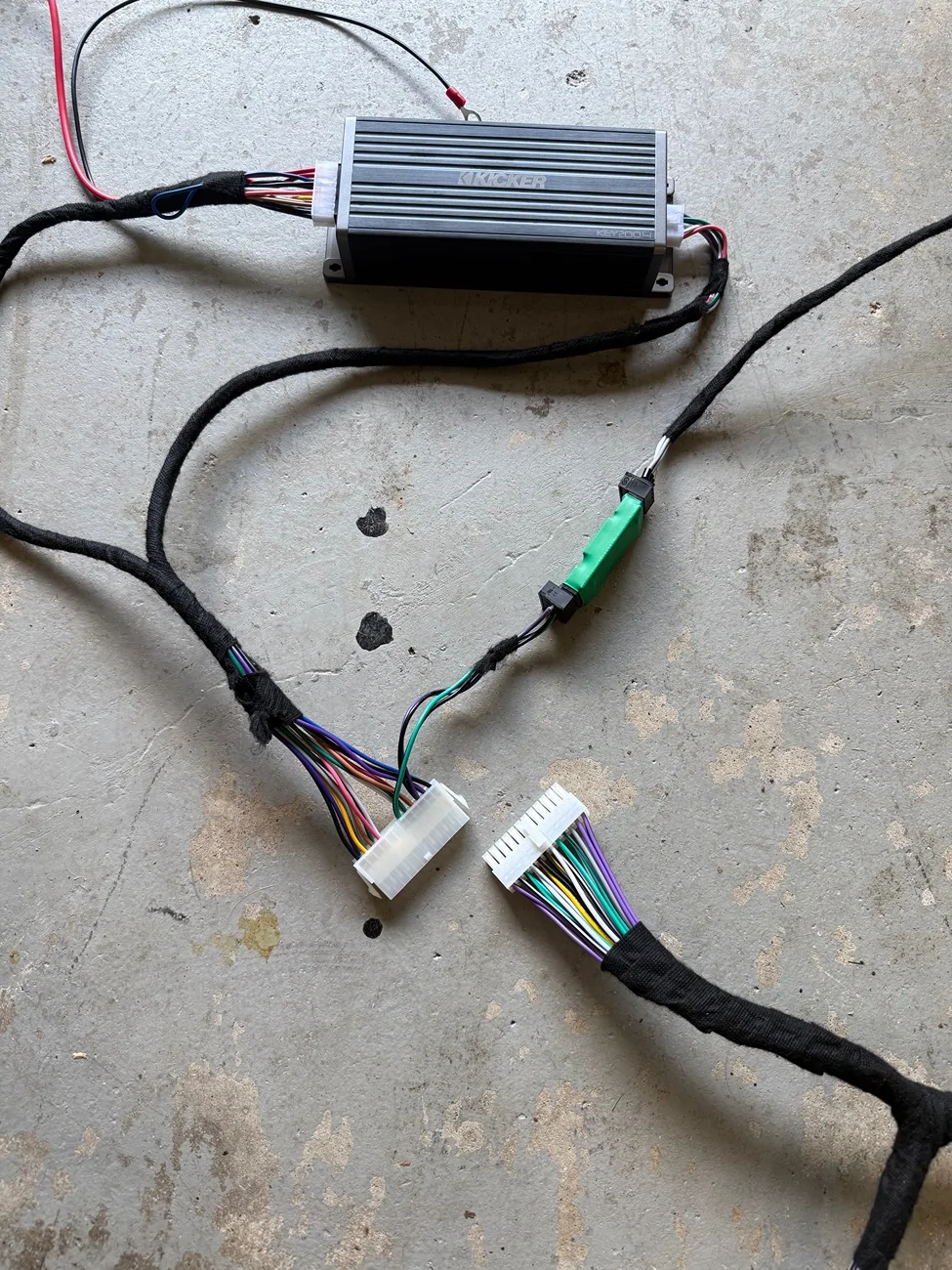
It is the Plugnplaykits 19-1 that Ragnarkon used in his install. Here is a picture showing the signal wire running to the amp in the back

Edit: After looking at your picture on page 7 #99 I see these are in addition to what you have on the plug, and I shouldn't have any difference than your setup.
Ford Bronco Kicker Key 200.4 Done Correctly IMG_0179
 
Last edited:
OP
OP
AZCoyote

AZCoyote

Big Bend
Well-Known Member
First Name
Wiley
Joined
Jul 18, 2025
Threads
11
Messages
291
Reaction score
412
Location
Phoenix
Vehicle(s)
2024 Big Bend Sasquatch
Your Bronco Model
Big Bend
It is the Plugnplaykits 19-1 that Ragnarkon used in his install. Here is a picture showing the signal wire running to the amp in the back

Edit: After looking at your picture on page 7 #99 I see these are in addition to what you have on the plug, and I shouldn't have any difference than your setup.
IMG_0179.webp
Awesome. Be sure to note post #101. You want a remote power wire from the 200 to the 500. It’s the only dependable way to turn on/off. Without it there are thumps and late signal detections.
 

Pmharris423

Badlands
New Member
First Name
Preston
Joined
Jun 3, 2025
Threads
0
Messages
4
Reaction score
1
Location
Roswell, GA
Vehicle(s)
Ford Bronco 4Dr Badlands Non-SAS
Your Bronco Model
Badlands
Awesome. Be sure to note post #101. You want a remote power wire from the 200 to the 500. It’s the only dependable way to turn on/off. Without it there are thumps and late signal detections.
Thanks for this advice, I did, was easy enough to run along the signal cable.
I haven’t been able to run the auto-eq unfortunately. Everytime I start it I get a sad beep followed by 2 beeps right after. I think it has to do with the subwoofer. I disconnected the power to it and got no sound out of the front at all, then disconnected the signal lines and get front speaker sound but I think this is tripping the low voltage alert at the sub amp, should I leave the subwoofer on and try the eq or would it work to just run a small loop of cable connecting the positive and negative terminal for signal output on the 500.1 so it thinks something is present?

edit: the subwoofer is almost nonexistent with the remote control turned down all the way.
Another edit: I tried disconnecting the remote line and running a dummy loop on the sub amp and neither changed my outcome.
On page 9 #135 I think, someone mentions needing to complete the loop where the old kick panels plugged in, I haven’t done that, I just taped up the ends and wrapped them away, could that be my issue? Stock wiring to the dash. New wiring to the kicks

yep, dash speakers have nothing, I’ll order the metra’s
 
Last edited:

Sponsored
OP
OP
AZCoyote

AZCoyote

Big Bend
Well-Known Member
First Name
Wiley
Joined
Jul 18, 2025
Threads
11
Messages
291
Reaction score
412
Location
Phoenix
Vehicle(s)
2024 Big Bend Sasquatch
Your Bronco Model
Big Bend
Thanks for this advice, I did, was easy enough to run along the signal cable.
I haven’t been able to run the auto-eq unfortunately. Everytime I start it I get a sad beep followed by 2 beeps right after. I think it has to do with the subwoofer. I disconnected the power to it and got no sound out of the front at all, then disconnected the signal lines and get front speaker sound but I think this is tripping the low voltage alert at the sub amp, should I leave the subwoofer on and try the eq or would it work to just run a small loop of cable connecting the positive and negative terminal for signal output on the 500.1 so it thinks something is present?

edit: the subwoofer is almost nonexistent with the remote control turned down all the way.
Another edit: I tried disconnecting the remote line and running a dummy loop on the sub amp and neither changed my outcome.
On page 9 #135 I think, someone mentions needing to complete the loop where the old kick panels plugged in, I haven’t done that, I just taped up the ends and wrapped them away, could that be my issue? Stock wiring to the dash. New wiring to the kicks

yep, dash speakers have nothing, I’ll order the metra’s
i used the old wires to the dash and ran new wires to the kick panels. The 200 handles all that. My amps are on separate power wires so removing the fuse for sub handles that. Balance should be full front when doing auto EQ and DSP setup.
 

Pmharris423

Badlands
New Member
First Name
Preston
Joined
Jun 3, 2025
Threads
0
Messages
4
Reaction score
1
Location
Roswell, GA
Vehicle(s)
Ford Bronco 4Dr Badlands Non-SAS
Your Bronco Model
Badlands
i used the old wires to the dash and ran new wires to the kick panels. The 200 handles all that. My amps are on separate power wires so removing the fuse for sub handles that. Balance should be full front when doing auto EQ and DSP setup.
What did you do with the old kick panel connections? Right now mine are empty and I’ve got no output to the dash. I’ve order some connectors and will loop them to continue the signal up to the dash. Kick panels are on my own wires like you outline. I’m assuming the pnp harness I have is tapping kick outputs so when I remove it, it interrupts the signal. I’ll try again tomorrow once I have the OEM kick connections looped
 
OP
OP
AZCoyote

AZCoyote

Big Bend
Well-Known Member
First Name
Wiley
Joined
Jul 18, 2025
Threads
11
Messages
291
Reaction score
412
Location
Phoenix
Vehicle(s)
2024 Big Bend Sasquatch
Your Bronco Model
Big Bend
What did you do with the old kick panel connections? Right now mine are empty and I’ve got no output to the dash. I’ve order some connectors and will loop them to continue the signal up to the dash. Kick panels are on my own wires like you outline. I’m assuming the pnp harness I have is tapping kick outputs so when I remove it, it interrupts the signal. I’ll try again tomorrow once I have the OEM kick connections looped
Have you modified your harness at all?

I disconnected my stock wires at kick and taped them up. I still get sound to dash.

I disconnect everything except the front floor speakers. Troubleshoot that. Then connect up the sub and go from there.
Sponsored


Top