
Sponsored

Kicker Key 200.4 Done Correctly

Brian_B

Big Bend
Well-Known Member
First Name
Brian
Joined
Sep 14, 2023
Threads
60
Messages
8,257
Reaction score
14,615
Location
Central CA
Vehicle(s)
'23 BB 4dr 7MT, '22 BSport OBX, '87 B-II XL
Your Bronco Model
Big Bend
Clubs
 
Maybe I missed it somewhere in the thread, but what is this for? Soundproofing behind the new kicks? If so, I already installed killmat, sound barrier and polyfill. I assume that is sufficient. Thanks.
Depends on what you are after really.

For most people, yeah, what you have done is reasonable and will sound good. (or at least, about as good as it gets)

If you want the mythical "midbass" response curve and want it to look flat - likely you haven't gone nearly far enough.
Sponsored


Jaymanire

Badlands
Active Member
First Name
Jay
Joined
Oct 5, 2021
Threads
2
Messages
35
Reaction score
38
Location
Knoxville, TN
Vehicle(s)
2022 Bronco Badlands
Your Bronco Model
Badlands
@AZCoyote, I finally completed the install of both kicker amps in my wife’s Bronco following your instructions and recommended speakers. Wow! What a difference. Sounds better than the B&O system in my Bronco. Guess I have to upgrade mine now.
 
OP
OP
AZCoyote

AZCoyote

Big Bend
Well-Known Member
First Name
Wiley
Joined
Jul 18, 2025
Threads
11
Messages
287
Reaction score
412
Location
Phoenix
Vehicle(s)
2024 Big Bend Sasquatch
Your Bronco Model
Big Bend
@AZCoyote, I finally completed the install of both kicker amps in my wife’s Bronco following your instructions and recommended speakers. Wow! What a difference. Sounds better than the B&O system in my Bronco. Guess I have to upgrade mine now.
That is great to hear! Glad you are loving it! It’s truly the best budget setup that exists for this system. Thanks for telling me!!!
 
OP
OP
AZCoyote

AZCoyote

Big Bend
Well-Known Member
First Name
Wiley
Joined
Jul 18, 2025
Threads
11
Messages
287
Reaction score
412
Location
Phoenix
Vehicle(s)
2024 Big Bend Sasquatch
Your Bronco Model
Big Bend
Maybe I missed it somewhere in the thread, but what is this for? Soundproofing behind the new kicks? If so, I already installed killmat, sound barrier and polyfill. I assume that is sufficient. Thanks.
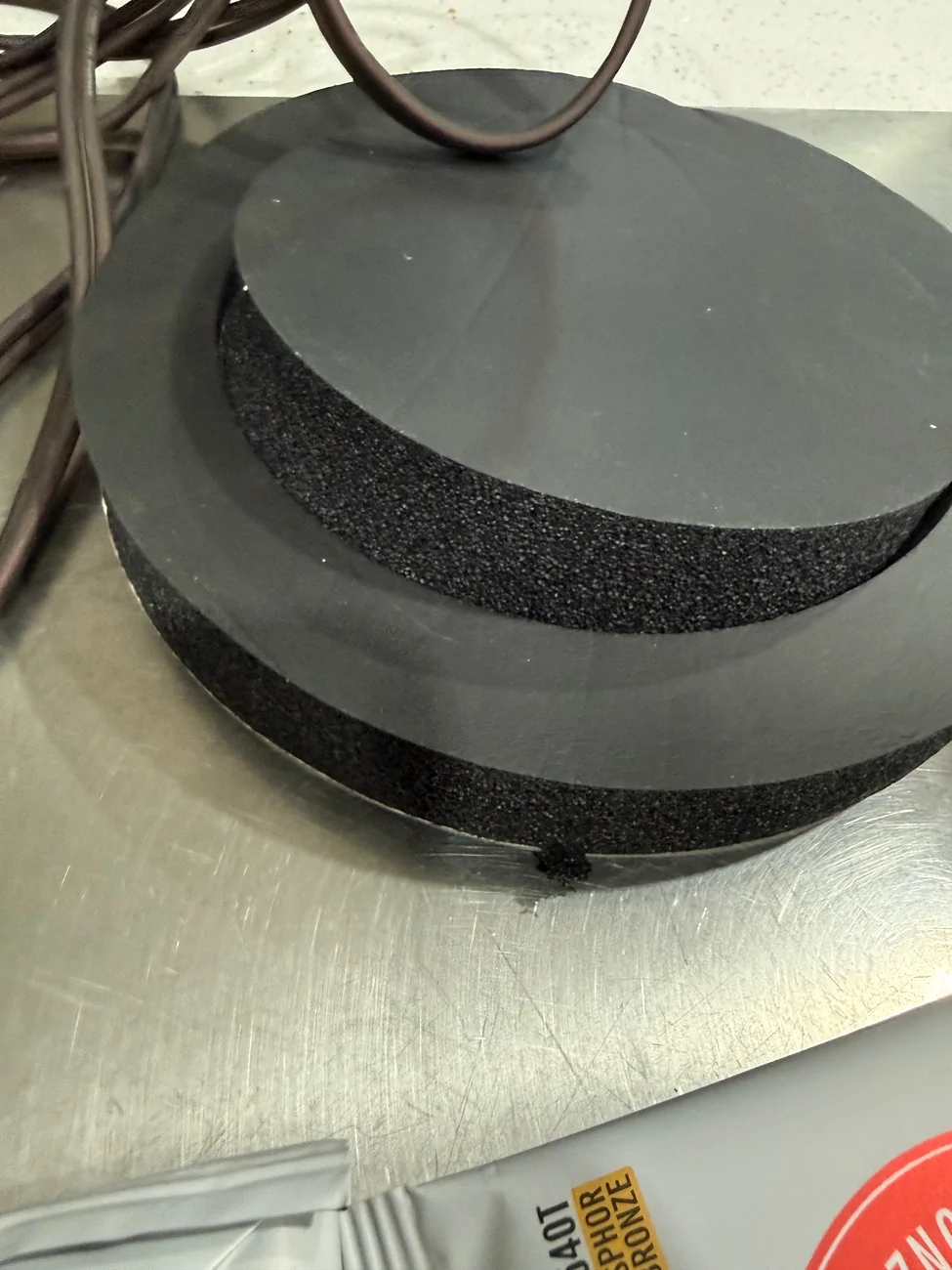
these just help separate the front wave from rear. Presses flush to the plastic trim piece. Not required but seems to help.
 

P_Baff

Badlands
Well-Known Member
First Name
Pierre
Joined
Jun 29, 2021
Threads
8
Messages
112
Reaction score
288
Location
Arizona
Vehicle(s)
'12 VW GTI & '21 Ford Bronco
Your Bronco Model
Badlands
@AZCoyote

I'm trying to get my audio shop to reconfigure the plug n play harness and get setup the way you have suggested with Bi-Amp mode. The installer emailed me the following before performing the job:


What Bi-Amp mode is actually doing
On amps like the Kicker KEY 200.4, Bi-Amp mode:

  • Sends separate power + signal to tweeters and woofers
  • Uses active crossovers (built into the amp) instead of the passive ones
  • Time-aligns and EQs each driver individually during setup
That’s why the manual says “without passive crossovers” — the amp is taking over that job.

Why coaxials don’t really work here
Coaxials already have:

  • A built-in passive crossover
  • Tweeter + woofer tied together internally
So if you run two sets of coaxials:

  • You’re basically bi-amping the same full-range signal twice
  • The amp can’t separately tune tweeter vs woofer
  • You lose the whole advantage of Bi-Amp mode


You can physically wire it… but it’s kinda pointless performance-wise.

Your other option (if you want to keep coaxials)
If you’re running:

  • Door coaxials + dash coaxials
Then:

  • Leave Bi-Amp OFF
  • Run normal 4-channel mode
  • Let the KEY do its tuning that way

Still sounds good, just not max potential.

What is your take on this? I have JL C1-400x in the dash & Kicker 46CSC674 in the kicks.

Really been frustrating getting them to understand what I want.

Let me know when you can. Thank you.
 

Sponsored

JediMcMuffin

Badlands
Well-Known Member
First Name
Tommy
Joined
Jun 15, 2021
Threads
47
Messages
2,389
Reaction score
4,431
Location
San Diego
Vehicle(s)
2021 Bronco Badlands
Your Bronco Model
Badlands
Clubs
 
Did anyone ever produce a newer harness that helps facilitate this? I never did reorder. Also @AZCoyote I finally saw your response on my diagram, it does make sense to re-use the factor wires for the wimpier dash speakers and run direct lines for the kick panels. I have some quiet time to myself next week, might be time to tackle this :D
 
OP
OP
AZCoyote

AZCoyote

Big Bend
Well-Known Member
First Name
Wiley
Joined
Jul 18, 2025
Threads
11
Messages
287
Reaction score
412
Location
Phoenix
Vehicle(s)
2024 Big Bend Sasquatch
Your Bronco Model
Big Bend
@AZCoyote

I'm trying to get my audio shop to reconfigure the plug n play harness and get setup the way you have suggested with Bi-Amp mode. The installer emailed me the following before performing the job:


What Bi-Amp mode is actually doing
On amps like the Kicker KEY 200.4, Bi-Amp mode:

  • Sends separate power + signal to tweeters and woofers
  • Uses active crossovers (built into the amp) instead of the passive ones
  • Time-aligns and EQs each driver individually during setup
That’s why the manual says “without passive crossovers” — the amp is taking over that job.

Why coaxials don’t really work here
Coaxials already have:

  • A built-in passive crossover
  • Tweeter + woofer tied together internally
So if you run two sets of coaxials:

  • You’re basically bi-amping the same full-range signal twice
  • The amp can’t separately tune tweeter vs woofer
  • You lose the whole advantage of Bi-Amp mode


You can physically wire it… but it’s kinda pointless performance-wise.

Your other option (if you want to keep coaxials)
If you’re running:

  • Door coaxials + dash coaxials
Then:

  • Leave Bi-Amp OFF
  • Run normal 4-channel mode
  • Let the KEY do its tuning that way

Still sounds good, just not max potential.

What is your take on this? I have JL C1-400x in the dash & Kicker 46CSC674 in the kicks.

Really been frustrating getting them to understand what I want.

Let me know when you can. Thank you.
you should probably find a new shop. The people you’re talking to are too fucking stupid to do car audio well. If you choose to stay with them, tell them RTFM page 9 and page 12.

The amp will use internal crossovers to send the front channels 320 hz and up. Perfect for our little midranges in the dash.

it sends 640hz and down to the rear channels so your kicks are in the perfect frequency range for the kick panel speakers.

Be sure to set the dip switch for cutting sub frequencies entirely. I prefer 80 on this setup. Your ears may like something else.
 

P_Baff

Badlands
Well-Known Member
First Name
Pierre
Joined
Jun 29, 2021
Threads
8
Messages
112
Reaction score
288
Location
Arizona
Vehicle(s)
'12 VW GTI & '21 Ford Bronco
Your Bronco Model
Badlands
you should probably find a new shop. The people you’re talking to are too fucking stupid to do car audio well. If you choose to stay with them, tell them RTFM page 9 and page 12.
I'm on the verge of finding another shop. I sent them the manual and even highlighted those pages. Basically what they're telling me is that since I have coaxials in the dash and in the kicks, that I don't need Bi-Amp mode. I asked grok and this is what it spit out when I told it I had JL coax in the dash and Kicker coax in the kicks:

"Do NOT use bi-amp mode unless you're separating woofers and tweeters with no passive crossovers (the KEY has a bi-amp option with auto 3.2kHz crossover, but your coaxials already have passives, so it could cause issues or thin sound)."

What's your take?
 
OP
OP
AZCoyote

AZCoyote

Big Bend
Well-Known Member
First Name
Wiley
Joined
Jul 18, 2025
Threads
11
Messages
287
Reaction score
412
Location
Phoenix
Vehicle(s)
2024 Big Bend Sasquatch
Your Bronco Model
Big Bend
I'm on the verge of finding another shop. I sent them the manual and even highlighted those pages. Basically what they're telling me is that since I have coaxials in the dash and in the kicks, that I don't need Bi-Amp mode. I asked grok and this is what it spit out when I told it I had JL coax in the dash and Kicker coax in the kicks:

"Do NOT use bi-amp mode unless you're separating woofers and tweeters with no passive crossovers (the KEY has a bi-amp option with auto 3.2kHz crossover, but your coaxials already have passives, so it could cause issues or thin sound)."

What's your take?
Grok is not all knowing. Back to page 12.

There are two ways to use bi-amp. the key auto detects and uses the correct crossover points. It will know you have dash coax and kickpanel mids.

the issue of not using passive crossover isn’t about the bass cap filtering on your coaxial tweeter. It means don’t use a puck sized inline crossover that would come with a tweeter/woofer combo set.

320hz up heads to dash midrange and that is the end of crossover stuff for the fronts. Key is indifferent to the cap on the tweeter on the coax. It literally does not see or care about the tweeter cap.

Ford Bronco Kicker Key 200.4 Done Correctly IMG_3771
 

P_Baff

Badlands
Well-Known Member
First Name
Pierre
Joined
Jun 29, 2021
Threads
8
Messages
112
Reaction score
288
Location
Arizona
Vehicle(s)
'12 VW GTI & '21 Ford Bronco
Your Bronco Model
Badlands
Grok is not all knowing. Back to page 12.

There are two ways to use bi-amp. the key auto detects and uses the correct crossover points. It will know you have dash coax and kickpanel mids.

the issue of not using passive crossover isn’t about the bass cap filtering on your coaxial tweeter. It means don’t use a puck sized inline crossover that would come with a tweeter/woofer combo set.

320hz up heads to dash midrange and that is the end of crossover stuff for the fronts. Key is indifferent to the cap on the tweeter on the coax. It literally does not see or care about the tweeter cap.
I'm going to send this reply to the owner that sent me the response I posted above in #155.

Thank you.
 

Sponsored
OP
OP
AZCoyote

AZCoyote

Big Bend
Well-Known Member
First Name
Wiley
Joined
Jul 18, 2025
Threads
11
Messages
287
Reaction score
412
Location
Phoenix
Vehicle(s)
2024 Big Bend Sasquatch
Your Bronco Model
Big Bend
That said, your coax in the kicks are not ideal. You are not going to use the tweeter at all in the configuration. It won’t hurt anything. Just don’t expect to hear those tweeters at all. 640 down to 80 is a tight frequency range. But the bi-amp mode gets the best out of the dash and kick panel speakers that you can with the Kicker Key.
 

P_Baff

Badlands
Well-Known Member
First Name
Pierre
Joined
Jun 29, 2021
Threads
8
Messages
112
Reaction score
288
Location
Arizona
Vehicle(s)
'12 VW GTI & '21 Ford Bronco
Your Bronco Model
Badlands
Thanks to @AZCoyote I was able to write up a step by step guide using all the information and knowledge be made available to us on this thread and forum. Here it is. Thank you @AZCoyote you're the man! If you see anything I missed, please point it out.

KICKER KEY 200.4 Bi-Amp Mode Wiring Instructions for 2021+ Ford Bronco w/ Plug N Play Harness (w/o B&O)


The harness is a Plug n Play "T" harness. (One connection coming out of the head unit, one connection to the factory harness and one connection to the Kicker Amp) You will see that color coding should exist the same way for both the factory & "T" harness. If it does, configuration will be very easy. If it doesn’t, you need to map it channel to channel.

1.) Access the plug n play harness "T" harness & Kicker amp under the steering wheel and under the head unit by removing the necessary panels. Disconnect and remove the plug n play "T" harness (this will make the install easier) Then start carefully removing the cloth tessa tape around all the wires for the plug n play "T" harness.

2.) For the rear speaker pods, you need to take apart the incorrectly wired plug n play "T" harness and just send the head unit power to the rear pods. (This will cause seat belt chimes, back-up and other vehicle alerts to be very loud and highly amplified. That's okay, it will be addressed later via FORScan programming) For the rear input channels, you will cut the corresponding wires about 2 inches from the end of the input plug going into the amp. Tape the stubby wires that were heading into the amp on the amp plug individually so they don’t short or touch anything.

3.) If the "T" harness wires match the OEM harness, cut purple, purple black stripe, green, green black stripe. So now you have freed up the two channels from the head unit that we’re feeding the rear input on the KEY. They are now disconnected from the KEY.

4.) On the amp output side of the "T" harness, the wires that are sending power out to the rear pods need to be freed up. Check to see if they are color-coded or mapped identically to the factory harness. The process is the same. Leave yourself a plenty of wire to work with so you can connect your kick panel speakers easily, about 3 inches of wire. You’ll cut the exact same colors on the output side. Purple, purple black stripe, green, green black stripe. (NOTE: Other possible color combination: (+) Right is Purple, (-) Right is Black & (+) Left is Green, (-) Left is Brown)

5.) At this point nothing should be going into channels (3) three and (4) four on the amp input and nothing connected to channels (3) three and (4) four on the amp output. You should have color matching sets of disconnected wires on both side sides of the plug n play "T" harness.

6.) Connect those "T" harness wires to each other by color. You probably note that you have long wires on the "T" harness. (If you don’t like that, the loop can be made shorter.) Do not tape anything up at this point.

7.) Pull the fuse on the Kicker KEY power wire near the battery. We want the amp off while you verify sound to the rear pods from the head unit power.

8.) Verify all your connections look correct, plug everything in and check for sound on the rear pods. (Test with radio & head unit fader) If you don’t hear the rear pods, go back and check crimps or connections and make sure your colors and polarity match.

9.) If you have sound to the pods, tape up the harness so it’s clean and compact and proceed to do the Kicker bi-amp set up.

10.) The easiest and correct way to wire the front kicks is to unplug the kick panel connectors. (Dash and kicks are connected together and wired in parallel from the factory, hence the aftermarket Metra adapters at the kicks.) Wrap the Metras in bubble wrap, or foam and tuck those connectors out of the way. They will not be used. This will leave AMP1 running just the dash speakers using stock wires. We'll need to run new wires to the kick panels and attach those directly to AMP2 left and right outputs.

11.) Set the dip switches. (Leave EQ, Bi-AMP and Time Delay ON, Compression Setting & Fader OFF, AMP 1&2 filter at 80Hz) Run DSP with head unit volume approx. level 24 (Right before clipping occurs). Reset gains using pink noise also at 24. (Gains only get set after DSP is done)

12.) Everything ready to be cleaned & tidied, finished for panels to buttoned back up.

NOTES:


IMPORTANT - During tuning, you set the head unit fader full front so the rear pods are silent and you pull the fuse for the subwoofer (if applicable). This keeps the tuning algorithm happy as it listens to the kick and dash speakers only.

*The only thing getting altered is the wiring on the third-party harness. No cutting, splicing or tapping the OEM factory wiring or harness.


** Part of the process of using bi-amp is flipping the switch to turn off fader. With fader off, you only need the left and right front inputs to generate all four of the output channels.

*** Be sure to set both gains equally as you raise them to just before clipping begins. (For example we don't want one at the 12 o'clock position and the other at 1 o'clock, they should be the same.)

**** Sound Deadening Material - Be sure to use plenty behind the kick panel and try to seal off all the holes and gaps in that space behind it. Then use a foam ring around the front of the driver so that it blocks the rear wave from the front. Use plenty of sound deadening material inside of the cavity behind the 4 inch dash speakers
 
OP
OP
AZCoyote

AZCoyote

Big Bend
Well-Known Member
First Name
Wiley
Joined
Jul 18, 2025
Threads
11
Messages
287
Reaction score
412
Location
Phoenix
Vehicle(s)
2024 Big Bend Sasquatch
Your Bronco Model
Big Bend
Thanks to @AZCoyote I was able to write up a step by step guide using all the information and knowledge be made available to us on this thread and forum. Here it is. Thank you @AZCoyote you're the man! If you see anything I missed, please point it out.

KICKER KEY 200.4 Bi-Amp Mode Wiring Instructions for 2021+ Ford Bronco w/ Plug N Play Harness (w/o B&O)


The harness is a Plug n Play "T" harness. (One connection coming out of the head unit, one connection to the factory harness and one connection to the Kicker Amp) You will see that color coding should exist the same way for both the factory & "T" harness. If it does, configuration will be very easy. If it doesn’t, you need to map it channel to channel.

1.) Access the plug n play harness "T" harness & Kicker amp under the steering wheel and under the head unit by removing the necessary panels. Disconnect and remove the plug n play "T" harness (this will make the install easier) Then start carefully removing the cloth tessa tape around all the wires for the plug n play "T" harness.

2.) For the rear speaker pods, you need to take apart the incorrectly wired plug n play "T" harness and just send the head unit power to the rear pods. (This will cause seat belt chimes, back-up and other vehicle alerts to be very loud and highly amplified. That's okay, it will be addressed later via FORScan programming) For the rear input channels, you will cut the corresponding wires about 2 inches from the end of the input plug going into the amp. Tape the stubby wires that were heading into the amp on the amp plug individually so they don’t short or touch anything.

3.) If the "T" harness wires match the OEM harness, cut purple, purple black stripe, green, green black stripe. So now you have freed up the two channels from the head unit that we’re feeding the rear input on the KEY. They are now disconnected from the KEY.

4.) On the amp output side of the "T" harness, the wires that are sending power out to the rear pods need to be freed up. Check to see if they are color-coded or mapped identically to the factory harness. The process is the same. Leave yourself a plenty of wire to work with so you can connect your kick panel speakers easily, about 3 inches of wire. You’ll cut the exact same colors on the output side. Purple, purple black stripe, green, green black stripe. (NOTE: Other possible color combination: (+) Right is Purple, (-) Right is Black & (+) Left is Green, (-) Left is Brown)

5.) At this point nothing should be going into channels (3) three and (4) four on the amp input and nothing connected to channels (3) three and (4) four on the amp output. You should have color matching sets of disconnected wires on both side sides of the plug n play "T" harness.

6.) Connect those "T" harness wires to each other by color. You probably note that you have long wires on the "T" harness. (If you don’t like that, the loop can be made shorter.) Do not tape anything up at this point.

7.) Pull the fuse on the Kicker KEY power wire near the battery. We want the amp off while you verify sound to the rear pods from the head unit power.

8.) Verify all your connections look correct, plug everything in and check for sound on the rear pods. (Test with radio & head unit fader) If you don’t hear the rear pods, go back and check crimps or connections and make sure your colors and polarity match.

9.) If you have sound to the pods, tape up the harness so it’s clean and compact and proceed to do the Kicker bi-amp set up.

10.) The easiest and correct way to wire the front kicks is to unplug the kick panel connectors. (Dash and kicks are connected together and wired in parallel from the factory, hence the aftermarket Metra adapters at the kicks.) Wrap the Metras in bubble wrap, or foam and tuck those connectors out of the way. They will not be used. This will leave AMP1 running just the dash speakers using stock wires. We'll need to run new wires to the kick panels and attach those directly to AMP2 left and right outputs.

11.) Set the dip switches. (Leave EQ, Bi-AMP and Time Delay ON, Compression Setting & Fader OFF, AMP 1&2 filter at 80Hz) Run DSP with head unit volume approx. level 24 (Right before clipping occurs). Reset gains using pink noise also at 24. (Gains only get set after DSP is done)

12.) Everything ready to be cleaned & tidied, finished for panels to buttoned back up.

NOTES:


IMPORTANT - During tuning, you set the head unit fader full front so the rear pods are silent and you pull the fuse for the subwoofer (if applicable). This keeps the tuning algorithm happy as it listens to the kick and dash speakers only.

*The only thing getting altered is the wiring on the third-party harness. No cutting, splicing or tapping the OEM factory wiring or harness.


** Part of the process of using bi-amp is flipping the switch to turn off fader. With fader off, you only need the left and right front inputs to generate all four of the output channels.

*** Be sure to set both gains equally as you raise them to just before clipping begins. (For example we don't want one at the 12 o'clock position and the other at 1 o'clock, they should be the same.)

**** Sound Deadening Material - Be sure to use plenty behind the kick panel and try to seal off all the holes and gaps in that space behind it. Then use a foam ring around the front of the driver so that it blocks the rear wave from the front. Use plenty of sound deadening material inside of the cavity behind the 4 inch dash speakers
Great write up, Bro! Be sure to grab all the diagrams too.
 
OP
OP
AZCoyote

AZCoyote

Big Bend
Well-Known Member
First Name
Wiley
Joined
Jul 18, 2025
Threads
11
Messages
287
Reaction score
412
Location
Phoenix
Vehicle(s)
2024 Big Bend Sasquatch
Your Bronco Model
Big Bend
Did anyone ever produce a newer harness that helps facilitate this? I never did reorder. Also @AZCoyote I finally saw your response on my diagram, it does make sense to re-use the factor wires for the wimpier dash speakers and run direct lines for the kick panels. I have some quiet time to myself next week, might be time to tackle this :D
Haven’t seen one yet. Current producers of “plug and play” harnesses for the kicker seem indifferent to the fact they are running the amps out of spec. The posts about failed Key 200s on the internet are easily attributable to the 2 ohm load they inflict on the amp. Their janky config works “mostly” and increases volume some but it trashes amps. And the output suffers. Kicker designed the amp well and it’s high value to cost for what you get IF you run it in spec. I doubt anyone will make a better harness just for bi-amp. Shame though. It would be a better product.
 

JediMcMuffin

Badlands
Well-Known Member
First Name
Tommy
Joined
Jun 15, 2021
Threads
47
Messages
2,389
Reaction score
4,431
Location
San Diego
Vehicle(s)
2021 Bronco Badlands
Your Bronco Model
Badlands
Clubs
 
Thanks to @AZCoyote I was able to write up a step by step guide using all the information and knowledge be made available to us on this thread and forum. Here it is. Thank you @AZCoyote you're the man! If you see anything I missed, please point it out.

KICKER KEY 200.4 Bi-Amp Mode Wiring Instructions for 2021+ Ford Bronco w/ Plug N Play Harness (w/o B&O)


The harness is a Plug n Play "T" harness. (One connection coming out of the head unit, one connection to the factory harness and one connection to the Kicker Amp) You will see that color coding should exist the same way for both the factory & "T" harness. If it does, configuration will be very easy. If it doesn’t, you need to map it channel to channel.

1.) Access the plug n play harness "T" harness & Kicker amp under the steering wheel and under the head unit by removing the necessary panels. Disconnect and remove the plug n play "T" harness (this will make the install easier) Then start carefully removing the cloth tessa tape around all the wires for the plug n play "T" harness.

2.) For the rear speaker pods, you need to take apart the incorrectly wired plug n play "T" harness and just send the head unit power to the rear pods. (This will cause seat belt chimes, back-up and other vehicle alerts to be very loud and highly amplified. That's okay, it will be addressed later via FORScan programming) For the rear input channels, you will cut the corresponding wires about 2 inches from the end of the input plug going into the amp. Tape the stubby wires that were heading into the amp on the amp plug individually so they don’t short or touch anything.

3.) If the "T" harness wires match the OEM harness, cut purple, purple black stripe, green, green black stripe. So now you have freed up the two channels from the head unit that we’re feeding the rear input on the KEY. They are now disconnected from the KEY.

4.) On the amp output side of the "T" harness, the wires that are sending power out to the rear pods need to be freed up. Check to see if they are color-coded or mapped identically to the factory harness. The process is the same. Leave yourself a plenty of wire to work with so you can connect your kick panel speakers easily, about 3 inches of wire. You’ll cut the exact same colors on the output side. Purple, purple black stripe, green, green black stripe. (NOTE: Other possible color combination: (+) Right is Purple, (-) Right is Black & (+) Left is Green, (-) Left is Brown)

5.) At this point nothing should be going into channels (3) three and (4) four on the amp input and nothing connected to channels (3) three and (4) four on the amp output. You should have color matching sets of disconnected wires on both side sides of the plug n play "T" harness.

6.) Connect those "T" harness wires to each other by color. You probably note that you have long wires on the "T" harness. (If you don’t like that, the loop can be made shorter.) Do not tape anything up at this point.

7.) Pull the fuse on the Kicker KEY power wire near the battery. We want the amp off while you verify sound to the rear pods from the head unit power.

8.) Verify all your connections look correct, plug everything in and check for sound on the rear pods. (Test with radio & head unit fader) If you don’t hear the rear pods, go back and check crimps or connections and make sure your colors and polarity match.

9.) If you have sound to the pods, tape up the harness so it’s clean and compact and proceed to do the Kicker bi-amp set up.

10.) The easiest and correct way to wire the front kicks is to unplug the kick panel connectors. (Dash and kicks are connected together and wired in parallel from the factory, hence the aftermarket Metra adapters at the kicks.) Wrap the Metras in bubble wrap, or foam and tuck those connectors out of the way. They will not be used. This will leave AMP1 running just the dash speakers using stock wires. We'll need to run new wires to the kick panels and attach those directly to AMP2 left and right outputs.

11.) Set the dip switches. (Leave EQ, Bi-AMP and Time Delay ON, Compression Setting & Fader OFF, AMP 1&2 filter at 80Hz) Run DSP with head unit volume approx. level 24 (Right before clipping occurs). Reset gains using pink noise also at 24. (Gains only get set after DSP is done)

12.) Everything ready to be cleaned & tidied, finished for panels to buttoned back up.

NOTES:


IMPORTANT - During tuning, you set the head unit fader full front so the rear pods are silent and you pull the fuse for the subwoofer (if applicable). This keeps the tuning algorithm happy as it listens to the kick and dash speakers only.

*The only thing getting altered is the wiring on the third-party harness. No cutting, splicing or tapping the OEM factory wiring or harness.


** Part of the process of using bi-amp is flipping the switch to turn off fader. With fader off, you only need the left and right front inputs to generate all four of the output channels.

*** Be sure to set both gains equally as you raise them to just before clipping begins. (For example we don't want one at the 12 o'clock position and the other at 1 o'clock, they should be the same.)

**** Sound Deadening Material - Be sure to use plenty behind the kick panel and try to seal off all the holes and gaps in that space behind it. Then use a foam ring around the front of the driver so that it blocks the rear wave from the front. Use plenty of sound deadening material inside of the cavity behind the 4 inch dash speakers
Thank you for this!! Though I still think I need to run a dedicated power wire to the battery since I have the OG version of the harness. Turns out I saved my diagram, and the I've done my best to visualize your adjustments described above:

Ford Bronco Kicker Key 200.4 Done Correctly 1774388597590-6m


Ford Bronco Kicker Key 200.4 Done Correctly 1774390319066-rl


Ford Bronco Kicker Key 200.4 Done Correctly 1774390345020-7u
Sponsored


Top