

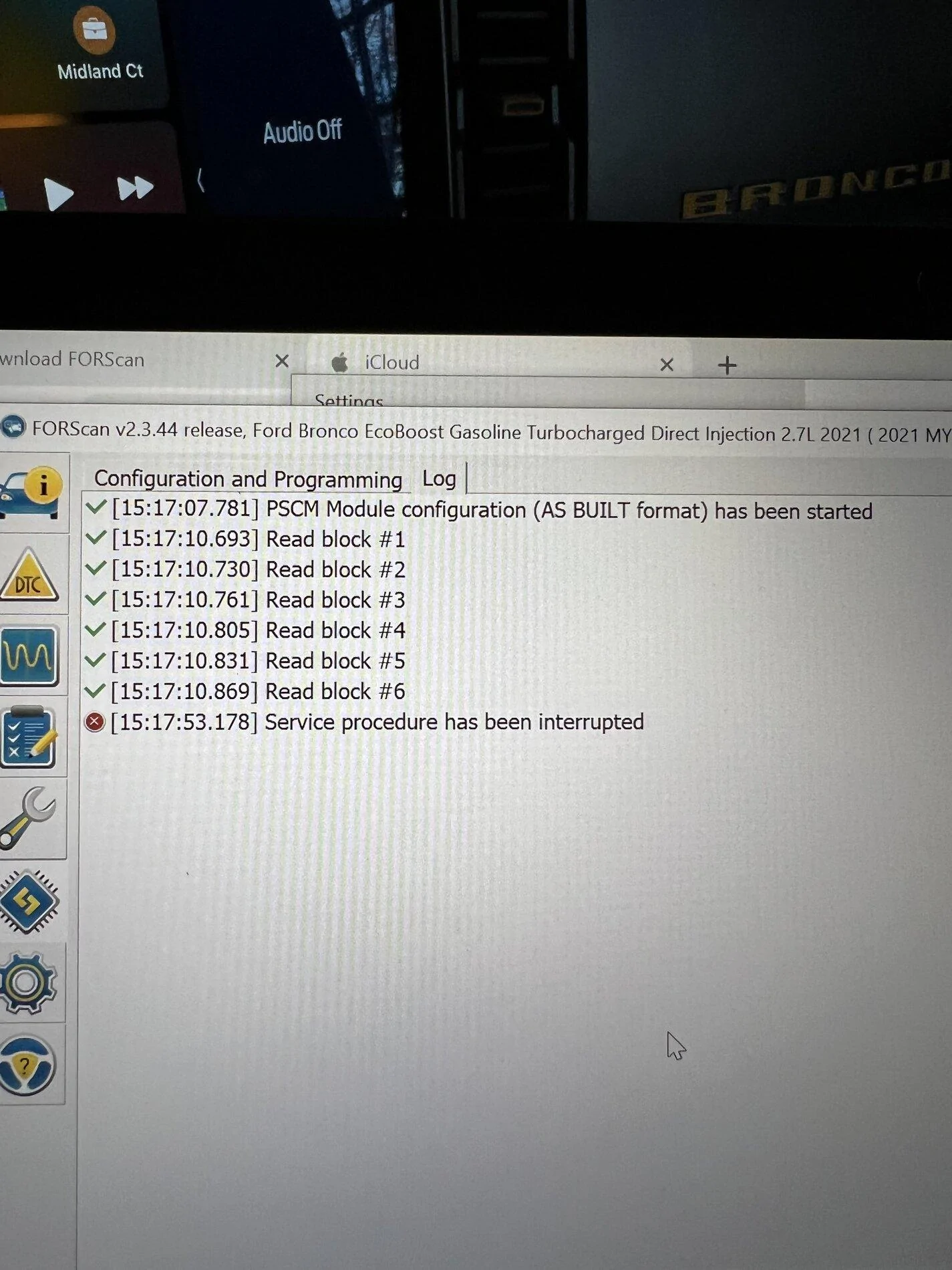
I just did it and had zero issues. Are you using a Bluetooth of Wi-Fi adapter?Has anyone been able to disable auto start-stop? I get the following error. I am in PSCM 730-03-01. No error codes.

Sponsored
I just did it and had zero issues. Are you using a Bluetooth of Wi-Fi adapter?Has anyone been able to disable auto start-stop? I get the following error. I am in PSCM 730-03-01. No error codes.


Alright, you turkeys (Thanksgiving joke, don't ban me)I can't wait to annoy one of you to spoon-feed me on how to do this in the future.
I'm used to flashing ECU's on motorcycles. I assume this is similar?
No using usb and all my other changes worked (e.g. sport mode on badlands, double honk)I just did it and had zero issues. Are you using a Bluetooth of Wi-Fi adapter?


Update the as built, did you check out the Forscan tutorial and embedded videos? Lots of good info on how to make changes. I also recommend logging before and after changes. I take screen shots before and after with each change and save in a word doc.I’ve got everything connected and created backups of all the “as-builds”. When making updates, do I update the “as-built” module or the “non as-built” module. Ex. “BdyCM Module Configuration (AS BUILT format” vs “BdyCM
I have saved my changes in notes and after a few days I’ll save my current as-builts to a new folder, once I know I like them, and this will be my reference point in case I need to restore or reset anything.Update the as built, did you check out the Forscan tutorial and embedded videos? Lots of good info on how to make changes. I also recommend logging before and after changes. I take screen shots before and after with each change and save in a word doc.
Updated the sheet. Please review and let me know. I had it highlighted as I wasn't certain.Here’s an update from my Bronco. To turn off the ”doo doo doo” for the key-in chime and the door ajar chime the changes are in IPC but on line 720-01-02 rather than 720-02-01 as listed in the spreadsheet. The following worked for me:
720-01-02 xxxx x*xx changed from 0 to 2 to turn off the key-in chime
720-01-02 xx*x xxxx changed from 2 to 0 to turn off the door ajar chime
regarding the door ajar, I still see a warning on the dash that a door is open.
hope this helps.

I've used Forscan on my Raptor last, about a year ago. I was getting this error when trying to add Baja to a BD.Has anyone been able to disable auto start-stop? I get the following error. I am in PSCM 730-03-01. No error codes.
Just reviewed and all looks to be the way I made my changes. Thanks for updating it, I wasn’t sure if it was something I could do or if it’s locked.Updated the sheet. Please review and let me know. I had it highlighted as I wasn't certain.
Thank you for the feedback.
I had the drivers window stop on one if the global command close. I suspect it's part of the window safety feature. The window will stop closing if they sense resistance. It may be Ford turned up the sensitivity when the windows are closed remotely. It only happened once, just to be safe I send the close wait 10 seconds and send it again if I am not standing next to the vehicle.Try loading your Bronco as a new vehicle Profile into FORScan.
I know some people have stated that trying to close all four windows at once just doesn’t work period. Could be why Global Close was never included. You should be able to try it again and close the front two. My Broncos will close all 4 so far, knock on wood. I’ve only done it a couple times just to test/demonstrate

Happened to me too.. I did the window reset which fixed for me… for the windows causing issue open it and hold button down for ten seconds, then close and hold button for ten seconds … repeat two more times … this also fixed my rear window which wasn’t functioning properly when door was opened then closed…. Thought the fix was an April fools joke or something but worked for me .. good luckOk an interesting thing happened when I had completed all programming steps. The first time I pushed the lock button, then pushed it again and held it down all the windows closed at the same time. The second and subsequent times I tried it the rear windows closed perfectly but the fronts stopped at different spots. I again had to press the lock button, then press it again and hold it down to get the fronts to close. Any ideas as to what’s happening?
What is "the window reset"Happened to me too.. I did the window reset which fixed for me… for the windows causing issue open it and hold button down for ten seconds, then close and hold button for ten seconds … repeat two more times … this also fixed my rear window which wasn’t functioning properly when door was opened then closed…. Thought the fix was an April fools joke or something but worked for me .. good luck