Sponsored

ThunderFlash

Wildtrak
Well-Known Member
First Name
Doug
Joined
Jun 23, 2024
Threads
28
Messages
1,291
Reaction score
2,970
Location
Washington
Vehicle(s)
'24 4-dr WT, '22 2-dr WT, '15 Explorer Sport, '02 F250 SD V-10
Your Bronco Model
Wildtrak
Clubs
 
Total newb here, sorry. I read the tutorial and read endless posts on the Forscan threads. I think the name Forscan is just too close to Fortran and that was a class I'd very much rather forget...so I'm a little gun shy about it. :) Two questions,

1) Is it advisable to be on a charger when connected to the vehicle OBDII port? Getting power out to my truck is not very easy.

2) When prompted by Forscan to cycle the ignition on/off after writing to the vehicle, is that done at that exact point, or after disconnecting from the vehicle? Seems like a stupid question, but it also seems like cycling the ignition may break the connection.

Thanks in advance and sorry for asking what's probably stupid questions. I'll be absolutely sure to back up all the as built modules first thing.
Sponsored
 

MachingBird

Wildtrak
Well-Known Member
First Name
Christopher
Joined
Aug 16, 2020
Threads
11
Messages
229
Reaction score
318
Location
Western, NY
Vehicle(s)
2015 F-150 Lariat
Your Bronco Model
Wildtrak
Total newb here, sorry. I read the tutorial and read endless posts on the Forscan threads. I think the name Forscan is just too close to Fortran and that was a class I'd very much rather forget...so I'm a little gun shy about it. :) Two questions,

1) Is it advisable to be on a charger when connected to the vehicle OBDII port? Getting power out to my truck is not very easy.

2) When prompted by Forscan to cycle the ignition on/off after writing to the vehicle, is that done at that exact point, or after disconnecting from the vehicle? Seems like a stupid question, but it also seems like cycling the ignition may break the connection.

Thanks in advance and sorry for asking what's probably stupid questions. I'll be absolutely sure to back up all the as built modules first thing.
Do what it says to do, when it says to do it and it works perfectly. TRIPLE check your module modifications before writing.
 

ThunderFlash

Wildtrak
Well-Known Member
First Name
Doug
Joined
Jun 23, 2024
Threads
28
Messages
1,291
Reaction score
2,970
Location
Washington
Vehicle(s)
'24 4-dr WT, '22 2-dr WT, '15 Explorer Sport, '02 F250 SD V-10
Your Bronco Model
Wildtrak
Clubs
 
@MachingBird, it also appears to warn that you are potentially f'ing up your Bronco with every change. Just ignore that? :)
 

MachingBird

Wildtrak
Well-Known Member
First Name
Christopher
Joined
Aug 16, 2020
Threads
11
Messages
229
Reaction score
318
Location
Western, NY
Vehicle(s)
2015 F-150 Lariat
Your Bronco Model
Wildtrak
@MachingBird, it also appears to warn that you are potentially f'ing up your Bronco with every change. Just ignore that? :)
It’s a standard warning telling you that you are about to alter what you very much intend to alter on your bronco to make it what you want to make it. That warning came with every modification I made on my bronco and every modification I made on my 2015 lariat F150. Just be sure to triple check your values before you write it and you won’t brick anything. Also, don’t forget to back up your as built data.
 

redone17

Black Diamond
Well-Known Member
First Name
Chris
Joined
Mar 6, 2021
Threads
75
Messages
4,754
Reaction score
5,185
Location
Cold Spring, NY
Vehicle(s)
2021 Bronco, 2020 Ranger
Your Bronco Model
Black Diamond
Anyone know how I can turn off “No Key Detected” chime on a 2025?
 

Sponsored

murphtron

Badlands
Well-Known Member
First Name
T
Joined
Mar 11, 2021
Threads
18
Messages
570
Reaction score
698
Location
Berkeley, CA
Vehicle(s)
2023 Badlands, 2013 Toyota Highlander, 2000 Miata
Your Bronco Model
Badlands
Clubs
 

redone17

Black Diamond
Well-Known Member
First Name
Chris
Joined
Mar 6, 2021
Threads
75
Messages
4,754
Reaction score
5,185
Location
Cold Spring, NY
Vehicle(s)
2021 Bronco, 2020 Ranger
Your Bronco Model
Black Diamond
The row 10 instruction doesn’t work in the 2025?
I got key in ignition working. I think it’s the 2025 version of double honk. I gotta try that.
 

ActionZ

Black Diamond
Well-Known Member
First Name
Jackson
Joined
Jun 21, 2025
Threads
8
Messages
113
Reaction score
63
Location
Vancouver
Vehicle(s)
2024 Bronco 2.7
Your Bronco Model
Black Diamond
has anyone figured out ACM settings for 2025 broncos? EQ to flat and changing rear pods to Speaker+Tweeter+Sub on my 2024 base 7 speaker system was amazing with upgraded kickers, but the same setup and setting sounds exactly the same if not worse than stock on my 2025 with base 7 speaker...


Edit: ok I messed around with it and on my 2025 7 speaker setup, I have to leave EQ at the default 1 to make it sound good. If I have it flat, it sounds like the factory speaker with no bass. For the rear pods, changing it to speaker+tweeter or speaker + tweeter + sub sounds the same with no difference.
 
Last edited:

GoHawks63

Wildtrak
Well-Known Member
First Name
George
Joined
Jan 17, 2025
Threads
16
Messages
702
Reaction score
1,039
Location
Metro Detroit
Vehicle(s)
Bronco Wildtrak, Cadillac CTS-V Coupe, Roush Stage 3 Mustang convertible
Your Bronco Model
Wildtrak
Edit: Never mind, I figured it out. The DDM module also needed to be updated. Working now.

I used Forscan to enable Global Close for the windows.

I enabled all the global close options (Just like the banner at the top of the Forscan sub-forum) and only the passenger side windows close.

Anyone run into this?
 
Last edited:

Nc211

Outer Banks
Well-Known Member
Joined
Dec 16, 2023
Threads
47
Messages
736
Reaction score
1,420
Location
Washington DC
Vehicle(s)
24 OBX, 20 GLS 450, 14 VW Tiquan
Your Bronco Model
Outer Banks
Sorry if dumb question - 100% newbie on the learning curve of Forscan. Main question - first time I set it up and asks me to set the profile for the car (first time connection), is that my back-up to stock? I want to make sure I fully understand how to save a version of the as-built values across the board before I start making a few of the popular changes. I follow 99% of it, thanks to all of you (seriously, thanks guys who have spent the hours doing these videos and data mining and showing us how to do this!!!)

Laptop is all set up, Forscan 2-month license activated, waiting for the adaptor to arrive.

I want to:
1) turn off fake engine noise
2) turn off double horn
3) check heated steering wheel temperature setting

I saw Ragarkon's audio thread and found the entires for the lux / BO system to check (thank you!)

Just want to make sure I understand how to save a file from the very start as back up just in case.
 

Sponsored

ThunderFlash

Wildtrak
Well-Known Member
First Name
Doug
Joined
Jun 23, 2024
Threads
28
Messages
1,291
Reaction score
2,970
Location
Washington
Vehicle(s)
'24 4-dr WT, '22 2-dr WT, '15 Explorer Sport, '02 F250 SD V-10
Your Bronco Model
Wildtrak
Clubs
 
Just want to make sure I understand how to save a file from the very start as back up just in case.
I'm a newb as well. I went thru and saved all the "as built" profiles individually, which was a bit of a PITA. It did not remember the directory I used, so I was manually pointing it each time for 20 some files. It's also kind of weird that I don't see the files on my laptop in Windows Explorer, but they do show up in the FORscan software. Not sure why that is except maybe an unrecognized file extension maybe?
 

DarthLincoln

Badlands
Well-Known Member
First Name
Chuck
Joined
Feb 11, 2022
Threads
2
Messages
935
Reaction score
2,320
Location
Northern California - Contra Costa County
Vehicle(s)
1999 BMW M coupe, 2023 Ford Bronco Badlands 2dr
Your Bronco Model
Badlands
Clubs
 
Sorry if dumb question - 100% newbie on the learning curve of Forscan. Main question - first time I set it up and asks me to set the profile for the car (first time connection), is that my back-up to stock? I want to make sure I fully understand how to save a version of the as-built values across the board before I start making a few of the popular changes.
When you connect for the first time it asks you to set the profile of that vehicle, but this step does NOT save backup data of all the modules. You still have to manually backup each AS BUILT DATA module as shown in the tutorial videos.

I'm not really sure what saving the vehicle profile does. One thing I noticed is it creates a vehicle profile file located in a hidden directory
C:\Users\username\AppData\Roaming\FORScan\vehicles
That vehicle file includes the vehicle info and all the module part numbers it found. I don't know what this is used for since it scans all modules every time you connect. I suppose maybe it checks to see if a module part has changed, or is a reference while it does certain functions.
 
Last edited:

Nc211

Outer Banks
Well-Known Member
Joined
Dec 16, 2023
Threads
47
Messages
736
Reaction score
1,420
Location
Washington DC
Vehicle(s)
24 OBX, 20 GLS 450, 14 VW Tiquan
Your Bronco Model
Outer Banks
When you connect for the first time it asks you to set the profile of that vehicle, but this step does NOT save backup data of all the modules. You still have to manually backup each AS BUILT DATA module as shown in the tutorial videos.

I'm not really sure what saving the vehicle profile does. One thing I noticed is it creates a vehicle profile file located in a hidden directory
C:\Users\username\AppData\Roaming\FORScan\vehicles
That vehicle file includes the vehicle info and all the module part numbers it found. I don't know what this is used for since it scans all modules every time you connect. I suppose maybe it checks to see if a module part has changed, or is a reference while it does certain functions.

View attachment 776733

Ok, I follow now (and found the video), many thanks DarthLincoln!!
 

Nc211

Outer Banks
Well-Known Member
Joined
Dec 16, 2023
Threads
47
Messages
736
Reaction score
1,420
Location
Washington DC
Vehicle(s)
24 OBX, 20 GLS 450, 14 VW Tiquan
Your Bronco Model
Outer Banks
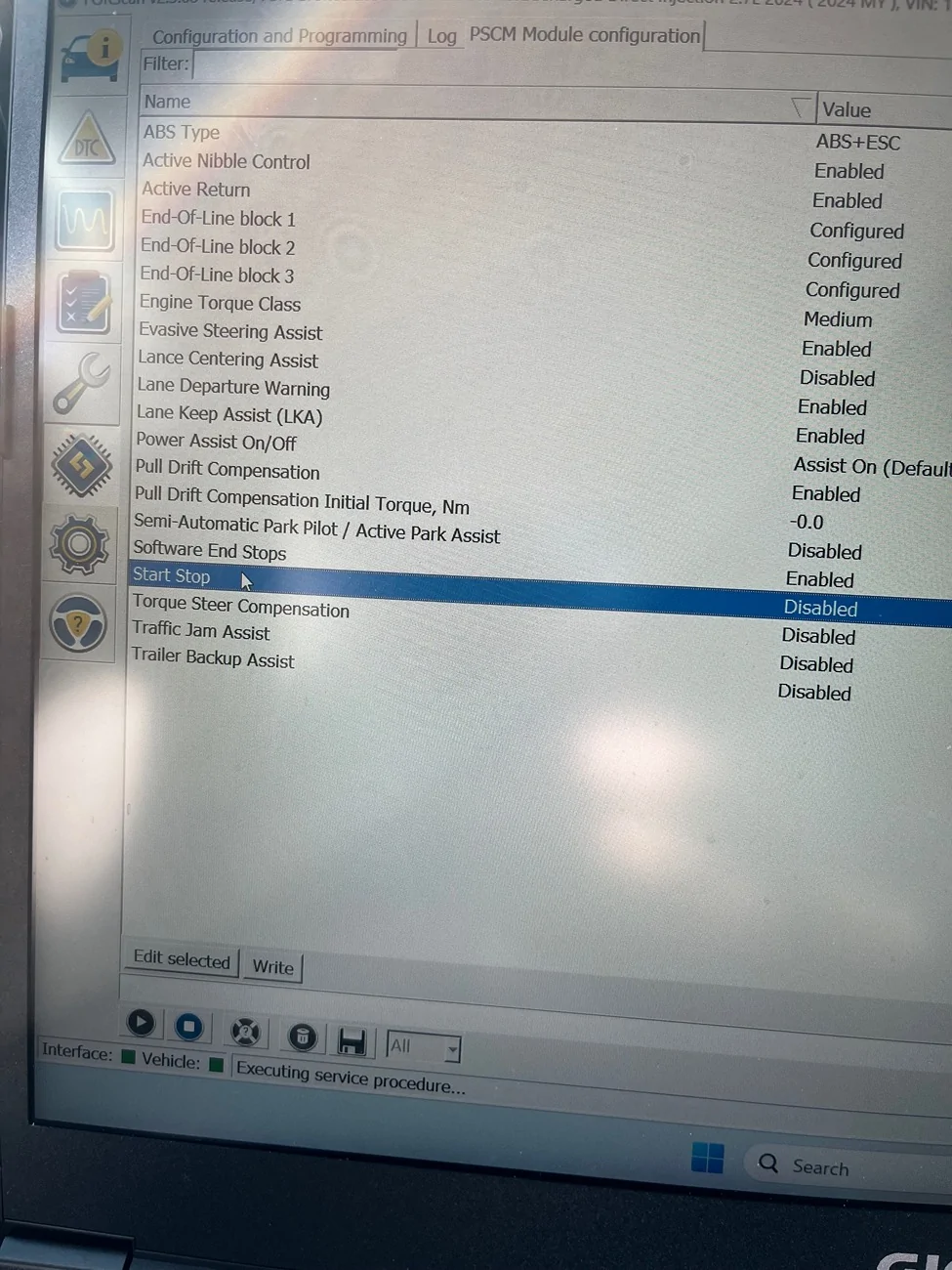
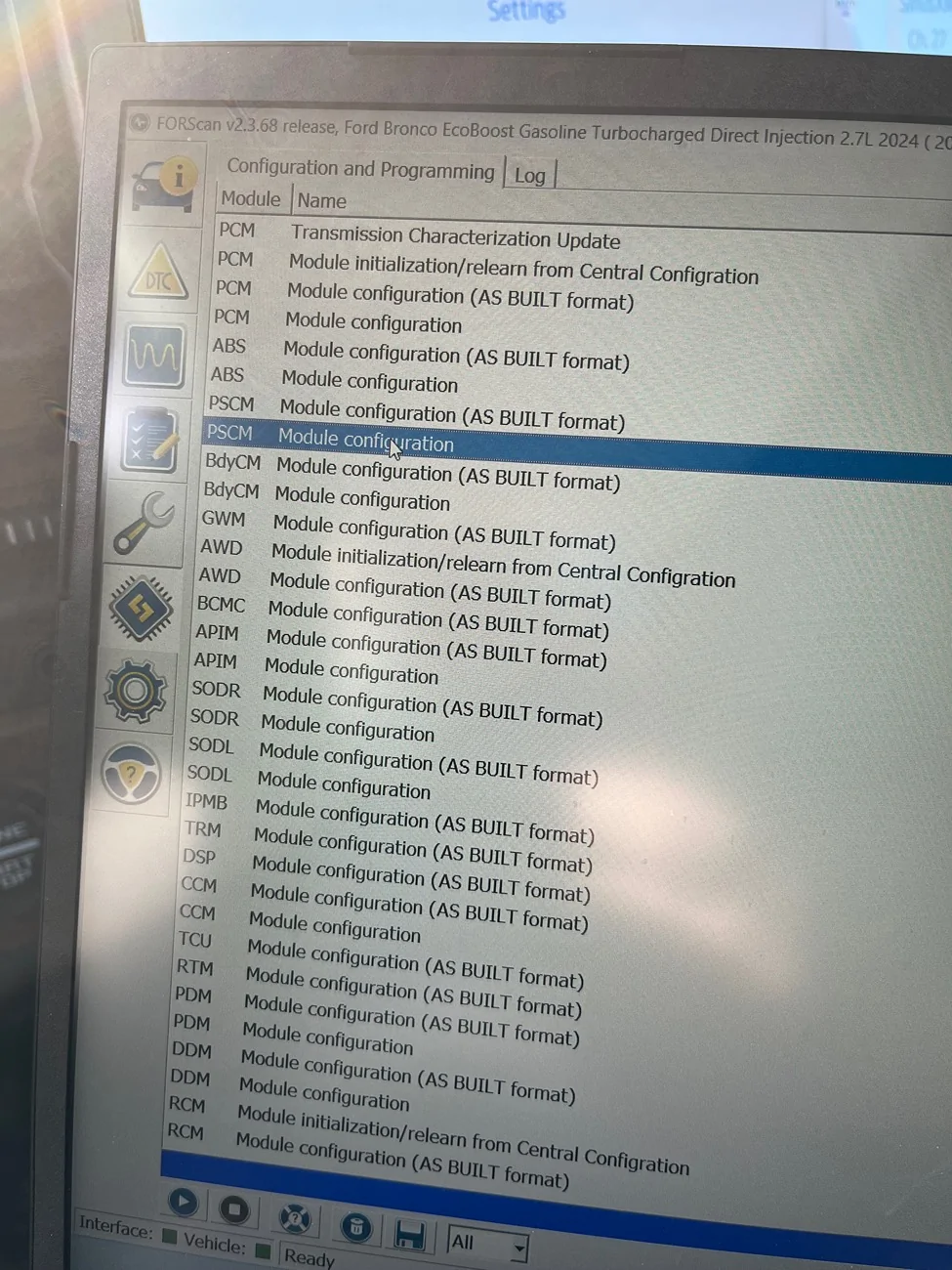
Pretty slick program!!! Can absolutely see how the inexperienced could totally mess up their cars with it by mistake! Thankfully I avoided that. I was able to eliminate start/stop, double honk, fake engine noise, which were my main items. I noticed “chime” for blind spot was disabled, so I enabled it, but not sure if it’ll do anything…

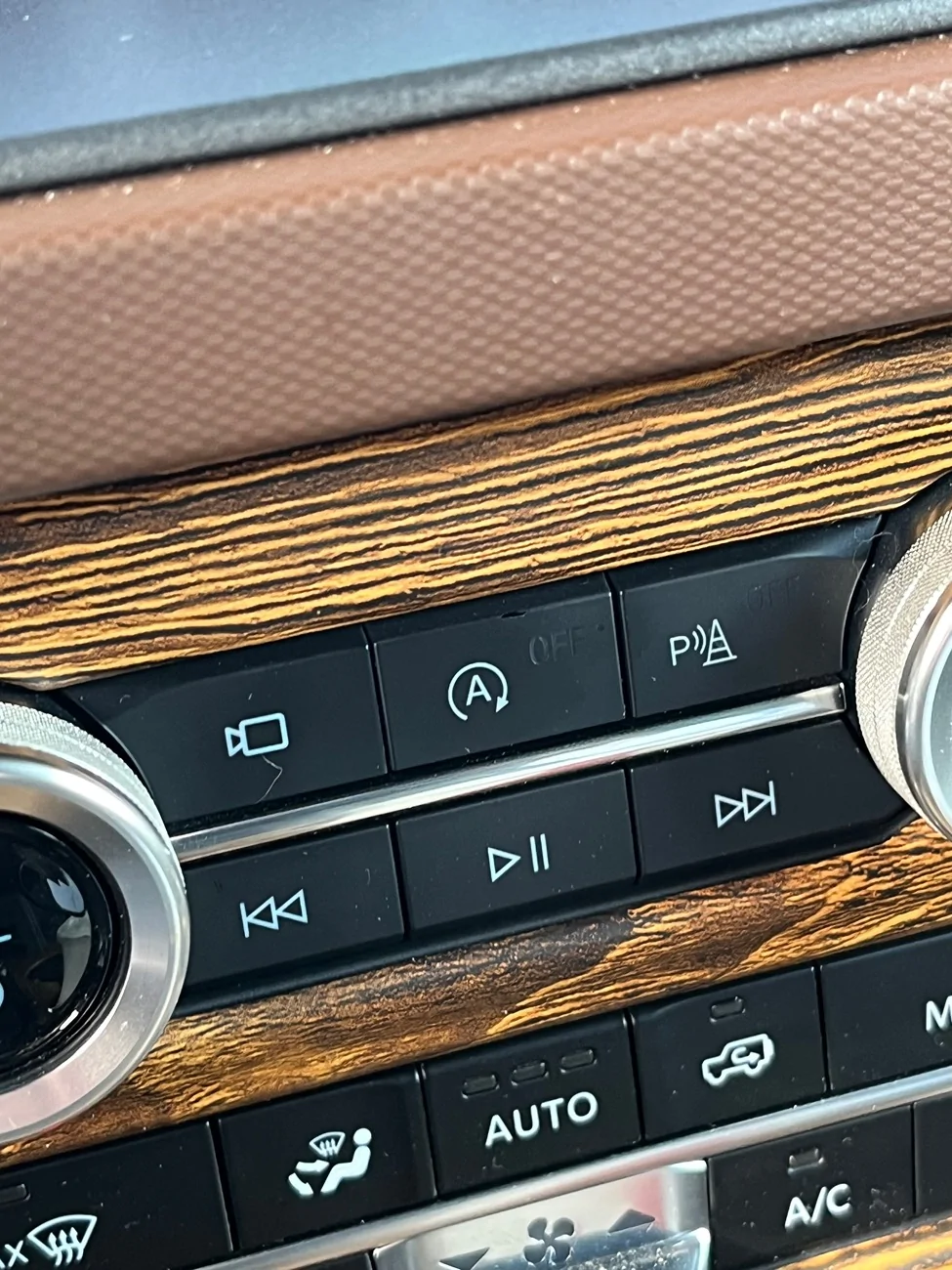
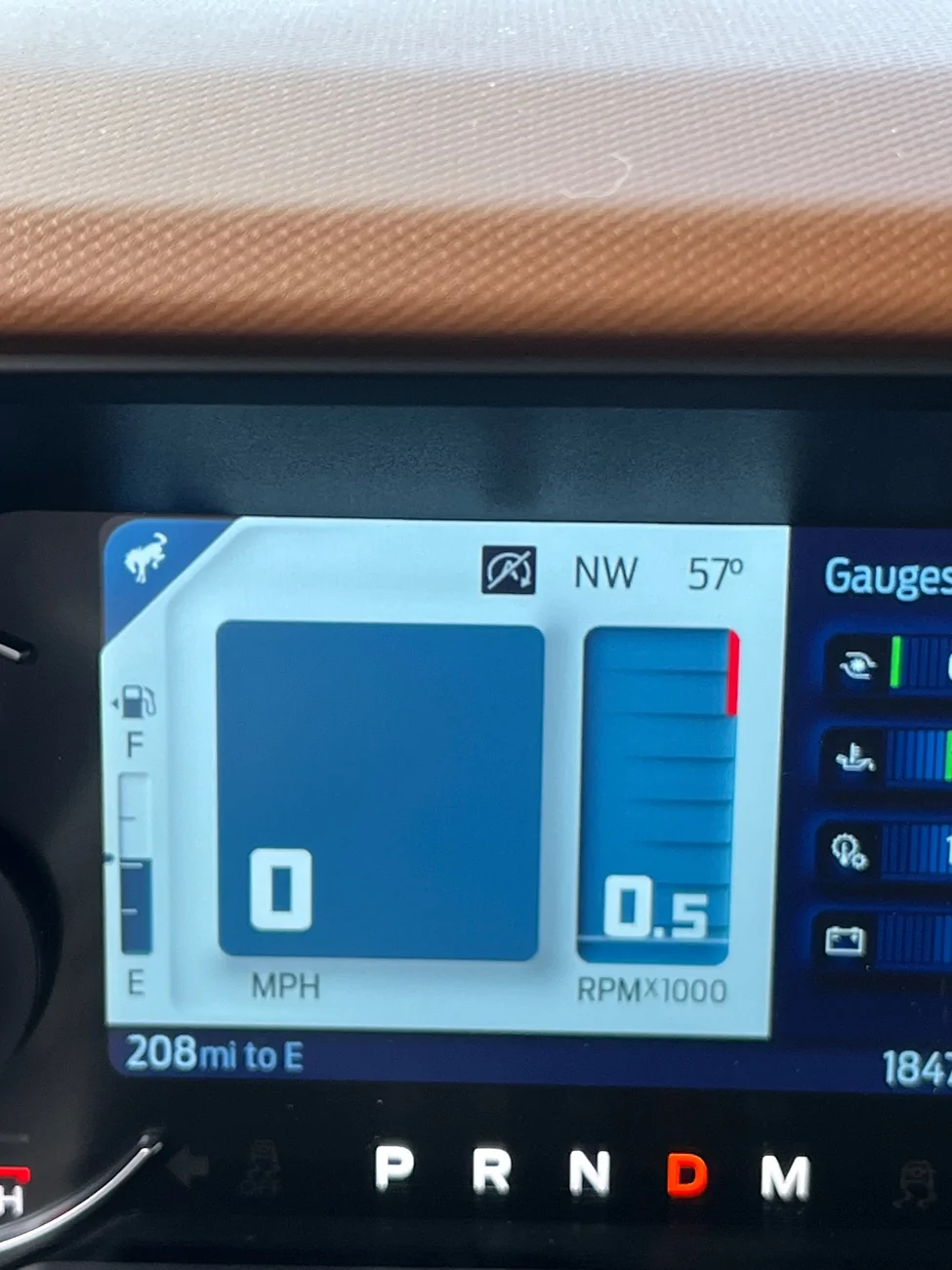
On the start/stop, here is how I did it, and what it looks like afterwards. I get the symbol on the dash saying it's in stop mode when at a stop, but it's not stopped.

Ford Bronco 2021+ Bronco ForScan Thread IMG_7151


Ford Bronco 2021+ Bronco ForScan Thread IMG_7150


Ford Bronco 2021+ Bronco ForScan Thread IMG_7153


Ford Bronco 2021+ Bronco ForScan Thread IMG_7152
 

Nc211

Outer Banks
Well-Known Member
Joined
Dec 16, 2023
Threads
47
Messages
736
Reaction score
1,420
Location
Washington DC
Vehicle(s)
24 OBX, 20 GLS 450, 14 VW Tiquan
Your Bronco Model
Outer Banks
Scratch the effective deletion of the start/stop. It came back on today. Ugh….
Sponsored


Top