
Sponsored

3.0 Steering Rack Install Issues

CH02

Outer Banks
Active Member
First Name
Chad
Joined
Dec 30, 2021
Threads
10
Messages
42
Reaction score
55
Location
Kennesaw
Vehicle(s)
2021 Outer Banks Sasquatch
Your Bronco Model
Outer Banks
Clubs
 
The shop put the rack in and has it plugged in but when running the rack file program in the tuner this is what happens. Any thoughts?

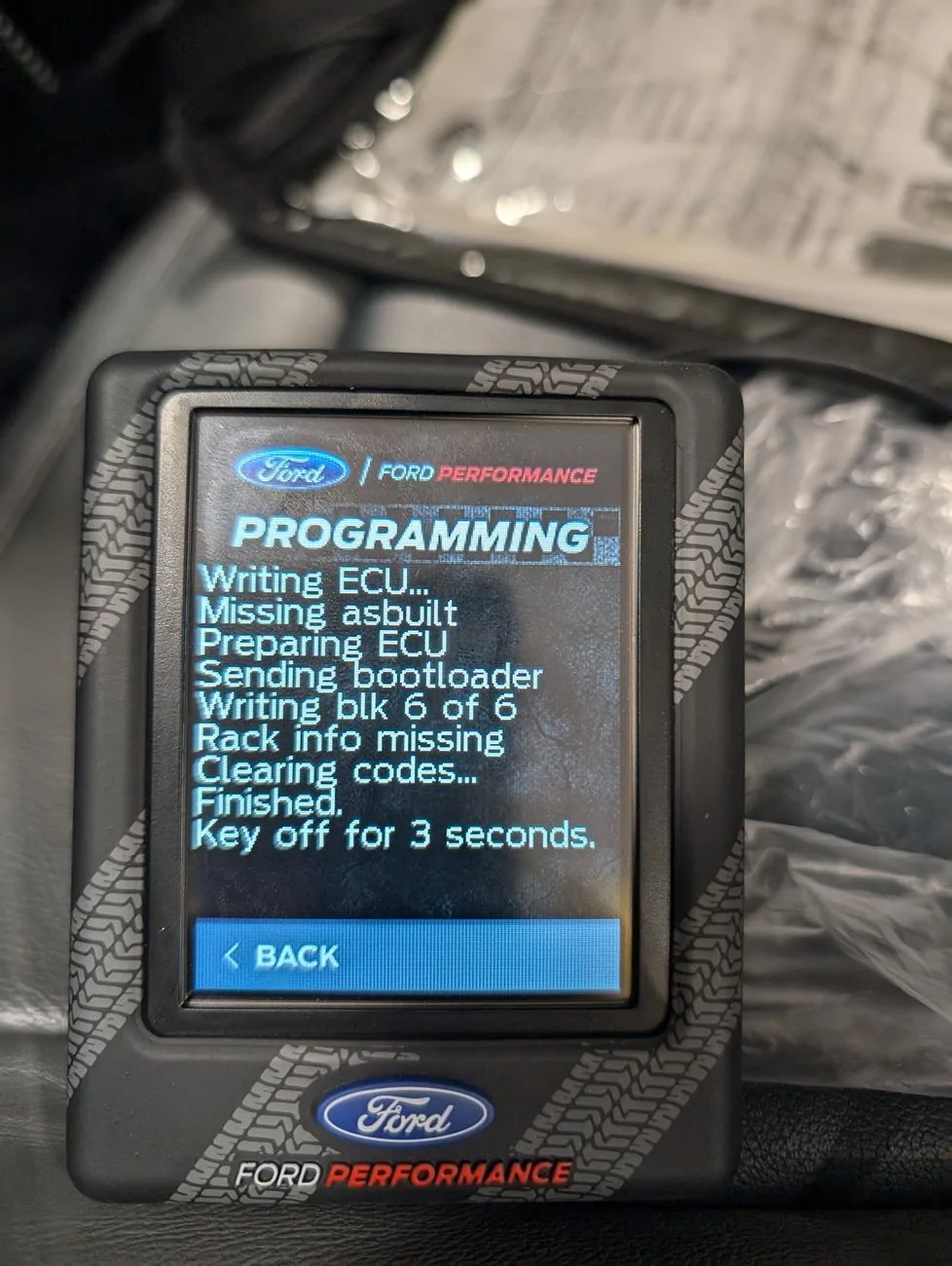
Ford Bronco 3.0 Steering Rack Install Issues PXL_20240828_135900023
Sponsored


PWillette

Badlands
Well-Known Member
First Name
Parrie
Joined
Dec 28, 2020
Threads
44
Messages
3,548
Reaction score
6,107
Location
Maine
Vehicle(s)
'08 F250 Super Duty, '01 SS Camaro, '21 Bronco
Your Bronco Model
Badlands

BigMeatsBronco

First Edition
Well-Known Member
First Name
Allan
Joined
Nov 25, 2021
Threads
52
Messages
3,389
Reaction score
10,504
Location
97301
Vehicle(s)
2021 FE 2 door
Your Bronco Model
First Edition
Clubs
 
Did the shop download the actual tune onto the device from Ford performance?
 
OP
OP
CH02

CH02

Outer Banks
Active Member
First Name
Chad
Joined
Dec 30, 2021
Threads
10
Messages
42
Reaction score
55
Location
Kennesaw
Vehicle(s)
2021 Outer Banks Sasquatch
Your Bronco Model
Outer Banks
Clubs
 
I did all the downloads before taking it over. The files show up on the tuner itself.
 

Sponsored

Snacktime

Black Diamond
Well-Known Member
First Name
Nate
Joined
Jul 14, 2020
Threads
71
Messages
3,870
Reaction score
9,693
Location
Sac-a-tomatoes
Vehicle(s)
Bronco, F150
Your Bronco Model
Black Diamond
Clubs
 
@Snacktime is the steering rack guru.
When it comes to the ProCal it's a bunch of 4 letter words. I haven't successfully used a ProCal to program a rack and why I was interested in your Bronco. The whole process is unnerving as the ProCal rack programming seems to be hit or miss.
 
OP
OP
CH02

CH02

Outer Banks
Active Member
First Name
Chad
Joined
Dec 30, 2021
Threads
10
Messages
42
Reaction score
55
Location
Kennesaw
Vehicle(s)
2021 Outer Banks Sasquatch
Your Bronco Model
Outer Banks
Clubs
 
So at some point between putting the upgrade files on the ProCal and running the rack upgrade process it deleted the original rack files. The tech at FP asked for pics of a couple menus in the ProCal and came back a few hours later with a solution to plug the tuner into the PC without logging into the app then running the upgrade on the Bronco. Took a few minutes to run and I was back on the road.
 

AJITO

Wildtrak
Well-Known Member
First Name
AJ
Joined
May 25, 2023
Threads
8
Messages
47
Reaction score
81
Location
Baltimore
Vehicle(s)
2022 Bronco Wildtrak
Your Bronco Model
Wildtrak
Clubs
 
I had a similar issue happen with my 3.0 w/74 weld stage 1. The download code was almost thrown out with the box too!
But after taking the ProCal to the shop, entering the key to download the rack file, and then trying to upload it into the Bronco, it was not picking up the file and said something similar to what you have above.

I eventually figured out that I needed to grab the most recent Bronco data/backup the Broncos stock calibration file through ProCal. I did have issues performing the Rack Upgrade while the new rack was on. When the system booted back up, I still had a bunch of check advancetrac and service 4x4 DTCs. I ultimately had to connect my ProCal back to my computer and have it apply the rack upgrade to the backup that was created when I clicked “Rack Upgrade”.

If you still run into errors, download Forscan, apply for a temp key (1 months) and clear your DTCs using Forscan and an OBD 2.0 cable connected to your laptop and car.
If you lost your ASBUILT, and it won't proceed any further, you can also download the ASBUILT data. https://www.motorcraftservice.com/AsBuilt
 

Razorback

Badlands
Well-Known Member
First Name
Bill
Joined
Jul 14, 2020
Threads
73
Messages
1,774
Reaction score
4,588
Location
Dallas
Vehicle(s)
Lincoln MKX
Your Bronco Model
Badlands
Clubs
 
Question: I'm having the HOSS 3.0 and stage 2 74Weld rack put in this next week. Is there a market for a HOSS 2.0 rack with 37k miles, or just leave it with the shop?
 

Sponsored
OP
OP
CH02

CH02

Outer Banks
Active Member
First Name
Chad
Joined
Dec 30, 2021
Threads
10
Messages
42
Reaction score
55
Location
Kennesaw
Vehicle(s)
2021 Outer Banks Sasquatch
Your Bronco Model
Outer Banks
Clubs
 
Question: I'm having the HOSS 3.0 and stage 2 74Weld rack put in this next week. Is there a market for a HOSS 2.0 rack with 37k miles, or just leave it with the shop?
No idea honestly. Mine is sitting in the garage.

 

Razorback

Badlands
Well-Known Member
First Name
Bill
Joined
Jul 14, 2020
Threads
73
Messages
1,774
Reaction score
4,588
Location
Dallas
Vehicle(s)
Lincoln MKX
Your Bronco Model
Badlands
Clubs
 
No idea honestly. Mine is sitting in the garage.
I don't know whether to travel back home for 4 hours with it or not. Even then I would probably only be able to sell it local since shipping would probably make it cost prohibited to sell it.
 

userdude

Badlands
Well-Known Member
First Name
Jared
Joined
Feb 20, 2023
Threads
45
Messages
6,512
Reaction score
12,527
Location
Denton, TX
Vehicle(s)
2023 2dr Badsquatch
Your Bronco Model
Badlands
Clubs
 
I don't know whether to travel back home for 4 hours with it or not. Even then I would probably only be able to sell it local since shipping would probably make it cost prohibited to sell it.
I still have mine after a year. Whose going to buy it? Someone who busted their 2.0 and doesn't want to upgrade or wants a backup in case (and wants to store it). It's not worthless, but it's a thin market. With the 74W rack, I just don't need it except out of my garage...
 

brnc_o_vrlndr

Badlands
Well-Known Member
First Name
Casey
Joined
Nov 21, 2021
Threads
0
Messages
86
Reaction score
74
Location
Southeast Michigan
Vehicle(s)
2021 Ford Bronco Badlands 4-dr non-Sasquatch 7-spd
Your Bronco Model
Badlands
I had a similar issue happen with my 3.0 w/74 weld stage 1. The download code was almost thrown out with the box too!
But after taking the ProCal to the shop, entering the key to download the rack file, and then trying to upload it into the Bronco, it was not picking up the file and said something similar to what you have above.

I eventually figured out that I needed to grab the most recent Bronco data/backup the Broncos stock calibration file through ProCal. I did have issues performing the Rack Upgrade while the new rack was on. When the system booted back up, I still had a bunch of check advancetrac and service 4x4 DTCs. I ultimately had to connect my ProCal back to my computer and have it apply the rack upgrade to the backup that was created when I clicked “Rack Upgrade”.

If you still run into errors, download Forscan, apply for a temp key (1 months) and clear your DTCs using Forscan and an OBD 2.0 cable connected to your laptop and car.
If you lost your ASBUILT, and it won't proceed any further, you can also download the ASBUILT data. https://www.motorcraftservice.com/AsBuilt

I tried to perform the rack upgrade last night and was met with the same screen as the OP. After some back and forth with the Procal and computer, I found that the original rack was no longer reporting a part number under the "Module Info" Procal menu screen. After trying a few more things, I decided I would just write the original As-Built information back into the original rack and start over. In Forscan, I noticed that the PSCM only shows the menu for programmable parameters and NOT the as-built interface for it. So, I cannot flash the original PSCM with original as-built. I will reach out to FP tomorrow, but does anyone know how to get back the As-Built interface for a module in Forscan? Is there a way to blanket-load all module as-built information from the Motorcraft as-built file?
 

Brian_B

Big Bend
Well-Known Member
First Name
Brian
Joined
Sep 14, 2023
Threads
60
Messages
8,257
Reaction score
14,611
Location
Central CA
Vehicle(s)
'23 BB 4dr 7MT, '22 BSport OBX, '87 B-II XL
Your Bronco Model
Big Bend
Clubs
 
I tried to perform the rack upgrade last night and was met with the same screen as the OP. After some back and forth with the Procal and computer, I found that the original rack was no longer reporting a part number under the "Module Info" Procal menu screen. After trying a few more things, I decided I would just write the original As-Built information back into the original rack and start over. In Forscan, I noticed that the PSCM only shows the menu for programmable parameters and NOT the as-built interface for it. So, I cannot flash the original PSCM with original as-built. I will reach out to FP tomorrow, but does anyone know how to get back the As-Built interface for a module in Forscan? Is there a way to blanket-load all module as-built information from the Motorcraft as-built file?
You save all the files before you touch them. That's really the only way to get "as-builts"

Even the web site, that is named "As-Built" - gets updated with OTA information. So if you make a change, the web site version will get updated in ... a few days/weeks? to reflect the change.

As far as the PSCM - that's physically part of the rack. And part of the problem, since the new rack comes with a completely blank/unprogrammed module and Ford is relying on the ProCal unit to populate it (and does a horrible job of it). If you put the old rack back in, it should still have all the original programming.
Sponsored


Top