
Sponsored

Wireless CarPlay Stopped - Anyone Solve This?

bkirchhoff

Badlands
Well-Known Member
First Name
Brian
Joined
Sep 6, 2022
Threads
7
Messages
128
Reaction score
231
Location
Middlebury, VT
Vehicle(s)
BMW: '07 328xi, '13 X1, '75 R90/6, '12 R1200GS
Your Bronco Model
Badlands
Clubs
 
I know I’m not the only one who has experienced this. Also know not everyone has and it’s not just Ford’s infotainment system that has been impacted (have seen the same reported problem for other car brands using CarPlay). I’ve searched Apple forums, this forum, and everywhere else online I can think of. I’ve reset the infotainment system. Reset my phone (iPhone 14 Pro). Deleted and reconnected the Bluetooth connection dozens of times. Updated software on both sides. Messed with every related setting I can find in the Ford system and my phone. It’s now been a couple of months and I still can only make CarPlay work using a wired connection. Wireless worked for over a year (with minor glitches here and there) but I can’t get it to connect wirelessly at all anymore.

Has anyone who lost wireless CarPlay successfully fixed theirs? What else can I try?
Sponsored

 

raqball

Badlands
Well-Known Member
First Name
Kris
Joined
Mar 14, 2024
Threads
12
Messages
362
Reaction score
1,200
Location
WA
Vehicle(s)
2023 Ford Bronco Badlands 2DR
Your Bronco Model
Badlands
The APIM modules for the Sync 4 are absolute garbage.. When mine freaks out I just hold power and FF buttons to restart the system and it works fine after that..

I've not had an issue where I could not eventually reconnect though..
 

dejones64

Black Diamond
Well-Known Member
First Name
Dan
Joined
Jul 24, 2020
Threads
7
Messages
2,060
Reaction score
3,398
Location
MN
Vehicle(s)
Bronco 2-dr Black Diamond
Your Bronco Model
Black Diamond
Clubs
 
Watching this thread. This drives me nuts, cuts out randomly, especially when using maps navigation. Sometimes connect-disconnect-reconnect the usb cable to my phone works. I have no real solution.
 
OP
OP
bkirchhoff

bkirchhoff

Badlands
Well-Known Member
First Name
Brian
Joined
Sep 6, 2022
Threads
7
Messages
128
Reaction score
231
Location
Middlebury, VT
Vehicle(s)
BMW: '07 328xi, '13 X1, '75 R90/6, '12 R1200GS
Your Bronco Model
Badlands
Clubs
 
The APIM modules for the Sync 4 are garbage.. When mine freaks out I just hold power and FF buttons to restart the system and it works fine after that..
Yeah, that was the “minor glitching” that I was referring to. It was annoying but when I did the system reset like you described I could always get it to work again. Until about 2 months ago. Sync 4 really is a garbage piece of software.

I'm especially frustrated because I installed a proper MagSafe charging pad inside my center console (because the wireless charging pad that comes with the Lux package is also garbage - it’s now where I store my sunglasses). Had it sorted out so I could put my phone inside the center console, out of the sun, and wirelessly connected to the system — that worked great for a while. Now I’m back to plugging the phone in and having it awkwardly sitting by my gear shift.
 

Brian_B

Big Bend
Well-Known Member
First Name
Brian
Joined
Sep 14, 2023
Threads
60
Messages
8,274
Reaction score
14,660
Location
Central CA
Vehicle(s)
'23 BB 4dr 7MT, '22 BSport OBX, '87 B-II XL
Your Bronco Model
Big Bend
Clubs
 
Make sure Wireless App Projection is enabled in Sync options
 

Sponsored
OP
OP
bkirchhoff

bkirchhoff

Badlands
Well-Known Member
First Name
Brian
Joined
Sep 6, 2022
Threads
7
Messages
128
Reaction score
231
Location
Middlebury, VT
Vehicle(s)
BMW: '07 328xi, '13 X1, '75 R90/6, '12 R1200GS
Your Bronco Model
Badlands
Clubs
 
Make sure Wireless App Projection is enabled in Sync options
Thanks. That is indeed one of the settings I checked and made sure it was enabled. When I read that advice in a forum, I got excited that it might have been the one that I was missing but, alas, it was already enabled.
 

Brian_B

Big Bend
Well-Known Member
First Name
Brian
Joined
Sep 14, 2023
Threads
60
Messages
8,274
Reaction score
14,660
Location
Central CA
Vehicle(s)
'23 BB 4dr 7MT, '22 BSport OBX, '87 B-II XL
Your Bronco Model
Big Bend
Clubs
 
Couple of other things to try:

You can't be on another WiFi connection while on wireless CarPlay, so if you have something like a mobile hot spot or StarLink in your vehicle, you can't use that with the phone while on CarPlay. You must have WiFi enabled on the phone though, as Wireless CarPlay uses Bluetooth to handshake the connection, then actually does the heavy lifting via a private WiFi channel.

When you go to Sync Settings - Phone, and it lists the phones that are paired with Sync, there should be 3 buttons to the right -- one for Music, one for Phone, and one for CarPlay

Is the CarPlay button available, and have you tried hitting it to force a connection while not connected to USB?

Do you have another phone you can try connecting with?
 

Sgt Badlands

Badlands
Well-Known Member
First Name
Joe
Joined
May 1, 2024
Threads
24
Messages
437
Reaction score
853
Location
Midwesr
Vehicle(s)
2021 Bronco
Your Bronco Model
Badlands
Same thing happened to me. About a month ago Bluetooth CarPlay quit working all together.
Have to use wired, and sometimes it connects, sometimes it doesn’t.
Can’t figure it out.
 

JediMcMuffin

Badlands
Well-Known Member
First Name
Tommy
Joined
Jun 15, 2021
Threads
47
Messages
2,390
Reaction score
4,434
Location
San Diego
Vehicle(s)
2021 Bronco Badlands
Your Bronco Model
Badlands
Clubs
 
Do a Sync4 Reset, and then on your dvice, be sure to delete the bronco profile under carplay or android auto and the bluetooth pairing as well. Re-do the bluetooth pairing, then plug the cable in, and it should offer to enable wireless carplay again

I had to do this only once, after an IOS major update
 

bucky2000

Black Diamond
Member
First Name
Chris
Joined
Sep 18, 2024
Threads
1
Messages
8
Reaction score
6
Location
ontario canada
Vehicle(s)
2023 ford bronco 2 door Sasquatch black diamond
Your Bronco Model
Black Diamond
Try a factory reset
 

Sponsored
OP
OP
bkirchhoff

bkirchhoff

Badlands
Well-Known Member
First Name
Brian
Joined
Sep 6, 2022
Threads
7
Messages
128
Reaction score
231
Location
Middlebury, VT
Vehicle(s)
BMW: '07 328xi, '13 X1, '75 R90/6, '12 R1200GS
Your Bronco Model
Badlands
Clubs
 
Couple of other things to try:

You can't be on another WiFi connection while on wireless CarPlay, so if you have something like a mobile hot spot or StarLink in your vehicle, you can't use that with the phone while on CarPlay. You must have WiFi enabled on the phone though, as Wireless CarPlay uses Bluetooth to handshake the connection, then actually does the heavy lifting via a private WiFi channel.

When you go to Sync Settings - Phone, and it lists the phones that are paired with Sync, there should be 3 buttons to the right -- one for Music, one for Phone, and one for CarPlay

Is the CarPlay button available, and have you tried hitting it to force a connection while not connected to USB?

Do you have another phone you can try connecting with?
Oh man, I thought this might have been the solution because I have a mesh network access point in my garage. Thought that might have been what was interference by. But I just tried forgetting the network on my phone but kept WiFi o. hoping that would do the trick but got same results.

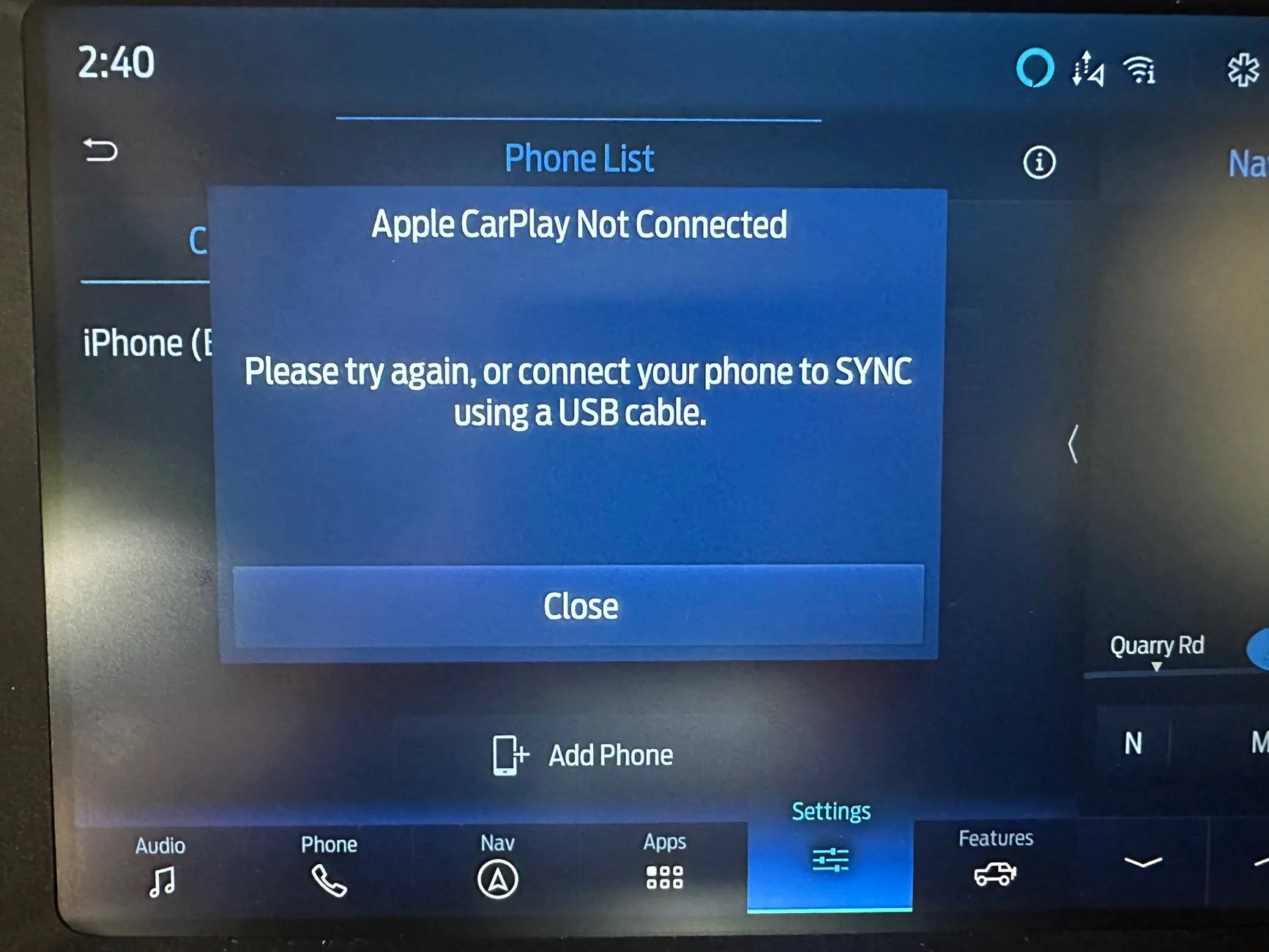
And I have tried the button to manually force the connection. Every time I do that, I get the same result:
Ford Bronco Wireless CarPlay Stopped - Anyone Solve This? IMG_7977
 
OP
OP
bkirchhoff

bkirchhoff

Badlands
Well-Known Member
First Name
Brian
Joined
Sep 6, 2022
Threads
7
Messages
128
Reaction score
231
Location
Middlebury, VT
Vehicle(s)
BMW: '07 328xi, '13 X1, '75 R90/6, '12 R1200GS
Your Bronco Model
Badlands
Clubs
 
Try a factory reset
Have done that for both the Sync4 and my phone. Purged the connections on both first, then reset them and started fresh. Still couldn’t make it work on wireless.
 

Stevefi

Badlands
New Member
First Name
Steve
Joined
Jun 23, 2025
Threads
0
Messages
2
Reaction score
2
Location
San Mateo
Vehicle(s)
23 Bronco
Your Bronco Model
Badlands
I have found for me, when carplay doesn't connect to my phone is to toggle carplay off and back on for my bronco connection. I made a iphone shortcut to the carplay settings so I can do this easily. when doing this, it is not always fast so be patient.
 

HPNQ420

Black Diamond
Well-Known Member
First Name
David
Joined
Jul 8, 2020
Threads
19
Messages
501
Reaction score
940
Location
Wauwatosa, WI
Vehicle(s)
'23 Bronco, '19 GTI, '88 R100GS, HPN BMW G/S, 14 JK Rubicon
Your Bronco Model
Black Diamond
Clubs
 
The APIM modules for the Sync 4 are absolute garbage.. When mine freaks out I just hold power and FF buttons to restart the system and it works fine after that..

I've not had an issue where I could not eventually reconnect though..
I hate Sync 4. But I am (almost) certain the problem with random disconnects is RF interference overriding the connection. It is such a problem because the Bronco has a plastic roof and loses any Faraday-cage like shielding that a conventional vehicle has. Mine would disconnect every damn time around I41N and Brown Deer Road in Milwaukee and any time near the Orland Park, IL Police Department.

Solution: Turn Bluetooth off and use a wired connection. I don't think any software update will fix it. Nor hardware update.

(Well, I guess you could install aluminum foil headliners on the roof and electrically bond them at multiple points to the roll cage)
 

JediMcMuffin

Badlands
Well-Known Member
First Name
Tommy
Joined
Jun 15, 2021
Threads
47
Messages
2,390
Reaction score
4,434
Location
San Diego
Vehicle(s)
2021 Bronco Badlands
Your Bronco Model
Badlands
Clubs
 
I hate Sync 4. But I am (almost) certain the problem with random disconnects is RF interference overriding the connection. It is such a problem because the Bronco has a plastic roof and loses any Faraday-cage like shielding that a conventional vehicle has. Mine would disconnect every damn time around I41N and Brown Deer Road in Milwaukee and any time near the Orland Park, IL Police Department.

Solution: Turn Bluetooth off and use a wired connection. I don't think any software update will fix it. Nor hardware update.

(Well, I guess you could install aluminum foil headliners on the roof and electrically bond them at multiple points to the roll cage)
This is my running theory as well. It seems to have gotten better with some updates, but yeah anywhere someone is using a microwave connection to extend a network across a highway kills it. For me its the I-405 and I-5 interchange in Irvine, CA. Every, single, time.
Sponsored


Top