
Sponsored

Global Window CLOSE issue with DDM

JBlanco

Base
Well-Known Member
First Name
Julio
Joined
Sep 21, 2021
Threads
21
Messages
1,201
Reaction score
2,442
Location
Charlotte NC
Vehicle(s)
2023 Bronco BaseSquatch, 2023 Tesla Y Performance
Your Bronco Model
Base
Based on the 1, 2, 3, 4...I think these are in reference to each door/window. If you look at the Global Open, which is on by factory...they are all enabled for 1, 2, 3, 4. This would make me think that a 2dr Bronco won't have 3 and 4 and just 1 and 2 but I cannot confirm since I have a 4dr and will be testing this out tomorrow morning (attempting to turn this on).
I think your theory is correct. I have a 2023 2 door and initially thought the personal 1,2,3,4 were related to the key fobs being allowed to global open close. I disabled 3 and 4 and was still able to remote open/close both windows with all three of my fobs. I programmed a cheap used third fob to the vehicle in case I lose one, I'm still able to program them without going to the dealer.
Sponsored


omi205

Badlands
Well-Known Member
First Name
BoJack
Joined
Feb 11, 2023
Threads
29
Messages
706
Reaction score
784
Location
Austin
Vehicle(s)
2023 Bronco Badlands Sasquatch
Your Bronco Model
Badlands
Clubs
 
IT WORKEEEEDDDD. BdyCM went perfect. Gave me a "write" issue on the PDM and DDM. Disconnected Forscan. Turned the bronco on/off. Reconnected Forscan. Checked that the BdyCM settings still saved (they did). Then attempted the PDM and DDM changes again, worked!!! Tested and windows all went down. Then all went up. Happy camper.
 

derichio02

Badlands
Well-Known Member
First Name
Bo
Joined
Apr 25, 2022
Threads
65
Messages
1,208
Reaction score
828
Location
Southern California
Vehicle(s)
Bronco Badlands, Maverick, Tesla M3, F250 Tremor
Your Bronco Model
Badlands
IT WORKEEEEDDDD. BdyCM went perfect. Gave me a "write" issue on the PDM and DDM. Disconnected Forscan. Turned the bronco on/off. Reconnected Forscan. Checked that the BdyCM settings still saved (they did). Then attempted the PDM and DDM changes again, worked!!! Tested and windows all went down. Then all went up. Happy camper.
Going to try this. I will program BdyCM first then after successfully writing I will try PDM and DDM
 

JBlanco

Base
Well-Known Member
First Name
Julio
Joined
Sep 21, 2021
Threads
21
Messages
1,201
Reaction score
2,442
Location
Charlotte NC
Vehicle(s)
2023 Bronco BaseSquatch, 2023 Tesla Y Performance
Your Bronco Model
Base

Sponsored

BroncoDave24

Wildtrak
Well-Known Member
First Name
David
Joined
Mar 11, 2024
Threads
7
Messages
170
Reaction score
227
Location
East Tennessee
Vehicle(s)
'61 Falcon, '87 F150 XLT Lariat 5.0, '01 F350 7.3L, '24 WildTrak
Your Bronco Model
Wildtrak
Remote Window roll-up programming worked on the first try for me. 2024 Wildtrak, version 2.3.60 Forscan and a OBDLink EX interface and a HP laptop running Windows 10.
 
Last edited:

vrtical

Raptor
Well-Known Member
First Name
Doug AI
Joined
Jul 14, 2020
Threads
48
Messages
7,535
Reaction score
15,371
Location
GSMNP, TN
Vehicle(s)
Fords
Your Bronco Model
Raptor
Clubs
 
Just got to get this to work on my 23 braptor. I needed to run a new profile after Forscan update for DDM and PDM changes to work. The BdyCM changes which I did first worked on old profile.
 

Agrod

Outer Banks
Well-Known Member
Joined
Aug 20, 2022
Threads
8
Messages
125
Reaction score
166
Location
SJ, PR
Vehicle(s)
22 4dr OBX
Your Bronco Model
Outer Banks
I did this change, and it worked as expected. The windows go back up with the key fob, except for the front passenger's side window.

It goes down and up fine, but always rolls back down to about 3/4 shut, even with the normal window buttons for that particular window after triggering it to go up with the key fob. I have to do the relearn process for it to shut completely.

EDIT:
I'm not alone...
 

phubar

Outer Banks
New Member
First Name
J
Joined
Apr 9, 2021
Threads
0
Messages
3
Reaction score
2
Location
Tampa, FL
Vehicle(s)
2020 Jeep Wrangler
Your Bronco Model
Outer Banks
Thank you for posting this. Could someone share a screenshot of their hex numbers please? I must have mistyped one of the digits because my windows go up as soon as I hit the lock button without having to hold it.
 

Sponsored

murrman

Black Diamond
Well-Known Member
First Name
Sean
Joined
Jan 13, 2025
Threads
89
Messages
371
Reaction score
228
Location
Toledo, OH
Vehicle(s)
2024 2 Door Black Diamond
Your Bronco Model
Black Diamond
Clubs
 
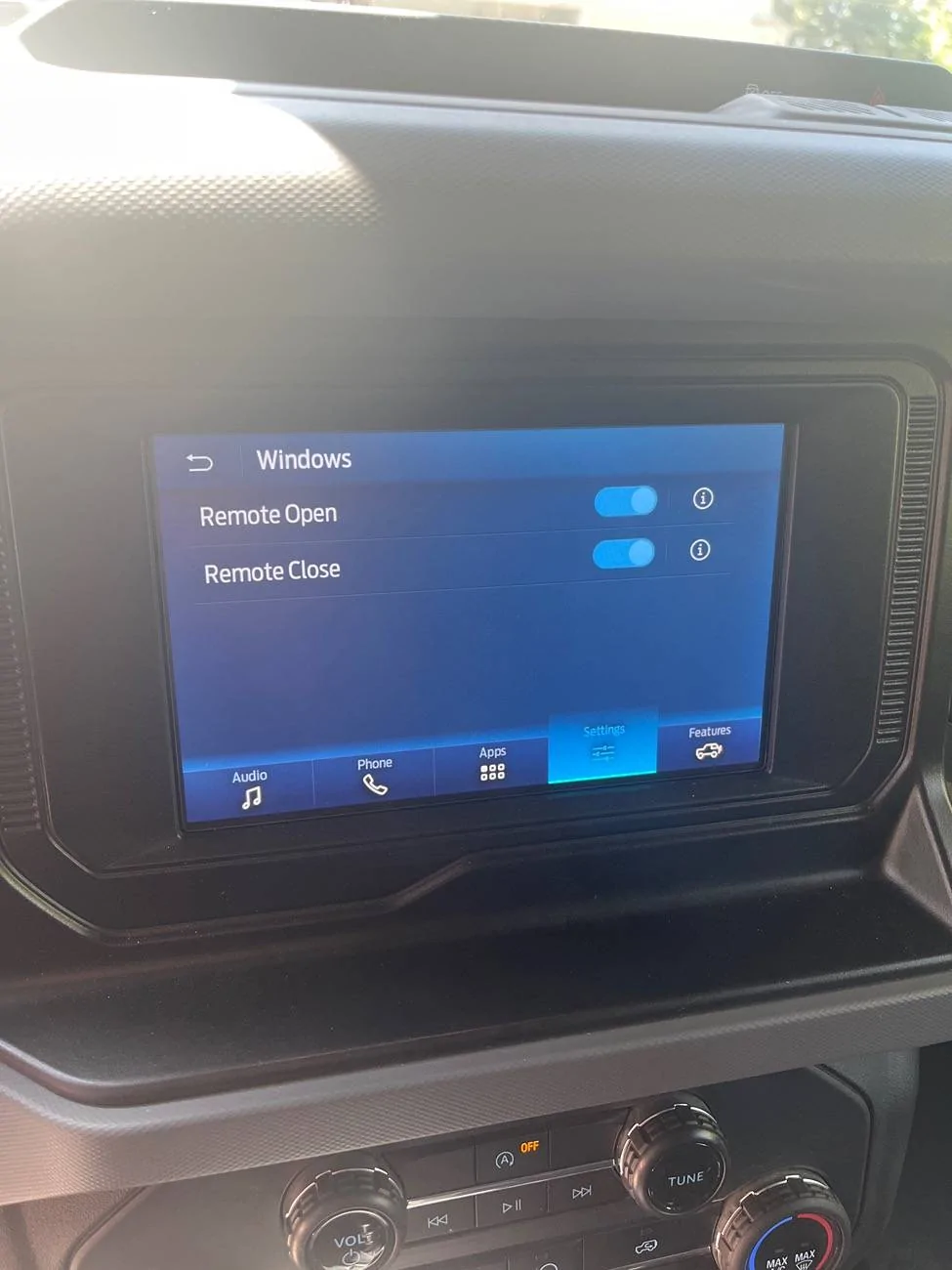
Sorry to resurrect an old thread, but I found this while trying to find out if what needed to be modified for the 2 doors was different than the 4 doors. I’m going to give this a go later today using the “easy” way of using the plain-text module (instead of the asbuilt). The only thing I wasn’t sure of is whether making the changes that way added the window open/close setting to the Sync 4 settings menu. Could anyone confirm whether or not it does?
 

Brian_B

Big Bend
Well-Known Member
First Name
Brian
Joined
Sep 14, 2023
Threads
60
Messages
8,244
Reaction score
14,594
Location
Central CA
Vehicle(s)
'23 BB 4dr 7MT, '22 BSport OBX, '87 B-II XL
Your Bronco Model
Big Bend
Clubs
 
Sorry to resurrect an old thread, but I found this while trying to find out if what needed to be modified for the 2 doors was different than the 4 doors. I’m going to give this a go later today using the “easy” way of using the plain-text module (instead of the asbuilt). The only thing I wasn’t sure of is whether making the changes that way added the window open/close setting to the Sync 4 settings menu. Could anyone confirm whether or not it does?
Not sure if easy mode does or not, but in as built format there are two edits you make - one enables the function, the other adds the Sync option
 

murrman

Black Diamond
Well-Known Member
First Name
Sean
Joined
Jan 13, 2025
Threads
89
Messages
371
Reaction score
228
Location
Toledo, OH
Vehicle(s)
2024 2 Door Black Diamond
Your Bronco Model
Black Diamond
Clubs
 
Not sure if easy mode does or not, but in as built format there are two edits you make - one enables the function, the other adds the Sync option
From the spreadsheet, it looks like there are seven total changes to make the windows go up and down with the fob, correct? It then lists an optional eighth change to add it to the Sync 4 menu. I’m guessing the easy mode changes do the first seven changes, but the eighth one is still necessary to do in the asbuilt menu. On a side note, could someone who’s enabled the option in the menu tell me exactly what it allows you to turn on and off? Does it let you separately decide whether to allow the fob to roll up and/or down the windows, or is a global on/off for both up and down?
 

Brian_B

Big Bend
Well-Known Member
First Name
Brian
Joined
Sep 14, 2023
Threads
60
Messages
8,244
Reaction score
14,594
Location
Central CA
Vehicle(s)
'23 BB 4dr 7MT, '22 BSport OBX, '87 B-II XL
Your Bronco Model
Big Bend
Clubs
 
From the spreadsheet, it looks like there are seven total changes to make the windows go up and down with the fob, correct? It then lists an optional eighth change to add it to the Sync 4 menu. I’m guessing the easy mode changes do the first seven changes, but the eighth one is still necessary to do in the asbuilt menu. On a side note, could someone who’s enabled the option in the menu tell me exactly what it allows you to turn on and off? Does it let you separately decide whether to allow the fob to roll up and/or down the windows, or is a global on/off for both up and down?
Sounds correct. If I recall, it’s distinct up and down, either/or

Ford Bronco Global Window CLOSE issue with DDM imag
 

murrman

Black Diamond
Well-Known Member
First Name
Sean
Joined
Jan 13, 2025
Threads
89
Messages
371
Reaction score
228
Location
Toledo, OH
Vehicle(s)
2024 2 Door Black Diamond
Your Bronco Model
Black Diamond
Clubs
 
Sounds correct. If I recall, it’s distinct up and down, either/or

image.jpg
Gotcha, thanks. This might be a stupid question, but I’m assuming you can’t just enable the ui using ForScan and then enable the actual feature in the Sync 4 ui, right?
Sponsored


Top