
Sponsored

Carplay/Sync no audio intermittent issue

BlarneyStoned

Badlands
Well-Known Member
Joined
Mar 25, 2021
Threads
3
Messages
243
Reaction score
290
Location
Apple-at-cha
Vehicle(s)
Bronco, Land Rover
Your Bronco Model
Badlands
Happens in my 23 Badlands about 15% of the time I get in it. What I've noticed when it does it, if you switch to another audio source (radio, Sirius) eventually carplay will reset itself (your phone will disconnect and reconnect) then it works just fine. If you don't do the source switch carplay will happily continue playing in silence.
 

Brsox

Heritage
Well-Known Member
First Name
Bill
Joined
Jan 2, 2022
Threads
24
Messages
612
Reaction score
1,604
Location
Rhode Island
Vehicle(s)
2023 4Runner TRD Pro
Your Bronco Model
Heritage
It's not a Ford issue. It's with CarPlay. Happens in my Honda too with the same phone. Friend of mine mentioned that it happens in his wife's Mazda as well. I usually just reboot my phone and all is well.
 

Area51BS

Badlands
Well-Known Member
First Name
Ron
Joined
Sep 20, 2022
Threads
228
Messages
3,095
Reaction score
4,999
Location
Florida
Vehicle(s)
Badlands non SAS 4dr 2.3
Your Bronco Model
Badlands
Do the radio reset or plug phone in. Mine was playing FM yesterday but displaying CarPlay. That was after the a blank screen as shown in pic. Seems most issues for me are if you only leave the vehicle for a few minutes then come back. Rarely are there issues after long off periods, but frequently after a quick pop in out of a store.

Ford Bronco Carplay/Sync no audio intermittent issue IMG_8209
 

bcgray

Big Bend
Well-Known Member
Joined
Aug 10, 2020
Threads
3
Messages
60
Reaction score
59
Location
Dallas, TX
Vehicle(s)
2004 Subaru Outback Sport
Your Bronco Model
Big Bend
Clubs
 
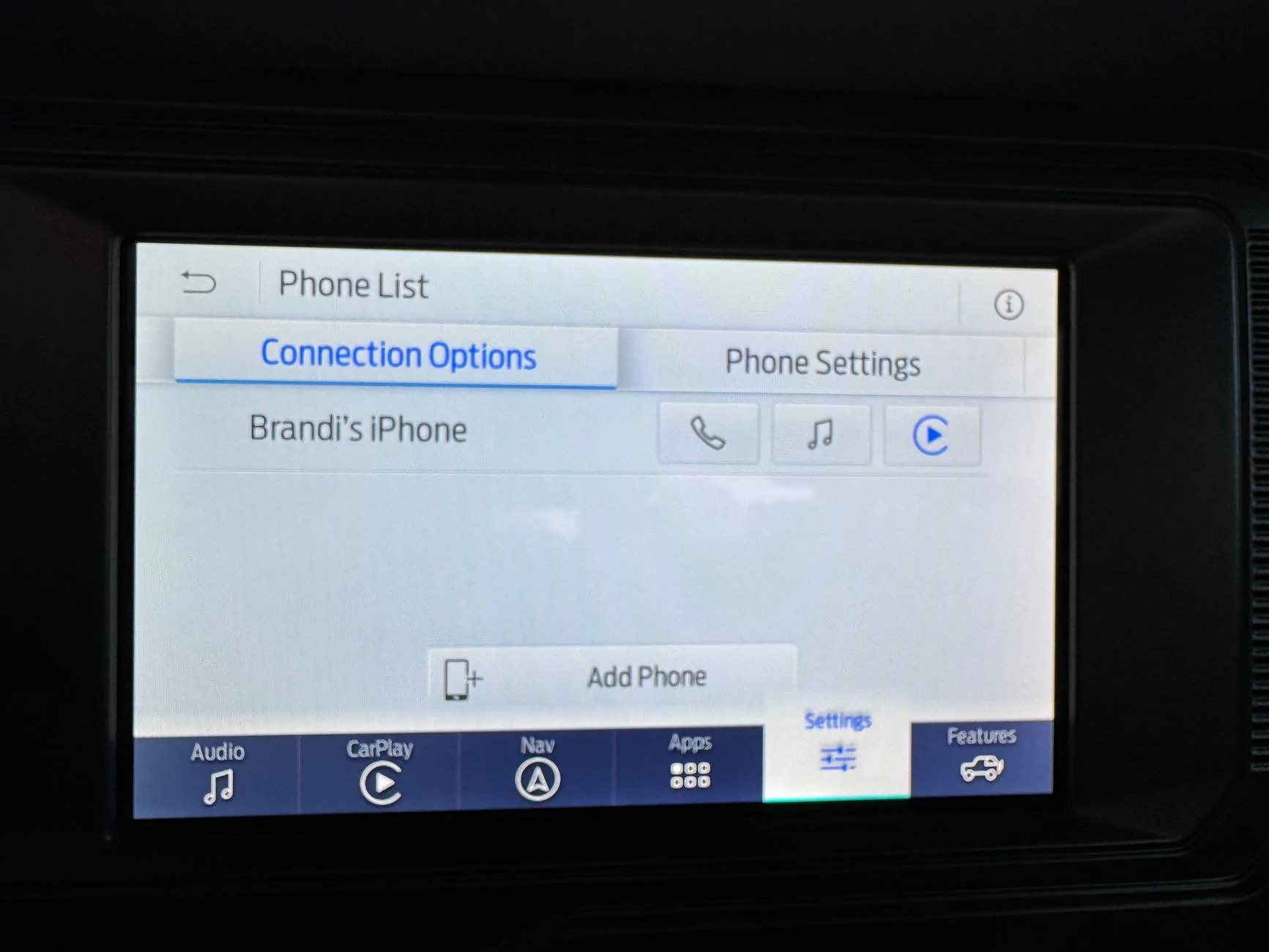
When this happens to me I tap the Ford app on carplay then go to Ford Settiings, then Phones and toggle the Play button off then back on for my phone and the audio starts to work.
 

Sponsored

bhoth1011

Wildtrak
Active Member
First Name
Brian
Joined
Sep 13, 2024
Threads
1
Messages
25
Reaction score
12
Location
Utah
Vehicle(s)
2023 Bronco Wildtrak 4 dr
Your Bronco Model
Wildtrak
When this happens to me I tap the Ford app on carplay then go to Ford Settiings, then Phones and toggle the Play button off then back on for my phone and the audio starts to work.
Do you mean the Ford pass app or something else?
 

bcgray

Big Bend
Well-Known Member
Joined
Aug 10, 2020
Threads
3
Messages
60
Reaction score
59
Location
Dallas, TX
Vehicle(s)
2004 Subaru Outback Sport
Your Bronco Model
Big Bend
Clubs
 
Do you mean the Ford pass app or something else?
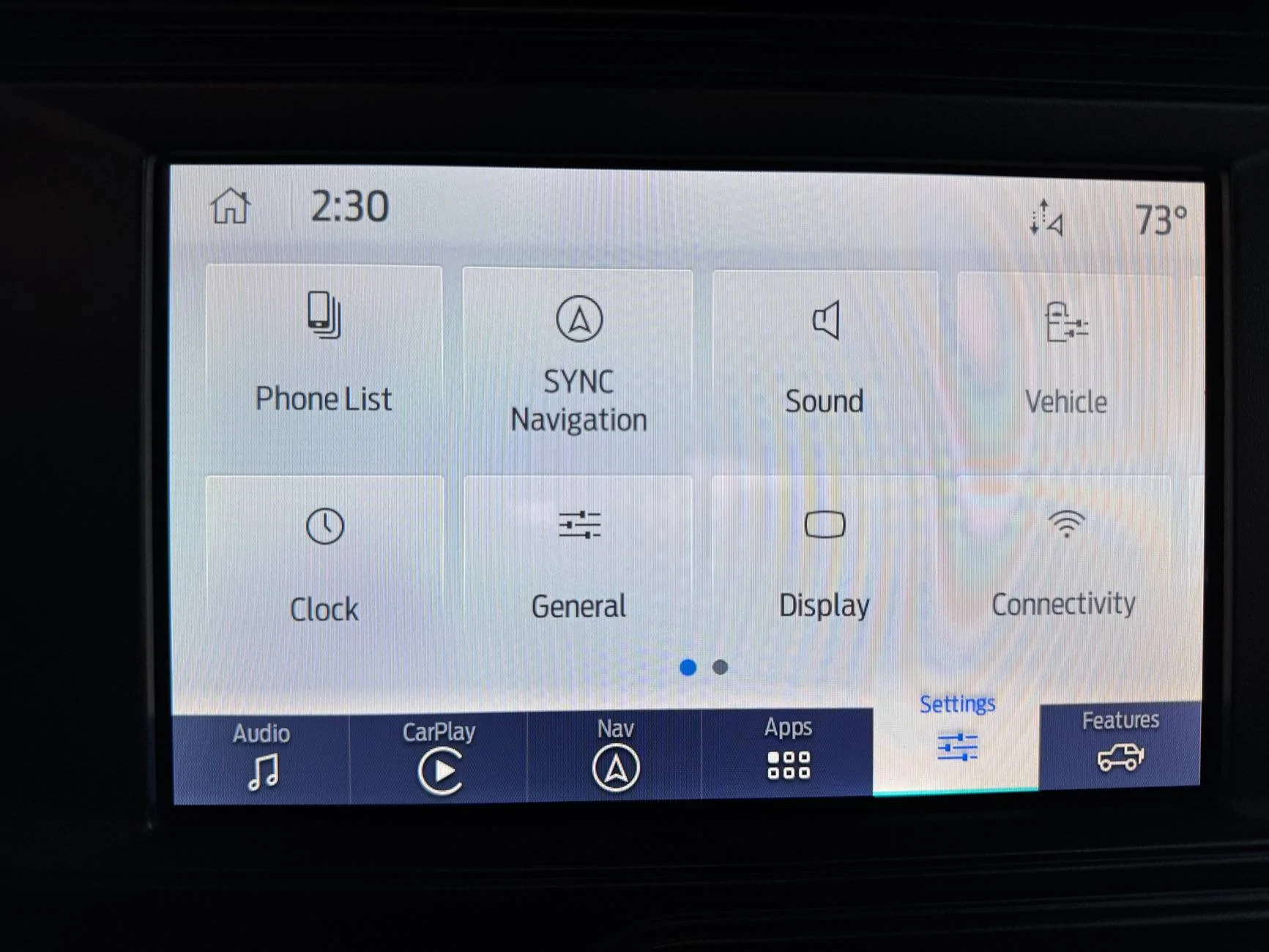
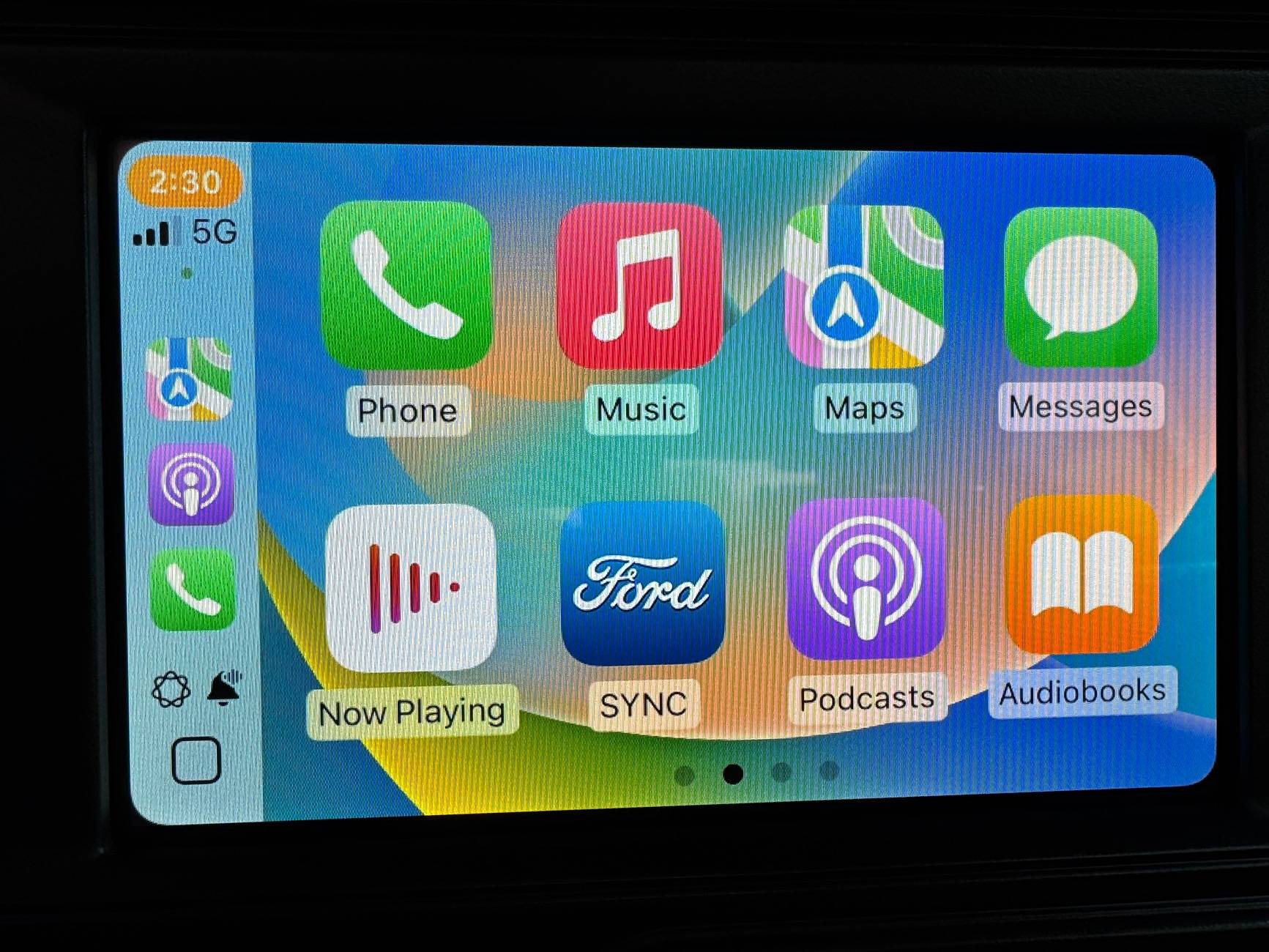
from the CarPlay screen the app is Ford Sync
Then settings at the bottom
Then Phone List
Then toggle the Play button off then back on at the far right for your phone


Ford Bronco Carplay/Sync no audio intermittent issue IMG_1571


Ford Bronco Carplay/Sync no audio intermittent issue IMG_1572


Ford Bronco Carplay/Sync no audio intermittent issue IMG_1573
 

CrystalRedTintCoat

Wildtrak
Well-Known Member
First Name
BertJ
Joined
Nov 14, 2022
Threads
16
Messages
297
Reaction score
273
Location
Bay Area
Vehicle(s)
‘22 Bronco Wildtrak; ‘13 Camaro 1LE
Your Bronco Model
Wildtrak
Hi there! If you'd like to, go ahead and send us a private message with your VIN and dealer info and we’ll look into this audio concern. Thanks!
Ford (et al):

I too have this problem and it’s somewhat reproducible.

Test Environment:
  • iPhone 13
  • iOS 18.1
  • 2022 Bronco WildTrak w/Lux package and B&O speakers
  • Bronco software 24-PU0218-LOC

Summary
  • CarPlay audio not heard on Bronco Speakers while Music/Podcast/Audible/Spotify app displays active playback progress (time counter increases; scrub bar shows progress)

Steps to Reproduce:
  1. Allow Bronco to sit overnight or for several hours.
  2. Start Bronco.
  3. Allow Bronco to automatically connect to iPhone and display CarPlay UI on Bronco’s Lux flat panel display.
  4. Start music, podcast, audible, or Spotify app.
  5. Drive Bronco ensuring that audio is playing through Bronco speakers.
  6. Park and turn off Bronco. Lock doors. Run an errand in 5 minutes or less (eg: get gas, buy a bottle of bourbon, drop off a box to return something to amazon…)
  7. Restart your Bronco
  8. Allow Bronco to automatically connect to iPhone and display CarPlay UI on Bronco’s Lux flat panel display
  9. Visually ensure your audio app (eg: Music, Spotify, Audible, Podcasts) is in active playback mode.
  10. Ensure you are NOT hearing audio on the Bronco speakers. (This is the key step where failure occurs in this scenario)
Actual Results:
  • No audio is heard
Expected Results
  • Audio should be playing through the Bronco speakers
Work around
  • Put Bronco into Park.
  • Turn off Bronco ignition.
  • Open driver’s door.
  • Count to 5
  • Close driver’s door.
  • Start Bronco
  • Allow Bronco to connect to CarPlay
  • Your audio will now play
Extra Credit
  • This 2nd issue is harder to reproduce.
  • Sometimes when starting Bronco again in short order (eg: step 6 above) audio resumes but only in the right side speakers.
  • Work around for this this balance issue, but NOT for the no-audio issue above, is to change the audio source to FM then back the CarPlay
 

CrystalRedTintCoat

Wildtrak
Well-Known Member
First Name
BertJ
Joined
Nov 14, 2022
Threads
16
Messages
297
Reaction score
273
Location
Bay Area
Vehicle(s)
‘22 Bronco Wildtrak; ‘13 Camaro 1LE
Your Bronco Model
Wildtrak
from the CarPlay screen the app is Ford Sync
Then settings at the bottom
Then Phone List
Then toggle the Play button off then back on at the far right for your phone

IMG_1571.jpeg


IMG_1572.jpeg


IMG_1573.jpeg
Often my phone will only pair with the phones icon and the music icon but NOT with the CarPlay icon, no matter how many times I tap the car Play icon in this screen above.
 

Brian_B

Big Bend
Well-Known Member
First Name
Brian
Joined
Sep 14, 2023
Threads
60
Messages
8,248
Reaction score
14,600
Location
Central CA
Vehicle(s)
'23 BB 4dr 7MT, '22 BSport OBX, '87 B-II XL
Your Bronco Model
Big Bend
Clubs
 
Ford (et al):

I too have this problem and it’s somewhat reproducible.

Test Environment:
  • iPhone 13
  • iOS 18.1
  • 2022 Bronco WildTrak w/Lux package and B&O speakers
  • Bronco software 24-PU0218-LOC

Summary
  • CarPlay audio not heard on Bronco Speakers while Music/Podcast/Audible/Spotify app displays active playback progress (time counter increases; scrub bar shows progress)

Steps to Reproduce:
  1. Allow Bronco to sit overnight or for several hours.
  2. Start Bronco.
  3. Allow Bronco to automatically connect to iPhone and display CarPlay UI on Bronco’s Lux flat panel display.
  4. Start music, podcast, audible, or Spotify app.
  5. Drive Bronco ensuring that audio is playing through Bronco speakers.
  6. Park and turn off Bronco. Lock doors. Run an errand in 5 minutes or less (eg: get gas, buy a bottle of bourbon, drop off a box to return something to amazon…)
  7. Restart your Bronco
  8. Allow Bronco to automatically connect to iPhone and display CarPlay UI on Bronco’s Lux flat panel display
  9. Visually ensure your audio app (eg: Music, Spotify, Audible, Podcasts) is in active playback mode.
  10. Ensure you are NOT hearing audio on the Bronco speakers. (This is the key step where failure occurs in this scenario)
Actual Results:
  • No audio is heard
Expected Results
  • Audio should be playing through the Bronco speakers
Work around
  • Put Bronco into Park.
  • Turn off Bronco ignition.
  • Open driver’s door.
  • Count to 5
  • Close driver’s door.
  • Start Bronco
  • Allow Bronco to connect to CarPlay
  • Your audio will now play
Extra Credit
  • This 2nd issue is harder to reproduce.
  • Sometimes when starting Bronco again in short order (eg: step 6 above) audio resumes but only in the right side speakers.
  • Work around for this this balance issue, but NOT for the no-audio issue above, is to change the audio source to FM then back the CarPlay
You can "reboot" your Sync by pressing Radio Power + Fast Forward for about 10 seconds -- easier than shutting off the Bronco, stepping outside, doing the hokey pokey, and getting back in.

That said - yeah, this happens more than it should.
 

Sponsored

bcgray

Big Bend
Well-Known Member
Joined
Aug 10, 2020
Threads
3
Messages
60
Reaction score
59
Location
Dallas, TX
Vehicle(s)
2004 Subaru Outback Sport
Your Bronco Model
Big Bend
Clubs
 
Often my phone will only pair with the phones icon and the music icon but NOT with the CarPlay icon, no matter how many times I tap the car Play icon in this screen above.
seems that fix stopped working for me as well yesterday.
im going to try rebooting the sync system next time it glitches.
 

CrystalRedTintCoat

Wildtrak
Well-Known Member
First Name
BertJ
Joined
Nov 14, 2022
Threads
16
Messages
297
Reaction score
273
Location
Bay Area
Vehicle(s)
‘22 Bronco Wildtrak; ‘13 Camaro 1LE
Your Bronco Model
Wildtrak
You can "reboot" your Sync by pressing Radio Power + Fast Forward for about 10 seconds -- easier than shutting off the Bronco, stepping outside, doing the hokey pokey, and getting back in.

That said - yeah, this happens more than it should.

Thank you. Tried this today and it worked!
 

DaveInSA

Badlands
Well-Known Member
First Name
David
Joined
Apr 29, 2022
Threads
58
Messages
1,084
Reaction score
1,469
Location
Seguin, Texas
Vehicle(s)
2025 F150 Lightning Flash
Your Bronco Model
Badlands
I actually blame the iphone. Since I get this issue on multiple cars / radios.
 

f1loco

Badlands
Well-Known Member
First Name
Don
Joined
Oct 26, 2020
Threads
15
Messages
199
Reaction score
198
Location
Florida
Vehicle(s)
Bronco, Ranger Tremor, Porsche 911SC, Willys CJ-2A
Your Bronco Model
Badlands
Clubs
 
Yup, recent development. Only quick solution is at a red light, kill the car, open the door, then restart the car. Usually reconnects right away on second go - but alas - it should be on the first go.
 

CrystalRedTintCoat

Wildtrak
Well-Known Member
First Name
BertJ
Joined
Nov 14, 2022
Threads
16
Messages
297
Reaction score
273
Location
Bay Area
Vehicle(s)
‘22 Bronco Wildtrak; ‘13 Camaro 1LE
Your Bronco Model
Wildtrak
N.B. The ford software update this week, 23-PU1024-6CH-AUD, does not fix this issue.
Sponsored


Top