Sponsored

Android Auto Functionality - 6 Months In, and I can't Take a Call!

BroncoChallenger

Black Diamond
Well-Known Member
Joined
Aug 14, 2024
Threads
1
Messages
651
Reaction score
881
Location
Michigan
Vehicle(s)
2024 Bronco
Your Bronco Model
Black Diamond
How do you force Sync and Android Auto to use the USB when it's connected? I'm having an issue where I can't stop the blutooth from connecting even if I have the USB plugged in. My phone won't even let me turn blutooth off, it just turns itself back on and connects automatically. This is a problem for me as my amped speakers sound significantly better using the USB rather than the heavily compressed blutooth codec. I'd like to disable the blutoogh entirely if possible, but I can't figure out how.
If your phone won't allow you to turn the bluetooth off, that DEFINITELY sounds like a phone issue. You should be able to toggle it on and off at will.
Sponsored


adam1991

Banned
Outer Banks
Banned
Banned
Joined
Aug 26, 2024
Threads
30
Messages
1,969
Reaction score
3,155
Location
USA
Vehicle(s)
VW GTI (2)
Your Bronco Model
Outer Banks
Clubs
 
You're using a phone that came out over a decade ago and blaming Ford? I bet if you upgrade to proper phone rather than something that isn't even sold anymore all your problems would go away.
This right here.

Step 1: use wired instead of wireless. Does it work?
Step 2: use a more modern and more mainstream phone--iPhone, Samsung, Motorola. Does it work?
 

jensht

Badlands
Well-Known Member
Joined
Jul 23, 2024
Threads
8
Messages
130
Reaction score
174
Location
Germany
Vehicle(s)
2023 Ford Bronco
Your Bronco Model
Badlands
Android Auto will always use Bluetooth for the Audio, regardless if plugged in via USB or not. That is by design.

To disable Android Auto wireless, you should just need to turn of WiFi on the phone and plug it in via USB. The easy way to tell if it is using wired or wireless Android Auto is to unplug the phone. If Android Auto stops, then it was using wired.
 

rugedraw

Well-Known Member
First Name
Javier
Joined
Jan 9, 2024
Threads
0
Messages
383
Reaction score
327
Location
Miami, FL
Vehicle(s)
2021 Ford F150 Platinum FX4 EB/2023 Bronco Sport Badlands/1991 Mustang 5.0 coupe
Your Bronco Model
Undecided
Hey AK,
I'm using the newest version of the Brigadier (less than 2 years old), running the software version 5.230VZ (fully updated). Like I said in my post, I had zero issues until just before last Halloween. Took my phone and truck to 2 different dealers and both told me it was a Ford software issue, not due to my (Android) phone.
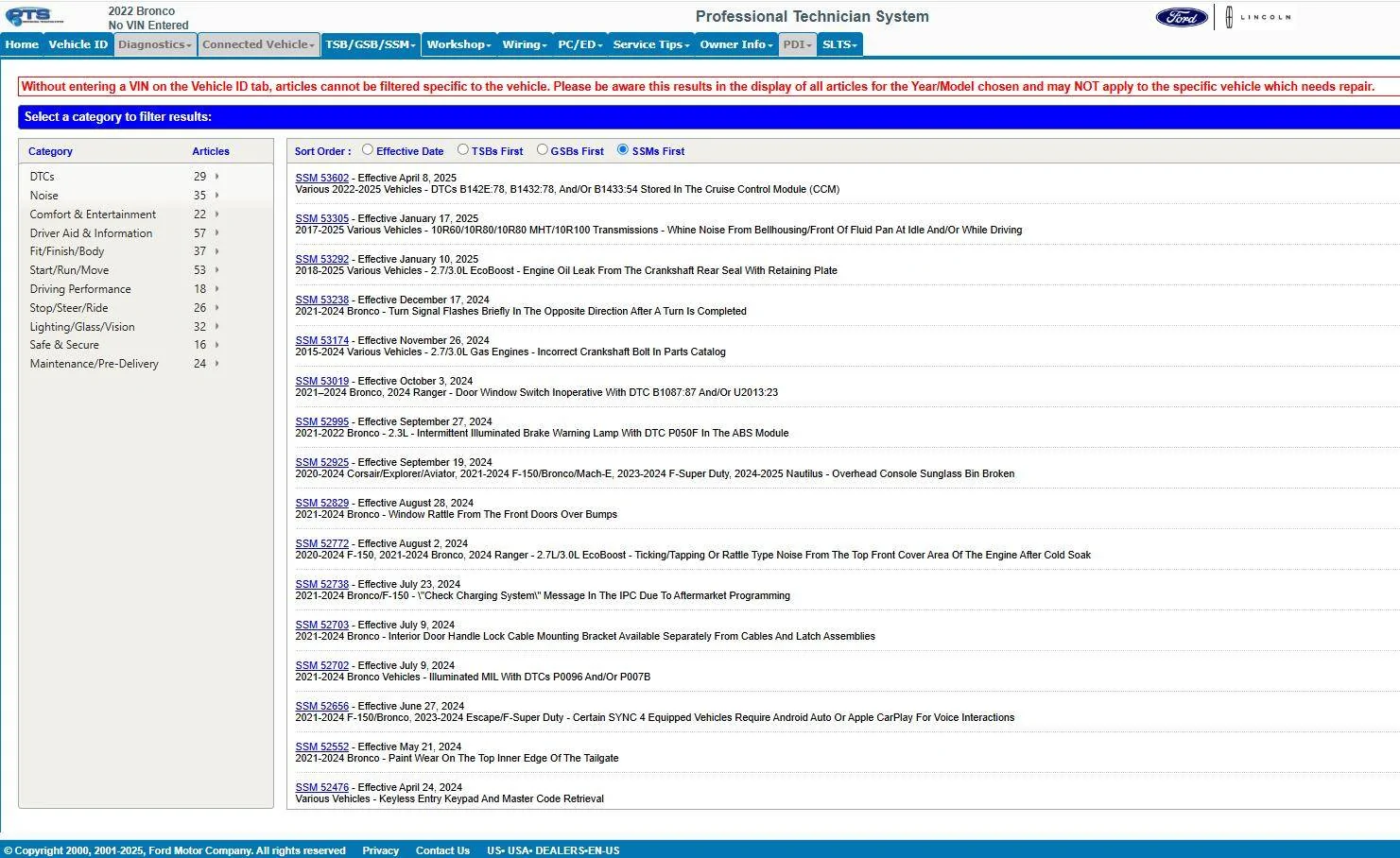
Have you got any useful info regarding this issue (SSM 53088)?
Thanks! C
It does not seem like that SSM is active anymore. What Sync version is your truck on now? 5 digit number that starts with a 2 in your "about sync" page in your general settings menu.

Ford Bronco Android Auto Functionality - 6 Months In, and I can't Take a Call! 1745511507818-j


So I disabeled blutooth in sync 4 and the usb won't even recognize android auto. As soon as I connect the phone back up, blutooth automatically comes on and connects. Extremely frusterating. The Blutooth codec on sync 4 is complete garbage and makes music sound horrible.
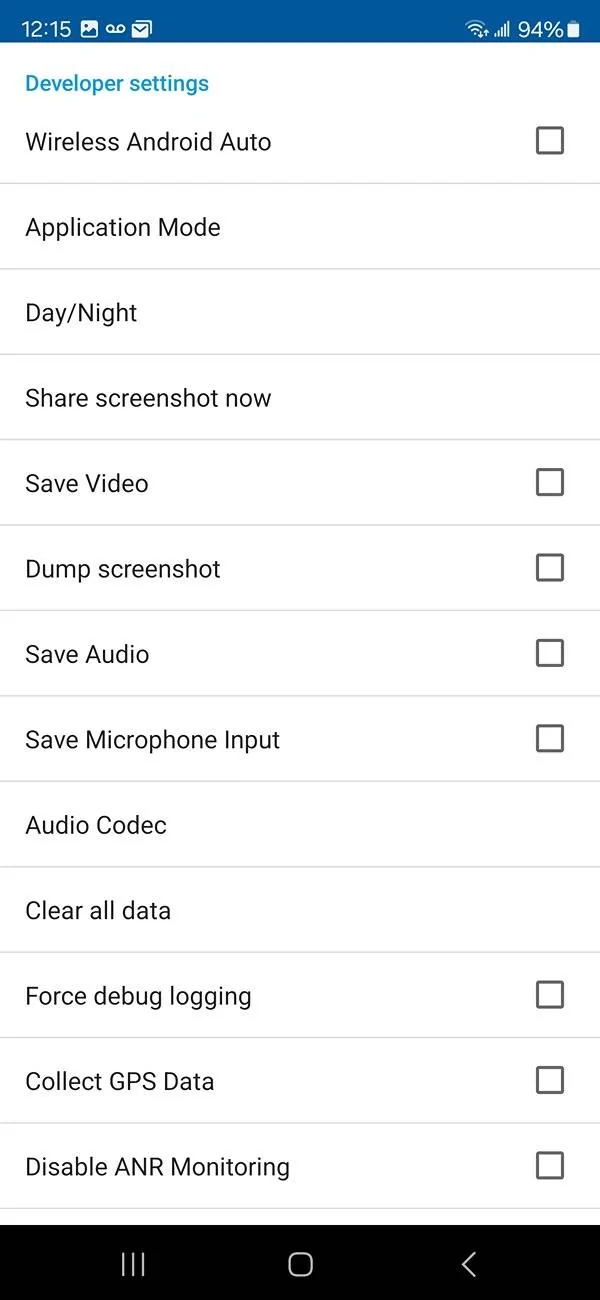
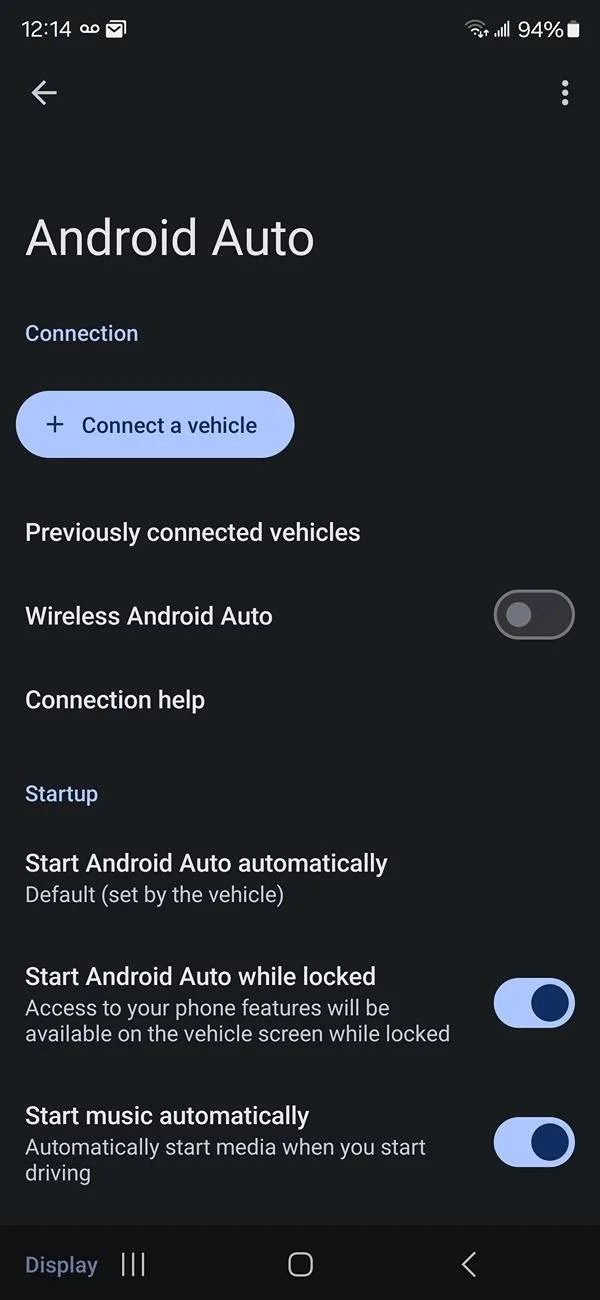
I am not sure how it works on your phone, but you need to find a way to enable the developer settings on it. On my S25 Ultra, you go to software info in the about phone section and tap "build number" seven times. That will allow you to turn off wireless android auto. I've been running it that way for years. Even on the latest and greatest Sync version, wireless projection is garbage whether you have Android or Apple. IMO, anyway. If I don't plug my phone in, the truck won't pick it up. The other thing is, I use an OEM Samsung cable and not a cheap knock-off cable. I don't know how much of a difference that makes, but I can tell you Android Auto works flawlessly 95% of the time. The only issue I have is sometimes the maps do not load, but if I unplug the cable and plug it back in, the maps load up right away 100% of the time.

Ford Bronco Android Auto Functionality - 6 Months In, and I can't Take a Call! Screenshot_20250424_121535_Android Auto

Ford Bronco Android Auto Functionality - 6 Months In, and I can't Take a Call! Screenshot_20250424_121457_Android Auto
 
Last edited:

DriveAllNight

Wildtrak
Well-Known Member
First Name
Dan
Joined
Aug 17, 2022
Threads
20
Messages
1,321
Reaction score
4,378
Location
N.J.
Vehicle(s)
24 Wildtrak, 25 Audi Q6 etron Quattro
Your Bronco Model
Wildtrak
I would find a friend who has an android and pair it up with your Bronco - I'm betting big it's your phone, and not the Bronco. That is the easiest way to test it. Of course when I say find a friend with an Android, I mean with a different brand, like a Samsung or a Google.

I've only ever owned Android phones, and I've never had any issues.
 

Sponsored

jensht

Badlands
Well-Known Member
Joined
Jul 23, 2024
Threads
8
Messages
130
Reaction score
174
Location
Germany
Vehicle(s)
2023 Ford Bronco
Your Bronco Model
Badlands
I wholly agree that the USB cable can make a huge difference! If you really want to make sure the cable will be trouble free make sure to get a USB-IF certified cable. I have wireless Android Auto enabled, but I still plug my phone in to a USB-IF cable, and with my Google Pixel phone I almost never have any issues using Android Auto in the Bronco and other cars.
 

rugedraw

Well-Known Member
First Name
Javier
Joined
Jan 9, 2024
Threads
0
Messages
383
Reaction score
327
Location
Miami, FL
Vehicle(s)
2021 Ford F150 Platinum FX4 EB/2023 Bronco Sport Badlands/1991 Mustang 5.0 coupe
Your Bronco Model
Undecided
These are the settings I need. I'm on s25 Ultra and have had developer options available. However, mine is missing those settings somehow. Where do you find that develepor settings page?
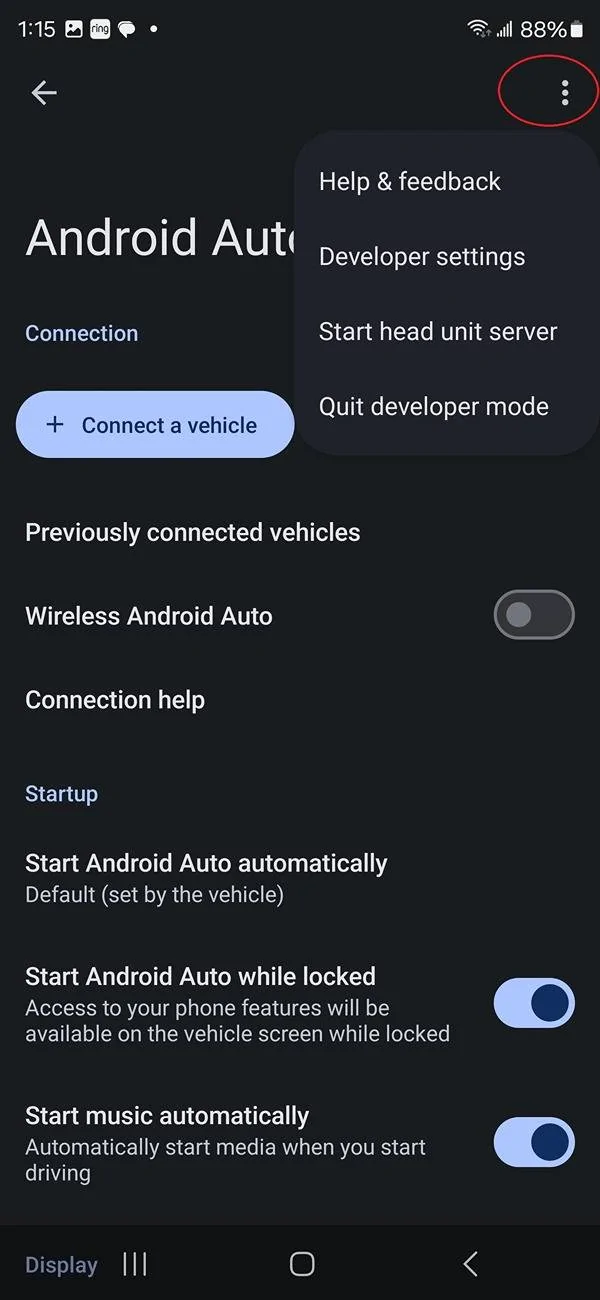
Hit these three little dots and it'll bring up this menu to go into the developer settings for AA:

Ford Bronco Android Auto Functionality - 6 Months In, and I can't Take a Call! Screenshot_20250424_131524_Android Auto
 

n5mj

Big Bend
Member
First Name
Mike
Joined
Sep 10, 2022
Threads
1
Messages
23
Reaction score
20
Location
Carlsbad, NM
Vehicle(s)
'22, '93 Bronco '97 Ranger '03 Sport Trac '11 SHO
Your Bronco Model
Big Bend
Clubs
 
Just another data point: My 2022 BB with the small screen. Not many updates to Sync. Absolutely unreliable bluetooth or wired phone connections with a 5 year old Moto X4, Android 9 max. Bought a newer Moto g 5g 2023, Android 14, last year. Haven't had a problem since. Android auto, maps, phone calls, all flawless.
 

BR549

Black Diamond
Member
Joined
Jul 7, 2024
Threads
0
Messages
22
Reaction score
153
Location
Tennessee
Vehicle(s)
22OBX, 23BD, 23Expedition, 05F150
Your Bronco Model
Black Diamond
Clubs
 
23 BD with small screen. From day 1, using OnePlus phone, sound quality using phone was not great, and everyone I talked to said they could barely hear me. The suddenly one day all I got out of the speakers was loud static, same as you. Tried changing all kinds of settings, no difference. During this entire period, my wife's iphone worked great with great sound quality.

Back in November, I accidentally dropped my OnePlus and it busted beyond repair. Bought new high end Samsung. It worked great from day one with great sound quality both directions, never had a hiccup since.

Something about the OnePlus version of Android, or its hardware, did not play nice with Sync4. And "something" changed at about the same time you experienced that made it go from bad to total static.
 
OP
OP

Cameron

Black Diamond
Active Member
First Name
Cameron
Joined
Jul 19, 2022
Threads
4
Messages
28
Reaction score
23
Location
Gilbert AZ
Vehicle(s)
'22 2.7l 2 Door BD , '99 Buell X1, '07 DRZ-400
Your Bronco Model
Black Diamond
Clubs
 
OP Update:
OK, I've verified that my Android OS is the most recent version. I've purchased a new USB cable from my provider's brick/mortar store ($40!), and still no improvement.

My local Ford store (San Tan Ford) checked my truck's systems during the last visit and as far as they could tell, the APIM software is the latest version as well. They updated the GWM, and refreshed the network. No other updates for GWM, APIM, or TCU were available and stated, "All software is up to date at this time".

As I said in my original post, my phone and truck connectivity worked 100% for nearly 2 years prior to last October.

My dealer rep continued his comments stating, "Ford is working on a software solution for this concern that will be delivered OTA when solution becomes available. No other repairs available at this time".
He also let me know he's got many other clients with the same issue, including a local fleet purchaser, so I'm not the only one with this issue.

Has anyone got any new ideas/solutions aside from me purchasing another $1,000 phone? Thanks!!!
 
OP
OP

Cameron

Black Diamond
Active Member
First Name
Cameron
Joined
Jul 19, 2022
Threads
4
Messages
28
Reaction score
23
Location
Gilbert AZ
Vehicle(s)
'22 2.7l 2 Door BD , '99 Buell X1, '07 DRZ-400
Your Bronco Model
Black Diamond
Clubs
 
Thanks to everyone who replied to my thread!
I dropped my truck at my local dealer earlier this week as I still haven't received the necessary OTA update, and they were finally able to "force" 3 different software updates. I'm happy to say that after 8 months, I'm finally able to use my phone w/my truck again!
If anyone reading is still having issues, please check w/your local dealer about the se updates. Hopefully you'll have some luck.
Shout out to James and his staff at San Tan Ford in Chandler AZ! Thanks guys!
Sponsored


Top