
Sponsored

OP
OP


- Thread starter
- #212
Got it. A dedicated power cable to the battery. You definitely need that.
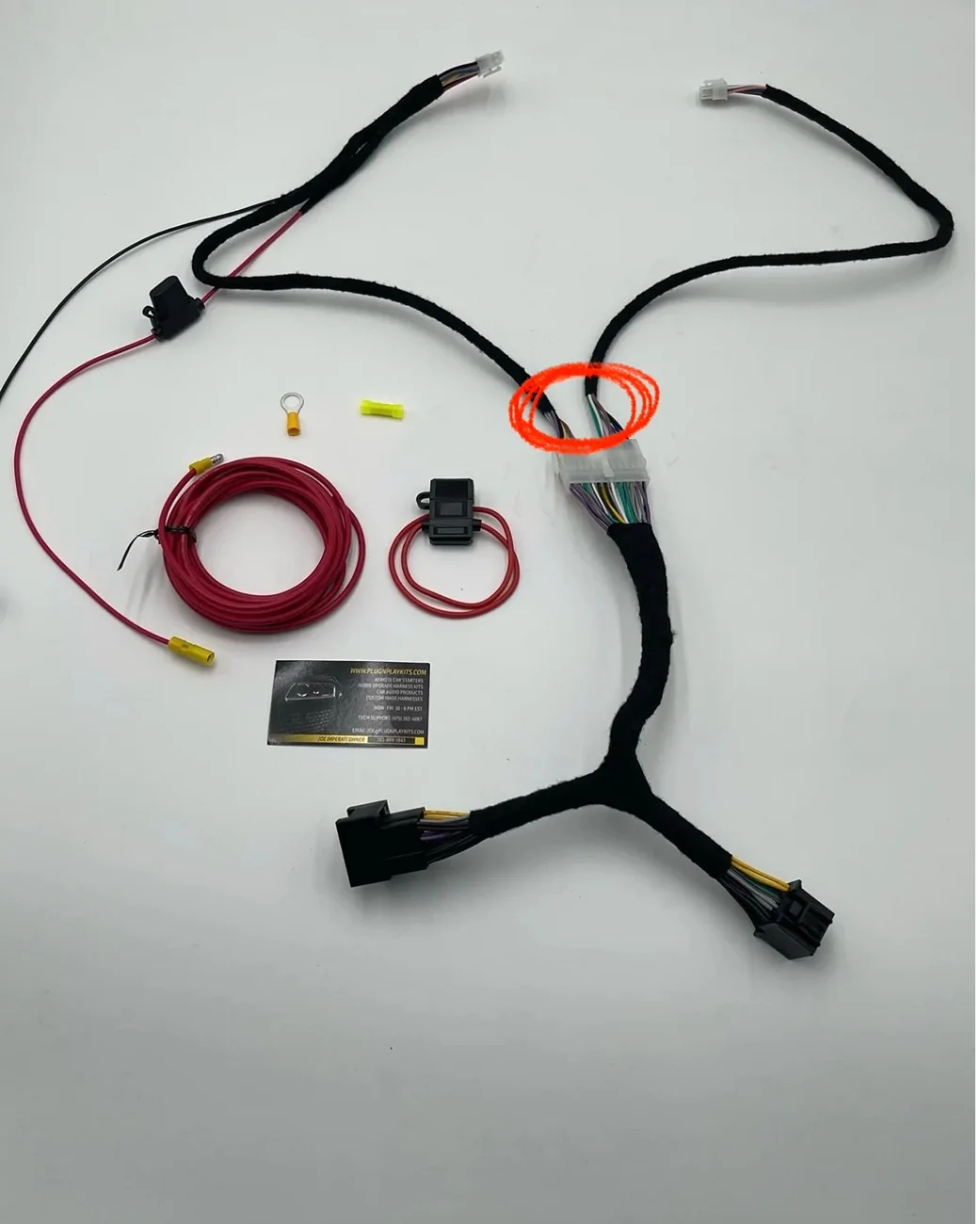
I was wondering how the wires on your white connector were so much larger. This seems obvious to ask, but you did run that straight to the battery and not a fuse tap correct?
So where the rest of us have a single harness that we’re plugging in, you have this additional harness piece that sits between your harness and the OEM wiring, right?
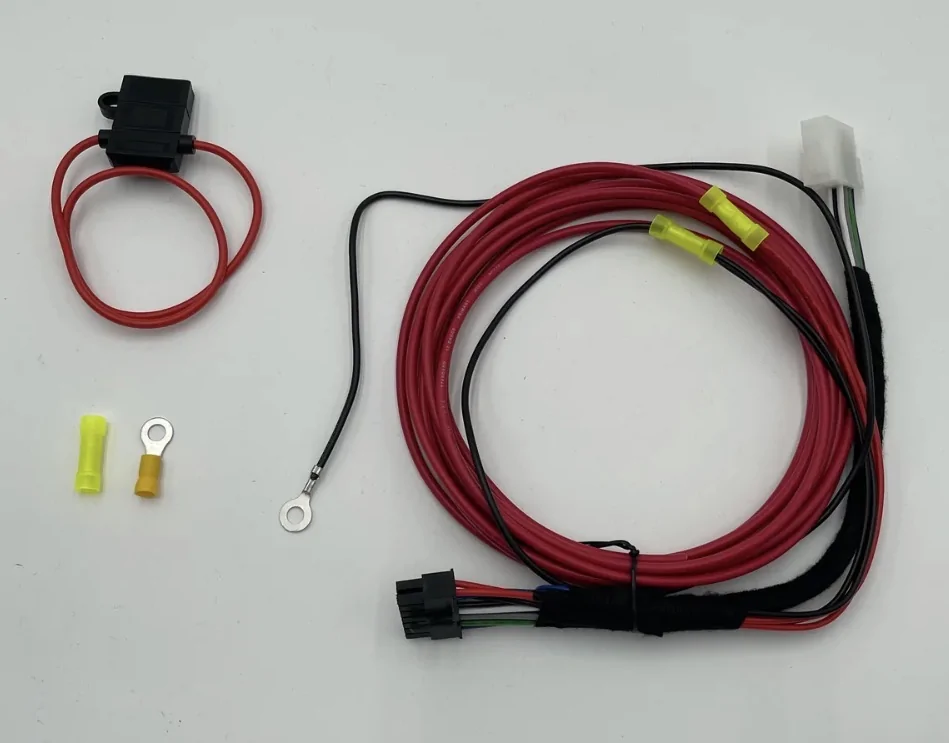
OP
OP
- Thread starter
- #213
Ok. I think I have this figured out if my imagination matches what you see on the current wiring set up. You have both of these harnesses, correct?


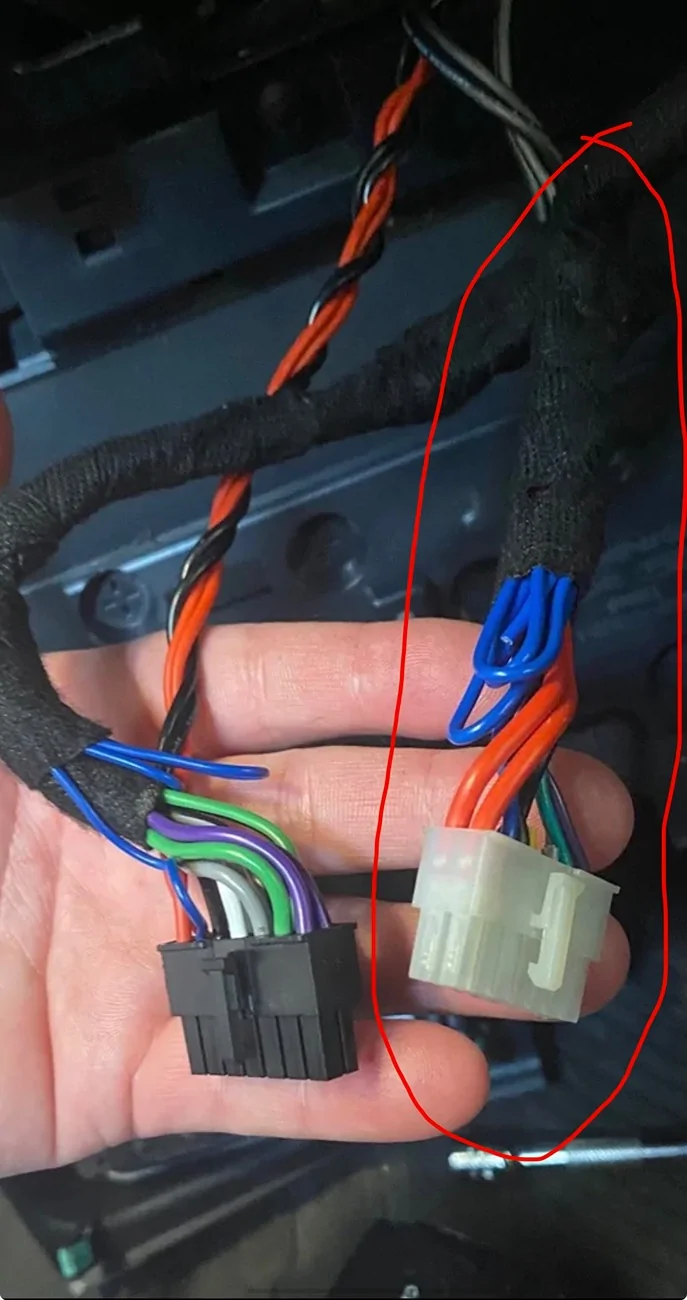
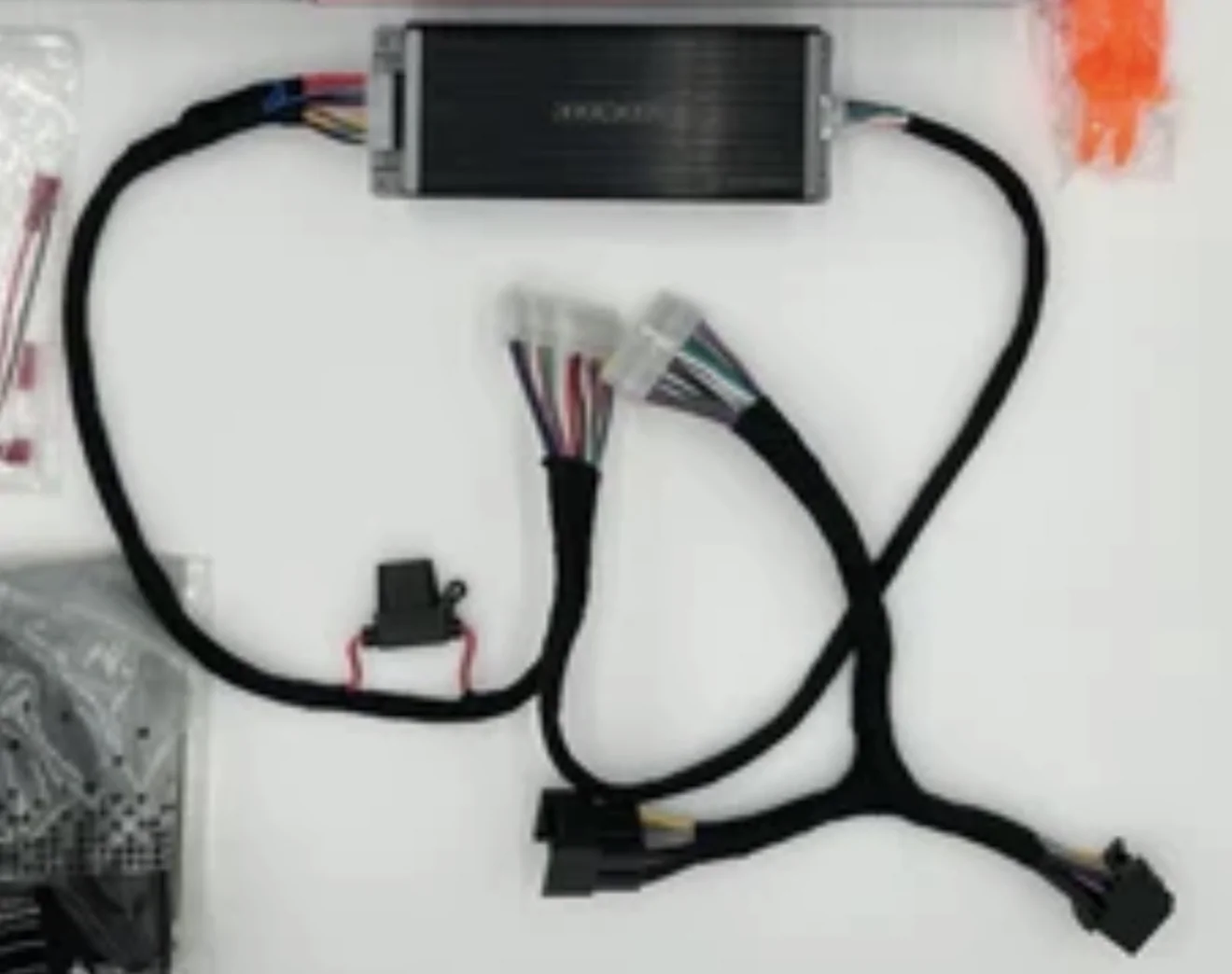

Ok. I think I have this figured out if my imagination matches what you see on the current wiring set up. You have both of these harnesses, correct?
Exactly right. I ran it direct to the battery. No fuse tap.Ok. I think I have this figured out if my imagination matches what you see on the current wiring set up. You have both of these harnesses, correct?
OP
OP
- Thread starter
- #215
Ok. So the power harness you have should sit in between the amp and the original upgrade harness. It essentially passes through all the audio connections but replaces the power section which now routes to your battery connection. Is that correct? It seems like the only logical way to do it and the wire color choices appear to support it.
If I am correct, there should be no hanging connectors.
Did you install the power upgrade adapter inline beteen the amp and original upgrade harness?
If I am correct, there should be no hanging connectors.
Did you install the power upgrade adapter inline beteen the amp and original upgrade harness?
Sponsored

@AZCoyote
I need some help. I think i flubbed up somewhere along the way.
I upgraded all stock speakers so I have coaxial in the dash, kicks and put the upsized 6.5 in the rear pods along with a hideaway kicker 10. I used a Kicker Key 200.4 and a harness from PNP Kits. (KIT 11-4 KICKER KEY HARNESS 180/200.4 ONLY WITH 17 FT HIGH LEVEL INPUT CABLE WITH LOAD RESISTOR FOR SUB AMP / POWERED SUB INSTALL). I made a few Forscan adjustments as well. But this was all years ago.
In this setup - sound was better than stock, but the gains on the key 200.4 were essentially zero. I've lived with it, but after reading this thread it made me want to unlock the speakers in bi-amp as described and later replace the coaxial speakers with a dedicated 6.5 woofer for the kicks and dedicated tweeter or possibly keep the coaxial speaker in the dash.
As I fumbled through it this weekend - I found that somewhere along the way, I lost sound to both the dash and kicks and possibly sub. The rear pods are working. I haven't rerun kicker DSP or anything yet - figured that wouldn't make sense if i had no sound coming from speakers.
What I did:
1. Cut the four wires from the INPUT side of the Key that were for the rear pod speakers. The stubby wires closest to the plug on the Input are all individually wrapped and then taped to rest of harness.
2. Cut the four matching wires from the OUTPUT side of the Key that ran to the rear pod speakers.
3. I joined the cut wires from the OUTPUT side of the key to the longer ones from the INPUT side of the key so it would bypass the Key altogether. I turned my bronco on and I have sound in both rears pods.
NOTE: As I working on a few other things in the bronco - I had already pulled the dash and disconnected the kick panel speakers.
Here is a picture of what I've done around the amp.

3. I connected two new speaker wires to the cut wires on the OUTPUT side of the key and ran those to the kick panel speakers. I think this is where I screwed up. I disconnected the factory connection to the Metra connector. I cut the Metra connector so only the spaded wires were attached to the speaker and connected my new wire to those. This was mainly for convenience so i didn't have to fight to get the speakers out from the kick panel (it was 114 yesterday and I'm a farily large and inflexible guy). But in my mind it was the same thing as putting the spades on the wire and directly connecting it to the speaker.
I am certain I misunderstood the instructions, missed a step, or did too much - maybe all 3.
Can you help guide me so I can get back on track?
I need some help. I think i flubbed up somewhere along the way.
I upgraded all stock speakers so I have coaxial in the dash, kicks and put the upsized 6.5 in the rear pods along with a hideaway kicker 10. I used a Kicker Key 200.4 and a harness from PNP Kits. (KIT 11-4 KICKER KEY HARNESS 180/200.4 ONLY WITH 17 FT HIGH LEVEL INPUT CABLE WITH LOAD RESISTOR FOR SUB AMP / POWERED SUB INSTALL). I made a few Forscan adjustments as well. But this was all years ago.
In this setup - sound was better than stock, but the gains on the key 200.4 were essentially zero. I've lived with it, but after reading this thread it made me want to unlock the speakers in bi-amp as described and later replace the coaxial speakers with a dedicated 6.5 woofer for the kicks and dedicated tweeter or possibly keep the coaxial speaker in the dash.
As I fumbled through it this weekend - I found that somewhere along the way, I lost sound to both the dash and kicks and possibly sub. The rear pods are working. I haven't rerun kicker DSP or anything yet - figured that wouldn't make sense if i had no sound coming from speakers.
What I did:
1. Cut the four wires from the INPUT side of the Key that were for the rear pod speakers. The stubby wires closest to the plug on the Input are all individually wrapped and then taped to rest of harness.
2. Cut the four matching wires from the OUTPUT side of the Key that ran to the rear pod speakers.
3. I joined the cut wires from the OUTPUT side of the key to the longer ones from the INPUT side of the key so it would bypass the Key altogether. I turned my bronco on and I have sound in both rears pods.
NOTE: As I working on a few other things in the bronco - I had already pulled the dash and disconnected the kick panel speakers.
Here is a picture of what I've done around the amp.
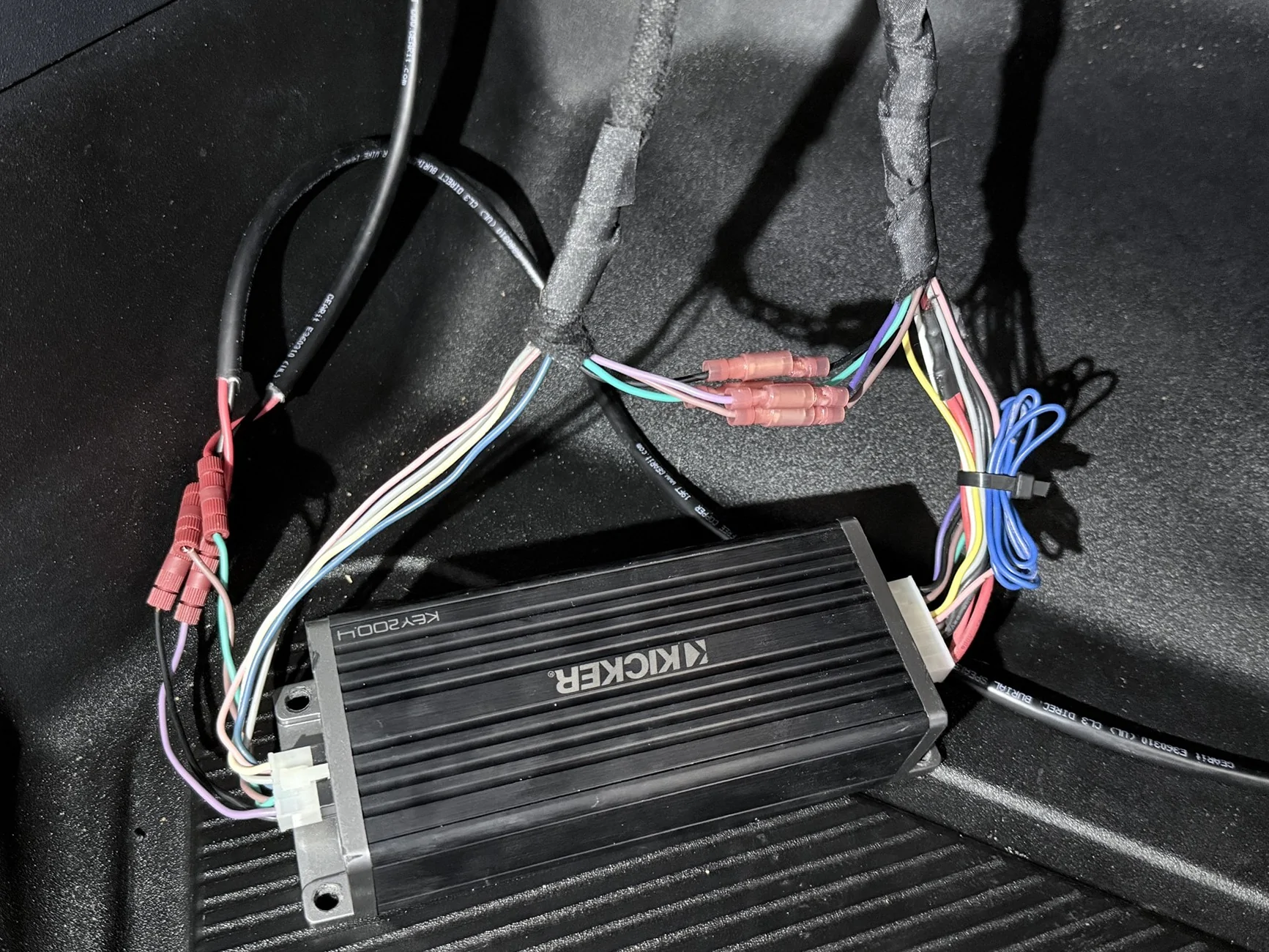
3. I connected two new speaker wires to the cut wires on the OUTPUT side of the key and ran those to the kick panel speakers. I think this is where I screwed up. I disconnected the factory connection to the Metra connector. I cut the Metra connector so only the spaded wires were attached to the speaker and connected my new wire to those. This was mainly for convenience so i didn't have to fight to get the speakers out from the kick panel (it was 114 yesterday and I'm a farily large and inflexible guy). But in my mind it was the same thing as putting the spades on the wire and directly connecting it to the speaker.
I am certain I misunderstood the instructions, missed a step, or did too much - maybe all 3.
Can you help guide me so I can get back on track?
OP
OP
- Thread starter
- #217
@AZCoyote
I need some help. I think i flubbed up somewhere along the way.
I upgraded all stock speakers so I have coaxial in the dash, kicks and put the upsized 6.5 in the rear pods along with a hideaway kicker 10. I used a Kicker Key 200.4 and a harness from PNP Kits. (KIT 11-4 KICKER KEY HARNESS 180/200.4 ONLY WITH 17 FT HIGH LEVEL INPUT CABLE WITH LOAD RESISTOR FOR SUB AMP / POWERED SUB INSTALL). I made a few Forscan adjustments as well. But this was all years ago.
In this setup - sound was better than stock, but the gains on the key 200.4 were essentially zero. I've lived with it, but after reading this thread it made me want to unlock the speakers in bi-amp as described and later replace the coaxial speakers with a dedicated 6.5 woofer for the kicks and dedicated tweeter or possibly keep the coaxial speaker in the dash.
As I fumbled through it this weekend - I found that somewhere along the way, I lost sound to both the dash and kicks and possibly sub. The rear pods are working. I haven't rerun kicker DSP or anything yet - figured that wouldn't make sense if i had no sound coming from speakers.
What I did:
1. Cut the four wires from the INPUT side of the Key that were for the rear pod speakers. The stubby wires closest to the plug on the Input are all individually wrapped and then taped to rest of harness.
2. Cut the four matching wires from the OUTPUT side of the Key that ran to the rear pod speakers.
3. I joined the cut wires from the OUTPUT side of the key to the longer ones from the INPUT side of the key so it would bypass the Key altogether. I turned my bronco on and I have sound in both rears pods.
NOTE: As I working on a few other things in the bronco - I had already pulled the dash and disconnected the kick panel speakers.
Here is a picture of what I've done around the amp.
3. I connected two new speaker wires to the cut wires on the OUTPUT side of the key and ran those to the kick panel speakers. I think this is where I screwed up. I disconnected the factory connection to the Metra connector. I cut the Metra connector so only the spaded wires were attached to the speaker and connected my new wire to those. This was mainly for convenience so i didn't have to fight to get the speakers out from the kick panel (it was 114 yesterday and I'm a farily large and inflexible guy). But in my mind it was the same thing as putting the spades on the wire and directly connecting it to the speaker.
I am certain I misunderstood the instructions, missed a step, or did too much - maybe all 3.
Can you help guide me so I can get back on track?
This is where my loops are. I just resent the power speaker signals back to their original target. It sounds like you got yours connected correctly for the rears just farther up the harness. If you unplug the Key entirely and leave T-harness plugs connected, you should have rear speaker sound. Mine were color code matches so that was easy.
The dash/kick situation will seem a little weird. The original powered signal went to the kicks first then on to the dash as those channels are wired together. When stock, you can unplug the kick panel speaker and you should still hear the dash. When I installed my dash speakers, that is exactly what I did. I taped up the old kick connector and put it aside. Lucky for us the bi-amp setting uses Amp 1 for the dash and that is how the harness is already setup. As long as your stock wires aren't altered, you should have dash sound when the amp is connected. Make sure you have dips set to bi-amp at this time.
For the kicks, I sent new wire and crimped on new spades at the speaker side then connected direct to the Amp 2 outputs on the harness. I did not have any metra connectors at any point in my setup. I would use standard crimp on connectors for the kicks, check the crimps are clean (super easy to get insulator in a crimp and interrupt the connection.)
All that said, I will throw some super obvious stuff. You have verified your lights are on on the Key? You have the inline fuse inserted? You want that out while doing wiring of course.
You have dedicated power to the battery right? The old harness setup that uses power from the "deck" is not sufficient for these to run well.
Be sure to set your gains all down so you don't damage anything while testing.
114? Sounds like out here in AZ for me. Dust storms and 110+ plus days lately.
Thanks brother. I'll run out and go take another look and see I can make sense of it. Maybe I missed something or made a sloppy connection. My original thought was that because I got rid of the metra connections on the kicks maybe I messed up there or had my connections in the wrong spot on the harness or something. I am very good at overthinking my way into something haha -This is where my loops are. I just resent the power speaker signals back to their original target. It sounds like you got yours connected correctly for the rears just farther up the harness. If you unplug the Key entirely and leave T-harness plugs connected, you should have rear speaker sound. Mine were color code matches so that was easy.
The dash/kick situation will seem a little weird. The original powered signal went to the kicks first then on to the dash as those channels are wired together. When stock, you can unplug the kick panel speaker and you should still hear the dash. When I installed my dash speakers, that is exactly what I did. I taped up the old kick connector and put it aside. Lucky for us the bi-amp setting uses Amp 1 for the dash and that is how the harness is already setup. As long as your stock wires aren't altered, you should have dash sound when the amp is connected. Make sure you have dips set to bi-amp at this time.
For the kicks, I sent new wire and crimped on new spades at the speaker side then connected direct to the Amp 2 outputs on the harness. I did not have any metra connectors at any point in my setup. I would use standard crimp on connectors for the kicks, check the crimps are clean (super easy to get insulator in a crimp and interrupt the connection.)
All that said, I will throw some super obvious stuff. You have verified your lights are on on the Key? You have the inline fuse inserted? You want that out while doing wiring of course.
You have dedicated power to the battery right? The old harness setup that uses power from the "deck" is not sufficient for these to run well.
Be sure to set your gains all down so you don't damage anything while testing.
114? Sounds like out here in AZ for me. Dust storms and 110+ plus days lately.
and yes - the heat right now is flat out disrespectful. haha
Sponsored


