
Sponsored

ActionZ

Black Diamond
Well-Known Member
First Name
Jackson
Joined
Jun 21, 2025
Threads
9
Messages
117
Reaction score
65
Location
Vancouver
Vehicle(s)
2024 Bronco 2.7
Your Bronco Model
Black Diamond
I've eliminated the seatbelt and door chimes, but I don't see anything in the plain English enable/disable options to remove this pop up? Anybody know if it's possible, and if so... how? I'm not opposed to doing As Built.

IMG_6040.webp
You can't remove that. Just the sounds.
Sponsored


Mr Nick

Outer Banks
Active Member
First Name
Nick
Joined
May 10, 2026
Threads
4
Messages
28
Reaction score
60
Location
Chicagoland
Vehicle(s)
2026 OBX SAS, 1969 Olds Cutlass
Your Bronco Model
Outer Banks
I was able to get rid of the red or green X's, but not the pop up itself. Swing and a miss.
 

Mr Nick

Outer Banks
Active Member
First Name
Nick
Joined
May 10, 2026
Threads
4
Messages
28
Reaction score
60
Location
Chicagoland
Vehicle(s)
2026 OBX SAS, 1969 Olds Cutlass
Your Bronco Model
Outer Banks
You can't remove that. Just the sounds.
I was able to eliminate the pop up screen entirely using plain English EZ mode option by changing "Seat Row 2 Bench" to "Not Present", but it created a DTC P160B in the IPC module. I don't care about the DTC, I'll clear it a couple times and see if it keeps returning. My only concern is the vehicle now thinks seats are missing and the restraint system or air bags won't function properly. But I have no codes in the RCM (Restraint Control Module), and the airbag light comes up on the dash during start up for a few seconds like it should.

Might be on to something here.
 

Skold

Badlands
Member
Joined
Nov 27, 2023
Threads
0
Messages
10
Reaction score
4
Location
TX
Vehicle(s)
2023 Bronco Sport Badlands
Your Bronco Model
Badlands
"If you do a lot of highway driving the Eco mode paired with cruise control does way better than me with fuel efficiency than just Eco alone."

I did a trip for work to the same place twice, a week apart (came home for the weekend), about 530 miles each round trip. Almost all of it was highway/turnpike driving and I'm thinking the speed, and pushing a brick, took away any "advantage", because the difference was 3/10th less with Eco... or practically the same. Also where I live wind is always a factor, as it's always present, but both trips were in similar conditions. It may have had more to do with the speed, cruise was set on 70-80mph for just about all of the trips, and somewhere around 70mph MPG it starts taking a noticeable hit, regardless of mode... it would be interesting to try it with cruise set to 65mph, but then I'd get ran over or have a parade behind me :crackup:

FWIW, I got rid of Eco Mode using the "Easy" way (??), choosing disable in the Non As Built module, back in March. The dash display went back to displaying all of the modes normally when toggling thru them, now it just has Sport instead of Eco. I've tried each mode at least a couple times each since, and have checked for codes periodically (none). Also, even when I had all 8 enabled, they all functioned correctly, and it did not kick any codes. The only thing different was the last one, Rock Crawl, got a generic looking picture and no title when going to that mode, and by going back to 7 Rock Crawl got it's title back and it's original picture.
I have a 2025 base w/SAS. Can you please tell me specifically how you got rid of eco mode but kept/added sport?
 

ssitruc

Badlands
Member
Joined
Feb 7, 2026
Threads
0
Messages
17
Reaction score
9
Location
Oklahoma
Vehicle(s)
'25 Bronco Badlands
Your Bronco Model
Badlands
I did it by using Forscan and the spreadsheet from this forum... Thanks to those guys that compiled all of that! If you haven't used Forscan, I highly recommend reading/watching all the "How To's" and "Tutorial" so you know what to do and in what sequence (reading module, making back ups, communicating, writing, saving, exiting, cycling, etc)... BEFORE you are actually doing it. I even made a step by step list for myself.

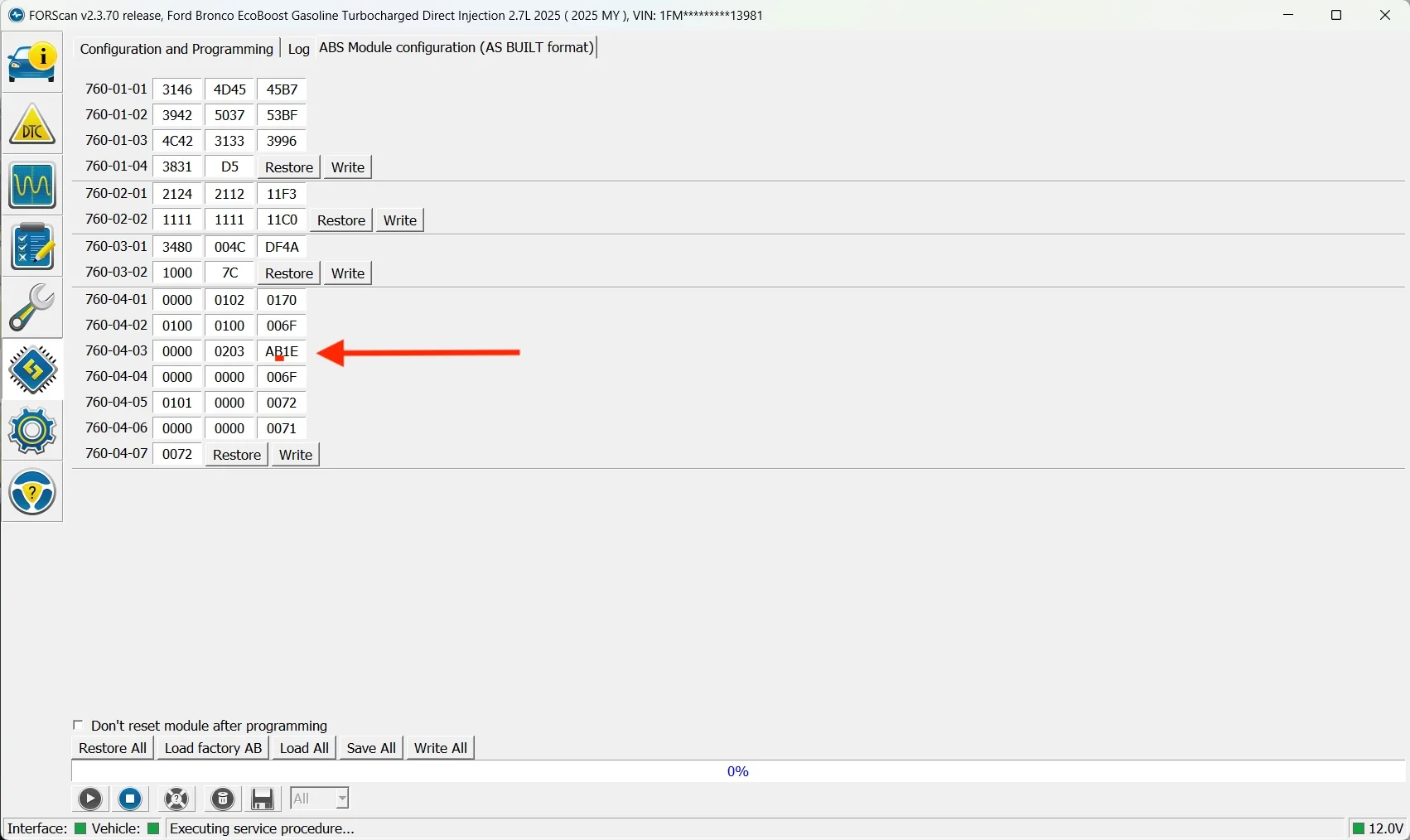
Specifically, after first backing up the "ABS As Built module", I added Sport Mode by going into the ABS As Built module and on 760-04-03 changing only the second digit in the third box (red asterisk * below) to a "B" as shown below (don't worry about the rest of the numbers/letters)
Ford Bronco 2021+ Bronco ForScan Thread 1781967095316-a


looked like this in Forscan (below is after the change was made)
Ford Bronco 2021+ Bronco ForScan Thread As Built

Then saved/wrote/cycled and exited out. Then turned the Bronco off, and let it power down completely for a minute. Then started the Bronco, confirmed Sport mode was available and took it for a drive to confirm settings were actually changing and it was actually in Sport mode, which it was obvious it was. After that I turned it off and let it sit for a couple minutes, then turned the ignition on (not engine), and checked for any codes and cleared them (I don't remember if there actually was a code doing one this or not). I left it like this, with both Sport and Eco, for about a month, had no issues (other than the display being generic for Rock Crawl because I had 8 modes enabled).

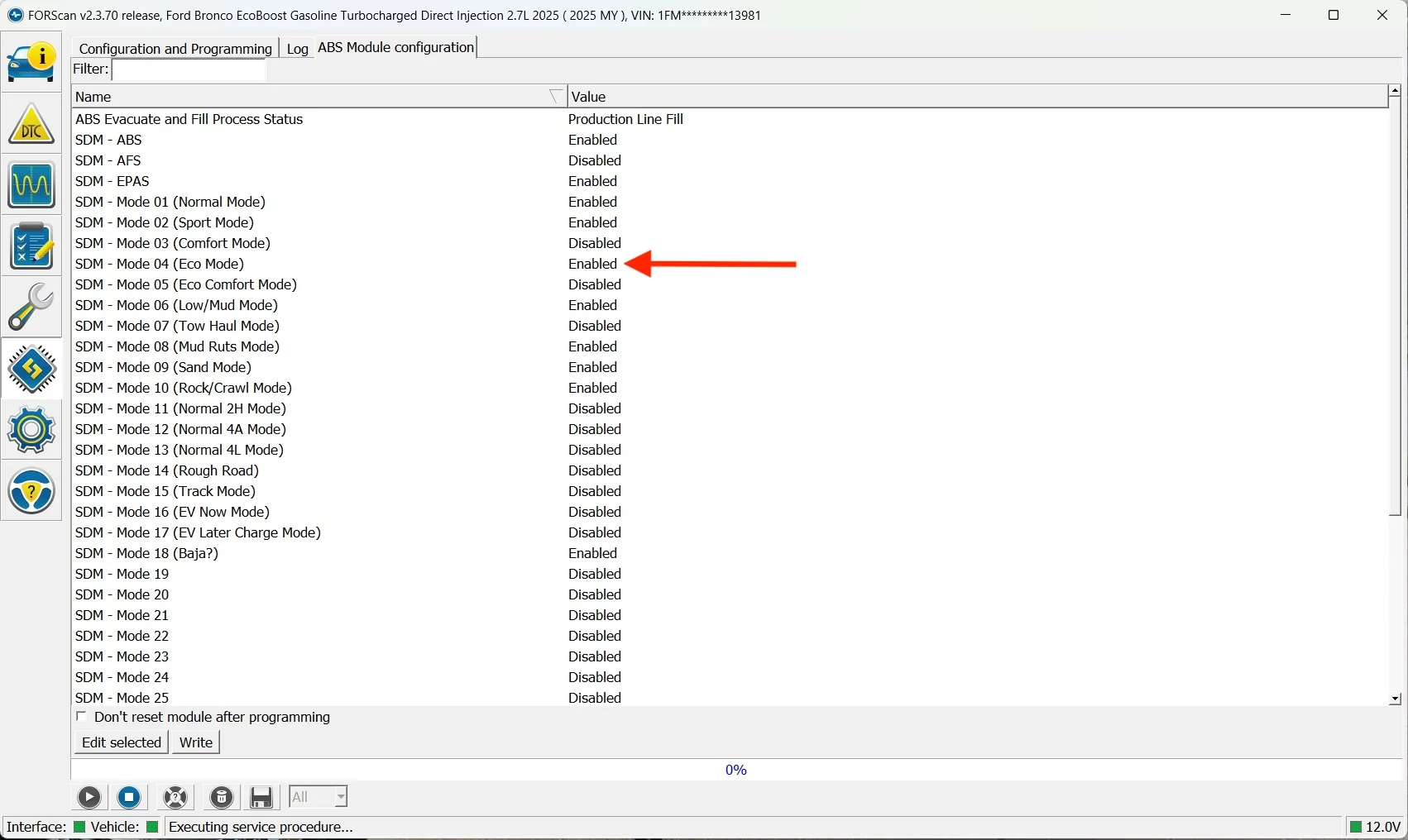
Then a month or so later, again using Forscan, I went in to disable Eco mode. Because I was unable to figure out or find the value to change to disabled Eco mode in the ABS As Built module, I went in to just the ABS module (the one that does not say "As Built"), that people refer to as "easy mode" to disable Eco mode. I found Eco mode in the list of modes (pick the right one!) and clicked on where it said "Enabled" and changed it to "Disabled", then again went thru the steps of writing/saving changes and exited out.
(below is before I changed Eco to Disabled)
Ford Bronco 2021+ Bronco ForScan Thread Easy


Go thru the tutorials, because I am probably not using the correct terminology, so you know how to get in to and communicate with the module(s), how to make and apply your changes, when to cycle the ignition, how to disconnect, etc... properly. It's simple, but I still wrote the sequence down, big enough I could read it, to have a cheat sheet just to be sure as I was actually doing it.

I also did several changes to other things... and after I get done with whatever I was doing I always turn the Bronco off and let it power down completely and set for a minute or two. Then turn the ignition on (not the engine) and check to see if it has kicked any codes, see what they are and clear them. Sometimes I would have codes at this point. Once I had "cleared" them, I would again turn the Bronco off and power down for a minute or two, then take it for a test spin testing whatever changes I had made. After that, and once everything was confirmed to be working as intended, I will check again to see if any codes are kicking up... and check again a week or so later just to be sure (OCD), and none have ever came back after they were initially cleared.
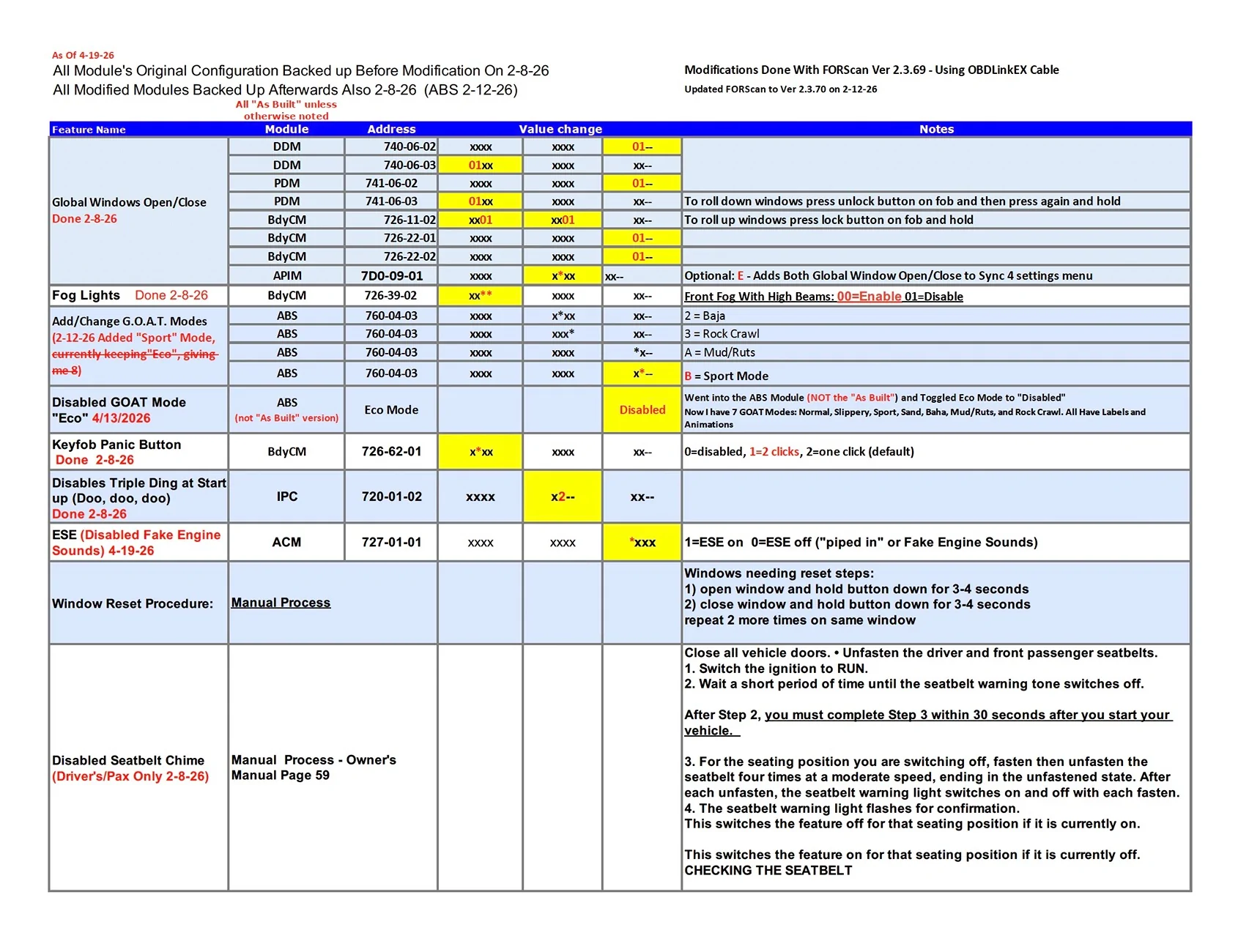
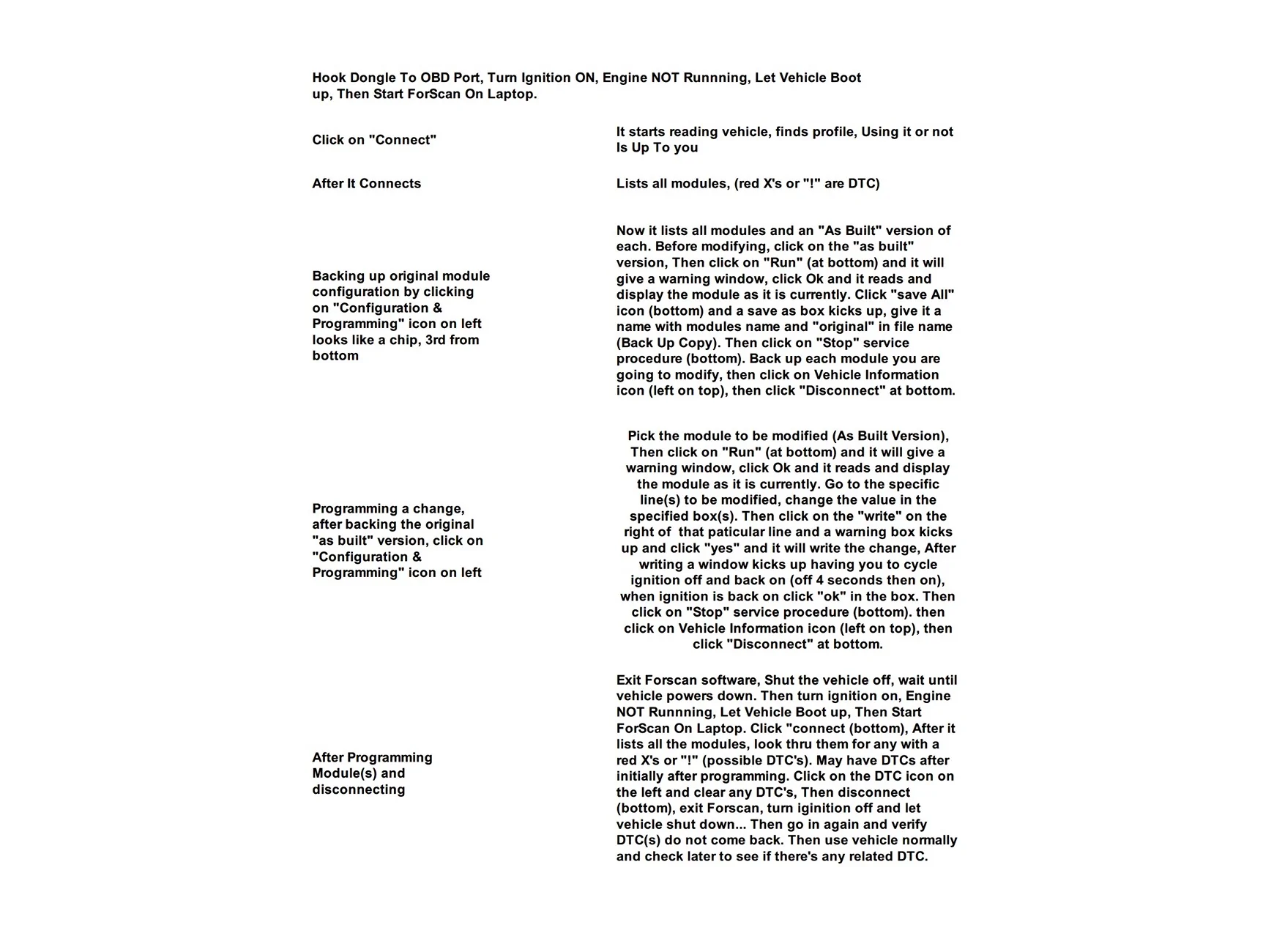
This is my "Cheat Sheet" and step by step for the changes I made to my '25 Badlands (if anyone sees inaccurate information, please let me know!)
Ford Bronco 2021+ Bronco ForScan Thread CheatSheet1

Ford Bronco 2021+ Bronco ForScan Thread CheatSheet2

Hope that answers your question....
 
Last edited:

Sponsored

Skold

Badlands
Member
Joined
Nov 27, 2023
Threads
0
Messages
10
Reaction score
4
Location
TX
Vehicle(s)
2023 Bronco Sport Badlands
Your Bronco Model
Badlands
I did it by using Forscan and the spreadsheet from this forum... Thanks to those guys that compiled all of that! If you haven't used Forscan, I highly recommend reading/watching all the "How To's" and "Tutorial" so you know what to do and in what sequence (reading module, making back ups, communicating, writing, saving, exiting, cycling, etc)... BEFORE you are actually doing it. I even made a step by step list for myself.

Specifically, after first backing up the "ABS As Built module", I added Sport Mode by going into the ABS As Built module and on 760-04-03 changing only the second digit in the third box (red asterisk * below) to a "B" as shown below (don't worry about the rest of the numbers/letters)
View attachment 804480

looked like this in Forscan (below is after the change was made)
As Built.webp

Then saved/wrote/cycled and exited out. Then turned the Bronco off, and let it power down completely for a minute. Then started the Bronco, confirmed Sport mode was available and took it for a drive to confirm settings were actually changing and it was actually in Sport mode, which it was obvious it was. After that I turned it off and let it sit for a couple minutes, then turned the ignition on (not engine), and checked for any codes and cleared them (I don't remember if there actually was a code doing one this or not). I left it like this, with both Sport and Eco, for about a month, had no issues (other than the display being generic for Rock Crawl because I had 8 modes enabled).

Then a month or so later, again using Forscan, I went in to disable Eco mode. Because I was unable to figure out or find the value to change to disabled Eco mode in the ABS As Built module, I went in to just the ABS module (the one that does not say "As Built"), that people refer to as "easy mode" to disable Eco mode. I found Eco mode in the list of modes (pick the right one!)and clicked on where it said "Enabled" and changed it to "Disabled", then again went thru the steps of writing/saving changes and exited out.
(below is before I changed Eco to Disabled)
Easy.webp


Go thru the tutorials, because I am probably not using the correct terminology, so you know how to get in to and communicate with the module(s), how to make and apply your changes, when to cycle the ignition, how to disconnect, etc... properly. It's simple, but I still wrote the sequence down, big enough I could read it, to have a cheat sheet just to be sure as I was actually doing it.

I also did several changes to other things... and after I get done with whatever I was doing I always turn the Bronco off and let it power down completely and set for a minute or two. Then turn the ignition on (not the engine) and check to see if it has kicked any codes, see what they are and clear them. Sometimes I would have codes at this point. Once I had "cleared" them, I would again turn the Bronco off and power down for a minute or two, then take it for a test spin testing whatever changes I had made. After that, and once everything was confirmed to be working as intended, I will check again to see if any codes are kicking up... and check again a week or so later just to be sure (OCD), and none have ever came back after they were initially cleared.
This is my "Cheat Sheet" and step by step for the changes I made for the changes I did to my '25 Badlands (if anyone sees inaccurate information, please let me know!)
CheatSheet1.webp

CheatSheet2.webp

Hope that answers your question....

View attachment 804479
This is EXTREMELY helpful as it compiles a lot of what most people probably want to do in one spot and is good for a '25 and newer. Thank you very much for taking the time to detail this out. I am like you and am very OCD and cautious so I will take it slow and careful.
 

ssitruc

Badlands
Member
Joined
Feb 7, 2026
Threads
0
Messages
17
Reaction score
9
Location
Oklahoma
Vehicle(s)
'25 Bronco Badlands
Your Bronco Model
Badlands
Man it is the guys who put the time into making and verifying that spreadsheet and making the tutorials, who needs to be thanked, thats was the real work... I just copied their stuff that I did into my own sheet to document exactly how/what/when I was doing it to my own, hope it helps though.
 

Skold

Badlands
Member
Joined
Nov 27, 2023
Threads
0
Messages
10
Reaction score
4
Location
TX
Vehicle(s)
2023 Bronco Sport Badlands
Your Bronco Model
Badlands
Man it is the guys who put the time into making and verifying that spreadsheet and making the tutorials, who needs to be thanked, thats was the real work... I just copied their stuff that I did into my own sheet to document exactly how/what/when I was doing it to my own, hope it helps though.
Indeed! I appreciate you all!
Sponsored


Top