
Sponsored

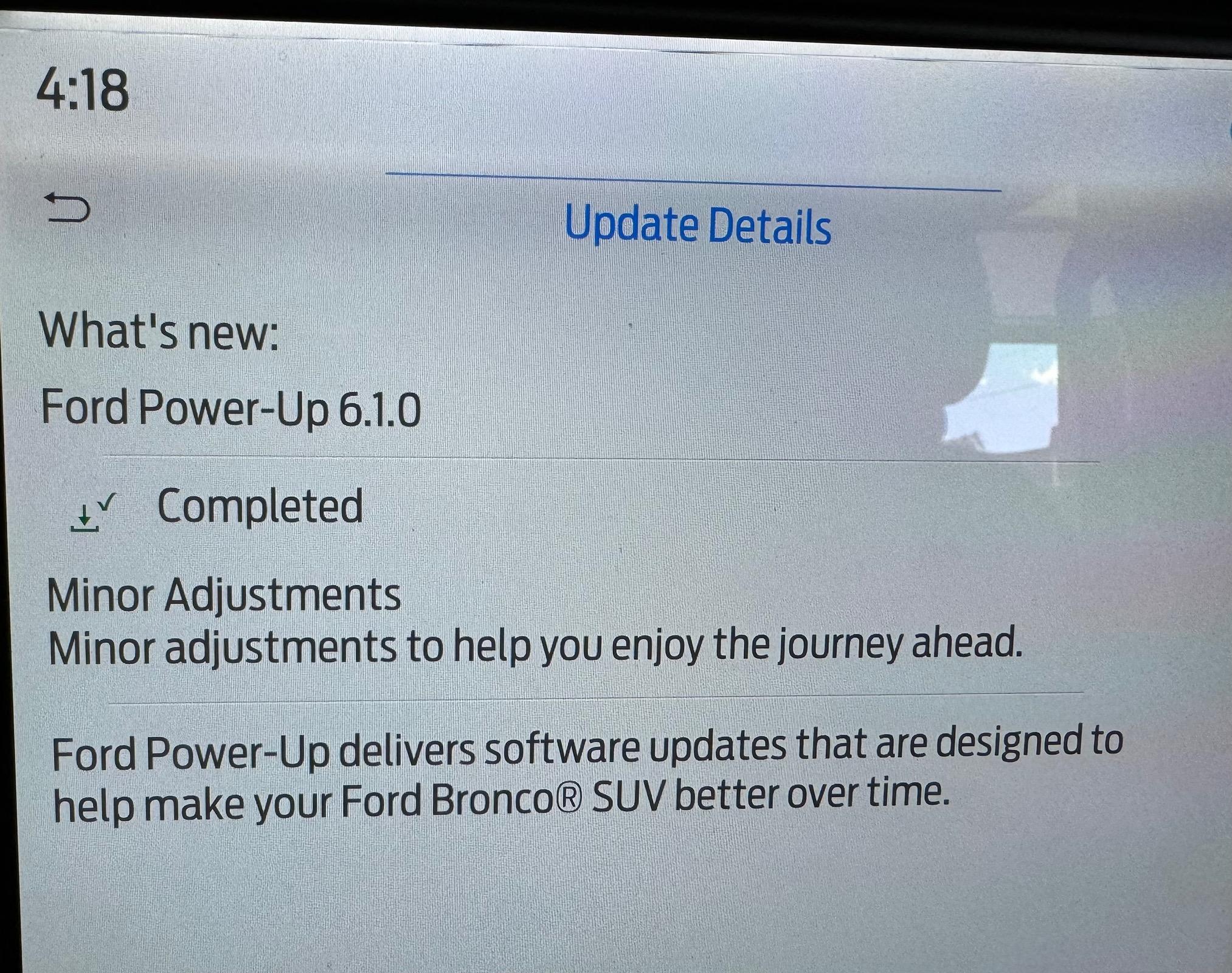
Power-Up 6.1.0

5GENIDN

Heritage
Well-Known Member
First Name
Joe
Joined
Jul 1, 2023
Threads
12
Messages
3,585
Reaction score
10,352
Location
Idaho
Vehicle(s)
23 Ford Bronco Heritage Limited 2dr
Your Bronco Model
Heritage
Clubs
 
On my Ford Pass App/Features and Settings/software updates

I can schedule my updates and turn on or off auto updates.

This is not on the Bronco itself. Maybe they both do the same thing? Maybe they operate independently? I do not know. It does say if I connect to wifi I can download faster.... Than "over the air".
Sponsored


da_jokker

Wildtrak
Well-Known Member
Joined
Jul 14, 2020
Threads
125
Messages
6,173
Reaction score
7,130
Location
California
Vehicle(s)
Jeep Wrangler JKUR
Your Bronco Model
Wildtrak
Clubs
 
On my Ford Pass App/Features and Settings/software updates

I can schedule my updates and turn on or off auto updates.

This is not on the Bronco itself. Maybe they both do the same thing? Maybe they operate independently? I do not know. It does say if I connect to wifi I can download faster.... Than "over the air".
Those settings are there. First thing I did when I got my Bronco was turn off the auto updates using the Sync 4.

Now with all the updates I've happily missed, maybe they removed that feature to prevent people like me from having their Bronco work trouble-free :)
 

coadr

Badlands
Well-Known Member
First Name
Coady
Joined
Jan 26, 2022
Threads
4
Messages
355
Reaction score
682
Location
Denver, CO
Vehicle(s)
2022 Ford Bronco Badlands
Your Bronco Model
Badlands
Clubs
 
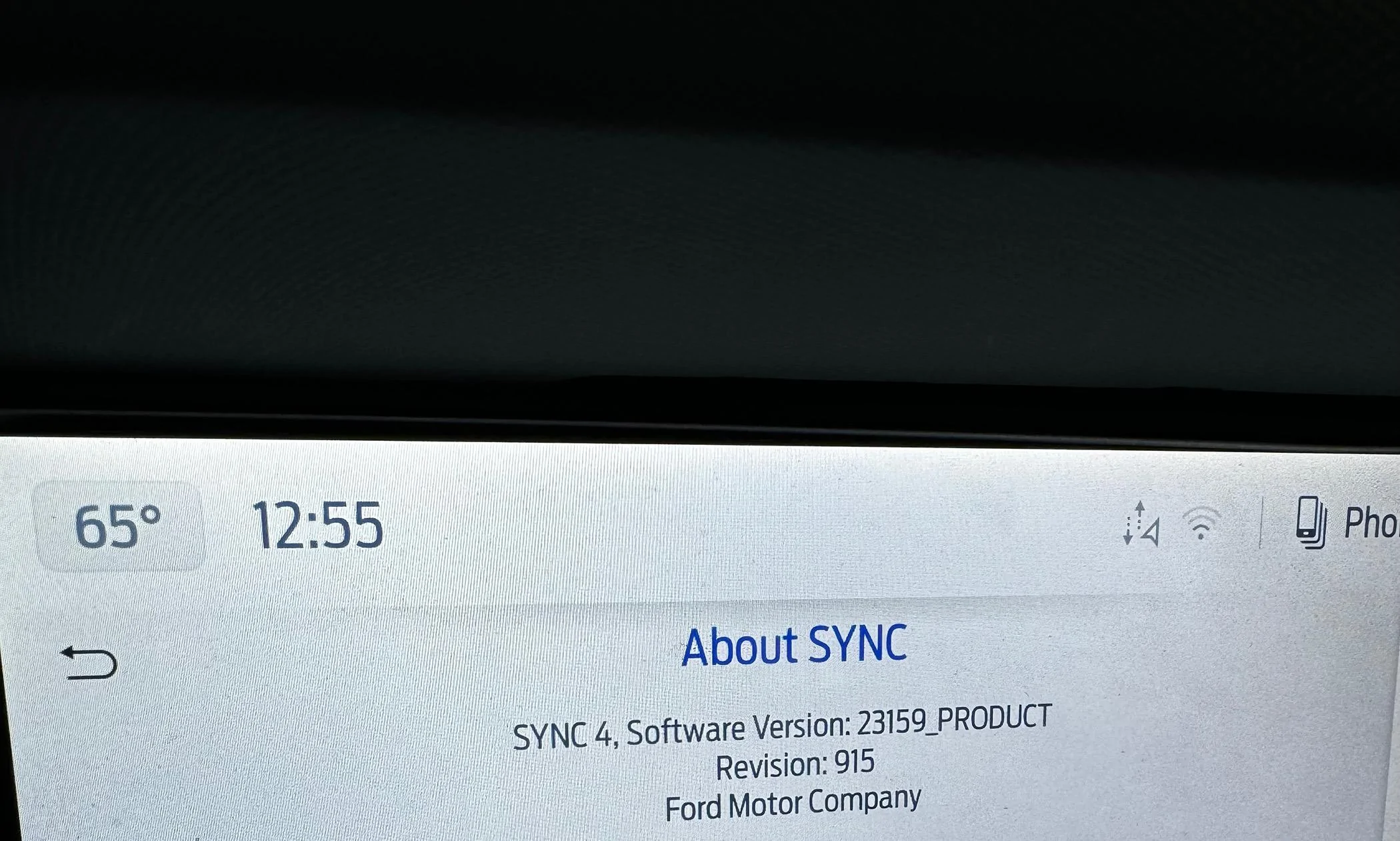
@fiatlux @Mr Bacon Jr looks like you guys are the only ones with 6.1.0 in here. Can one of you look and see what the SYNC version and revision numbers are in Setting -> General -> About SYNC?

I manually pushed all updates yesterday and this is what I'm seeing on my end, but I'm not sure if it aligns with 4.2.3 or 6.1.0

Ford Bronco Power-Up 6.1.0 IMG_0443
 

Brian_B

Big Bend
Well-Known Member
First Name
Brian
Joined
Sep 14, 2023
Threads
60
Messages
8,287
Reaction score
14,682
Location
Central CA
Vehicle(s)
'23 BB 4dr 7MT, '22 BSport OBX, '87 B-II XL
Your Bronco Model
Big Bend
Clubs
 
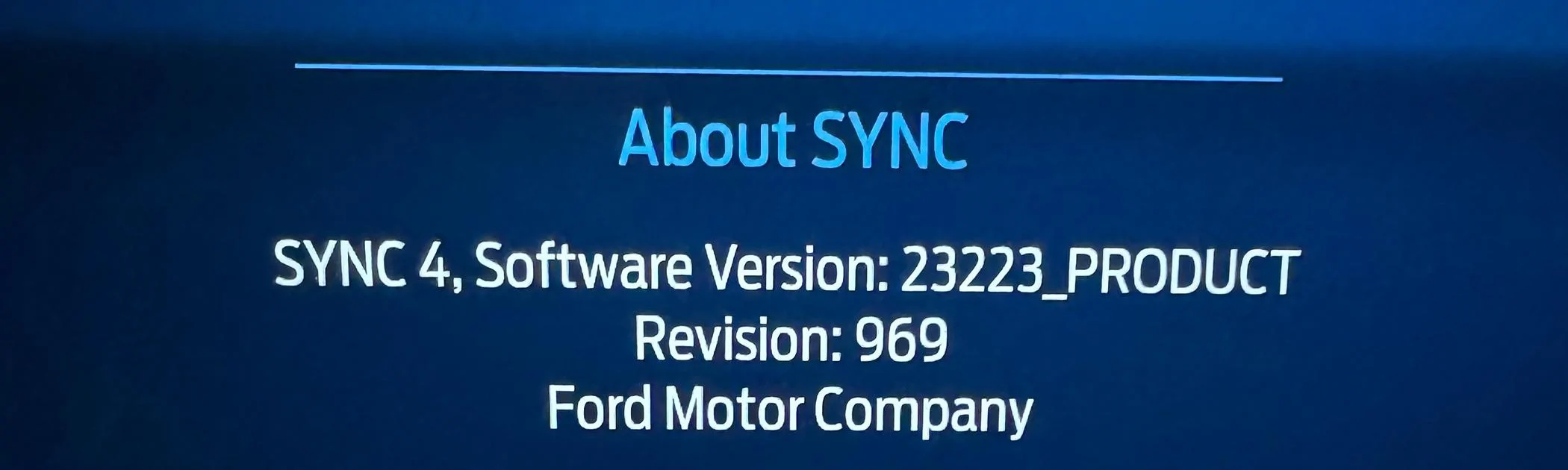
Version: 23223_PRODUCT
Revision: 969

6.1.0 with 23-PU0102-SVD-FX
 

DRC

Outer Banks
Well-Known Member
First Name
David
Joined
Feb 4, 2021
Threads
6
Messages
138
Reaction score
114
Location
Cedarpines Park, CA
Vehicle(s)
22 Bronco
Your Bronco Model
Outer Banks
Clubs
 
Version: 23223_PRODUCT
Revision: 969

6.1.0 with 23-PU0102-SVD-FX
How did you determine 6.1.0 with 23-PU0102-SVD-FX
Thanks
 

Sponsored

coadr

Badlands
Well-Known Member
First Name
Coady
Joined
Jan 26, 2022
Threads
4
Messages
355
Reaction score
682
Location
Denver, CO
Vehicle(s)
2022 Ford Bronco Badlands
Your Bronco Model
Badlands
Clubs
 
Version: 23223_PRODUCT
Revision: 969

6.1.0 with 23-PU0102-SVD-FX
Thanks!

Well that answers that, 23159 is 4.2.3 then. 6.1.0 must be a slow start to rolling out because I'm not seeing it on the backend for my truck.
 

AZ_Liberty

Base
Well-Known Member
First Name
Mark
Joined
Apr 18, 2021
Threads
26
Messages
3,519
Reaction score
5,224
Location
Arizona
Vehicle(s)
2007 Expedition
Your Bronco Model
Base
Every time they update it just gets crappier and crappier.

I like the new behavior where it give a "connecting to phone" error message that never turns off covering your entire radio display. I've had to turn off the engine at a stop light, open and close the door, and restart the engine to make that one go away.
 

coadr

Badlands
Well-Known Member
First Name
Coady
Joined
Jan 26, 2022
Threads
4
Messages
355
Reaction score
682
Location
Denver, CO
Vehicle(s)
2022 Ford Bronco Badlands
Your Bronco Model
Badlands
Clubs
 
Every time they update it just gets crappier and crappier.

I like the new behavior where it give a "connecting to phone" error message that never turns off covering your entire radio display. I've had to turn off the engine at a stop light, open and close the door, and restart the engine to make that one go away.
Yikes, that's no fun.

I will say you can accomplish the same thing while driving if you hold the power button in the middle of the volume knob AND the track forward button at the same time for a few seconds. That'll force restart the center screen without having to stop and turn off the truck.
 

Mr Bacon Jr

Wildtrak
Well-Known Member
First Name
Gary
Joined
Jun 7, 2023
Threads
16
Messages
199
Reaction score
268
Location
Santa Fe, NM
Vehicle(s)
Yeti SB130
Your Bronco Model
Wildtrak
@fiatlux @Mr Bacon Jr looks like you guys are the only ones with 6.1.0 in here. Can one of you look and see what the SYNC version and revision numbers are in Setting -> General -> About SYNC?

I manually pushed all updates yesterday and this is what I'm seeing on my end, but I'm not sure if it aligns with 4.2.3 or 6.1.0

IMG_0443.jpeg

Here you go!


Ford Bronco Power-Up 6.1.0 IMG_1151
Ford Bronco Power-Up 6.1.0 IMG_1150
 

Sponsored

coadr

Badlands
Well-Known Member
First Name
Coady
Joined
Jan 26, 2022
Threads
4
Messages
355
Reaction score
682
Location
Denver, CO
Vehicle(s)
2022 Ford Bronco Badlands
Your Bronco Model
Badlands
Clubs
 
Here you go!


IMG_1151.jpeg
IMG_1150.jpeg
Thanks sir! So that 23223 version (August 11, 2023 software build) is the 6.1.0 update and 23159 (June 6, 2023 build) is 4.2.0.
 

adamruiz2001

Wildtrak
Well-Known Member
Joined
Aug 21, 2020
Threads
23
Messages
1,099
Reaction score
1,450
Location
SoCal
Vehicle(s)
Ford SVT Lightning
Your Bronco Model
Wildtrak
Clubs
 
Well, I finally took the Bronco in to get checked out, Ford Nav stopped connecting, Alexa disappeared and the voice activation button on steering wheel stopped working. Got word this morning that it is the APIM module wasn't accepting a reprogram or update, so they have one on order, we will see how it goes!
 

Swiftblaze

Badlands
Active Member
First Name
Chris
Joined
May 18, 2024
Threads
1
Messages
42
Reaction score
78
Location
Florida
Vehicle(s)
2025 Badlands 2 Door
Your Bronco Model
Badlands
🤷‍♂️ I have my recurring setup for software updates and got the notification it had updated to 6.1.0.

I had to reconnect it to WiFi and reenable ambient lighting. Everything else worked fine though including Apple CarPlay. Dunno what the actual update did, but no issues to report. Ambient lightning persisted through several drives and telematics stayed enabled (I know some don’t like it, but I don’t mind).

My former F-150 had weird things too that required setting some things again after updates. Nothing new lol.

My wife’s Honda and even a prior BMW all had headaches with software. Don’t get me started with the atrocious infotainment with a Subaru we had. Vehicles have a long way to go to catch up with tech. I just drive and think of connected tech as a nice luxury when it works.
 
Last edited:

rugedraw

Well-Known Member
First Name
Javier
Joined
Jan 9, 2024
Threads
0
Messages
398
Reaction score
330
Location
Miami, FL
Vehicle(s)
2021 Ford F150 Platinum FX4 EB/2023 Bronco Sport Badlands/1991 Mustang 5.0 coupe
Your Bronco Model
Undecided
Thanks!

Well that answers that, 23159 is 4.2.3 then. 6.1.0 must be a slow start to rolling out because I'm not seeing it on the backend for my truck.
Correct....it is a back-end issue. Many vehicles (not just Broncos) hit a wall at Sync 23159. Do you still have FDRS access?
 

coadr

Badlands
Well-Known Member
First Name
Coady
Joined
Jan 26, 2022
Threads
4
Messages
355
Reaction score
682
Location
Denver, CO
Vehicle(s)
2022 Ford Bronco Badlands
Your Bronco Model
Badlands
Clubs
 
Correct....it is a back-end issue. Many vehicles (not just Broncos) hit a wall at Sync 23159. Do you still have FDRS access?
Not right now, I've been on the road for a month and my Windows laptop for FDRS is at home. Honestly I haven't really stressed about it since you and Jesse helped me out over on the F150 forum. Got that one 24-PU0227-VI-RBS update that we had discussed potentially being the fix, nothing since then.

Are you seeing anything on PTS? 1FMEE5DP2NLB04180
Sponsored


Top