
Sponsored
Android Auto Coolwalk w/ Full Split Screen (Public Stable Release) Now Working in Bronco!
Loading

I think part of it is server-side by Google and they are only pushing it out to so many a day.Can't get coolwalk to work on my pixel 6 pro. Go figure it wont update on googles own phone.
Even tried sideloading the apk and still nothing.
- First Name
- Ryan
- Joined
- Nov 17, 2020
- Threads
- 11
- Messages
- 416
- Reaction score
- 1,756
- Location
- Zachary, Louisiana
- Vehicle(s)
- 2013 F150 Eco SCREW 4WD
- Your Bronco Model
- Badlands
Got both updates (Ford OTA and sideloaded AA 8.6.6), can't get rid of the sidebar for true full screen on the 12" screen. What's interesting is, when I hit the "Fullscreen arrows" on the AA icon, the sidebar disappears momentarily like its going to go Fullscreen but then it just goes back. All that happens is the toolbar relocates to the side instead the bottom of the screen. Would have loved to have had fullscreen GAIA today on our backroads ride

If your Android auto apps don't have the rounded edges, it's not cool walk.
Sponsored
Do you have pics???My Apple CarPlay is also full-screen as of this morning and it looks amazing! Has the option for the old size or extend to full-screen.

- First Name
- Mark
- Joined
- Feb 15, 2022
- Threads
- 59
- Messages
- 1,224
- Reaction score
- 1,653
- Location
- San Antonio, TX
- Vehicle(s)
- 2020 Hyundai Palisade
- Your Bronco Model
- Outer Banks
It is full screen and different, the thing is, at least on mine, is that Spotify takes the sidebar now and I can't figure out a way to change it. You're correct though that the main app, for instance Google maps, won't go completely full screen.Got both updates (Ford OTA and sideloaded AA 8.6.6), can't get rid of the sidebar for true full screen on the 12" screen. What's interesting is, when I hit the "Fullscreen arrows" on the AA icon, the sidebar disappears momentarily like its going to go Fullscreen but then it just goes back. All that happens is the toolbar relocates to the side instead the bottom of the screen. Would have loved to have had fullscreen GAIA today on our backroads ride
I'm also wondering if that can change or if we need one if those boxes like @BigMeatsBronco has...
So it looks like the truck updated. Do I understand correctly that I need to perform the sideload process to get GAIA full screen?

And yeah, cold mornin' at 9000 ft.
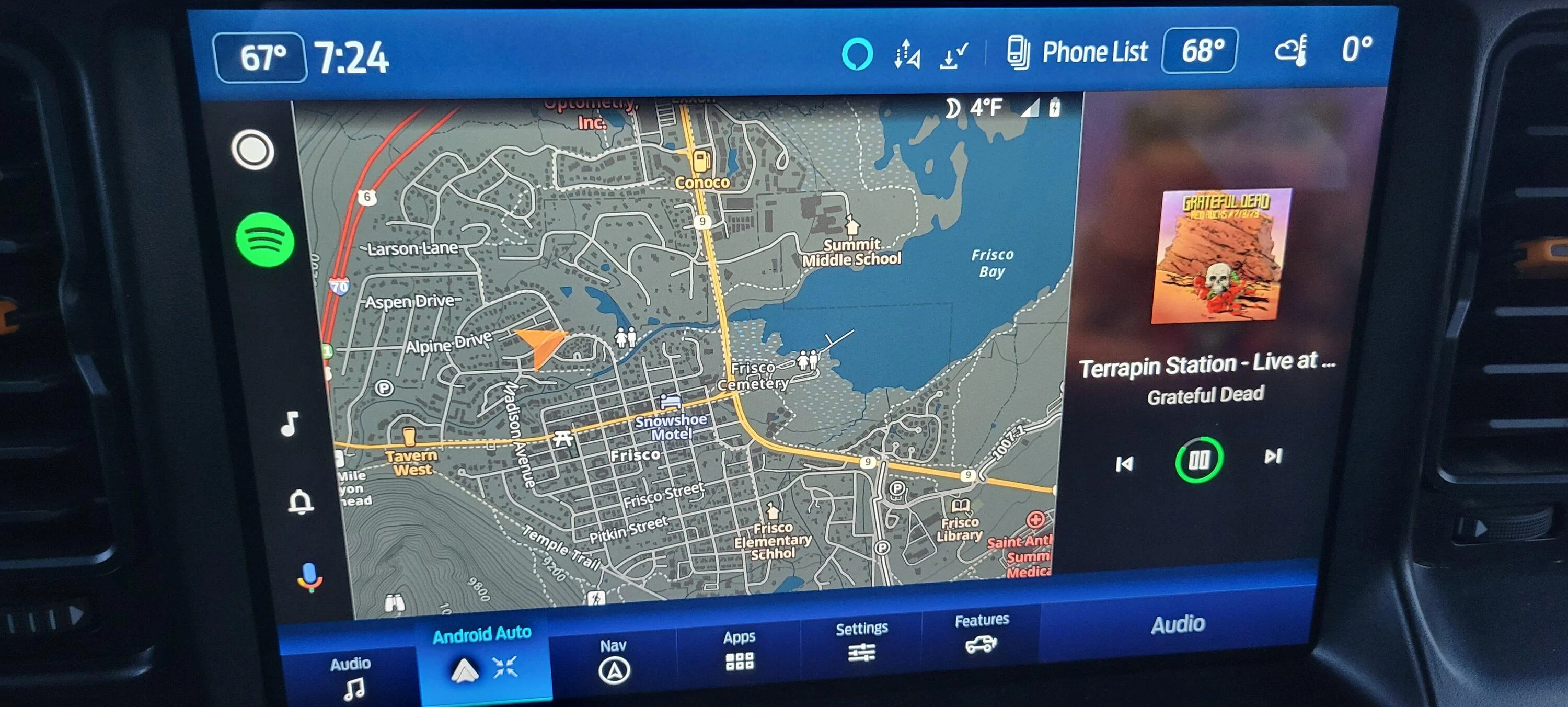
And yeah, cold mornin' at 9000 ft.
- First Name
- Richard
- Joined
- May 23, 2022
- Threads
- 0
- Messages
- 25
- Reaction score
- 42
- Location
- North Carolina
- Vehicle(s)
- 2021 Bronco Badlands
- Your Bronco Model
- Badlands
Side loading won't work on this, you will have to wait for Google to turn it on for you. It's called a server switch and it should come soon to everyone. They slowly roll it out just like Ford does with Sync 4. You can side load the lastest version but that won't guarantee it works until the server switchSo it looks like the truck updated. Do I understand correctly that I need to perform the sideload process to get GAIA full screen?
And yeah, cold mornin' at 9000 ft.

On the reverse camera, wr can now zoom in to hitch view...uncertain if this was available beforeWhat's the rear camera view improvements? I did receive this update.
Sponsored
Thanks Brother, and to all who contributed to this thread thus far.Side loading won't work on this, you will have to wait for Google to turn it on for you. It's called a server switch and it should come soon to everyone. They slowly roll it out just like Ford does with Sync 4. You can side load the lastest version but that won't guarantee it works until the server switch

So, friday night after seeing all the updates and comments here and on FB/Instagram about the full screen Apple CarPlay/Android Auto, I checked the software on our Bronco. It showed we were up to date, but still didn't have the full screen option.Hmm any idea why I can't go full screen with my carplay? I have the latest updates...
Yesterday morning I had the Bronco in at the dealership for it's first oil change, and while sitting in the waiting room watching the FordApp alerts go crazy (door open/hood open etc) I had a software update notification, mentioning Alexa integration, but nothing about full screen Apple CarPlay.
I get in the Bronco when all is said and done, and lo and behold, we have full screen Apple CarPlay, along with and Alexa button up in the top of the screen.
So maybe some Bronco's have the update fed by the dealership (even tho they are supposed to be OTA - we know how glitchy some of these updates have been), because as I say, the night before, it showed we were up to date, but no Apple CarPlay (or Alexa for that matter).
Makes such a difference!
Oh cool thanks, I don't remember seeing that previously. Heaven forbid they actually post detailed update notes.On the reverse camera, wr can now zoom in to hitch view...uncertain if this was available before
Ya this! Not really full screen with Spotify taking up the side...It is full screen and different, the thing is, at least on mine, is that Spotify takes the sidebar now and I can't figure out a way to change it. You're correct though that the main app, for instance Google maps, won't go completely full screen.
I'm also wondering if that can change or if we need one if those boxes like @BigMeatsBronco has...

- First Name
- Ken
- Joined
- Jan 24, 2022
- Threads
- 101
- Messages
- 2,611
- Reaction score
- 3,370
- Location
- 90Bronco19
- Vehicle(s)
- 2022 bronco outer banks
- Your Bronco Model
- Outer Banks
For CarPlay the expand arrows are right between the clocks. Left hand upper of the screen. You just tap that.Hmm any idea why I can't go full screen with my carplay? I have the latest updates...
For the AA it doesn’t go true full screen for us. Wife updated her s22 ultra and all that did was make her phone freeze up and buggy as all get out. So now I’m getting attitude for suggesting to update her phone.

Sponsored


