Sponsored

chopperbobby

Outer Banks
Well-Known Member
First Name
bob
Joined
Jan 30, 2026
Threads
6
Messages
121
Reaction score
176
Location
northern ky
Vehicle(s)
2025 bronco
Your Bronco Model
Outer Banks
Keep us updated on the error and solution please.
i had a hard time signing in. Kept saying did not recognize email or password re set password 3 times and it finally signed in?
Am waiting to see if your issue is resolved befor i attempt any changes.
Sponsored

 
OP
OP
Superchips_Mktg

Superchips_Mktg

Well-Known Member
Squatch Sponsor (Level 3)
First Name
Jacob
Joined
Aug 26, 2021
Threads
28
Messages
240
Reaction score
439
Location
Sanford, FL
Website
www.holley.com
Vehicle(s)
2022 Bronco
Your Bronco Model
Undecided
I think this is Great for us old technically challenged Bronco owners. I will however wait until the end of the year for when I upgrade the size of my tires.
I do have a question though.
Will future additional upgrades after purchase come with some sort of notification?
If you choose to enable notifications, it will let you know when there is a new version available. If its something really cool, we may push a notification to your phone through the app to let you know.
 

Sponsored
OP
OP
Superchips_Mktg

Superchips_Mktg

Well-Known Member
Squatch Sponsor (Level 3)
First Name
Jacob
Joined
Aug 26, 2021
Threads
28
Messages
240
Reaction score
439
Location
Sanford, FL
Website
www.holley.com
Vehicle(s)
2022 Bronco
Your Bronco Model
Undecided
Mine arrived today, but I was not able to get it to work. The first step when you try to make a change (for the first time, presumably) is an automatic save of the "stock" configuration. Every time I tried to do that an error occurred and it was unable to save. It says you can try to proceed without the stock configuration saved, but when I tried that it said none of the modes or changes was supported on my Bronco. Emailed tech support and hoping for a quick resolution.

Edited to add I have the ProCal tune installed and previously used a 4D Tech Horn Honk Eliminator flash to get rid of the double-honk when the key fob leaves the vehicle.
not ideal, but I'm sure we can get around this. I don't think the procal is an issue, but the Honk disabler may have done something strange. Any chance you can give us a call at 407-585-7000 so we can sort this out?
If not, please PM me with the serial number on the device and/or the email address you registered with.

Thanks!
 
OP
OP
Superchips_Mktg

Superchips_Mktg

Well-Known Member
Squatch Sponsor (Level 3)
First Name
Jacob
Joined
Aug 26, 2021
Threads
28
Messages
240
Reaction score
439
Location
Sanford, FL
Website
www.holley.com
Vehicle(s)
2022 Bronco
Your Bronco Model
Undecided
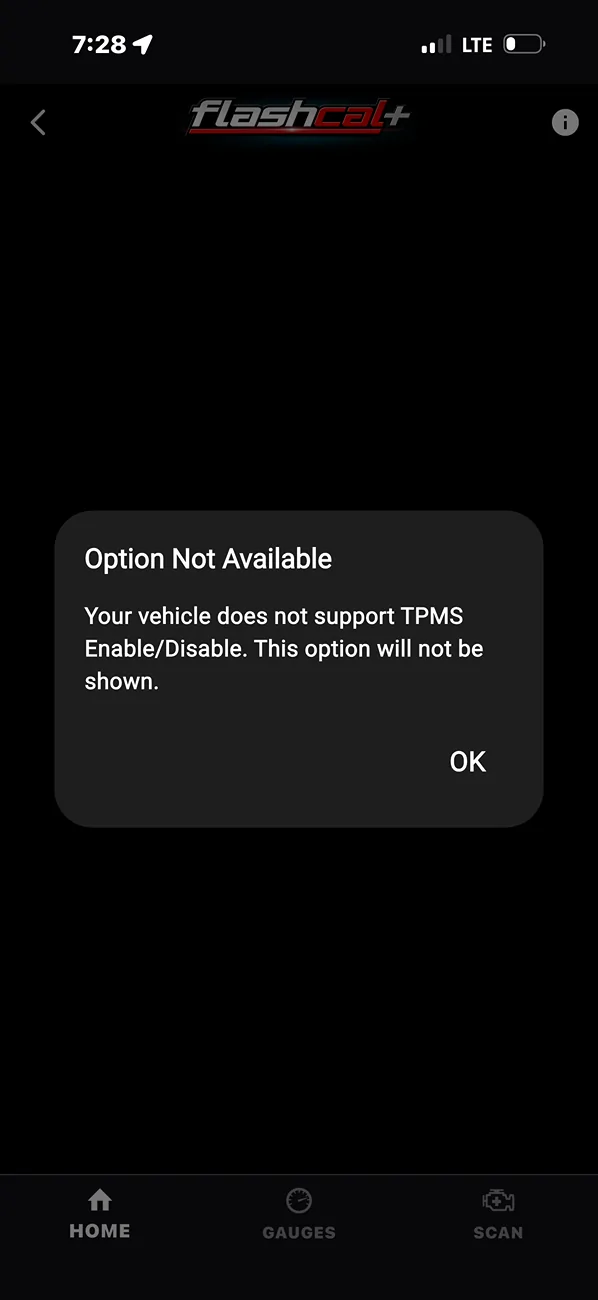
I was just getting ready to come and post the same exact thing. Mine connects but when I click on any of the options to “install” I get the same message followed by this error message . Nothing in it works!

IMG_3022.webp
Have you used anything else to make changes in the past? Just curious.
Please give us a call if possible, and/or submit the support request from within the app. Feel free to message me with the serial number or email used and we'll dig in and sort this out.
 
OP
OP
Superchips_Mktg

Superchips_Mktg

Well-Known Member
Squatch Sponsor (Level 3)
First Name
Jacob
Joined
Aug 26, 2021
Threads
28
Messages
240
Reaction score
439
Location
Sanford, FL
Website
www.holley.com
Vehicle(s)
2022 Bronco
Your Bronco Model
Undecided
I was just getting ready to come and post the same exact thing. Mine connects but when I click on any of the options to “install” I get the same message followed by this error message . Nothing in it works!

IMG_3022.webp
The support team has suggested that you go into the hamburger menu on the home screen and force update the app, then reconnect and try again.
 

TraumaJoe

Badlands
Well-Known Member
First Name
Joseph
Joined
Jul 22, 2020
Threads
11
Messages
173
Reaction score
524
Location
Roseville, CA
Vehicle(s)
Jeep Wrangler Unlimited Rubicon JK
Your Bronco Model
Badlands
Clubs
 
The support team has suggested that you go into the hamburger menu on the home screen and force update the app, then reconnect and try again.
Thanks for the quick response. I will try it when I get home and if it doesn’t work I’ll call the support number!
 

Sponsored
OP
OP
Superchips_Mktg

Superchips_Mktg

Well-Known Member
Squatch Sponsor (Level 3)
First Name
Jacob
Joined
Aug 26, 2021
Threads
28
Messages
240
Reaction score
439
Location
Sanford, FL
Website
www.holley.com
Vehicle(s)
2022 Bronco
Your Bronco Model
Undecided
For any new users, please enter the menu on the home screen and select 'Force Update' to get the latest firmware loaded to your SC-MOD prior to using it, and you should not have any problems from there. Not all phones will allow auto updating of the dongle firmware.

Thanks!
 

S/F Bad Sas

Badlands
Member
First Name
Eddie
Joined
Jul 19, 2025
Threads
0
Messages
18
Reaction score
12
Location
San Antonio, FL
Vehicle(s)
2025 Bronco Badlands Sasquatch
Your Bronco Model
Badlands
Clubs
 
I ordered mine a bit ago and just finished reading all 19 pages! Haha. I wanted to double-check everything before I bought it. I’m really excited to finally make the changes I’ve been meaning to do with my 25 BadSas and add some cool stuff to make it even better.
 

BobN - USAF

Big Bend
Well-Known Member
First Name
Robert
Joined
Mar 26, 2023
Threads
12
Messages
84
Reaction score
176
Location
Tallahassee
Vehicle(s)
2023 Bronco Big Bend, 1942 Ford GPW (jeep)
Your Bronco Model
Big Bend
Clubs
 
I got mine yesterday! Well the first information fail is that it comes with two dongles and no explanation. Here's a PRO tip (lol), you don't need the little one as that is for strangled jeeps. So you figure there is a video that goes over this, right? Not really, it is for jeeps, the product support is so new they haven't posted a vid yet or at least I couldn't find it. So I used AI and it was initially confused but decided I only needed the big one. So I plugged it in after downloading the app. and it connected. However, none of the things could be installed. It wasn't clear but the device has to connect to the servers at Holley and download the Bronco gee whiz stuff. After the fail, the device suggested I contact support. There was a button in the app and tech support was on the line in one minute.

The guy was very patient and stepped me thru all the rigamarole. It takes a while to download but after that he stayed on the line while I made one simple change. I ended the hated one push panic button. Yay! After that I thanked him and hung up. Great support.

Now for the next fail or at least it didn't work for me. I changed and wanted to try the the key-fob windows down (works, always has) and windows UP. Nope does not work . What did I do wrong? I will call support in a few days if I haven't figured it out by then. LOL

On the plus side I think my audio tweaks made it sound better. I have an March 23 Big Bend which had the amp/sub delete. Well, thanks to info from Buckleup Krista, I replaced the fake amp and speaker with a Ford Fusion amp and an Amazon special speaker. I think I can hear it better. I don't see how to control the sound coming out of the amp/speaker. Also, maybe one of you can tell me the exact changes I should have made in the flash app to get the best outcome with all stock speakers plus the new amp/speaker. I don't hope for much. I'm not an audiophile for sure. Heck I have a cheap stereo record player and listen tow ancient vinyl form the 30s to the 80s. Can you spell boomer? And proud of it as now every day but one is Saturday! LOL.
 
OP
OP
Superchips_Mktg

Superchips_Mktg

Well-Known Member
Squatch Sponsor (Level 3)
First Name
Jacob
Joined
Aug 26, 2021
Threads
28
Messages
240
Reaction score
439
Location
Sanford, FL
Website
www.holley.com
Vehicle(s)
2022 Bronco
Your Bronco Model
Undecided
Keep us updated on the error and solution please.
i had a hard time signing in. Kept saying did not recognize email or password re set password 3 times and it finally signed in?
Am waiting to see if your issue is resolved befor i attempt any changes.
Please force update the firmware from the Hamburger menu and it will work as expected ;)
 
OP
OP
Superchips_Mktg

Superchips_Mktg

Well-Known Member
Squatch Sponsor (Level 3)
First Name
Jacob
Joined
Aug 26, 2021
Threads
28
Messages
240
Reaction score
439
Location
Sanford, FL
Website
www.holley.com
Vehicle(s)
2022 Bronco
Your Bronco Model
Undecided
I got mine yesterday! Well the first information fail is that it comes with two dongles and no explanation. Here's a PRO tip (lol), you don't need the little one as that is for strangled jeeps. So you figure there is a video that goes over this, right? Not really, it is for jeeps, the product support is so new they haven't posted a vid yet or at least I couldn't find it. So I used AI and it was initially confused but decided I only needed the big one. So I plugged it in after downloading the app. and it connected. However, none of the things could be installed. It wasn't clear but the device has to connect to the servers at Holley and download the Bronco gee whiz stuff. After the fail, the device suggested I contact support. There was a button in the app and tech support was on the line in one minute.

The guy was very patient and stepped me thru all the rigamarole. It takes a while to download but after that he stayed on the line while I made one simple change. I ended the hated one push panic button. Yay! After that I thanked him and hung up. Great support.

Now for the next fail or at least it didn't work for me. I changed and wanted to try the the key-fob windows down (works, always has) and windows UP. Nope does not work . What did I do wrong? I will call support in a few days if I haven't figured it out by then. LOL

On the plus side I think my audio tweaks made it sound better. I have an March 23 Big Bend which had the amp/sub delete. Well, thanks to info from Buckleup Krista, I replaced the fake amp and speaker with a Ford Fusion amp and an Amazon special speaker. I think I can hear it better. I don't see how to control the sound coming out of the amp/speaker. Also, maybe one of you can tell me the exact changes I should have made in the flash app to get the best outcome with all stock speakers plus the new amp/speaker. I don't hope for much. I'm not an audiophile for sure. Heck I have a cheap stereo record player and listen tow ancient vinyl form the 30s to the 80s. Can you spell boomer? And proud of it as now every day but one is Saturday! LOL.
Thanks for the feedback. Glad our team was able to help!
Please submit a bug report from the app menu so we can look into why the window settings aren't working for you.
Sponsored


Top