
Sponsored

Inserted USB/Pre Collision Electrical Gremlins. Anyone else have these?

OldGuardV6

Base
Well-Known Member
Joined
Aug 26, 2021
Threads
6
Messages
92
Reaction score
70
Location
North Carolina
Vehicle(s)
2022 Base 2015 Mustang 1995 Yukon
Your Bronco Model
Base
I love my Bronco and the ~6000 miles driven so far have been a blast. That said, I have had two weird issues.

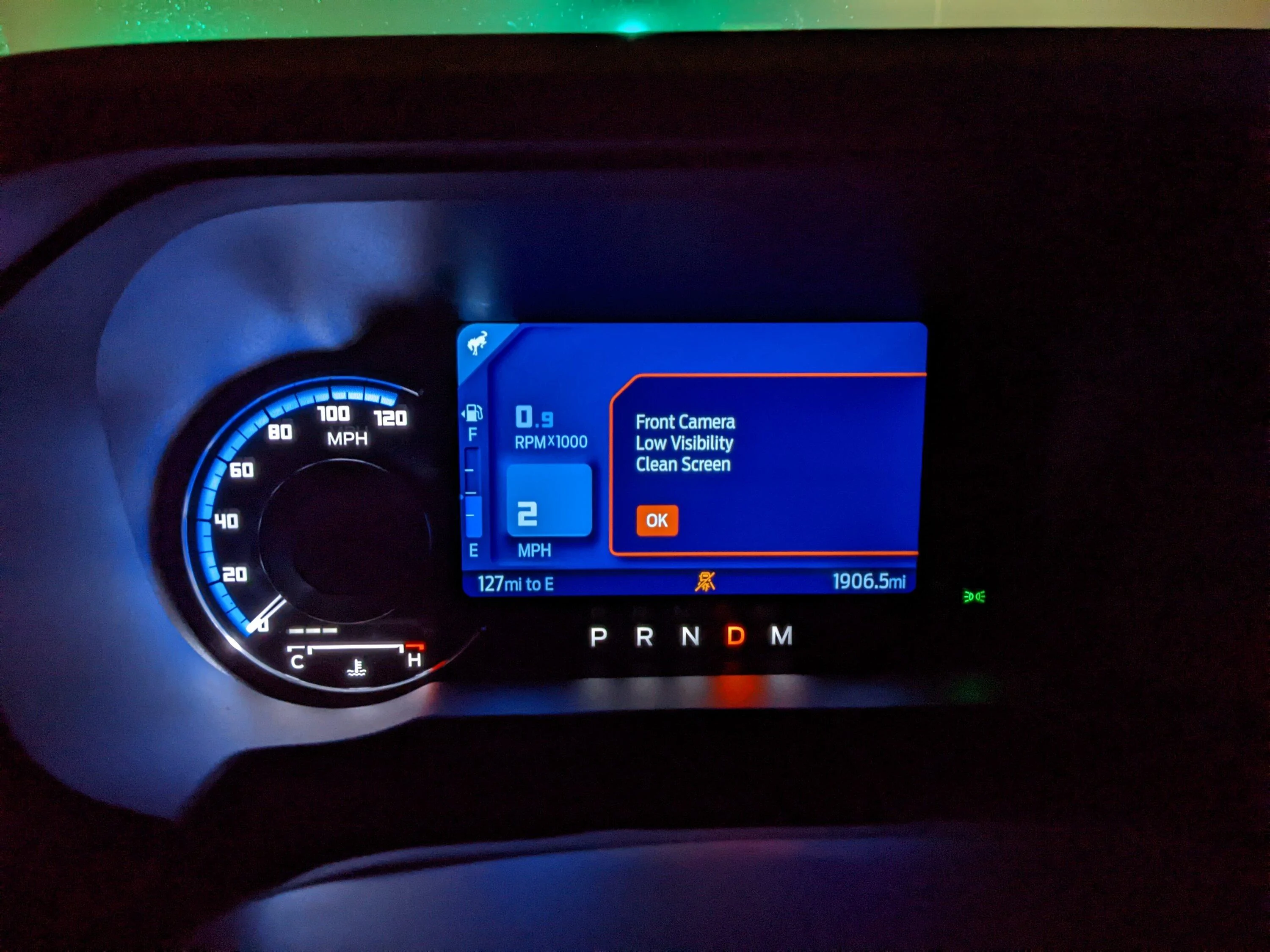
Problem one. I regularly get the Message "The Inserted USB device is not responding" with the popup pictured below (It will sometimes pop up 10 times in a row, then sometimes go for 30 minutes without popping up). The problem is that there is nothing plugged in to either USB port, so I just don't get it! Has anyone else had this issue?

Problem Two. So far, I've also gotten a pre collision warning twice while driving along (Couldn't capture it as it goes away so quickly). Once when going up a steep incline (Driving through WV) and once driving over a low bridge (no other vehicles around). The problem is that my Bronco is a base with no sensors so I don't get how I would be getting a pre-collision warning.

Apologies if this has been covered. I searched for related threads but didn't find any.

Just wondering if anyone else has had similar issues. Really hoping that this isn't a sign that I have a jacked up electrical system.

Ford Bronco Inserted USB/Pre Collision Electrical Gremlins. Anyone else have these? Bronco Screen
I have
Sponsored


cbrenthus

Badlands
Well-Known Member
Joined
Dec 31, 2021
Threads
38
Messages
1,553
Reaction score
3,495
Location
Western PA
Vehicle(s)
'22 BadSquatch, '02 T/A
Your Bronco Model
Badlands
I think I had the phantom pre collision warning a few days ago. Happened a few times over several minutes, I'd get a chime and alert in the cluster but it was gone before I knew what it was.
 

Ford Motor Company

First Edition
Well-Known Member
Official Ford Account
First Name
Ford
Joined
May 25, 2021
Threads
17
Messages
6,908
Reaction score
8,270
Location
Dearborn
Vehicle(s)
Bronco, Bronco Sport
Your Bronco Model
First Edition
I love my Bronco and the ~6000 miles driven so far have been a blast. That said, I have had two weird issues.

Problem one. I regularly get the Message "The Inserted USB device is not responding" with the popup pictured below (It will sometimes pop up 10 times in a row, then sometimes go for 30 minutes without popping up). The problem is that there is nothing plugged in to either USB port, so I just don't get it! Has anyone else had this issue?

Problem Two. So far, I've also gotten a pre collision warning twice while driving along (Couldn't capture it as it goes away so quickly). Once when going up a steep incline (Driving through WV) and once driving over a low bridge (no other vehicles around). The problem is that my Bronco is a base with no sensors so I don't get how I would be getting a pre-collision warning.

Apologies if this has been covered. I searched for related threads but didn't find any.

Just wondering if anyone else has had similar issues. Really hoping that this isn't a sign that I have a jacked up electrical system.
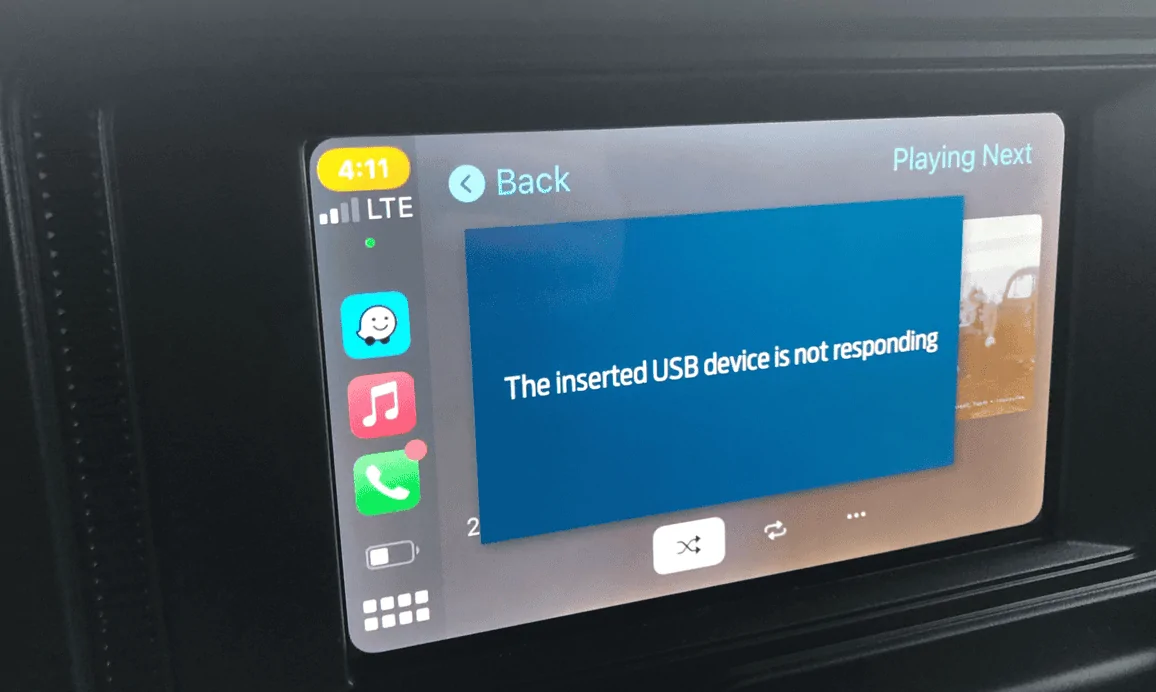
Bronco Screen.webp
I have
Good morning! If you send over a DM with your VIN and Ford dealer info, I can look into your Bronco concerns on my end.
 
OP
OP
OldGuardV6

OldGuardV6

Base
Well-Known Member
Joined
Aug 26, 2021
Threads
6
Messages
92
Reaction score
70
Location
North Carolina
Vehicle(s)
2022 Base 2015 Mustang 1995 Yukon
Your Bronco Model
Base
I think I had the phantom pre collision warning a few days ago. Happened a few times over several minutes, I'd get a chime and alert in the cluster but it was gone before I knew what it was.
Thanks for the reply! I'm glad I'm not losing my mind!
 

Sponsored

zyglyrox

Big Bend
Well-Known Member
First Name
Cory
Joined
May 11, 2021
Threads
6
Messages
1,067
Reaction score
2,319
Location
Cleveland
Vehicle(s)
‘24 BB Sas / ‘21 Bronco Sport BB
Your Bronco Model
Big Bend
Clubs
 
Pre collision is the sensor inside the windshield. Every bronco is equipped with it. I’ve had it go a little wonky on my BaseSasquatch sometimes.
 

Ksjrb03

First Edition
Well-Known Member
Joined
Jul 15, 2020
Threads
14
Messages
3,837
Reaction score
10,601
Location
Tx
Vehicle(s)
F250
Your Bronco Model
First Edition
Clubs
 
Smart proclaiming your love for the Bronco before reporting issues. Should keep the homers from calling you a troll, hopefully.

The pre collision uses a camera up behind the rear view mirror and every Bronco has it. I’ve had another vehicle where a dirty windshield caused false alarms, is there a big bird shit on your windshield?
 

Lifeliberty

Base
Well-Known Member
First Name
Moonbeam👀
Joined
Aug 12, 2020
Threads
12
Messages
2,884
Reaction score
5,453
Location
Columbus, OH
Vehicle(s)
93CBR900RR, (prior)88 Bronco Manual 4.9L str 6
Your Bronco Model
Base
Never had those issues.

2 things i would do first
1. Clean your windshield
2. Plug something into the usb and see what happens. I'd bet the cable is loose
 

KABQ

Base
Well-Known Member
First Name
Aaron
Joined
Aug 16, 2021
Threads
17
Messages
2,401
Reaction score
7,463
Location
Albuquerque, NM
Vehicle(s)
'93 4Runner, '84 Vanagon, '93 Miata, '14 LittleGuy
Your Bronco Model
Base
Clubs
 
I love my Bronco and the ~6000 miles driven so far have been a blast. That said, I have had two weird issues.

Problem one. I regularly get the Message "The Inserted USB device is not responding" with the popup pictured below (It will sometimes pop up 10 times in a row, then sometimes go for 30 minutes without popping up). The problem is that there is nothing plugged in to either USB port, so I just don't get it! Has anyone else had this issue?

Problem Two. So far, I've also gotten a pre collision warning twice while driving along (Couldn't capture it as it goes away so quickly). Once when going up a steep incline (Driving through WV) and once driving over a low bridge (no other vehicles around). The problem is that my Bronco is a base with no sensors so I don't get how I would be getting a pre-collision warning.

Apologies if this has been covered. I searched for related threads but didn't find any.

Just wondering if anyone else has had similar issues. Really hoping that this isn't a sign that I have a jacked up electrical system.

Bronco Screen.webp
I have
Like this?

Ford Bronco Inserted USB/Pre Collision Electrical Gremlins. Anyone else have these? PXL_20221205_065446586


Or like this?

 
OP
OP
OldGuardV6

OldGuardV6

Base
Well-Known Member
Joined
Aug 26, 2021
Threads
6
Messages
92
Reaction score
70
Location
North Carolina
Vehicle(s)
2022 Base 2015 Mustang 1995 Yukon
Your Bronco Model
Base
Smart proclaiming your love for the Bronco before reporting issues. Should keep the homers from calling you a troll, hopefully.

The pre collision uses a camera up behind the rear view mirror and every Bronco has it. I’ve had another vehicle where a dirty windshield caused false alarms, is there a big bird shit on your windshield?

No crap on the windshield, but there could have been. I clean it all the time since it seems to be
Smart proclaiming your love for the Bronco before reporting issues. Should keep the homers from calling you a troll, hopefully.

The pre collision uses a camera up behind the rear view mirror and every Bronco has it. I’ve had another vehicle where a dirty windshield caused false alarms, is there a big bird shit on your windshield?

No bird shit that I am aware of, but that could have been it. On that trip, I had to stop every 200 miles to clean the windshield. I actually took a fiberglass extendable painter's pole and put an invisible glass windshield cleaner on the end to keep the thing clean. It's the worst bug magnet I've ever seen (Worse than my 1971 Scout!).

It's weird that it has never gone off when I have come close to a car though, but at least I feel better about it not being something to worry about! Thanks for the reply!
 

Sponsored
OP
OP
OldGuardV6

OldGuardV6

Base
Well-Known Member
Joined
Aug 26, 2021
Threads
6
Messages
92
Reaction score
70
Location
North Carolina
Vehicle(s)
2022 Base 2015 Mustang 1995 Yukon
Your Bronco Model
Base
Like this?

PXL_20221205_065446586.jpg


Or like this?


No the pre-collision that I saw actually is a little icon that looks like cars hitting each other and the whole panel flashed red and it screeched a tone I have never heard. Now that I know it is on all broncos, I want to know what trips the thing.
 

BroncoDude

Base
Well-Known Member
First Name
Steve
Joined
Jul 17, 2020
Threads
4
Messages
675
Reaction score
1,430
Location
Sammamish, WA
Vehicle(s)
2014 F-150 3.5EB, 2021 2DR Base 2.7L Auto
Your Bronco Model
Base
Clubs
 
I also have a Base and the pre collision warning has popped up a few times for no reason. Maybe it is still learning my driving habits?
 
OP
OP
OldGuardV6

OldGuardV6

Base
Well-Known Member
Joined
Aug 26, 2021
Threads
6
Messages
92
Reaction score
70
Location
North Carolina
Vehicle(s)
2022 Base 2015 Mustang 1995 Yukon
Your Bronco Model
Base
Never had those issues.

2 things i would do first
1. Clean your windshield
2. Plug something into the usb and see what happens. I'd bet the cable is loose
1. I keep it pretty clean. That said it could have been dirty when the thing went off both times. I didn't know that little thing was for collision assist, only thought it was for the high beams. Glad to know that could be it, but still curious why I have never gotten a warning popup in traffic. I have been cut off several times, you would think that would trip it, but the only times I have gotten the warning have been on highways by myself!

2. I did that tonight. I feel silly because the outlets lit up at night, and worked (or at least I thought they did) when first plugged in (I never really used those outlets anyway). I guess this is one of those "It ain't got no gas in it" moments.

I didn't have anything to plug into the small usb but my go pro. After checking, back outlets both work fine (at least the show constant charging on my gopro and iphone). Front outlet the small usb slot seems to be totally dead, and once I plugged in to larger usb slot with my iphone, I noticed that the little charge logo/lightning bolt flashes on and off (cycles every 5 seconds or so) but if you don't keep watching, you might miss it, so it definitely looks like a connection issue. Still not sure what causes the message to pop, but if there is a connection issue, I'm sure that is probably it. Not going to pull the outlet as I don't want to void the warranty, but at least I feel a little better that it is not some weird computer issue.

I should have known better, but I just jumped to lit up means working/must be a software issue without actually checking. Should have started with going back to basics. Next time I am near a dealer, I will ask them to check that outlet!

Anyway, thanks again!
 
OP
OP
OldGuardV6

OldGuardV6

Base
Well-Known Member
Joined
Aug 26, 2021
Threads
6
Messages
92
Reaction score
70
Location
North Carolina
Vehicle(s)
2022 Base 2015 Mustang 1995 Yukon
Your Bronco Model
Base
I also have a Base and the pre collision warning has popped up a few times for no reason. Maybe it is still learning my driving habits?
That's just it. I have had a car cut me off so close I couldn't see their rear bumper when I finally got stopped but no pre collision warning (from the Ford, My Garmin GPS pre collision went nuts). Thats why it kind of shocked me the first time on the highway (flashing red/screeching) since there was nothing in the lane in front of me. I really want to know what it takes to trip it.
Sponsored


Top