
Sponsored

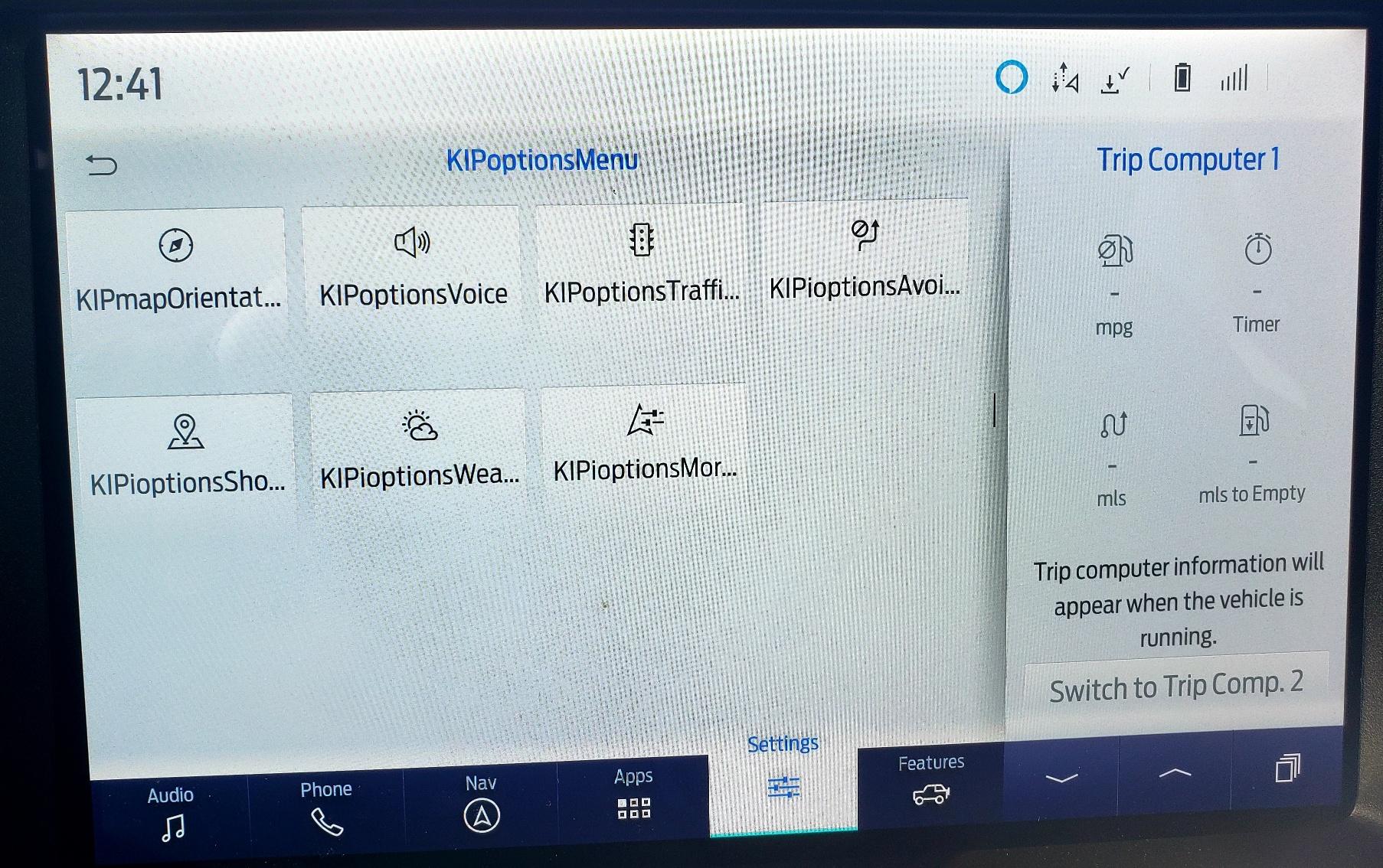
NavScreen showing "KIPOptions" Error Text after an Android Auto Update

Panzer948

Badlands
Well-Known Member
First Name
Bryan
Joined
Jul 25, 2020
Threads
53
Messages
795
Reaction score
925
Location
Charlotte, NC
Website
www.youtube.com
Vehicle(s)
1981 CJ5, 2015 BMW M4, 2023 Mach E GT PE
Your Bronco Model
Badlands
Clubs
 
For a quick background, about a year ago I used ForScan to make a few simple changes, mostly to enable Sport Mode and remove horn honks... However I did do one related to Navigation which was to enable the ability to add addresses while moving; and "maybe" one about home country (I can't recall that exactly). All of these have worked flawlessly the past year. Anyway, this weekend we noticed this odd text when trying to use the Factory Nav screen. Actually couldn't use it as most buttons would not function properly. The day before I had received the improved Android Auto update which works fine.

I am wondering if this update could be related due to the timing. I actually posted this to the Software Update/Nav Thread but I didnt get alot of feedback. I think this would be the better place for this question since I did change some settings in Forscan. Any idea what this is and how to fix it? I did try a soft reset and that didn't help.
Ford Bronco NavScreen showing "KIPOptions" Error Text after an Android Auto Update 1673396004651
Sponsored


projectbadlands

Badlands
Well-Known Member
First Name
Robert
Joined
May 26, 2021
Threads
2
Messages
465
Reaction score
840
Location
Los Angeles
Vehicle(s)
2018 Colorado ZR2
Your Bronco Model
Badlands
Clubs
 
I was wondering the same thing. Received this update a few days ago and my Nav shows "Kipcommand" at the beginning of every button. Luckily the buttons are functional but its hard to read what each button command is.

I also did the same changes on Forscan to remove the double honk, add Sport mode and enable Nav while driving and wondering if this somehow affected how the Nav text is displayed.
 

Ducati1098

Wildtrak
Well-Known Member
Joined
Jul 14, 2020
Threads
26
Messages
9,919
Reaction score
23,000
Location
Midwest
Vehicle(s)
2022 Bronco Wildtrak, 2006 Corvette Z06, 2012 Ford Fusion
Your Bronco Model
Wildtrak
Clubs
 
For a quick background, about a year ago I used ForScan to make a few simple changes, mostly to enable Sport Mode and remove horn honks... However I did do one related to Navigation which was to enable the ability to add addresses while moving; and "maybe" one about home country (I can't recall that exactly). All of these have worked flawlessly the past year. Anyway, this weekend we noticed this odd text when trying to use the Factory Nav screen. Actually couldn't use it as most buttons would not function properly. The day before I had received the improved Android Auto update which works fine.

I am wondering if this update could be related due to the timing. I actually posted this to the Software Update/Nav Thread but I didnt get alot of feedback. I think this would be the better place for this question since I did change some settings in Forscan. Any idea what this is and how to fix it? I did try a soft reset and that didn't help.
1673396004651.jpeg
Nav while driving creates a ton of issues, which is probably what’s causing this. I would reload the original as-built data into the APIM.
 
OP
OP
Panzer948

Panzer948

Badlands
Well-Known Member
First Name
Bryan
Joined
Jul 25, 2020
Threads
53
Messages
795
Reaction score
925
Location
Charlotte, NC
Website
www.youtube.com
Vehicle(s)
1981 CJ5, 2015 BMW M4, 2023 Mach E GT PE
Your Bronco Model
Badlands
Clubs
 
Nav while driving creates a ton of issues, which is probably what’s causing this. I would reload the original as-built data into the APIM.
ouch can I just go back in and renenble what I changed related to nav...
 

Sponsored
OP
OP
Panzer948

Panzer948

Badlands
Well-Known Member
First Name
Bryan
Joined
Jul 25, 2020
Threads
53
Messages
795
Reaction score
925
Location
Charlotte, NC
Website
www.youtube.com
Vehicle(s)
1981 CJ5, 2015 BMW M4, 2023 Mach E GT PE
Your Bronco Model
Badlands
Clubs
 
I was wondering the same thing. Received this update a few days ago and my Nav shows "Kipcommand" at the beginning of every button. Luckily the buttons are functional but its hard to read what each button command is.

I also did the same changes on Forscan to remove the double honk, add Sport mode and enable Nav while driving and wondering if this somehow affected how the Nav text is displayed.
Wow. Well we are in good company then. If this happened to you and I (and is what we think it is) then there are bound to be other Android users. I will check again to see if my buttons do work.
 

4x4TruckLEDs.com

Outer Banks
Well-Known Member
Squatch Sponsor (Level 3)
First Name
Adam
Joined
Aug 30, 2021
Threads
549
Messages
6,147
Reaction score
7,045
Location
Lindenhurst, NY
Website
www.4x4TruckLEDs.com
Vehicle(s)
2018 Raptor & 2021 Bronco Outer Banks
Your Bronco Model
Outer Banks
Clubs
 
Happened to me also. I don't recall if I did the GPS While driving thing, as I heard this could have caused other issues. BUT I also MIGHT have.

I do backup my settings so im going to try and reload them.
 

4x4TruckLEDs.com

Outer Banks
Well-Known Member
Squatch Sponsor (Level 3)
First Name
Adam
Joined
Aug 30, 2021
Threads
549
Messages
6,147
Reaction score
7,045
Location
Lindenhurst, NY
Website
www.4x4TruckLEDs.com
Vehicle(s)
2018 Raptor & 2021 Bronco Outer Banks
Your Bronco Model
Outer Banks
Clubs
 
Damn. I DID change APIM. Any idea what the first 2 characers should be for 7D0-03-01

I enabled it with "57xx" need to know what factory setting of "57" was as i didn't back it up.
 
OP
OP
Panzer948

Panzer948

Badlands
Well-Known Member
First Name
Bryan
Joined
Jul 25, 2020
Threads
53
Messages
795
Reaction score
925
Location
Charlotte, NC
Website
www.youtube.com
Vehicle(s)
1981 CJ5, 2015 BMW M4, 2023 Mach E GT PE
Your Bronco Model
Badlands
Clubs
 
Damn. I DID change APIM. Any idea what the first 2 characers should be for 7D0-03-01

I enabled it with "57xx" need to know what factory setting of "57" was as i didn't back it up.
I dont recall either as its been so long ago, although I did find my backup file. Hopefully someone else can chime in. TBH, I probably will not have time to fool with it until Friday.
 

Ducati1098

Wildtrak
Well-Known Member
Joined
Jul 14, 2020
Threads
26
Messages
9,919
Reaction score
23,000
Location
Midwest
Vehicle(s)
2022 Bronco Wildtrak, 2006 Corvette Z06, 2012 Ford Fusion
Your Bronco Model
Wildtrak
Clubs
 
I dont recall either as its been so long ago, although I did find my backup file. Hopefully someone else can chime in. TBH, I probably will not have time to fool with it until Friday.
I posted this on the other thread also, but you can use: https://www.motorcraftservice.com/AsBuilt
To look up all of your factory as-built data if you need to.
 

Sponsored

AK SNO RIDER

First Edition
Well-Known Member
First Name
Ty
Joined
Jul 11, 2020
Threads
20
Messages
2,891
Reaction score
10,260
Location
Alaska
Vehicle(s)
'19 GT350, '04 6.0, '76 High Boy
Your Bronco Model
First Edition
What update are you guys on? I just got 3.5.4 and do not have this issue.

I added sport mode and disabled double honk, but did NOT do Nav in Motion.
 

4x4TruckLEDs.com

Outer Banks
Well-Known Member
Squatch Sponsor (Level 3)
First Name
Adam
Joined
Aug 30, 2021
Threads
549
Messages
6,147
Reaction score
7,045
Location
Lindenhurst, NY
Website
www.4x4TruckLEDs.com
Vehicle(s)
2018 Raptor & 2021 Bronco Outer Banks
Your Bronco Model
Outer Banks
Clubs
 
Okay so i was right. I NEVER did change my "Navigation while driving" as I didn't want to mess up anything last year snice it was still untested.

Sooo not sure why my NAV screen is now displaying such jargon
 
OP
OP
Panzer948

Panzer948

Badlands
Well-Known Member
First Name
Bryan
Joined
Jul 25, 2020
Threads
53
Messages
795
Reaction score
925
Location
Charlotte, NC
Website
www.youtube.com
Vehicle(s)
1981 CJ5, 2015 BMW M4, 2023 Mach E GT PE
Your Bronco Model
Badlands
Clubs
 
Okay so i was right. I NEVER did change my "Navigation while driving" as I didn't want to mess up anything last year snice it was still untested.

Sooo not sure why my NAV screen is now displaying such jargon
Interesting... so maybe it has nothing to do with our forscan changes.... hmm.
 

4x4TruckLEDs.com

Outer Banks
Well-Known Member
Squatch Sponsor (Level 3)
First Name
Adam
Joined
Aug 30, 2021
Threads
549
Messages
6,147
Reaction score
7,045
Location
Lindenhurst, NY
Website
www.4x4TruckLEDs.com
Vehicle(s)
2018 Raptor & 2021 Bronco Outer Banks
Your Bronco Model
Outer Banks
Clubs
 
Interesting... so maybe it has nothing to do with our forscan changes.... hmm.
Dunno. I do have some other things done in Forscan but nothing with APIM

I've done the horn honk and the front fog circuit enable.
 

rpeary

Badlands
Well-Known Member
Joined
Aug 29, 2022
Threads
17
Messages
107
Reaction score
73
Location
Raleigh, NC
Vehicle(s)
'23 Badlands SAS LUX, 2017 Lexus RX350 F-Sport
Your Bronco Model
Badlands
Dunno. I do have some other things done in Forscan but nothing with APIM

I've done the horn honk and the front fog circuit enable.
Just out of curiosity, what does the front fog circuit enable do and what line did you change for that? There are a ton of options under the fog light section in the spreadsheet and can't seem to make any sense out of it all except for bambi mode which is line 726-39-02, 1st set, last 2 characters. That was self explanatory.

My end goal is to have the fogs come on while cornering at night (1 at a time of course, L or R). I can't tell if that is 726-39-01 or 02, and which values to change in those lines.
Sponsored


Top