Sponsored

Looking to buy an OBDII Bluetooth code scanner

B22-2023

Wildtrak
Well-Known Member
First Name
John
Joined
Aug 14, 2022
Threads
45
Messages
925
Reaction score
969
Location
Houston
Vehicle(s)
2023 Bronco, 2023 4Runner TRD OR. 5 previous Gen 1s
Your Bronco Model
Wildtrak
I don't have anything at the moment, but I thing I'm following along. It sounds like Forscan will allow me to program/make changes, while Blue Driver reads codes? Maybe Forscan spits out codes too? Blue Driver may be more my speed, I'm not looking to do any editing to my system. Call me a weirdo but I actually like auto stop/start. :like:

~Steve
You mentioned Forscan; yes it spits out codes. You have a code reader though. Good luck!
Sponsored


Brian_B

Big Bend
Well-Known Member
First Name
Brian
Joined
Sep 14, 2023
Threads
60
Messages
8,237
Reaction score
14,579
Location
Central CA
Vehicle(s)
'23 BB 4dr 7MT, '22 BSport OBX, '87 B-II XL
Your Bronco Model
Big Bend
Clubs
 
I don't have anything at the moment, but I thing I'm following along. It sounds like Forscan will allow me to program/make changes, while Blue Driver reads codes? Maybe Forscan spits out codes too? Blue Driver may be more my speed, I'm not looking to do any editing to my system. Call me a weirdo but I actually like auto stop/start. :like:

~Steve
Most OBD readers have basic code reading / reset capability, either on a little built-in screen or via some associated app/program. Not all readers can read all the Ford modules - as Ford hides their modules behind two different gateways. Some modules need to flip a switch to change gateways, others can do it automatically. One good example of this is the ProCal module - which can see ECM/PCM codes, but it can't (or rather, won't) read any other modules.

I've not used a Blue Driver - but the OBDLink MX+ BT can see all the modules, and can automatically switch between gateways - no physical switch required.

No license is required for OBDLink MX hardware = but it doesn't have a built-in screen, so you have to use some associated app - and some apps have some cost/license associated with them. It will work with Forscan Lite (the iOS version) - both the Free version that just scans/resets codes, and the fuller paid version that also does parameter monitoring. It also has it's own app - ODBLink - that performs similarly to Forscan Lite Paid version - it can scan/reset codes, and do parameter monitoring and data logging.

---

Forscan - the full PC version, is a bit of a different animal. You can get a 2-month free license, but normally it's $20/year. Forscan on the PC can scan and reset codes. It can run many different service routines, and it can reprogram many different module parameters. As it gets updated (one of the reasons I don't mind paying for it - the guy is pretty good at updating it) - you get "Easy Mode" changes for newer model vehicles.

Forscan can basically do anything ODBLink/Forscan Lite can do, plus all the reconfiguration stuff. There are also various service modes you can do with Forscan as well, such as entering Brake Maintenance mode, recalibrating the speedometer, calibrating the IPMA / front camera, etc.

Forscan can not set up a new, blank module right now - that still requires FDRS. It can't change the programming inside a module, all you can really do is change pre-existing variables. So, you can't magically change the way your HVAC works or your headlights work - you can just switch between whatever pre-programmed settings exist.

---

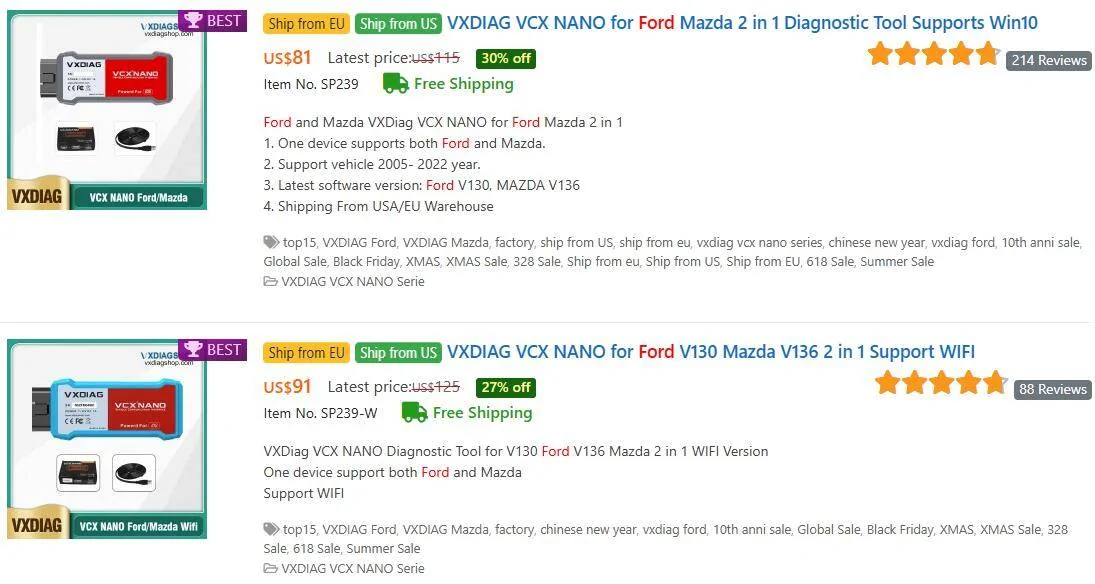
And that leads to FDRS, which is the official Ford Dealer tool. It can populate new modules. It can run updates. It can run many different service procedures. But it requires very specific adapters to use - I use a VCX Nano (which also works with Forscan, but is USB wired), but many have said they have had issues with that and use a Mongoose adapter.

FDRS requires a license, the licensing is onerous and cumbersome, and your PC has to be online, and the Ford servers have to be up. The Ford servers are not very reliable, and love to go down like... oh... anytime I decide I'm going to purchase a license. You can get 48 hours for $50, or a year for $850/year.

---

I like the ODBLink because you can just leave it plugged in even while driving, and use your phone to monitor any parameters you want in a dashboard, using whatever app you like best. I don't notice any speed difference between the VCX and the OBDLink - both are pretty fast, but the VCX is fairly large and difficult to sit in the driver's seat with it plugged in.
 
Last edited:

KyleNL

Outer Banks
Active Member
First Name
Kyle
Joined
May 21, 2024
Threads
0
Messages
36
Reaction score
30
Location
St. John's, Newfoundland
Vehicle(s)
2021 Ford Bronco
Your Bronco Model
Outer Banks
Hopefully you'll be using this on your wife's hyundai and not on your bronco more then anything. So the bluedriver seems like the obvious choice. Especially if you don't want to change your bronco or mess with coding. There isn't a better bang for your buck that I know of.
 
OP
OP
Big Red Rocket of Love

Big Red Rocket of Love

Outer Banks
Well-Known Member
First Name
Steve
Joined
May 1, 2025
Threads
12
Messages
114
Reaction score
168
Location
Florida
Vehicle(s)
2024 Ford Bronco
Your Bronco Model
Outer Banks
Clubs
 
Most OBD readers have basic code reading / reset capability, either on a little built-in screen or via some associated app/program. Not all readers can read all the Ford modules - as Ford hides their modules behind two different gateways. Some modules need to flip a switch to change gateways, others can do it automatically. One good example of this is the ProCal module - which can see ECM/PCM codes, but it can't (or rather, won't) read any other modules.

I've not used a Blue Driver - but the OBDLink MX+ BT can see all the modules, and can automatically switch between gateways - no physical switch required.

No license is required for OBDLink MX hardware = but it doesn't have a built-in screen, so you have to use some associated app - and some apps have some cost/license associated with them. It will work with Forscan Lite (the iOS version) - both the Free version that just scans/resets codes, and the fuller paid version that also does parameter monitoring. It also has it's own app - ODBLink - that performs similarly to Forscan Lite Paid version - it can scan/reset codes, and do parameter monitoring and data logging.

---

Forscan - the full PC version, is a bit of a different animal. You can get a 2-month free license, but normally it's $20/year. Forscan on the PC can scan and reset codes. It can run many different service routines, and it can reprogram many different module parameters. As it gets updated (one of the reasons I don't mind paying for it - the guy is pretty good at updating it) - you get "Easy Mode" changes for newer model vehicles.

Forscan can basically do anything ODBLink/Forscan Lite can do, plus all the reconfiguration stuff. There are also various service modes you can do with Forscan as well, such as entering Brake Maintenance mode, recalibrating the speedometer, calibrating the IPMA / front camera, etc.

Forscan can not set up a new, blank module right now - that still requires FDRS. It can't change the programming inside a module, all you can really do is change pre-existing variables. So, you can't magically change the way your HVAC works or your headlights work - you can just switch between whatever pre-programmed settings exist.

---

And that leads to FDRS, which is the official Ford Dealer tool. It can populate new modules. It can run updates. It can run many different service procedures. But it requires very specific adapters to use - I use a VCX Nano (which also works with Forscan, but is USB wired), but many have said they have had issues with that and use a Mongoose adapter.

FDRS requires a license, the licensing is onerous and cumbersome, and your PC has to be online, and the Ford servers have to be up. The Ford servers are not very reliable, and love to go down like... oh... anytime I decide I'm going to purchase a license. You can get 48 hours for $50, or a year for $850/year.

---

I like the ODBLink because you can just leave it plugged in even while driving, and use your phone to monitor any parameters you want in a dashboard, using whatever app you like best. I don't notice any speed difference between the VCX and the OBDLink - both are pretty fast, but the VCX is fairly large and difficult to sit in the driver's seat with it plugged in.

This seems like a very thorough reply that could maybe be pinned...thanks Brian!

~Steve
 
OP
OP
Big Red Rocket of Love

Big Red Rocket of Love

Outer Banks
Well-Known Member
First Name
Steve
Joined
May 1, 2025
Threads
12
Messages
114
Reaction score
168
Location
Florida
Vehicle(s)
2024 Ford Bronco
Your Bronco Model
Outer Banks
Clubs
 
Thank you all for the very informative replies; I am going to order the Blue Driver thing for now. If I need to get Forscan later on, then I will - but for now I think the Blue Driver gadget will suffice.

~Steve
 

Sponsored

Rumbloki

Badlands
Well-Known Member
First Name
Alton
Joined
May 18, 2023
Threads
9
Messages
624
Reaction score
1,167
Location
ATX/PCB
Vehicle(s)
ZR2, 1973 Mach 1
Your Bronco Model
Badlands
Clubs
 

Brian_B

Big Bend
Well-Known Member
First Name
Brian
Joined
Sep 14, 2023
Threads
60
Messages
8,237
Reaction score
14,579
Location
Central CA
Vehicle(s)
'23 BB 4dr 7MT, '22 BSport OBX, '87 B-II XL
Your Bronco Model
Big Bend
Clubs
 
Is it the blue V130 model?

1753109731424-xq.webp
I have the non-WiFi gray model. I think that’s the only difference between the two you show there - but yes I believe that’s the model I have and it’s worked for me so far
Sponsored


Top