
Sponsored

BMS Shed Timer - Hotspot in Accessory Mode

Cruachan

First Edition
Well-Known Member
First Name
Joe
Joined
Aug 13, 2020
Threads
4
Messages
52
Reaction score
114
Location
Southern California
Vehicle(s)
1975 FJ40
Your Bronco Model
First Edition
Clubs
 
Hello all,

I've been interested in testing out the performance of the Wifi hotspot and comparing it against my mobile phone. I've got the MMB Multimedia box too, and was thinking it may be nice to have it simply work with the Bronco and not my mobile phone. The problem is, the hotspot only seems to work when the car power is in the "on" position. I'd like it to work in the "accessory" position. I can change the accessory timeout, but I believe the ability to run the wifi hotspot in accessory mode is attached to the "BMS Shed Timer" setting. I found an F150 thread where the owner was able to do this. So far, I'm not sure there is any other way but would be happy to know.

So, according to the F150 thread, you need to adjust the 726-05-02 setting as follows:
xxx* xxxx xxxx BMS Shed Timer Enable Cfg: 0=Disable, 1=Enable

I've found another reference online that shows the following:
0=ACC, 1=BMS, 2=None

My FE shows the following value:
726-05-02: 01D4 C00C 0CE1 (xxx* showing a 4??)

I'm willing to do a backup and try it... but I'd love for someone with more experience shed some light before I try. According to the F150 thread here, it does exactly what I'm looking for: https://www.f150forum.com/f118/keep-wifi-hotspot-active-when-truck-off-410773/index5/

Basically, the point is that when you have the power on, many of the systems are online and you're going to be draining the battery much faster than normal... perhaps that's the same with the setting above changed... I'm not sure. With that said, if anyone knows of a way to enable hotspot in accessory mode, I'm all ears. Just to be clear, I'm not looking to power it with the car off.

Thanks for advice if you've got it ;)
Sponsored


mini4mw

Badlands
Well-Known Member
First Name
W
Joined
Feb 23, 2022
Threads
1
Messages
144
Reaction score
135
Location
Atlanta
Vehicle(s)
Tundra
Your Bronco Model
Badlands
OP
OP
Cruachan

Cruachan

First Edition
Well-Known Member
First Name
Joe
Joined
Aug 13, 2020
Threads
4
Messages
52
Reaction score
114
Location
Southern California
Vehicle(s)
1975 FJ40
Your Bronco Model
First Edition
Clubs
 
Did you ever find anything here? I'm also looking at that timer, but to keep the electric brake boost active during flat towing behind RV. It also seems to shutdown after 45m:
https://www.bronco6g.com/forum/thre...-brake-bms-time-out-nthsa-claim.36496/page-15

I pulled 6 VINs on Broncos for sale and they all have 4 set for this value. I can't find a definition for 4 either.
Sadly, I'm behind on my testing for this... wanted to do it a few weeks ago. But I still plan on trying it. FWIW, the first thing I'll do is set the accessory power timeout (which is a known setting if I remember correctly), then I'll move onto the wifi hotspot enabled in accessory mode.

I will update the thread as soon as I test.
 

grtharris

Outer Banks
Well-Known Member
First Name
Grant
Joined
Jul 10, 2020
Threads
4
Messages
476
Reaction score
571
Location
Skiatook, OK
Vehicle(s)
Outer Banks 4dr, 2008 Mustang GT CS (Wife's), MH
Your Bronco Model
Outer Banks
Cruachan you are looking at the wrong spreadsheet. Should be 2021-22 F150. Tried to send the link and it posted the whole thing.
 

mini4mw

Badlands
Well-Known Member
First Name
W
Joined
Feb 23, 2022
Threads
1
Messages
144
Reaction score
135
Location
Atlanta
Vehicle(s)
Tundra
Your Bronco Model
Badlands
Here's the number/config you want. attached is the full sheet. It should work for any Sync4 Ford.

Shed_Timer_Enable_Cfg (STEC)
726-07-02xxxxxxxx**--00 =STEC DISABLE01 =STEC ENABLE
 

Attachments


Sponsored

grtharris

Outer Banks
Well-Known Member
First Name
Grant
Joined
Jul 10, 2020
Threads
4
Messages
476
Reaction score
571
Location
Skiatook, OK
Vehicle(s)
Outer Banks 4dr, 2008 Mustang GT CS (Wife's), MH
Your Bronco Model
Outer Banks
Cruachan, are you saying the hot spot works is ACC mode until the power is shed?
If that is the issue do as mini4mw showed an disable the STEC.
We are working on a towing issue and I just did it and the radio played for over an hour in the ACC mode.
 

mini4mw

Badlands
Well-Known Member
First Name
W
Joined
Feb 23, 2022
Threads
1
Messages
144
Reaction score
135
Location
Atlanta
Vehicle(s)
Tundra
Your Bronco Model
Badlands
FYI, while the one above turns off the timer, you may not want to do that. There is another value that will save you from killing the battery, a low battery SOC (state of charge) that will/should engage before battery is dead:

Shed_LowSOC_Enable_Cfg (SLSOCEC)
726-07-02xxxxxx**xx--00 =SLSOCEC DISABLE01 =SLSOCEC ENABLE

This one should be the timer for the shed process. We haven't tested it, but in ACC mode power turns off in 30m, which is what the default value is and calculated value for these addresses. Increasing the time will get you over 30m, but still let you control it so battery power is preserved rather than wide open with the timer disabled.

726-08-01xxxxxxxx**--Time_LSoff_Cfg (TLSC) • Seconds = Hex2Dec(********) • Range: 0 - 36000
726-08-02******xxxx--Time_LSoff_Cfg (TLSC) • Seconds = Hex2Dec(********) • Range: 0 - 36000


You should have the below by default:
726-08-01 XXXX XXXX 00--
726-08-02 0007 08XX XX--

This equals 1800 (HEX2DEC("00000708")=1800 in Excel) which is 1800 sec /60 sec =30 min which is the timer the radio and Nav turned off. Once you know the time you want, you'd want to run dec2hex in Excel to find the proper value to place in this location. You can also double check your Excel foo on a website like:
https://www.binaryhexconverter.com/hex-to-decimal-converter
 
OP
OP
Cruachan

Cruachan

First Edition
Well-Known Member
First Name
Joe
Joined
Aug 13, 2020
Threads
4
Messages
52
Reaction score
114
Location
Southern California
Vehicle(s)
1975 FJ40
Your Bronco Model
First Edition
Clubs
 
FYI, while the one above turns off the timer, you may not want to do that. There is another value that will save you from killing the battery, a low battery SOC (state of charge) that will/should engage before battery is dead:

Shed_LowSOC_Enable_Cfg (SLSOCEC)
726-07-02xxxxxx**xx--00 =SLSOCEC DISABLE01 =SLSOCEC ENABLE

This one should be the timer for the shed process. We haven't tested it, but in ACC mode power turns off in 30m, which is what the default value is and calculated value for these addresses. Increasing the time will get you over 30m, but still let you control it so battery power is preserved rather than wide open with the timer disabled.

726-08-01xxxxxxxx**--Time_LSoff_Cfg (TLSC) • Seconds = Hex2Dec(********) • Range: 0 - 36000
726-08-02******xxxx--Time_LSoff_Cfg (TLSC) • Seconds = Hex2Dec(********) • Range: 0 - 36000


You should have the below by default:
726-08-01 XXXX XXXX 00--
726-08-02 0007 08XX XX--

This equals 1800 (HEX2DEC("00000708")=1800 in Excel) which is 1800 sec /60 sec =30 min which is the timer the radio and Nav turned off. Once you know the time you want, you'd want to run dec2hex in Excel to find the proper value to place in this location. You can also double check your Excel foo on a website like:
https://www.binaryhexconverter.com/hex-to-decimal-converter
Hey @mini4mw,

I finally jumped into the cockpit today and was going to tweak the above settings. You are right, my defaults were as you said:
726-08-01 XXXX XXXX 00-- (0000-1388-00D1)
726-08-02 0007 08XX XX-- (0007-0805-004B)

I was just about to make some changes, but paused when I wondered why there are only 2 programmable digits in 08-01, but 6 digits in 08-02. I totally get the decimal to hex, but in the default, 1800 dec is 708 hex (as you mention), but are we supposed to program 08-01 with 708 when it doesn't fit? Likely no.

So, when you check the F150 sheets (thanks for the updated attachment), it specifies the range for 08-01 as 0-36000, but I'm wondering if it is actually supposed to be a simple 00 for enabled, and 01 for disabled, rather than a dec to hex for the timer value. So, 08-01 for enable/disable and 08-02 for timer duration.

In summary, I decided to do a bit more searching for others that have toggled these settings. I know I could just try it and set the backup value if my engine explodes ;)

To be honest, I could swear I saw a thread on 6G where someone had changed this setting, but I can't find it in a search.

Again, just to clarify, I've got two use cases:
  1. Extend Accessory Mode: This is so I can enjoy music and such for a longer period of time. I've got the Multimedia box that allows me to watch Netflix on the screen... so, getting through a 30 minute episode of IT Crowd would be nice without toggling power. (https://www.carplaymmb.com/products/mmb-android-multimedia-video-box)
  2. Use Ford's WiFi hotspot when in Accessory mode: by default, the Bronco's hotspot is only available when the car is powered on... when you turn the car off, it actually does keep working, but only for just a little while. I'd like to see if I could get the wifi hotspot to work by default in ACC mode. To be honest, I was just testing the hotspot, I'm not terribly happy with it so far.
Thanks to everyone's input... I'll hopefully get to testing it shortly after getting gun-shy today.

Cheers

Edit: I think I was thinking about this setting I had seen before... not quite the same:

Power Point Timeout Duration (in seconds converted to hex)BdyCM726-57-01ABCDxxxxxx--DeltaNu1142's power point timeout calculator
 
Last edited:

BradKelly6

Badlands
New Member
First Name
Brad
Joined
Apr 10, 2024
Threads
0
Messages
2
Reaction score
1
Location
Alberta
Vehicle(s)
Bronco
Your Bronco Model
Badlands
Hey folks, I've been creeping the threads for a long time but finally joined (just for this thread!). Well, it's priority at the moment.

Anyway. I'm looking to run my dashcams 24/7. They'll pick up motion/impact etc and wake and record a minute before detection. What I really want access to is ability to log in anytime and get live view (and therefore, yell/communicate with a perp, etc).

Have a secondary battery, so that's not an issue. And this setup is currently working for me... albeit this: as you've mentioned, after 30 minutes or whatever, the vehicle sleeps. So I have onboard wifi, to make all of the above happen, but that shuts off when the vehicle sleeps.

Sorry, this is getting wordy. I'll leave it at this for now. I need a solution to have the onboard wifi stay on.
Currently - $10 plan with Bell via Ford (shares my current 300gig phone plan)
Probably need to: get Inseego mobile data device. Cons - TERRIBLE data plans. Pro - can have it run on secondary battery 24/7.
Option 2 - 2 simcards (front and rear camera) with mobile plans EACH. Also expensive.

I'm in Canada, our mobile options are the worst.
Appreciate any thoughts!
 

Nibroc99

Wildtrak
Well-Known Member
First Name
Corbin
Joined
Apr 22, 2025
Threads
19
Messages
522
Reaction score
446
Location
Rochester, MA, USA
Website
www.corbonthecob.com
Vehicle(s)
2022 Wildtrak: The WildeBeast
Your Bronco Model
Wildtrak
Clubs
 
Hey folks, I've been creeping the threads for a long time but finally joined (just for this thread!). Well, it's priority at the moment.

Anyway. I'm looking to run my dashcams 24/7. They'll pick up motion/impact etc and wake and record a minute before detection. What I really want access to is ability to log in anytime and get live view (and therefore, yell/communicate with a perp, etc).

Have a secondary battery, so that's not an issue. And this setup is currently working for me... albeit this: as you've mentioned, after 30 minutes or whatever, the vehicle sleeps. So I have onboard wifi, to make all of the above happen, but that shuts off when the vehicle sleeps.

Sorry, this is getting wordy. I'll leave it at this for now. I need a solution to have the onboard wifi stay on.
Currently - $10 plan with Bell via Ford (shares my current 300gig phone plan)
Probably need to: get Inseego mobile data device. Cons - TERRIBLE data plans. Pro - can have it run on secondary battery 24/7.
Option 2 - 2 simcards (front and rear camera) with mobile plans EACH. Also expensive.

I'm in Canada, our mobile options are the worst.
Appreciate any thoughts!
I'm in the exact same boat now! I now need to park 5 minutes walk away from my girlfriend's apartment when I visit. I want to be able to monitor my vehicle remotely and get notified by my Blackvue DR770X if an event happens. Same boat where I have an aux battery. Any solution to this built into the bronco that you found? Or did you get an external device? Thanks in advance!
 

Sponsored

BradKelly6

Badlands
New Member
First Name
Brad
Joined
Apr 10, 2024
Threads
0
Messages
2
Reaction score
1
Location
Alberta
Vehicle(s)
Bronco
Your Bronco Model
Badlands
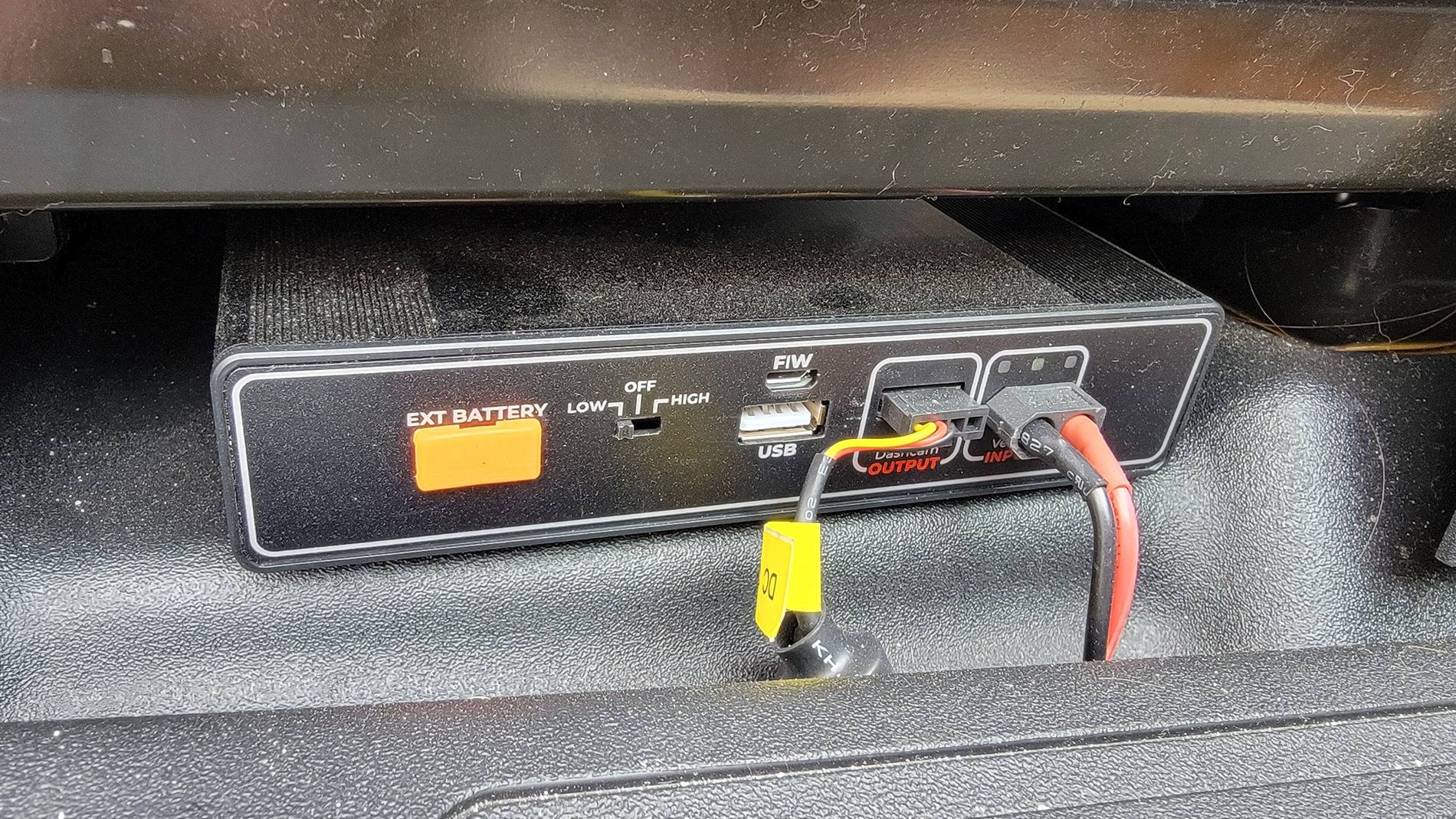
Managed to solve this problem, happy to say! I kept the onboard wifi through bell (for only $10 a month its peace of mind) but is only on when vehicle is on. Picked up Netgear portable wifi (usually designed for laptops/business on the go) with an LTE simcard through telus. It shares data with primary cell plan, so 200gigs a month, which is plenty. As long as it is charged, the vehicle (and cameras) has wifi 24/7. Battery and cameras (3 for 360 view) from MyBlackBox. Usb cord from the battery (under passenger seat, as shown in picture) runs discretely so I can plug netgear in if needed (ex parked over night and wifi won't reach from hotel room etc). ForScan to save a few car battery drains as well.
Telus is also only $10 a month. If interested I can get you folks Tlus deals.
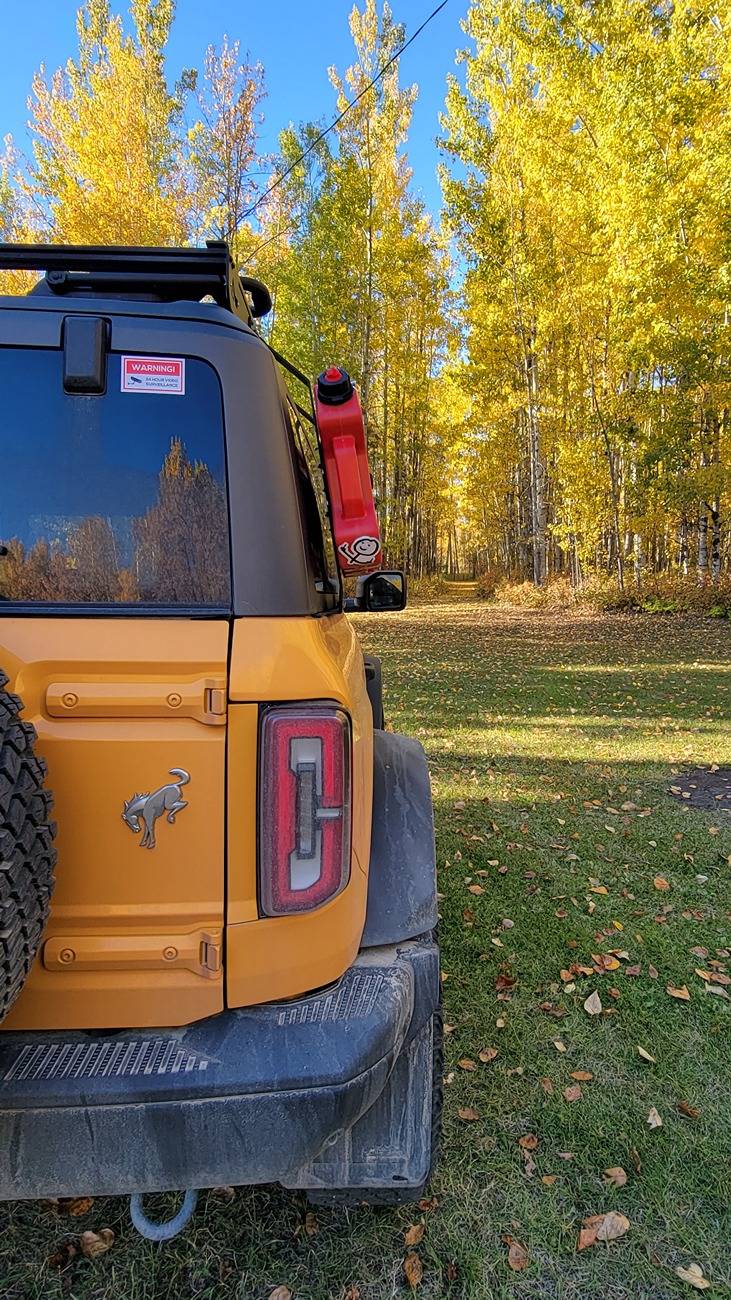
Finished it off with 24 hour surveillance warning stickers. Its been so useful so far for capturing wildlife and vandals.
Ford Bronco BMS Shed Timer - Hotspot in Accessory Mode 20241005_164510
Ford Bronco BMS Shed Timer - Hotspot in Accessory Mode 20240523_165207
 

Nibroc99

Wildtrak
Well-Known Member
First Name
Corbin
Joined
Apr 22, 2025
Threads
19
Messages
522
Reaction score
446
Location
Rochester, MA, USA
Website
www.corbonthecob.com
Vehicle(s)
2022 Wildtrak: The WildeBeast
Your Bronco Model
Wildtrak
Clubs
 
Managed to solve this problem, happy to say! I kept the onboard wifi through bell (for only $10 a month its peace of mind) but is only on when vehicle is on. Picked up Netgear portable wifi (usually designed for laptops/business on the go) with an LTE simcard through telus. It shares data with primary cell plan, so 200gigs a month, which is plenty. As long as it is charged, the vehicle (and cameras) has wifi 24/7. Battery and cameras (3 for 360 view) from MyBlackBox. Usb cord from the battery (under passenger seat, as shown in picture) runs discretely so I can plug netgear in if needed (ex parked over night and wifi won't reach from hotel room etc). ForScan to save a few car battery drains as well.
Telus is also only $10 a month. If interested I can get you folks Tlus deals.
Finished it off with 24 hour surveillance warning stickers. Its been so useful so far for capturing wildlife and vandals.
20241005_164510.jpg
20240523_165207.jpg
Dude, awesome!! Does Telus work in the US by any chance? I'm in Massachusetts, I believe you mentioned you're somewhere in Canada.
Also, are you able to share specifically which Netgear device you went with? Seems like a pretty sweet setup!! Thank you so much for sharing!
Sponsored


Top