Sponsored

Apple iOS 26 and carplay

snow776

Big Bend
Member
Joined
Feb 14, 2026
Threads
0
Messages
6
Reaction score
5
Location
Texas
Vehicle(s)
2021 Bronco
Your Bronco Model
Big Bend
@Gangstead I recently updated to iOS 26 last week and realized both Apple Maps and Google Maps crash once I initiate a route. I can only reconnect to CarPlay once I perform a hard reset on the bronco. Otherwise, CarPlay works fine so long as I don’t try using maps in my vehicle.

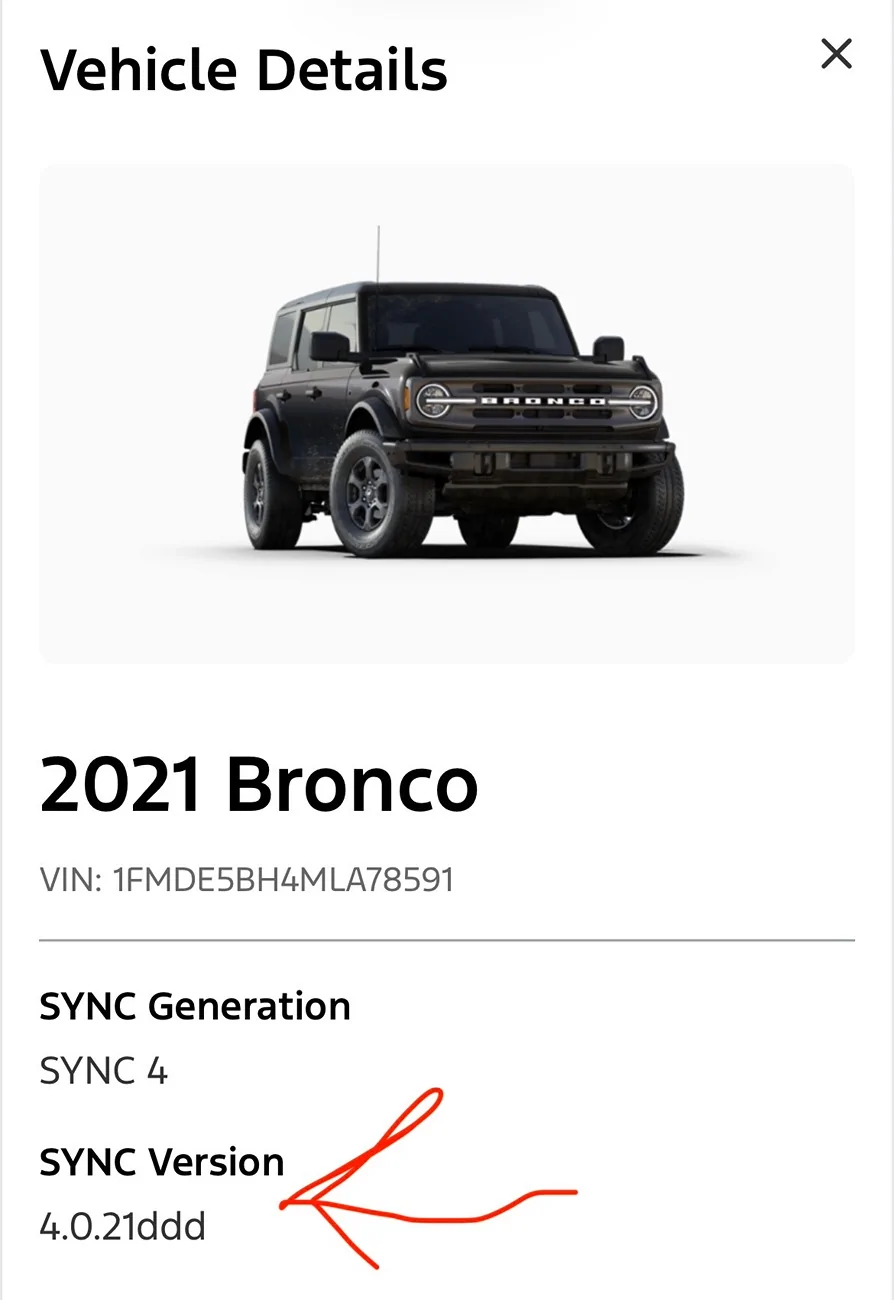
My sync 4 version is 4.0.21ddd on my 2021 bronco. I think the fix lies with the dealership reflashing the sync 4 firmware to a newer version to accommodate for iOS changes. I’m going to confirm once I contact a dealership about the issue.

I believe this issue only occurs in the older models of the Bronco using the older sync 4 firmware.
A month or two ago Google Maps stopped working in Car Play for me. As soon as I start navigation the screen freezes and Car Play crashes until I do the soft reset (ie stop the car and open the door) or the Power + Forward hard reset.

I was hoping this upgrade to ios 26 would fix it but it doesn't. Apple Maps works fine. A friend's iPhone on my Bronco works. My iPhone on another Car Play (a 24 Honda Odyssey), also fine.

Has anyone else had Car Play + Google Maps problems and been able to fix them?
Sponsored
 

Gangstead

Black Diamond
Well-Known Member
Joined
Jul 5, 2020
Threads
18
Messages
200
Reaction score
391
Location
Texas
Vehicle(s)
'21 BD 4DR 7MT Soft
Your Bronco Model
Black Diamond
Clubs
 
@Gangstead I recently updated to iOS 26 last week and realized both Apple Maps and Google Maps crash once I initiate a route. I can only reconnect to CarPlay once I perform a hard reset on the bronco. Otherwise, CarPlay works fine so long as I don’t try using maps in my vehicle.

My sync 4 version is 4.0.21ddd on my 2021 bronco. I think the fix lies with the dealership reflashing the sync 4 firmware to a newer version to accommodate for iOS changes. I’m going to confirm once I contact a dealership about the issue.

I believe this issue only occurs in the older models of the Bronco using the older sync 4 firmware.
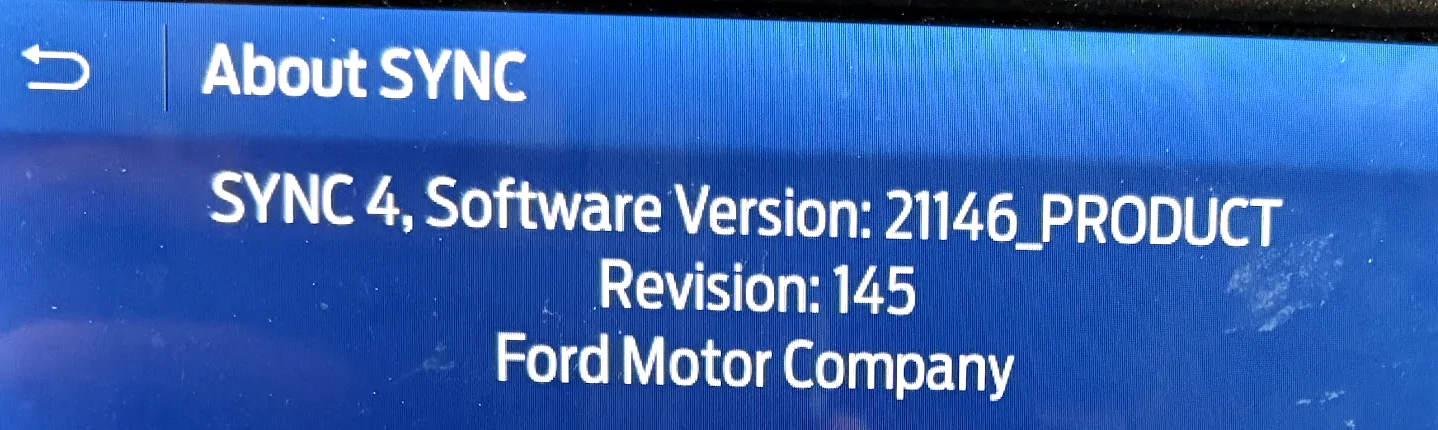
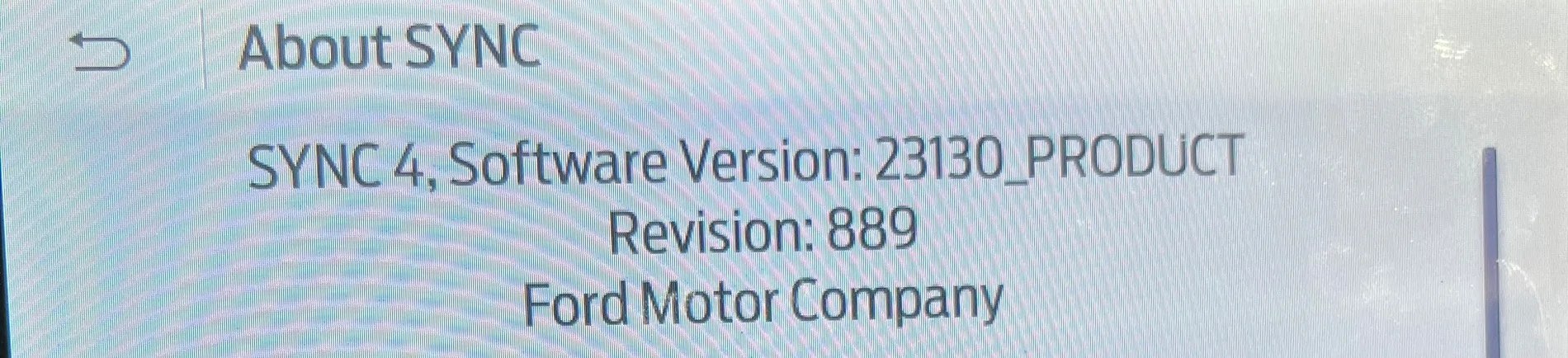
Does the Sync not do over the air updates? When I go through the update menu it tells me the system is up to date and that I have automatic updates on. I don't know if I have a newer or older version than you, it's a completely different format:
"SYNC 4, Software Version: 21146_PRODUCT Revision: 145" (this is from the General -> About SYNC menu)
Ford Bronco Apple iOS 26 and carplay 1771272762400-mq

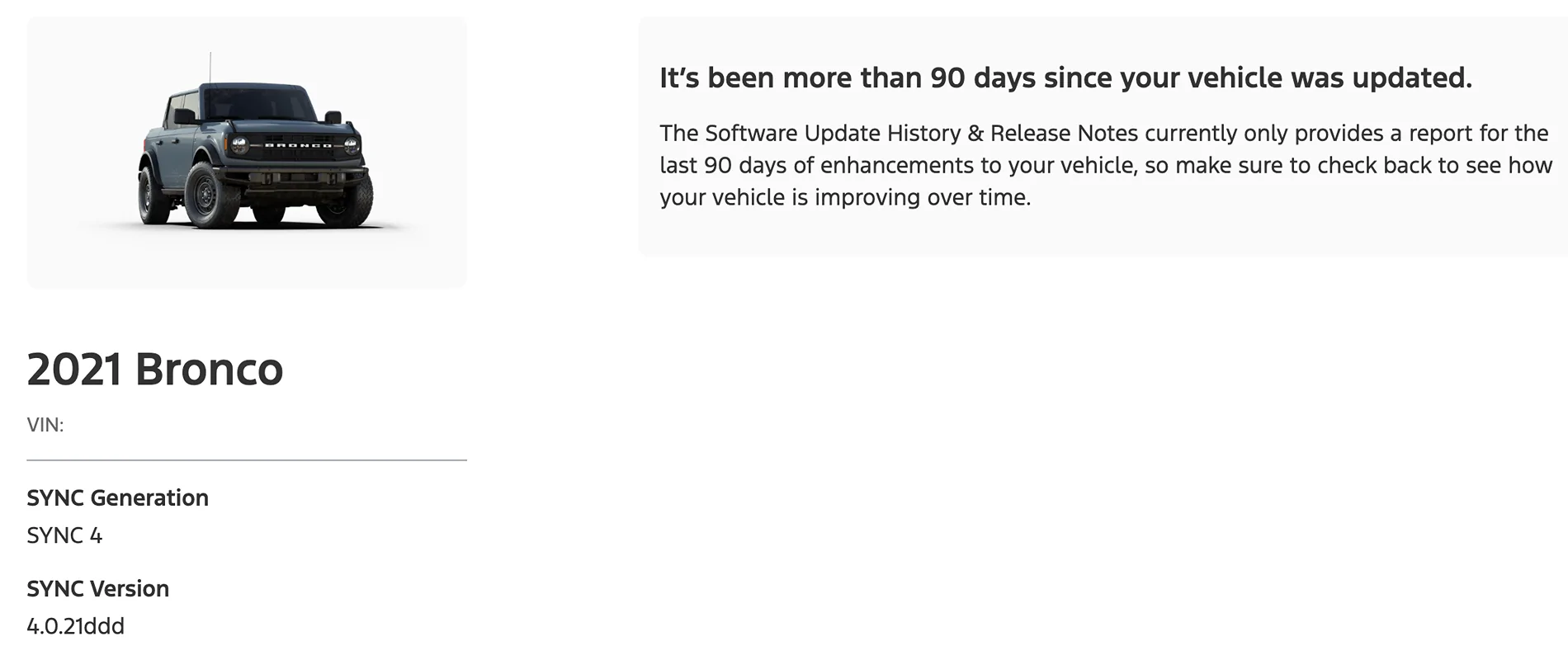
Never mind. When I log into ford.com and log in I see Sync Version is 4.0.21ddd, same as you. It also says "it's been more than 90 days since your vehicle was updated"
Ford Bronco Apple iOS 26 and carplay 1771272875515-n

I'm on a 2021 Bronco as well. I don't know if I mentioned it in this thread but I switched over from an Android Phone to an iPhone because Android Auto would crash as soon as I started navigating in Google Maps. Unlike CarPlay starting the navigation before connecting didn't help. When I switched to iPhone Google Maps worked at first on Car Play. Then it started crashing when starting navigation, but Apple Maps worked. Then around when iOS 26 came out Apple Maps started crashing, but like you if I have navigation going before it connects then it works. I've also tried forgetting the car and starting over only in USB mode (wireless off), that doesn't help.

Navigation in Car Play works fine on my wife's 2024 Honda, and her Android and other people's iPhones have worked fine on my Bronco. I've run out of ideas and I mostly cope with it by 1) not using navigation 2) setting a destination from my phone before starting the car or 3) Holding Power + Forward to reset it when I've forgotten step 2 and waiting the 30-60 seconds for Sync to restart and reconnect to Car Play. It's a pretty sad state of affairs.
 

snow776

Big Bend
Member
Joined
Feb 14, 2026
Threads
0
Messages
6
Reaction score
5
Location
Texas
Vehicle(s)
2021 Bronco
Your Bronco Model
Big Bend
Does the Sync not do over the air updates? When I go through the update menu it tells me the system is up to date and that I have automatic updates on. I don't know if I have a newer or older version than you, it's a completely different format:
"SYNC 4, Software Version: 21146_PRODUCT Revision: 145" (this is from the General -> About SYNC menu)
1771272762400-mq.webp

Never mind. When I log into ford.com and log in I see Sync Version is 4.0.21ddd, same as you. It also says "it's been more than 90 days since your vehicle was updated"
1771272875515-nb.webp

I'm on a 2021 Bronco as well. I don't know if I mentioned it in this thread but I switched over from an Android Phone to an iPhone because Android Auto would crash as soon as I started navigating in Google Maps. Unlike CarPlay starting the navigation before connecting didn't help. When I switched to iPhone Google Maps worked at first on Car Play. Then it started crashing when starting navigation, but Apple Maps worked. Then around when iOS 26 came out Apple Maps started crashing, but like you if I have navigation going before it connects then it works. I've also tried forgetting the car and starting over only in USB mode (wireless off), that doesn't help.

Navigation in Car Play works fine on my wife's 2024 Honda, and her Android and other people's iPhones have worked fine on my Bronco. I've run out of ideas and I mostly cope with it by 1) not using navigation 2) setting a destination from my phone before starting the car or 3) Holding Power + Forward to reset it when I've forgotten step 2 and waiting the 30-60 seconds for Sync to restart and reconnect to Car Play. It's a pretty sad state of affairs.
@Gangstead I’ll be taking my Bronco in next week to have techs review the firmware version and a possible update. I’ll follow up with the results once I get the vehicle back. I read that OTA updates are for small changes to the software. Huge updates like the sync 4 updates could brick the system with an unstable connection.

Your sync 4 behavior is very similar to mine. I can confirm my statement if I can verify the sync 4 version on a newer Bronco, and compare it to mine regarding the car play behavior with the iOS 26 update. Thanks for your reply to this. I’m happy I’m not the only one.

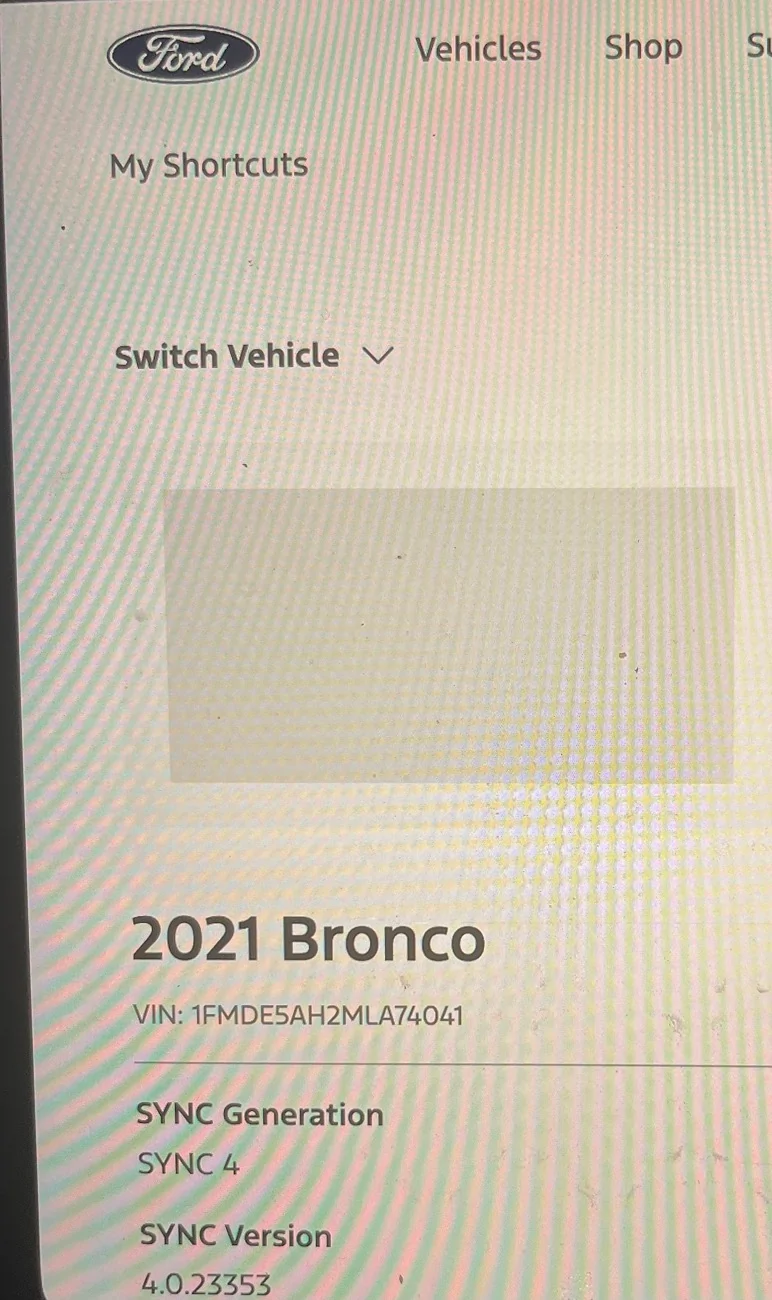
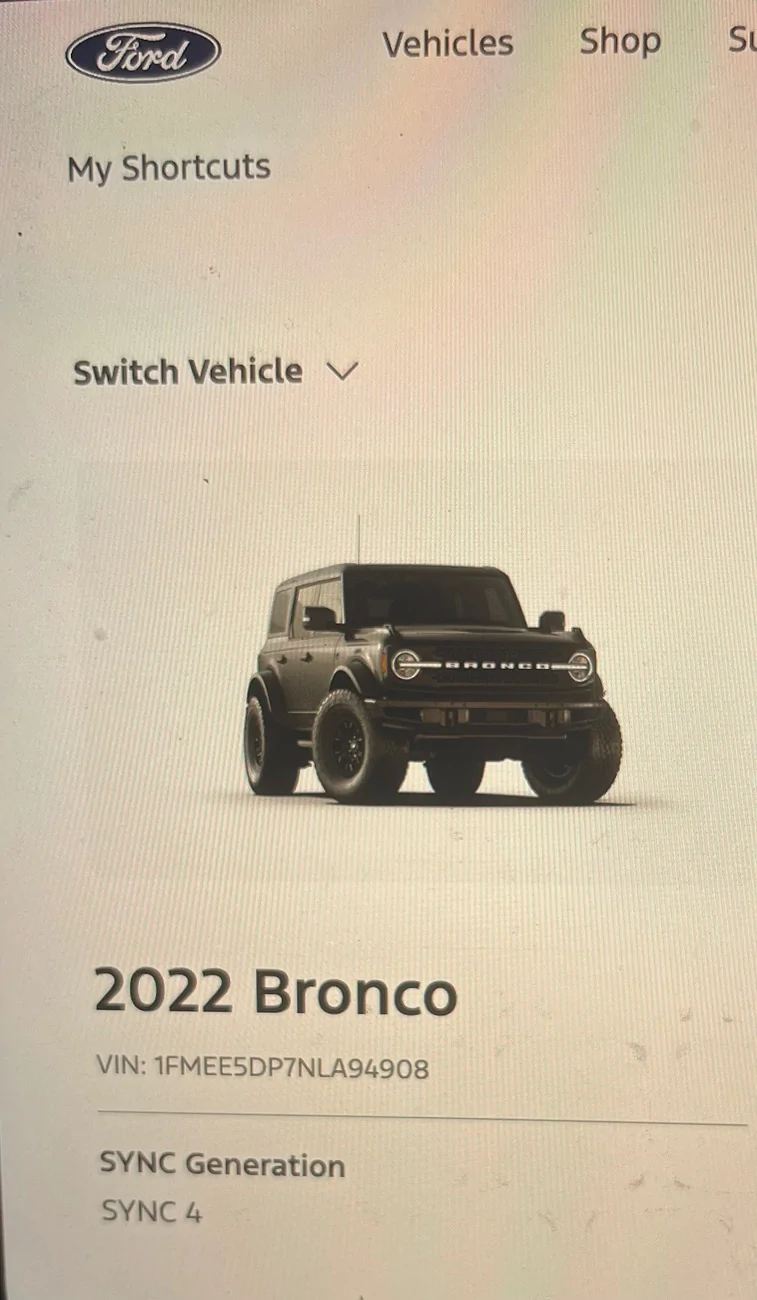
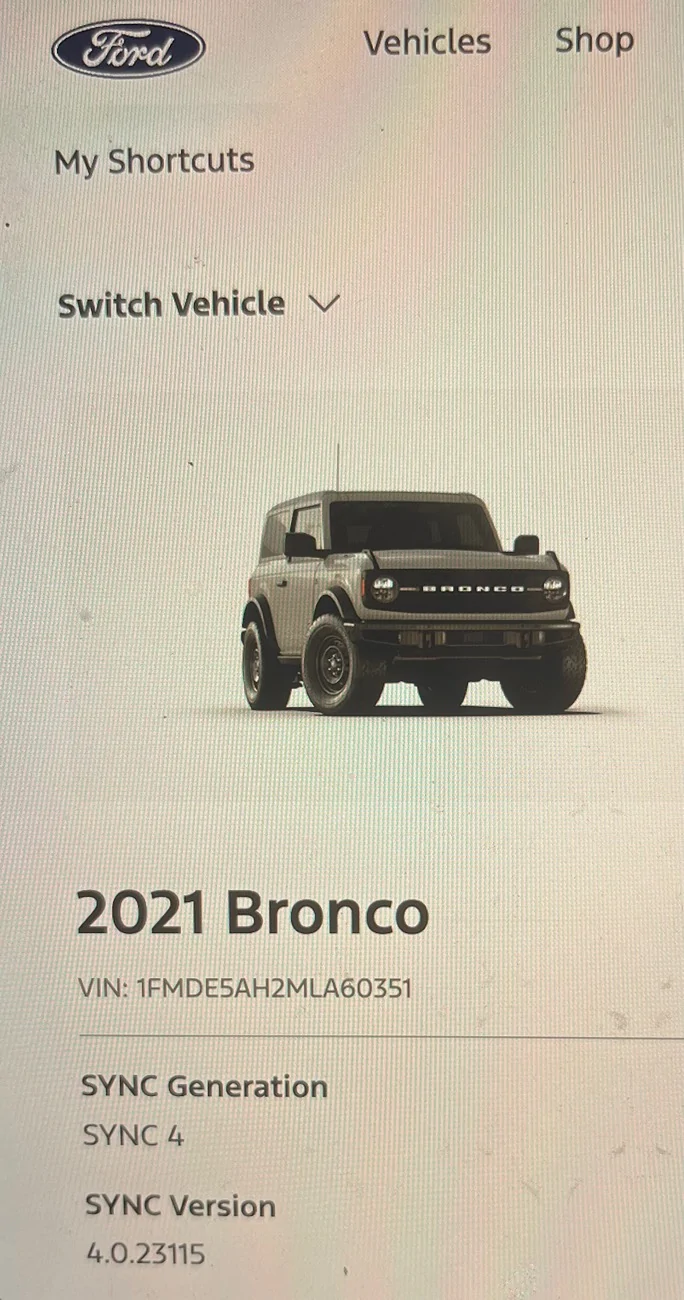
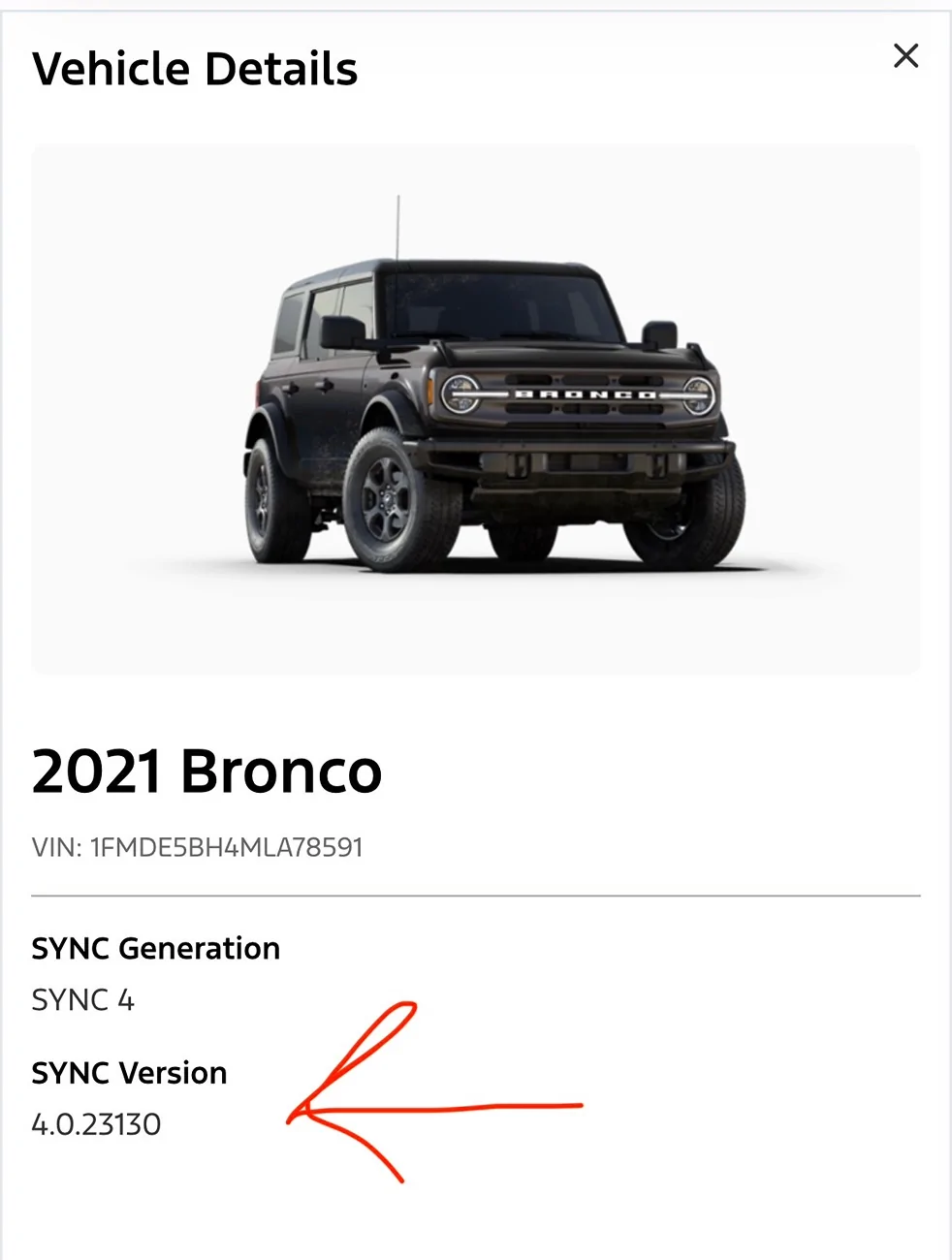
I want to add that I looked up random vins from carvana on the Ford website and it’s clear the firmware on our broncos are older than current generations. 2022 and above simply reflect sync 4, however 2021 models all vary on the version number as seen below.

Ford Bronco Apple iOS 26 and carplay IMG_7960
Ford Bronco Apple iOS 26 and carplay IMG_7961
Ford Bronco Apple iOS 26 and carplay IMG_7962
 
Last edited:

snow776

Big Bend
Member
Joined
Feb 14, 2026
Threads
0
Messages
6
Reaction score
5
Location
Texas
Vehicle(s)
2021 Bronco
Your Bronco Model
Big Bend
Does the Sync not do over the air updates? When I go through the update menu it tells me the system is up to date and that I have automatic updates on. I don't know if I have a newer or older version than you, it's a completely different format:
"SYNC 4, Software Version: 21146_PRODUCT Revision: 145" (this is from the General -> About SYNC menu)
1771272762400-mq.webp

Never mind. When I log into ford.com and log in I see Sync Version is 4.0.21ddd, same as you. It also says "it's been more than 90 days since your vehicle was updated"
1771272875515-nb.webp

I'm on a 2021 Bronco as well. I don't know if I mentioned it in this thread but I switched over from an Android Phone to an iPhone because Android Auto would crash as soon as I started navigating in Google Maps. Unlike CarPlay starting the navigation before connecting didn't help. When I switched to iPhone Google Maps worked at first on Car Play. Then it started crashing when starting navigation, but Apple Maps worked. Then around when iOS 26 came out Apple Maps started crashing, but like you if I have navigation going before it connects then it works. I've also tried forgetting the car and starting over only in USB mode (wireless off), that doesn't help.

Navigation in Car Play works fine on my wife's 2024 Honda, and her Android and other people's iPhones have worked fine on my Bronco. I've run out of ideas and I mostly cope with it by 1) not using navigation 2) setting a destination from my phone before starting the car or 3) Holding Power + Forward to reset it when I've forgotten step 2 and waiting the 30-60 seconds for Sync to restart and reconnect to Car Play. It's a pretty sad state of affairs.
Hey @Gangstead,

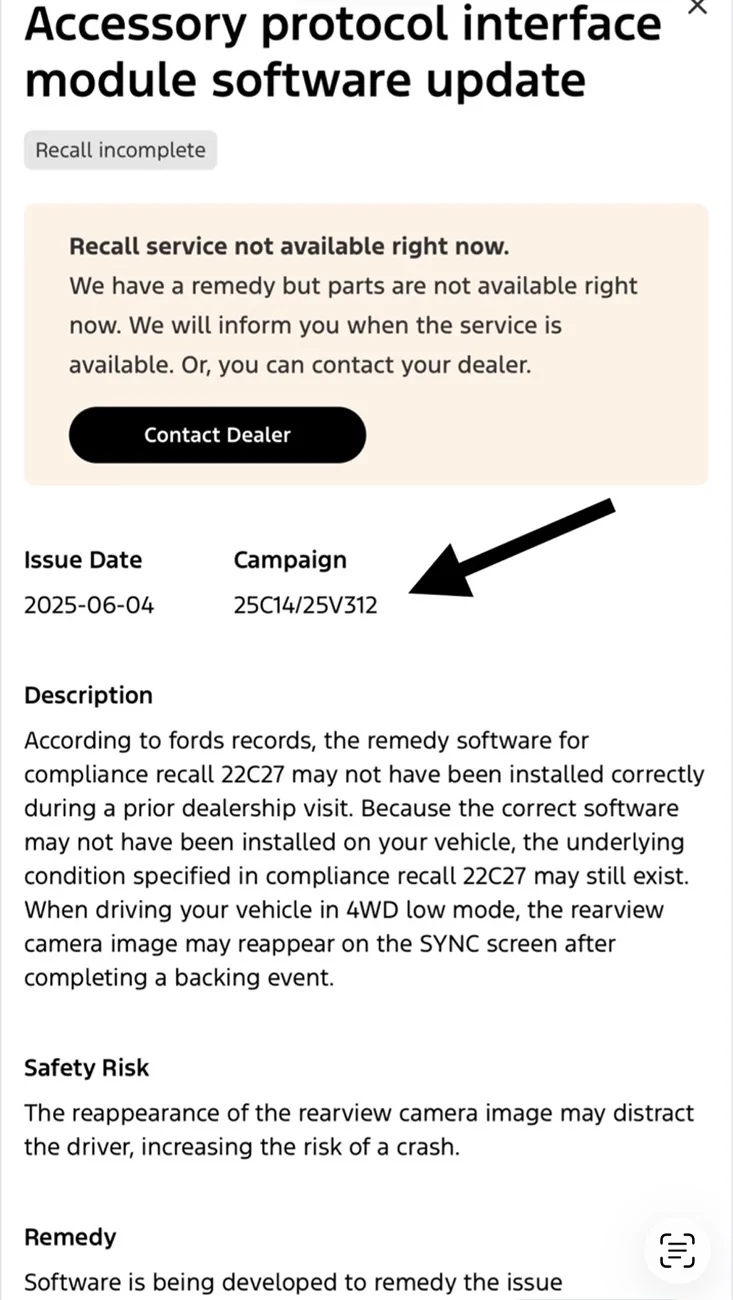
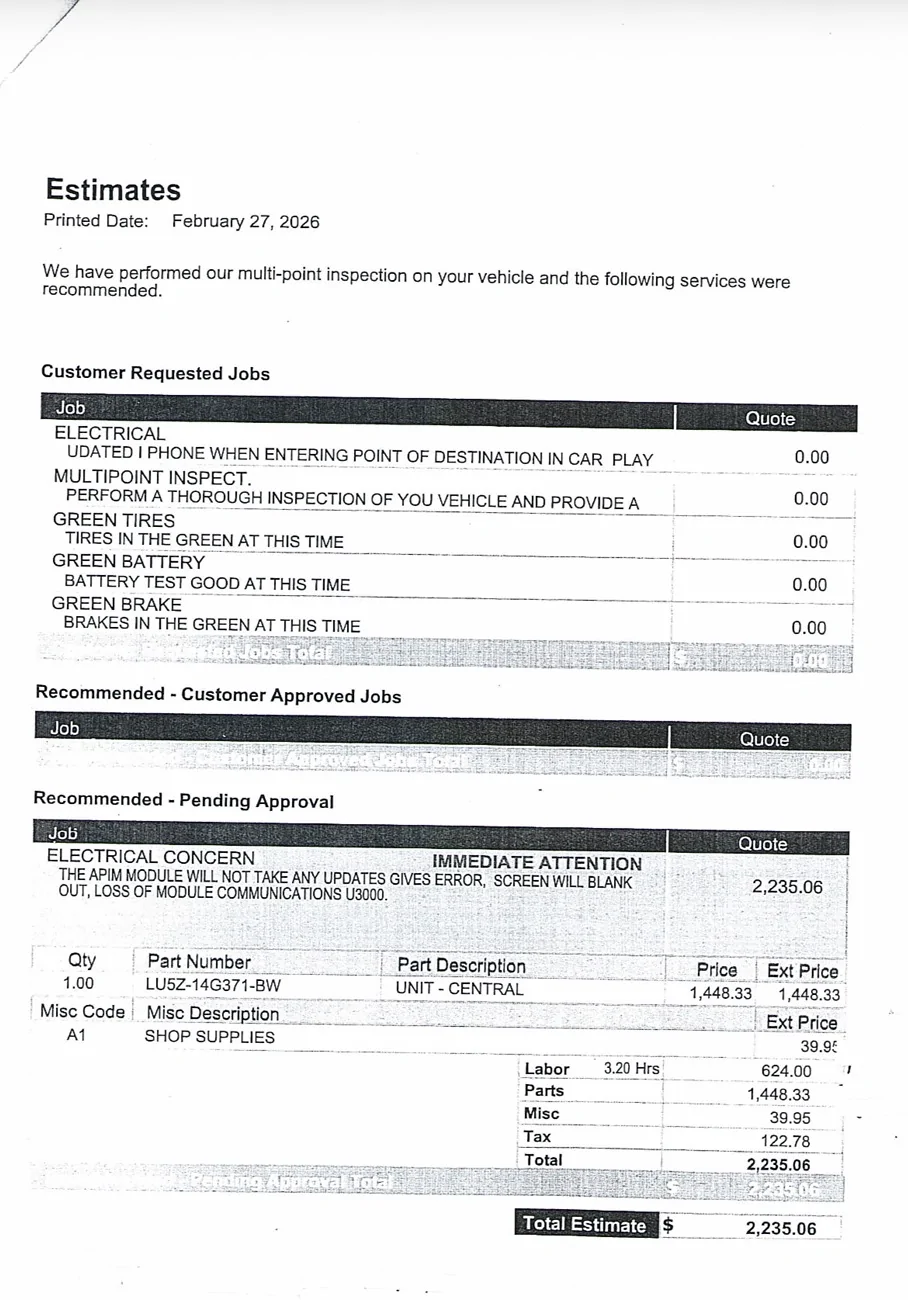
Update on the sync 4 issue. There’s an active recall for the sync 4/APIM to have the software updated in the 2021 broncos. I took it into ford before knowing this fact. They were unable to update the software and recommended I replace the entire unit. This would’ve costed around 2k for parts and labor, but the service guys forwarded my case to Ford. Ford offered to cover the cost for the replacement leaving me with around $200 to pay for the repairs/unit replacement.

It’s clear Ford knows about the outdated sync 4 issues in the 2021 Ford Broncos. Attached you’ll see the recall and cost I would have needed to pay if Ford didn’t step in to cover the cost for a fault on their end. I should have it back on Monday. I’ll be sure to let you know if it worked.

Next for you is to run your VIN on the Ford website and verify if your vehicle has that recall shown below.
Ford Bronco Apple iOS 26 and carplay IMG_7998
Ford Bronco Apple iOS 26 and carplay IMG_7997
 

GoHawks63

Wildtrak
Well-Known Member
First Name
George
Joined
Jan 17, 2025
Threads
16
Messages
749
Reaction score
1,111
Location
Metro Detroit
Vehicle(s)
2024 Bronco Wildtrak, Cadillac CTS-V Coupe, Roush Stage 3 Mustang convertible
Your Bronco Model
Wildtrak
I recently received the Sync 4 OTA update and haven’t had any issues.
 

Sponsored

Gangstead

Black Diamond
Well-Known Member
Joined
Jul 5, 2020
Threads
18
Messages
200
Reaction score
391
Location
Texas
Vehicle(s)
'21 BD 4DR 7MT Soft
Your Bronco Model
Black Diamond
Clubs
 
@snow776 When I put my VIN in I don't see that recall/campaign, but also doesn't that seem unrelated to CarPlay/Android Auto Issues? That recall is about the reverse camera view showing up at the wrong time. I guess that's a Sync issue as well?
 

snow776

Big Bend
Member
Joined
Feb 14, 2026
Threads
0
Messages
6
Reaction score
5
Location
Texas
Vehicle(s)
2021 Bronco
Your Bronco Model
Big Bend
@snow776 When I put my VIN in I don't see that recall/campaign, but also doesn't that seem unrelated to CarPlay/Android Auto Issues? That recall is about the reverse camera view showing up at the wrong time. I guess that's a Sync issue as well?
You’re correct @Gangstead, and I guess Ford saw it that way as well. Strange your 2021 bronco wasn’t flagged for the recall. Seems most 2021 Broncos were flagged and you’re on the same sync4 version as myself. I believe Ford should replace your unit as they’re currently doing that with mine.
 

snow776

Big Bend
Member
Joined
Feb 14, 2026
Threads
0
Messages
6
Reaction score
5
Location
Texas
Vehicle(s)
2021 Bronco
Your Bronco Model
Big Bend
@Gangstead, I got the bronco back and all is good. Unfortunately for me replacing the APIM unit fixed all my issues. I can verify my unit has an updated version of the sync 4 software, and my iPhone connects with no crashes when launching my Apple Maps or Google Maps.

Old sync 4 version
Ford Bronco Apple iOS 26 and carplay IMG_7946


Updated sync 4 version
Ford Bronco Apple iOS 26 and carplay IMG_8010

Ford Bronco Apple iOS 26 and carplay IMG_8009

If it’s still affecting you, it might be worth it to verify the recalls on your vehicle to find the APIM recall like myself. Additionally, I didn’t need to pay that hefty cost for the replacement.

Good luck!
 
Last edited:

Gangstead

Black Diamond
Well-Known Member
Joined
Jul 5, 2020
Threads
18
Messages
200
Reaction score
391
Location
Texas
Vehicle(s)
'21 BD 4DR 7MT Soft
Your Bronco Model
Black Diamond
Clubs
 
@Gangstead, I got the bronco back and all is good. Unfortunately for me replacing the APIM unit fixed all my issues. I can verify my unit has an updated version of the sync 4 software, and my iPhone connects no crashes when launching my Apple Maps or Google Maps.

Old sync 4 version
IMG_7946.webp


Updated sync 4 version
IMG_8010.webp

IMG_8009.webp

If it’s still affecting you, it might be worth it to verify the recalls on your vehicle to find the APIM recall like myself. Additionally, I didn’t need to pay that hefty cost for the replacement.

Good luck!
Glad you got some resolution. I'll have to get it to the dealer at some point then. Hopefully there's someone nice there because I don't think I'm persuasive enough to get them to fix their problem at their own cost. There's no way I'm paying $2k, I'll just live with it not fully functional and keep that in mind when deciding on any future Ford vehicle purchases.
 

WildMike

Wildtrak
Member
First Name
Mike
Joined
Oct 24, 2021
Threads
1
Messages
17
Reaction score
5
Location
Italy
Vehicle(s)
Your Bronco Model
Wildtrak
I’m having the same problem with CarPlay and Maps… wouldn’t it be enough to just update the apim software? Why is it necessary to swap the entire unit?
 

snow776

Big Bend
Member
Joined
Feb 14, 2026
Threads
0
Messages
6
Reaction score
5
Location
Texas
Vehicle(s)
2021 Bronco
Your Bronco Model
Big Bend
I’m having the same problem with CarPlay and Maps… wouldn’t it be enough to just update the apim software? Why is it necessary to swap the entire unit?
I took it to Ford to get the APIM module updated, but it was clear the APIM in my Bronco was faulty and I had a recall for it, so Ford opted to replace the unit.

They attempted the update numerous times, but it failed over and over again.
Sponsored


Top