
Sponsored
Here are the Bronco Build & Tracking links
- Thread starter Michael Grasso
- Start date
- Watchers 421


Module tracker shows the below. Download does not open on my PC. Does the below show my vehicle as built or not? Any hints in how to open the download?For all of you that are waiting on your Bronco being built and want to track it.
Here are some good links…
Required Reading: Bronco Build Process - Window Sticker, Blend Date, Production Rotation Number, Built & Shipped Emails, Delivery Date Estimates & More
https://www.bronco6g.com/forum/thre...ed-emails-delivery-date-estimates-more.24987/
Bronco6G Tracker w/ window sticker lookup
https://www.bronco6g.com/forum/threads/🧭-track-your-bronco-order-by-vin-order-number.15328/
To the Ford site to check on status
https://shop.ford.com/vehicleordertracking#/
To view your Window Sticker, add your VIN at the end
https://www.windowsticker.forddirect.com/windowsticker.pdf?vin=
To the Ford site that populates your Modules being turned on (this lets you know it’s actually built at the factory
https://www.motorcraftservice.com/AsBuilt
And lastly to see if it’s scheduled on the Convoy (Truck not Rail) to your Dealer!
https://palsapp.com
If you are going by rail, it’s more complicated…
First you will need the rail car letters and numbers. It is on the visibility report or DORA which is from the dealership. You MAY be able to get it from the SVT people but they seem often in a cranky mood and may tell you to get it from the dealer.
There are two major rail companies.
CSX is everything east of the mississippi
UP is everything west of the mississippi
But they all start out on CSX so once they have it in their system they will follow it all the way.
So, how do you track your truck on a railcar?
First and most important. Never talk to live personnel at the railroad! Only use automated phone system. If it attempts to transfer you to a live person please hang up. The railcar information we are provided by is given as a courtesy and if we call live personnel we may lose the access and ability to track.
CSX
1. Call the CSX 1-800-235-2352
2. When prompted for location or weight, press "1" on your phone for location.
3. When prompted for the car initials, say CN (or whatever initials you have) then wait for the next prompt.
4. When prompted for the car number, say 907048 (or whatever your number is)
5. When prompted for next car say DONE.
6. That's it; enjoy your updated status report.
Union Pacific
1. Call UP at 1 800 877-5123 1 800 877-5123
2. Follow phone prompts for Trace
3. Say the railcar number complete and clearly. Example CN123456 all together
4. Listen for your update
NS Norfolk Southern
1. Call 800-635-5768
2. Press 2.
3. Press 2.
4. Enter the letters on the numeric keypad then press #. As in: TTGX will be 8849
5. Enter the numbers then press #. It wasn't taking my voice prompts but typing worked.
Please let me know if there are any others and I'll add. That way it'll all be in one place!
Or maybe make it a sticky.
Michael
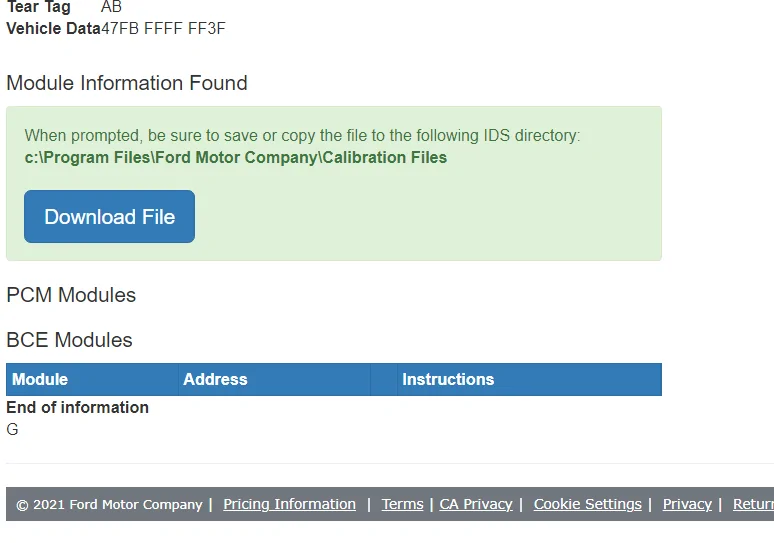

Your modules are not populated yet, you will clearly know when they are.Module tracker shows the below. Download does not open on my PC. Does the below show my vehicle as built or not? Any hints in how to open the download?

So basically....it did not get built yesterday? ThanksYour modules are not populated yet, you will clearly know when they are.

- First Name
- Matthew
- Joined
- Mar 15, 2021
- Threads
- 0
- Messages
- 86
- Reaction score
- 78
- Location
- Surprise, AZ
- Vehicle(s)
- On order: 2021 Bronco Wildtrak
- Your Bronco Model
- Wildtrak
Michael-/thank you so much for providing this. It’s super helpful, or will be for me, once I get a build date. Lol. Is there any sort of tracker when you only have an order #? Something to maybe show a status on when we may get scheduled? Thank you!For all of you that are waiting on your Bronco being built and want to track it.
Here are some good links…
Required Reading: Bronco Build Process - Window Sticker, Blend Date, Production Rotation Number, Built & Shipped Emails, Delivery Date Estimates & More
https://www.bronco6g.com/forum/thre...ed-emails-delivery-date-estimates-more.24987/
Bronco6G Tracker w/ window sticker lookup
https://www.bronco6g.com/forum/threads/🧭-track-your-bronco-order-by-vin-order-number.15328/
To the Ford site to check on status
https://shop.ford.com/vehicleordertracking#/
To view your Window Sticker, add your VIN at the end
https://www.windowsticker.forddirect.com/windowsticker.pdf?vin=
To the Ford site that populates your Modules being turned on (this lets you know it’s actually built at the factory
https://www.motorcraftservice.com/AsBuilt
And lastly to see if it’s scheduled on the Convoy (Truck not Rail) to your Dealer!
https://palsapp.com
If you are going by rail, it’s more complicated…
First you will need the rail car letters and numbers. It is on the visibility report or DORA which is from the dealership. You MAY be able to get it from the SVT people but they seem often in a cranky mood and may tell you to get it from the dealer.
There are two major rail companies.
CSX is everything east of the mississippi
UP is everything west of the mississippi
But they all start out on CSX so once they have it in their system they will follow it all the way.
So, how do you track your truck on a railcar?
First and most important. Never talk to live personnel at the railroad! Only use automated phone system. If it attempts to transfer you to a live person please hang up. The railcar information we are provided by is given as a courtesy and if we call live personnel we may lose the access and ability to track.
CSX
1. Call the CSX 1-800-235-2352
2. When prompted for location or weight, press "1" on your phone for location.
3. When prompted for the car initials, say CN (or whatever initials you have) then wait for the next prompt.
4. When prompted for the car number, say 907048 (or whatever your number is)
5. When prompted for next car say DONE.
6. That's it; enjoy your updated status report.
Union Pacific
1. Call UP at 1 800 877-5123 1 800 877-5123
2. Follow phone prompts for Trace
3. Say the railcar number complete and clearly. Example CN123456 all together
4. Listen for your update
NS Norfolk Southern
1. Call 800-635-5768
2. Press 2.
3. Press 2.
4. Enter the letters on the numeric keypad then press #. As in: TTGX will be 8849
5. Enter the numbers then press #. It wasn't taking my voice prompts but typing worked.
Please let me know if there are any others and I'll add. That way it'll all be in one place!
Or maybe make it a sticky.
Michael
Sponsored
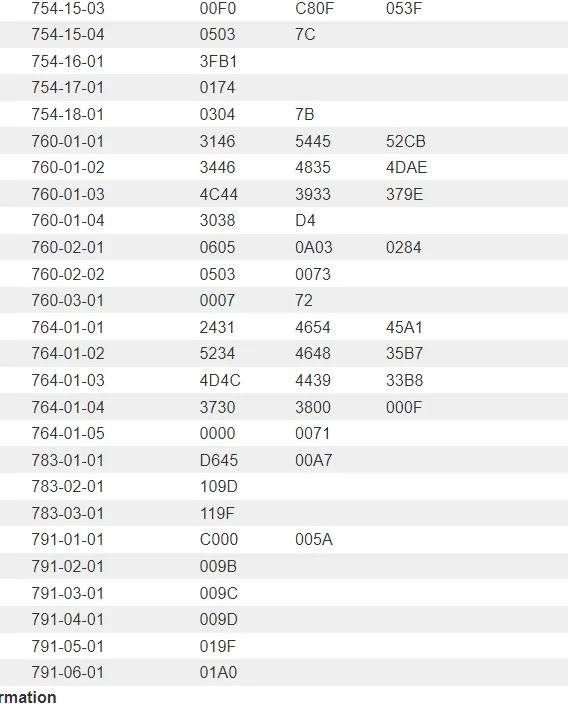
OK....now it shows pages of codes....so it looks like she (this is my Ranger Tremor) (still waiting on the Bronco) is built. QUESTION though; as in the attached clip, a few columns are blank. Does that mean anything, not complete, missing something or maybe that line item is just not utilized. Any experts here know (you guys know everything!!!). ThanksSo basically....it did not get built yesterday? Thanks

- Joined
- Apr 9, 2021
- Threads
- 174
- Messages
- 8,965
- Reaction score
- 32,062
- Location
- British Columbia
- Website
- www.bronco6g.com
- Vehicle(s)
- 2024 Toyota Tundra TRD Pro
- Your Bronco Model
- Badlands
So my understanding is window stickers generate 7 days before a build date, correct? Does this mean that a window sticker can generate any time of day/night? Or do these always get released in the mornings each day?
I hope that isn’t the case. Mine is scheduled to be built on 11/4 and I still don’t have a sticker.So my understanding is window stickers generate 7 days before a build date, correct? Does this mean that a window sticker can generate any time of day/night? Or do these always get released in the mornings each day?
I would say you might want to check with your dealer to confirm your build date. There have been window stickers released for builds through 11/5 that I have seen so far.I hope that isn’t the case. Mine is scheduled to be built on 11/4 and I still don’t have a sticker.
Yeah I did. I’m getting mine from Granger and as of today, it still shows 11/4.I would say you might want to check with your dealer to confirm your build date. There have been window stickers released for builds through 11/5 that I have seen so far.
Sponsored
- Joined
- Jul 19, 2020
- Threads
- 41
- Messages
- 3,265
- Reaction score
- 12,356
- Location
- Northwest Arkansas
- Vehicle(s)
- Ford Bronco, BMW R1150 GS
- Your Bronco Model
- Badlands
I have read that they typically generate at approximately 9 PM on the night of the 8th day before the target blend date. I don’t know what time zone, but assume it’s Eastern Time.So my understanding is window stickers generate 7 days before a build date, correct? Does this mean that a window sticker can generate any time of day/night? Or do these always get released in the mornings each day?

- Joined
- Apr 9, 2021
- Threads
- 174
- Messages
- 8,965
- Reaction score
- 32,062
- Location
- British Columbia
- Website
- www.bronco6g.com
- Vehicle(s)
- 2024 Toyota Tundra TRD Pro
- Your Bronco Model
- Badlands
Thanks - so 6 pm PST. Or maybe it's 9 pm PST as that'd be midnight EST and also make sense.I have read that they typically generate at approximately 9 PM on the night of the 8th day before the target blend date. I don’t know what time zone, but assume it’s Eastern Time.
Screw it, I'll check every hour, on the hour

- First Name
- Robert
- Joined
- Oct 15, 2021
- Threads
- 0
- Messages
- 2
- Reaction score
- 0
- Location
- Cornelius NC
- Vehicle(s)
- Chevy Traverse
- Your Bronco Model
- Badlands
So I ordered the 4dr. badlands 2.7 soft top w/ lux package. It went into production on 8/11. It's 11/2 and still "in production"
is this issue common for a vehicle to be in production this long. I've tried getting a better status update and a rough estimate of completion with no luck. Any info is appreciated.
is this issue common for a vehicle to be in production this long. I've tried getting a better status update and a rough estimate of completion with no luck. Any info is appreciated.

Is the tracking tool down for everyone? I enter my order number and VIN and does nothing but clear the fields after a few seconds
https://shop.ford.com/vehicleordertracking
https://shop.ford.com/vehicleordertracking
- First Name
- mark
- Joined
- Jul 14, 2020
- Threads
- 11
- Messages
- 334
- Reaction score
- 540
- Location
- California
- Vehicle(s)
- 2011 Lincoln MKZ hybrid
- Your Bronco Model
- Badlands
Seems to be working for meIs the tracking tool down for everyone? I enter my order number and VIN and does nothing but clear the fields after a few seconds
https://shop.ford.com/vehicleordertracking
Sponsored
Similar threads


- Replies
- 15
- Views
- 20,605


