Sponsored

Wolfbox G900 Tripro Dash Cam Firmware Update 【V1.6.3_251103】

WolfBox

Black Diamond
Well-Known Member
Squatch Sponsor (Level 3)
First Name
Florent
Joined
Oct 9, 2024
Threads
102
Messages
358
Reaction score
331
Location
LA
Vehicle(s)
2021 2dr Bronco
Your Bronco Model
Black Diamond
G900 TriPro Firmware Update:

Download: https://wolfbox.com/pages/firmware

The new firmware version number is V1.6.3_251103, the main change of this version is:
  1. Optimized encryption methods, improved Wi-Fi connection protocols, and upgraded local bin
  2. Enhanced Wi-Fi and warning pages in the preview interface; users can now customize alert window positioning and appearance
  3. Within the preview interface, users can customize split-screen content display
  4. Users can customize which information and function to appear in the preview interface.
  5. Added voice commands “show bumper camera” and “show cabin camera” to control additional camera displays.
  6. Optimized the range of the bumper camera indicator lines.
  7. Rear camera zoom settings now can be automatically saved after adjustment.

Upgrade instructions:
  1. Copy the firmware file to the root directory of the SD card (the outermost).
  2. Insert the SD card into the dash cam, and it will recognize the firmware. A prompt will appear; click to confirm and start the upgrade.
  3. After the upgrade progress bar is completed, the dash cam will restart and turn on automatically, indicating that the upgrade is complete.

Note: Copying the firmware to the card separately to upgrade only for a single dash cam to update. The file will be automatically deleted after the completion of the firmware upgrade.
Sponsored


 

NC_Oak

Big Bend
Well-Known Member
Joined
Dec 30, 2024
Threads
22
Messages
645
Reaction score
589
Location
North Carolina
Vehicle(s)
2024 4 door 2.3 sasq
Your Bronco Model
Big Bend
I look forward to this upgrade. We def want to be able to customize which cameras on split. I love the voice prompt add. Will test it this weekend!
 

ptgptg

Outer Banks
Well-Known Member
First Name
peter
Joined
Aug 25, 2023
Threads
12
Messages
213
Reaction score
213
Location
Long Island
Vehicle(s)
Bronco
Your Bronco Model
Outer Banks
I have the 900 tri pro. When I go to your link, the first thing it says is not to update firmware if the camera is working correctly. Mine works fine. Should I install the firmware update? The zip file also downloads from a google drive account, is that correct? and when I unzip the file, I am copying this file:
1763132397574-jc.png


to the root directory of my microsd card, correct?

Lastly, I am not sure what this means in your original post:

Note: Copying the firmware to the card separately to upgrade only for a single dash cam to update. The file will be automatically deleted after the completion of the firmware upgrade.

Thanks.

P.S.While I have your ear, I have two questions about the install. First, my installer did not do the back up lines when reversing and when I went back to him, he said he will do it but it is a pain based on how he installed. Is that correct? Second question is about the rear camera install. I had it installed on the inside of my bronco. Ideally, it would be mounted to the rear glass. But because I take the top off a lot in the summer, I had it mounted on the roll bar. Is there some way to have a sort of temporary mount that can be swapped back and forth from roll bar to rear glass?
 

Jason N

Badlands
Well-Known Member
First Name
Jason
Joined
Jun 1, 2025
Threads
13
Messages
77
Reaction score
58
Location
California
Vehicle(s)
BadSquatch
Your Bronco Model
Badlands
Please add the voice command to turn parking mode on and off !!!!!!
 
OP
OP
WolfBox

WolfBox

Black Diamond
Well-Known Member
Squatch Sponsor (Level 3)
First Name
Florent
Joined
Oct 9, 2024
Threads
102
Messages
358
Reaction score
331
Location
LA
Vehicle(s)
2021 2dr Bronco
Your Bronco Model
Black Diamond
When I go to your link, the first thing it says is not to update firmware if the camera is working correctly. Mine works fine. Should I install the firmware update?
That's because some conduct this uncorrectly, which may cause unexpected issues.

The zip file also downloads from a google drive account, is that correct? and when I unzip the file, I am copying this file:
761914-75a095748f7523bff127d054b5f92262.png
Correct.

to the root directory of my microsd card, correct?
Correct.

Note: Copying the firmware to the card separately to upgrade only for a single dash cam to update. The file will be automatically deleted after the completion of the firmware upgrade.
It means, one firmware only for one specific model.

my installer did not do the back up lines when reversing and when I went back to him, he said he will do it but it is a pain based on how he installed. Is that correct?
The back up line can be edited in the settings.

Second question is about the rear camera install. I had it installed on the inside of my bronco. Ideally, it would be mounted to the rear glass. But because I take the top off a lot in the summer, I had it mounted on the roll bar. Is there some way to have a sort of temporary mount that can be swapped back and forth from roll bar to rear glass?
Sorry we don't have temporary mount solution for rear cam. Some customers buy two rear cams on different spots. When one rear cam is not used, the connector will be wrapped by electric tape to protect it from moistures.

Hope my answers help. Cheers!
 

Sponsored

blueflame

Black Diamond
Member
First Name
Don
Joined
Jan 22, 2025
Threads
1
Messages
13
Reaction score
64
Location
Mississippi
Vehicle(s)
2013 FJ Cruiser, 2024 Bronco
Your Bronco Model
Black Diamond
The new feature that saves the rearview zoom is the feature I have looked forward to.
G900 TriPro Firmware Update:

Download: https://wolfbox.com/pages/firmware

The new firmware version number is V1.6.3_251103, the main change of this version is:
  1. Optimized encryption methods, improved Wi-Fi connection protocols, and upgraded local bin
  2. Enhanced Wi-Fi and warning pages in the preview interface; users can now customize alert window positioning and appearance
  3. Within the preview interface, users can customize split-screen content display
  4. Users can customize which information and function to appear in the preview interface.
  5. Added voice commands “show bumper camera” and “show cabin camera” to control additional camera displays.
  6. Optimized the range of the bumper camera indicator lines.
  7. Rear camera zoom settings now can be automatically saved after adjustment.

Upgrade instructions:
  1. Copy the firmware file to the root directory of the SD card (the outermost).
  2. Insert the SD card into the dash cam, and it will recognize the firmware. A prompt will appear; click to confirm and start the upgrade.
  3. After the upgrade progress bar is completed, the dash cam will restart and turn on automatically, indicating that the upgrade is complete.

Note: Copying the firmware to the card separately to upgrade only for a single dash cam to update. The file will be automatically deleted after the completion of the firmware upgrade.
The new feature that saves the rear zoom setting is a great improvement. I can set the zoom for a closer view of traffic behind me but still see the blind spots on both sides.

Thanks, Wolfbox, for the new firmware.
 

ptgptg

Outer Banks
Well-Known Member
First Name
peter
Joined
Aug 25, 2023
Threads
12
Messages
213
Reaction score
213
Location
Long Island
Vehicle(s)
Bronco
Your Bronco Model
Outer Banks
Could you zoom the rear camera before the firmware update? If so, how?

Thanks,
 

ptgptg

Outer Banks
Well-Known Member
First Name
peter
Joined
Aug 25, 2023
Threads
12
Messages
213
Reaction score
213
Location
Long Island
Vehicle(s)
Bronco
Your Bronco Model
Outer Banks
That's because some conduct this uncorrectly, which may cause unexpected issues.


Correct.


Correct.


It means, one firmware only for one specific model.


The back up line can be edited in the settings.


Sorry we don't have temporary mount solution for rear cam. Some customers buy two rear cams on different spots. When one rear cam is not used, the connector will be wrapped by electric tape to protect it from moistures.

Hope my answers help. Cheers!
Thank you for the responses. The only one that I think there was miscommunication on was the rear camera back up lines. When they installed it, they did not connect it so the lines show when backing up. When I went back to ask them about it, they told me they would do it but that it was a pain to do. Just wanted to know if it is that involved.

Thanks,
 
OP
OP
WolfBox

WolfBox

Black Diamond
Well-Known Member
Squatch Sponsor (Level 3)
First Name
Florent
Joined
Oct 9, 2024
Threads
102
Messages
358
Reaction score
331
Location
LA
Vehicle(s)
2021 2dr Bronco
Your Bronco Model
Black Diamond
The new feature that saves the rearview zoom is the feature I have looked forward to.

The new feature that saves the rear zoom setting is a great improvement. I can set the zoom for a closer view of traffic behind me but still see the blind spots on both sides.

Thanks, Wolfbox, for the new firmware.
Always dedicated to improving and progressing. Cheers!
 
OP
OP
WolfBox

WolfBox

Black Diamond
Well-Known Member
Squatch Sponsor (Level 3)
First Name
Florent
Joined
Oct 9, 2024
Threads
102
Messages
358
Reaction score
331
Location
LA
Vehicle(s)
2021 2dr Bronco
Your Bronco Model
Black Diamond
Could you zoom the rear camera before the firmware update? If so, how?

Thanks,
Yes, you can slide on the right side of the screen to zoom.
 

Sponsored
OP
OP
WolfBox

WolfBox

Black Diamond
Well-Known Member
Squatch Sponsor (Level 3)
First Name
Florent
Joined
Oct 9, 2024
Threads
102
Messages
358
Reaction score
331
Location
LA
Vehicle(s)
2021 2dr Bronco
Your Bronco Model
Black Diamond
Thank you for the responses. The only one that I think there was miscommunication on was the rear camera back up lines. When they installed it, they did not connect it so the lines show when backing up. When I went back to ask them about it, they told me they would do it but that it was a pain to do. Just wanted to know if it is that involved.

Thanks,
If the rear cam is connected to the reverse light correctly (the red wire of the rear cam to the positive pole of the reverse light), then you can get it set up in the settings menu.
 

ptgptg

Outer Banks
Well-Known Member
First Name
peter
Joined
Aug 25, 2023
Threads
12
Messages
213
Reaction score
213
Location
Long Island
Vehicle(s)
Bronco
Your Bronco Model
Outer Banks
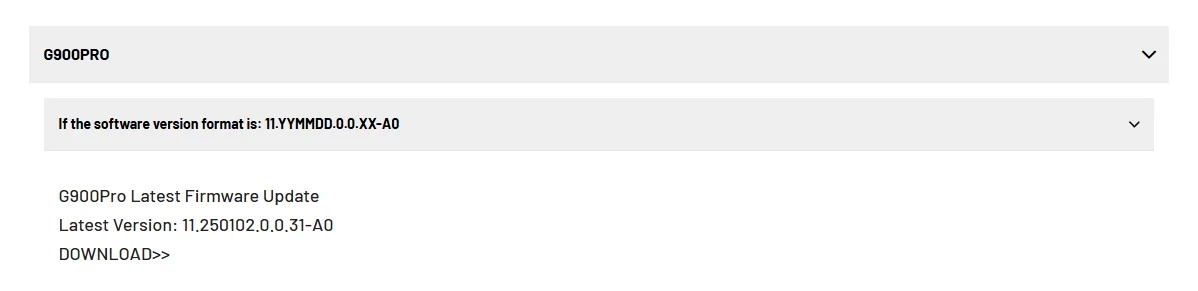
Click on the link posted in the initial post from OP. Scroll down and find your model. Click on it and it will expand The download link is the last line in the picture below (for the G900 Pro) "DOWNLOAD>>". That is the hyperlink to a google drive link.
1764030404395-xn.webp
 
OP
OP
WolfBox

WolfBox

Black Diamond
Well-Known Member
Squatch Sponsor (Level 3)
First Name
Florent
Joined
Oct 9, 2024
Threads
102
Messages
358
Reaction score
331
Location
LA
Vehicle(s)
2021 2dr Bronco
Your Bronco Model
Black Diamond
There is something that needs to be changed. Please wait for a while.
 

rayofsi

Raptor
Well-Known Member
Joined
Feb 14, 2022
Threads
25
Messages
567
Reaction score
532
Location
Staten Island, NY
Vehicle(s)
Raptor Gen2
Your Bronco Model
Raptor
Click on the link posted in the initial post from OP. Scroll down and find your model. Click on it and it will expand The download link is the last line in the picture below (for the G900 Pro) "DOWNLOAD>>". That is the hyperlink to a google drive link.
1764030404395-xn.webp
900 tripro and 900pro are not the same thing
Sponsored


Top