
Sponsored

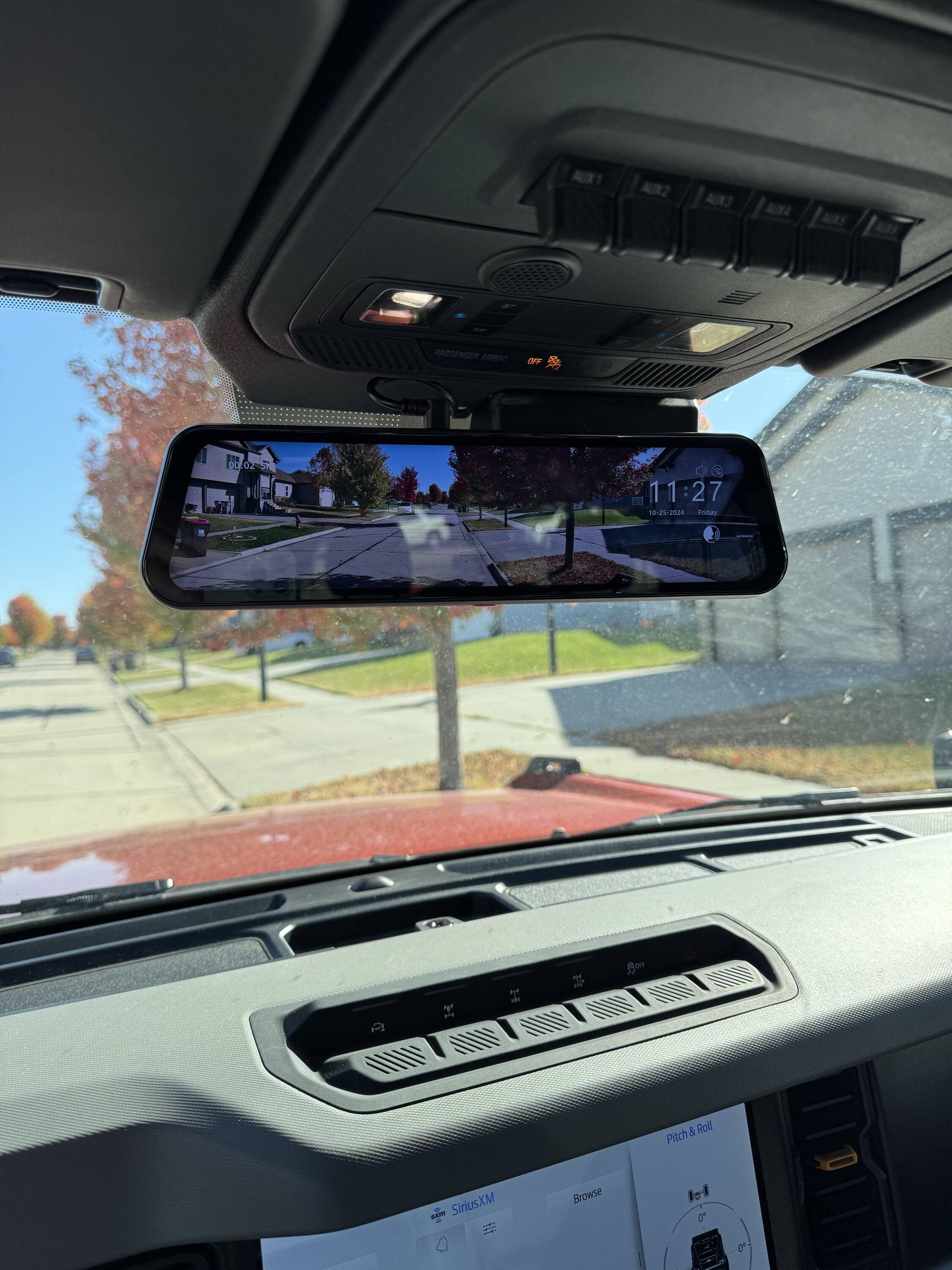
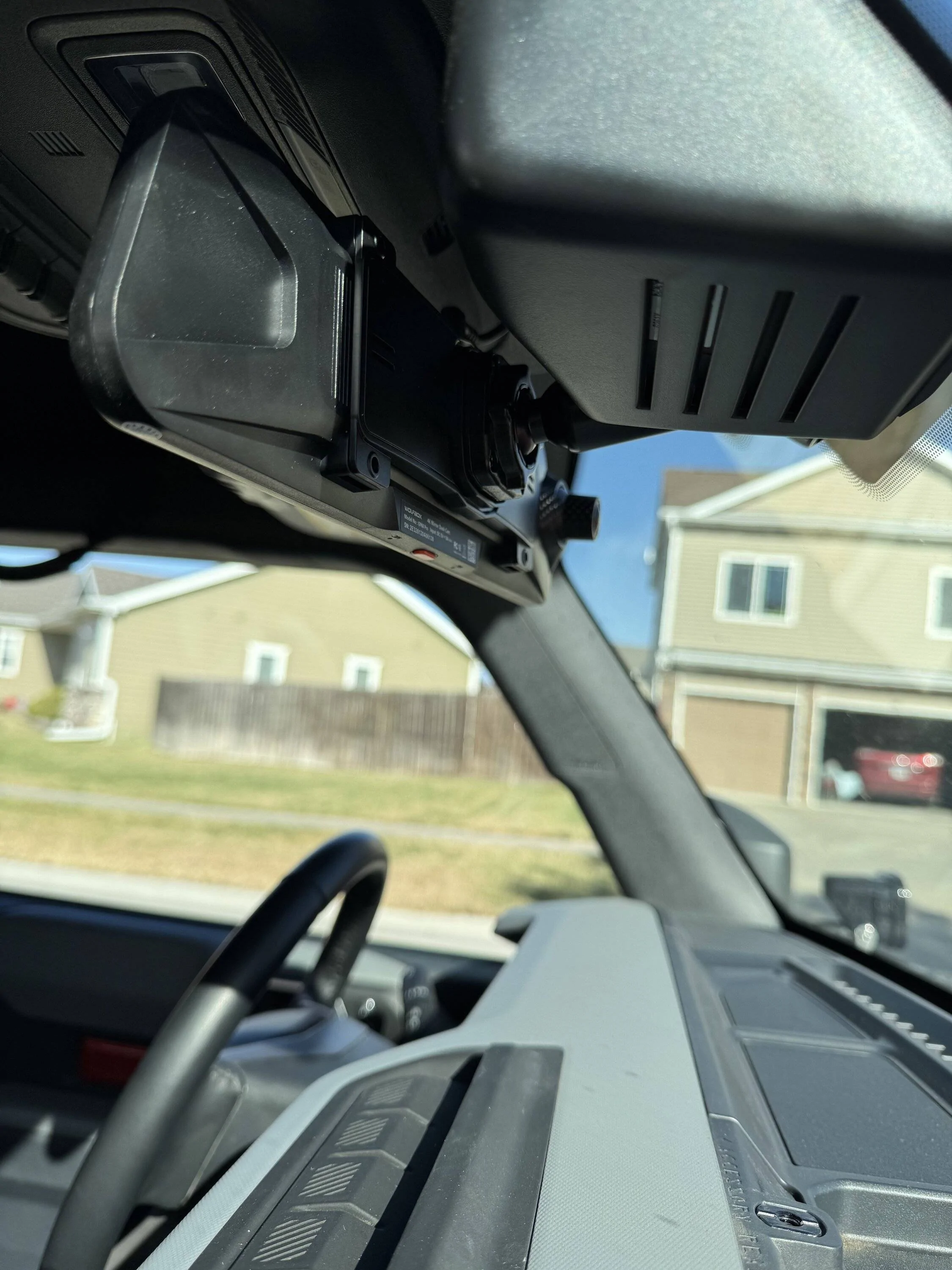
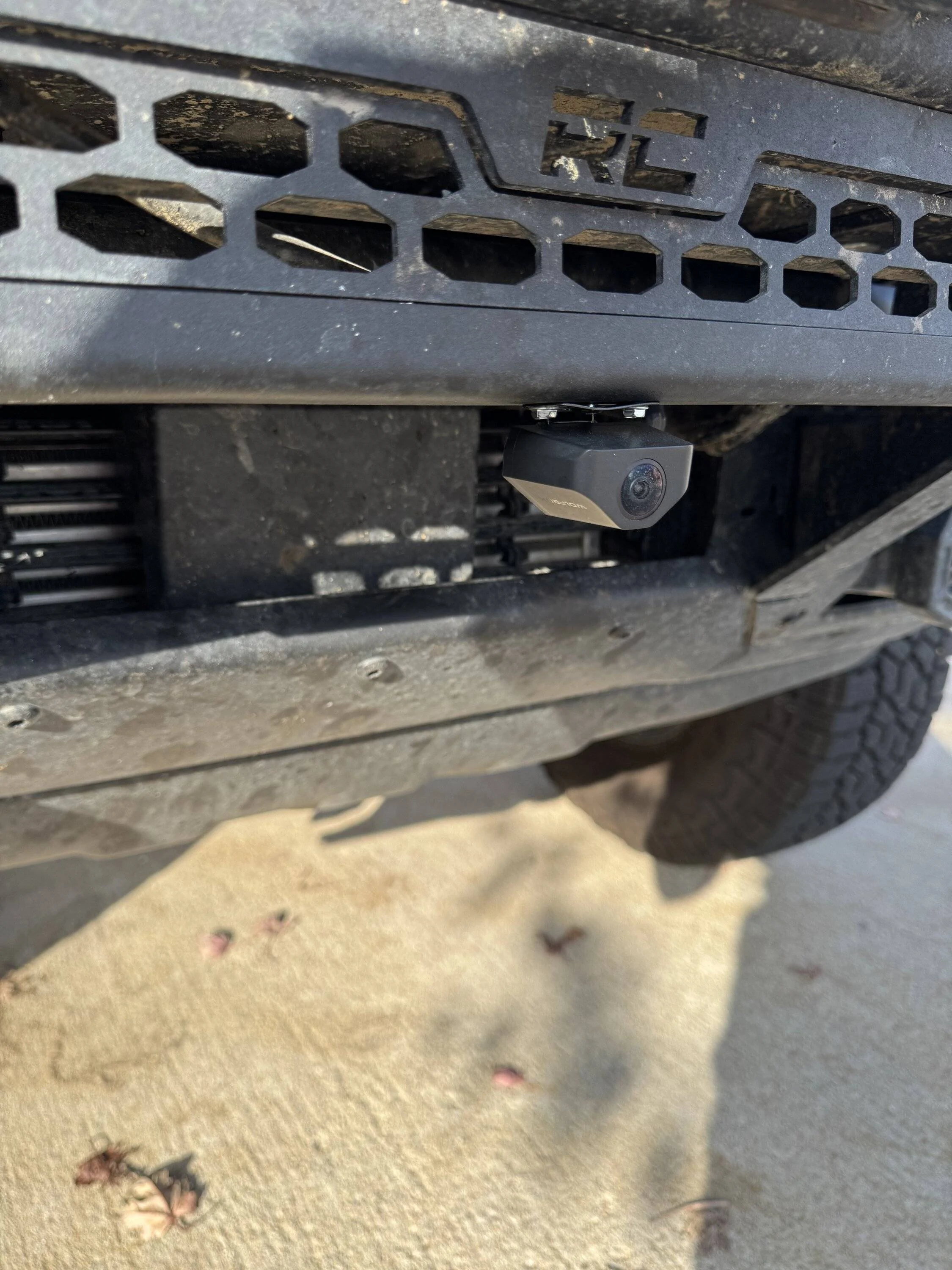
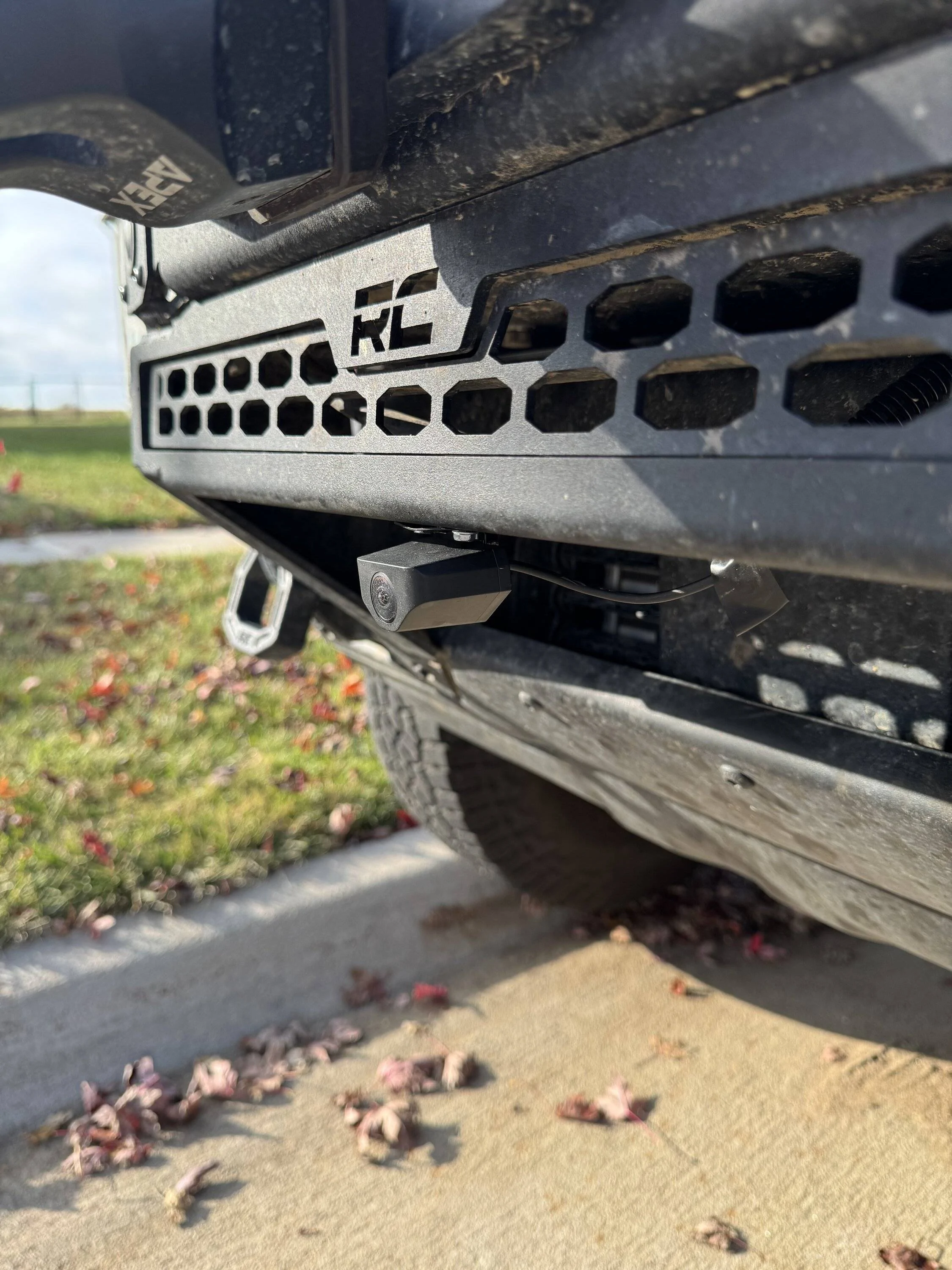
Wolfbox G900 Pro DashCam with the rear camera installed as a Front Trail camera.

raqball

Badlands
Well-Known Member
First Name
Kris
Joined
Mar 14, 2024
Threads
12
Messages
361
Reaction score
1,177
Location
WA
Vehicle(s)
2023 Ford Bronco Badlands 2DR
Your Bronco Model
Badlands
Wolfobx sent me the G900 Pro DashCam for free in exchange for sharing my thoughts on the system.

Photos and video samples provided at the end of this post.

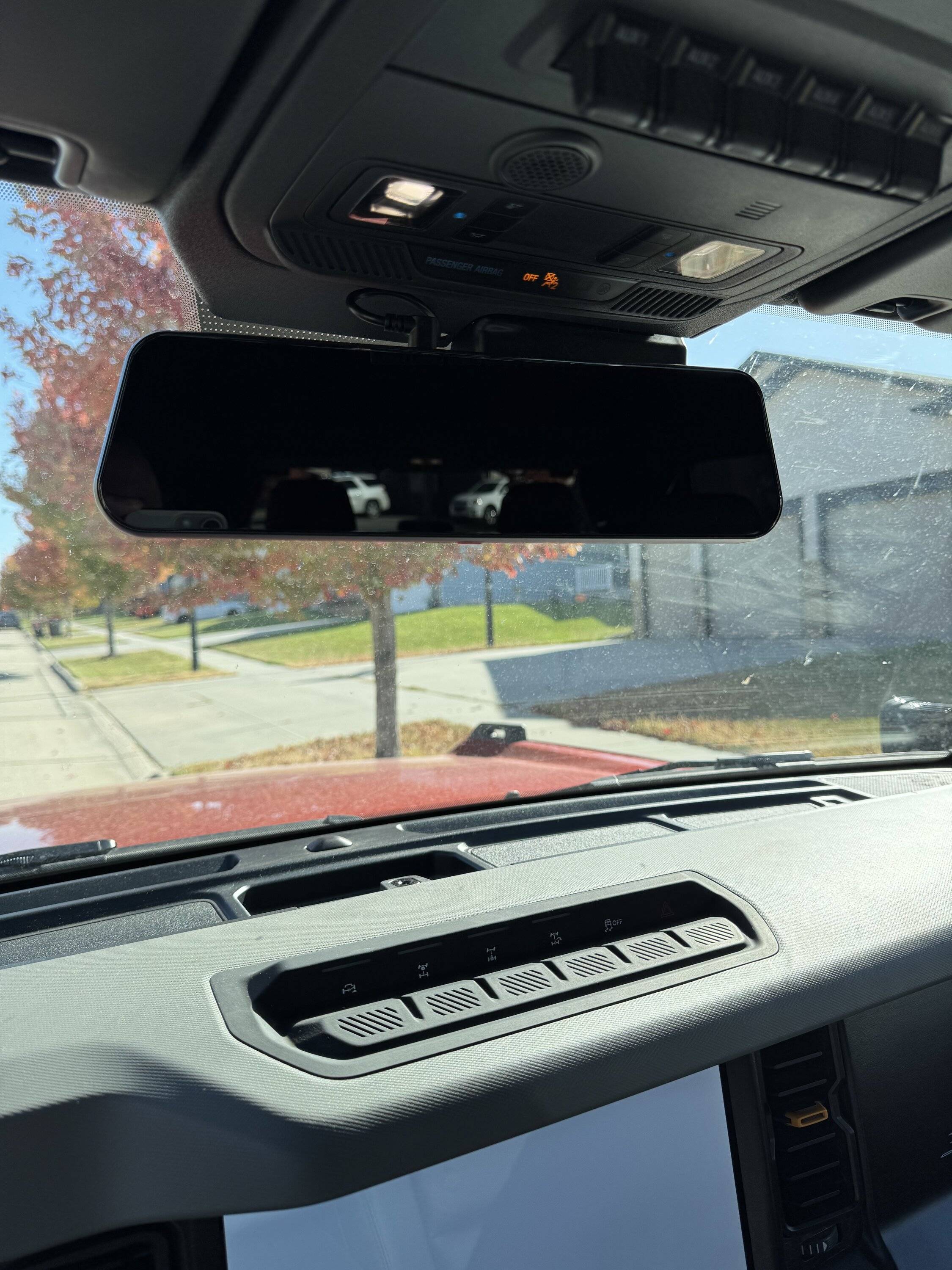
I got the mirror / dashcam and the 'rear' camera of the Wolfbox G900 Pro dash cam installed the other day. I installed the 'rear' / 'backup' camera as a front trail camera.

The camera comes with everything you need to get the install completed including all the required wiring and brackets.

Here is a link to the dash camera system:

https://wolfbox.com/products/wolfbo...dash-cam-smart-mirror-with-starvis-678-sensor

I also ordered a factory style rearview mirror mounting bracket for the Bronco. It can be seen here. If you order this, you need to choose FIT 1 for the Bronco.

https://wolfbox.com/products/wolfbox-oem-bracket-for-mirror-dash-cam-1?variant=47694764540193

The install was very easy and I ran the wiring from the mirror / dash camera down to the interior fusebox. Installing the mirror / dashcam took about 45 minutes and installing the 'rear' camera as a trail camera took me about 1 hour.

When wiring the system, you have a few options to consider.
  1. The Wolfbox has a parking mode where you'd need to wire it to be constantly on. The G9000 Pro has battery protection to protect the battery from draining when using parking mode.
  2. I wired to ignition on only as I will not use parking mode.
My main purpose for the dash camera system is for off-roading. I'll use it to capture videos on the trail. Installing the 'rear' camera as a front trail camera will assist when on the trail when a front trail view would be helpful.

I was limited on the placement of the 'rear' camera as a front trail camera due to my winch and winch mounting plate. This was the best spot I could find for it. It's, for the most part, tucked up close to the front bumper but I can see where if someone does extreme rock crawling, where they are bashing and scraping the front bumper, that the placement could be an issue. I am not an extreme rock crawler and have no plans to be one..

The camera quality is stellar. Not sure if the videos I will link below show the true quality of them as they will be compressed but both camera offers clear and crisp views.

I need to adjust the front dash cam to show less of the hood and I might need to adjust the front trail camera downward a little. I won't really know on the front trail camera angle until I get off road with it and test the angle of it on trails.

The system is voice controlled and you can say things like "Show Front Camera" and it will show video from the front camera on the rearview mirror. When I want to see the front trail camera I say " Show Rear Camera" and it's shows the front trail cameras video on the rearview mirrors screen.

There are a ton of settings and options you can change via the rearview mirror menu system. It came with a 128GB SD card and connects via wifi to download video clips. It also came with a GPS puck that can be installed if you want location and speed displayed but I did not install it as I do not need nor want that information..

I think this setup will do great for recording off-road adventures. I can capture off-roading on trails and not only record the front trails camera action, but use this front trail camera to see helpful views when cresting hills etc..

Here are 2 short videos showing footage from both cameras along with a few images of the dash camera and on where I mounted the 'rear camera' as a front trial camera.

.
Ford Bronco Wolfbox G900 Pro DashCam with the rear camera installed as a Front Trail camera. IMG_1023

Ford Bronco Wolfbox G900 Pro DashCam with the rear camera installed as a Front Trail camera. IMG_1024

Ford Bronco Wolfbox G900 Pro DashCam with the rear camera installed as a Front Trail camera. IMG_1026

Ford Bronco Wolfbox G900 Pro DashCam with the rear camera installed as a Front Trail camera. IMG_1032

Ford Bronco Wolfbox G900 Pro DashCam with the rear camera installed as a Front Trail camera. IMG_1033


G900 Pro Front DashCam Video


G900 Pro 'Rear / 'Backup' Camera - used as a Front Trail Camera

Sponsored


GSkipper

Big Bend
Active Member
First Name
Rich
Joined
Sep 25, 2024
Threads
2
Messages
37
Reaction score
16
Location
Michigan
Vehicle(s)
Jeep WJ
Your Bronco Model
Big Bend
Did you tie the “rear” camera to an aux switch with the signal feed lead/wire? I’m installing mine this weekend.
 
OP
OP
raqball

raqball

Badlands
Well-Known Member
First Name
Kris
Joined
Mar 14, 2024
Threads
12
Messages
361
Reaction score
1,177
Location
WA
Vehicle(s)
2023 Ford Bronco Badlands 2DR
Your Bronco Model
Badlands
Did you tie the “rear” camera to an aux switch with the signal feed lead/wire? I’m installing mine this weekend.
The 'rear' camera, since it's being used as a front trail camera, was just ran directly from the camera to the G900's mirror input..

I did not tie it into an aux switch as I want it always available and recording footage..

Hope that answers your question..
 

WolfBox

Black Diamond
Well-Known Member
Squatch Sponsor (Level 3)
First Name
Florent
Joined
Oct 9, 2024
Threads
94
Messages
335
Reaction score
315
Location
LA
Vehicle(s)
2021 2dr Bronco
Your Bronco Model
Black Diamond
Thanks for your honest review. Every adventure is worthy of being recorded. Waiting for your sharing 🍻
 
OP
OP
raqball

raqball

Badlands
Well-Known Member
First Name
Kris
Joined
Mar 14, 2024
Threads
12
Messages
361
Reaction score
1,177
Location
WA
Vehicle(s)
2023 Ford Bronco Badlands 2DR
Your Bronco Model
Badlands
I might try and move the camera up a little.

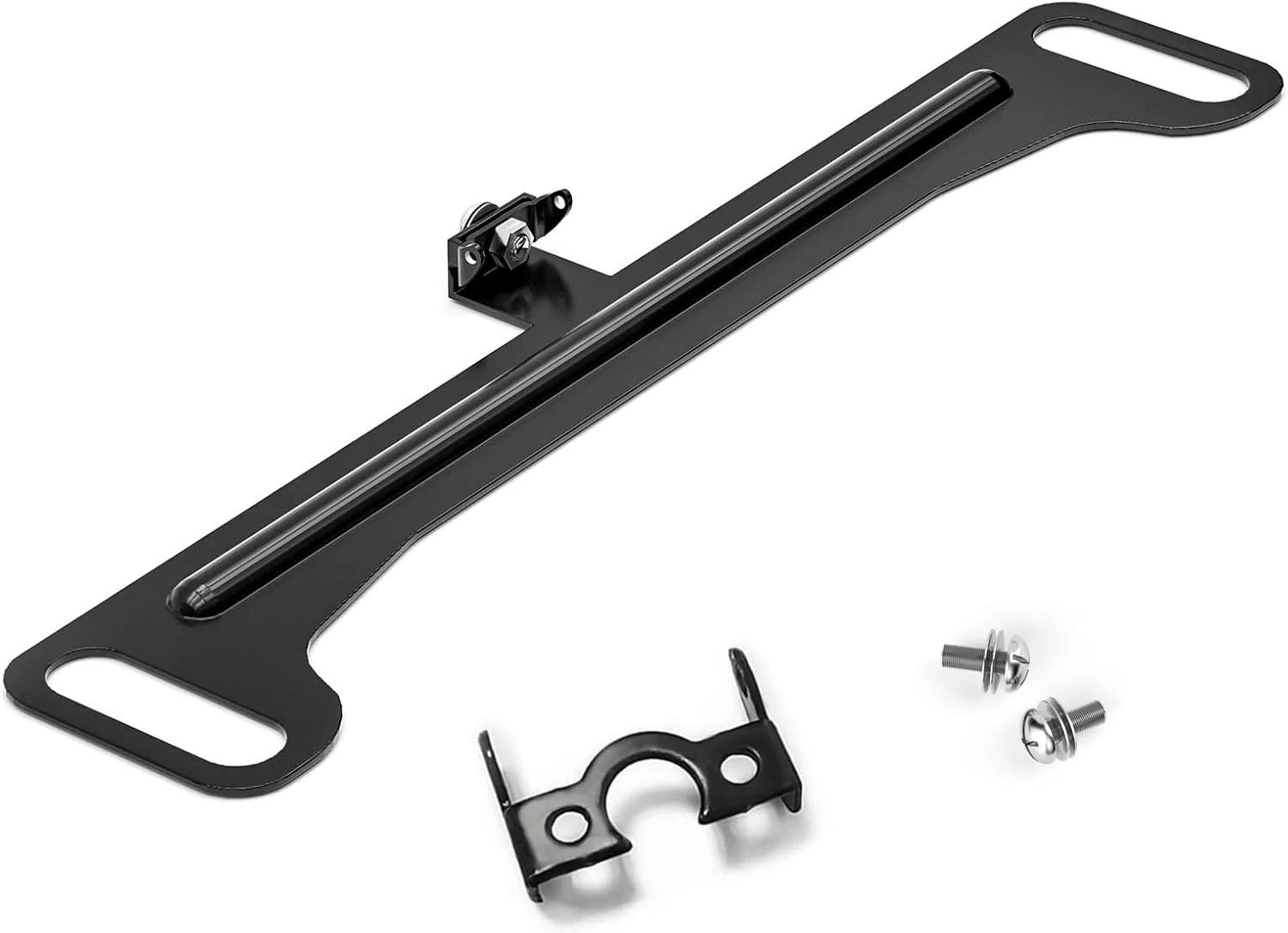
I ordered this license plate camera bracket. It's specifically for the G900 Pro 'rear' camera:

Ford Bronco Wolfbox G900 Pro DashCam with the rear camera installed as a Front Trail camera. data


My plan is to either mount it via screws or weld the bracket here in this location:

Ford Bronco Wolfbox G900 Pro DashCam with the rear camera installed as a Front Trail camera. data


Then mount the camera to the license plate bracket. This would give me more protection for the camera if I were to drag or scape the bumper when off-roading..

I should have the bracket Monday and I don't think it will take long to move the camera to the new location..

I'll update once I get it moved..
 

Sponsored

BoverW

Black Diamond
Well-Known Member
First Name
J
Joined
Mar 29, 2023
Threads
12
Messages
383
Reaction score
437
Location
Socal
Vehicle(s)
Bronco
Your Bronco Model
Black Diamond
Clubs
 
Thanks for your honest review. Every adventure is worthy of being recorded. Waiting for your sharing 🍻
I like this idea. Do you have a plan to extend it to a multi-camera system? Something like a 4 channel input would be great. (A front, back, two sides)
 

BadlandBill

Badlands
Well-Known Member
First Name
Bill
Joined
Oct 3, 2024
Threads
4
Messages
58
Reaction score
38
Location
Colorado
Vehicle(s)
2024
Your Bronco Model
Badlands
Clubs
 
Curious if instead of replacing the stock mirror if you could just mount the Wolfbox on the dash itself? I have the Bulletpoint system and would rather put it there.
 

C6ZZGT

Heritage
Well-Known Member
First Name
Brian
Joined
Aug 17, 2023
Threads
3
Messages
897
Reaction score
1,402
Location
Seattle
Vehicle(s)
66 GT Mustang,94 Escort wagon,
Your Bronco Model
Heritage
Wolfobx sent me the G900 Pro DashCam for free in exchange for sharing my thoughts on the system.

Photos and video samples provided at the end of this post.

I got the mirror / dashcam and the 'rear' camera of the Wolfbox G900 Pro dash cam installed the other day. I installed the 'rear' / 'backup' camera as a front trail camera.

The camera comes with everything you need to get the install completed including all the required wiring and brackets.

Here is a link to the dash camera system:

https://wolfbox.com/products/wolfbo...dash-cam-smart-mirror-with-starvis-678-sensor

I also ordered a factory style rearview mirror mounting bracket for the Bronco. It can be seen here. If you order this, you need to choose FIT 1 for the Bronco.

https://wolfbox.com/products/wolfbox-oem-bracket-for-mirror-dash-cam-1?variant=47694764540193

The install was very easy and I ran the wiring from the mirror / dash camera down to the interior fusebox. Installing the mirror / dashcam took about 45 minutes and installing the 'rear' camera as a trail camera took me about 1 hour.

When wiring the system, you have a few options to consider.
  1. The Wolfbox has a parking mode where you'd need to wire it to be constantly on. The G9000 Pro has battery protection to protect the battery from draining when using parking mode.
  2. I wired to ignition on only as I will not use parking mode.
My main purpose for the dash camera system is for off-roading. I'll use it to capture videos on the trail. Installing the 'rear' camera as a front trail camera will assist when on the trail when a front trail view would be helpful.

I was limited on the placement of the 'rear' camera as a front trail camera due to my winch and winch mounting plate. This was the best spot I could find for it. It's, for the most part, tucked up close to the front bumper but I can see where if someone does extreme rock crawling, where they are bashing and scraping the front bumper, that the placement could be an issue. I am not an extreme rock crawler and have no plans to be one..

The camera quality is stellar. Not sure if the videos I will link below show the true quality of them as they will be compressed but both camera offers clear and crisp views.

I need to adjust the front dash cam to show less of the hood and I might need to adjust the front trail camera downward a little. I won't really know on the front trail camera angle until I get off road with it and test the angle of it on trails.

The system is voice controlled and you can say things like "Show Front Camera" and it will show video from the front camera on the rearview mirror. When I want to see the front trail camera I say " Show Rear Camera" and it's shows the front trail cameras video on the rearview mirrors screen.

There are a ton of settings and options you can change via the rearview mirror menu system. It came with a 128GB SD card and connects via wifi to download video clips. It also came with a GPS puck that can be installed if you want location and speed displayed but I did not install it as I do not need nor want that information..

I think this setup will do great for recording off-road adventures. I can capture off-roading on trails and not only record the front trails camera action, but use this front trail camera to see helpful views when cresting hills etc..

Here are 2 short videos showing footage from both cameras along with a few images of the dash camera and on where I mounted the 'rear camera' as a front trial camera.

.
Ford Bronco {thread} {filename}

Ford Bronco {thread} {filename}

Ford Bronco {thread} {filename}

Ford Bronco {thread} {filename}

Ford Bronco {thread} {filename}


G900 Pro Front DashCam Video


G900 Pro 'Rear / 'Backup' Camera - used as a Front Trail Camera

@WolfBox

I believe this to be wider than the OE Bronco Mirror , How bad do the visors hit it ?
 

HighVelocity

Badlands
Well-Known Member
Joined
May 2, 2023
Threads
8
Messages
2,135
Reaction score
7,361
Location
Big Sky Country
Vehicle(s)
Pinto
Your Bronco Model
Badlands
@WolfBox I'd like to see a 2-channel version so I can have a camera in the front and rear.

Right now I use one (don't remember the model, 800-something) as a rear camera as I have the back 3 windows blocked out. Having the abilility to add a front camera would be great for my Bronco and I'd likely buy it for my F350 and F550 as well.
 

Sponsored

WolfBox

Black Diamond
Well-Known Member
Squatch Sponsor (Level 3)
First Name
Florent
Joined
Oct 9, 2024
Threads
94
Messages
335
Reaction score
315
Location
LA
Vehicle(s)
2021 2dr Bronco
Your Bronco Model
Black Diamond

WolfBox

Black Diamond
Well-Known Member
Squatch Sponsor (Level 3)
First Name
Florent
Joined
Oct 9, 2024
Threads
94
Messages
335
Reaction score
315
Location
LA
Vehicle(s)
2021 2dr Bronco
Your Bronco Model
Black Diamond
I like this idea. Do you have a plan to extend it to a multi-camera system? Something like a 4 channel input would be great. (A front, back, two sides)
Thanks for the idea. We may produce one in the future.
 

WolfBox

Black Diamond
Well-Known Member
Squatch Sponsor (Level 3)
First Name
Florent
Joined
Oct 9, 2024
Threads
94
Messages
335
Reaction score
315
Location
LA
Vehicle(s)
2021 2dr Bronco
Your Bronco Model
Black Diamond

WolfBox

Black Diamond
Well-Known Member
Squatch Sponsor (Level 3)
First Name
Florent
Joined
Oct 9, 2024
Threads
94
Messages
335
Reaction score
315
Location
LA
Vehicle(s)
2021 2dr Bronco
Your Bronco Model
Black Diamond
@WolfBox I'd like to see a 2-channel version so I can have a camera in the front and rear.

Right now I use one (don't remember the model, 800-something) as a rear camera as I have the back 3 windows blocked out. Having the abilility to add a front camera would be great for my Bronco and I'd likely buy it for my F350 and F550 as well.
Most of our products are 2-channel. Not sure if the current camera you using is WolfBox. If it is, please give me the model info, or a picture of firmware, so I can tell you if there's one unit that can compatible with it.
 

HighVelocity

Badlands
Well-Known Member
Joined
May 2, 2023
Threads
8
Messages
2,135
Reaction score
7,361
Location
Big Sky Country
Vehicle(s)
Pinto
Your Bronco Model
Badlands
Most of our products are 2-channel. Not sure if the current camera you using is WolfBox. If it is, please give me the model info, or a picture of firmware, so I can tell you if there's one unit that can compatible with it.
By 2-channel, I mean external to the one built into the mirror, so I guess 3-channel in your parlance.

Mine is a G840S, according to my Amazon purchase history.
Sponsored


Top