
Sponsored

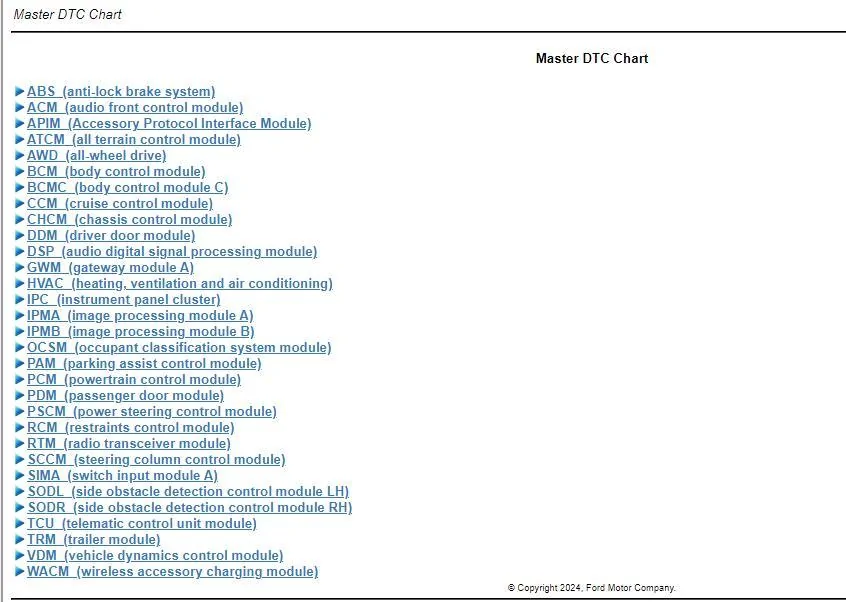
SOD-CMC module, who has this module?

Jms1

Badlands
Well-Known Member
First Name
John
Joined
Aug 5, 2020
Threads
19
Messages
153
Reaction score
125
Location
Oregon
Vehicle(s)
2022 Badlands
Your Bronco Model
Badlands
I have a 2022 Badland, Non SAS, 2.7 liter and my vehicle has a SOD-CMC module. I know the SOD stands for "side object detection" but do not know what the CMC stands for. I believe everyone has the SOD-LH and SOD-RH, meaning right and left hand. I have checked with other local Bronco owners to see if they have this module and they do not. Does anyone know what this is and do they happen to have it in their Bronco? It is currently throwing a code but everything works fine. If anyone had this module I would be curios as to what the settings are. Thanks.
Sponsored


 

RoverDude

First Edition
Well-Known Member
Joined
Oct 28, 2021
Threads
10
Messages
315
Reaction score
369
Location
Maryland
Vehicle(s)
2021 Bronco (First Edition)
Your Bronco Model
First Edition
Cmc stands for control module c,I believe that's the front driver 's side, and if forscan shows a CMD, that would be front passenger side , (control module D)

Not sure if that helps you at all, but that's what they stand for. Did you look up your factory asbuild for reference?
 
OP
OP
Jms1

Jms1

Badlands
Well-Known Member
First Name
John
Joined
Aug 5, 2020
Threads
19
Messages
153
Reaction score
125
Location
Oregon
Vehicle(s)
2022 Badlands
Your Bronco Model
Badlands
Cmc stands for control module c,I believe that's the front driver 's side, and if forscan shows a CMD, that would be front passenger side , (control module D)

Not sure if that helps you at all, but that's what they stand for. Did you look up your factory asbuild for reference?
Thanks for the reply. I looked up my factory as built from the Motorcraft website. That only shows the addresses for the different module settings, but I don’t know the address of the settings inside the SOD–CMC module. My sod-cmc module seems to be locked up. I know you can download, the factory as built off the Motorcraft website, but that requires FDRS to push the file. I have FDRS, but when I try to look up that particular module, it does not show up. So my hope was, if somebody else had that SOD – CMC module and they save the as built file for it or take a picture so I know the addresses I could manually enter them in via Forscan .
 

RoverDude

First Edition
Well-Known Member
Joined
Oct 28, 2021
Threads
10
Messages
315
Reaction score
369
Location
Maryland
Vehicle(s)
2021 Bronco (First Edition)
Your Bronco Model
First Edition
I do not follow exactly , The asbuilt data should have nothing to do with fdrs directly.
Meaning anyone can download any VIN number as build data, assuming they're not a robot and can correctly decipher three characters .

Out of curiosity, you say it's throwing codes in forscan? Can you take a screenshot or post the information related to that.
 

Hyins

Raptor
Member
Joined
Jan 30, 2022
Threads
0
Messages
5
Reaction score
5
Location
Santa Clara
Vehicle(s)
2024 Ford Bronco
Your Bronco Model
Raptor
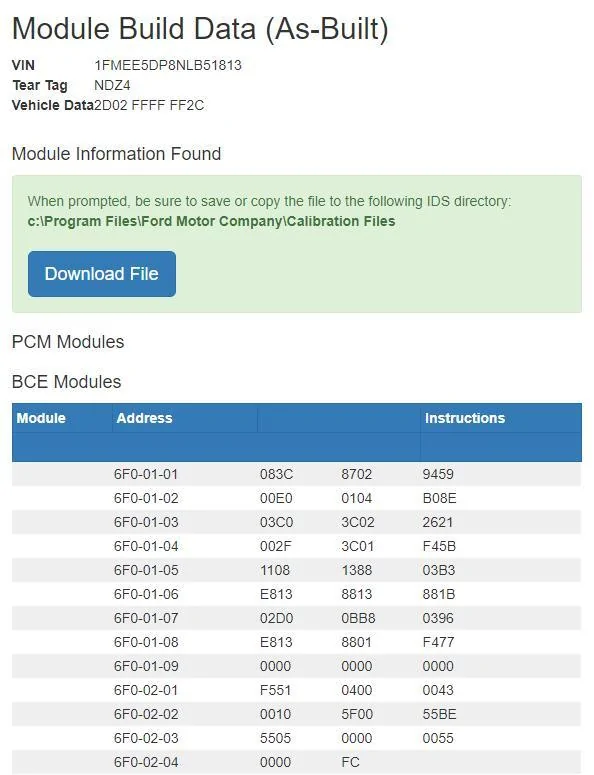
6F2 - Side Obstacle Detection Control Module C
 

Sponsored
OP
OP
Jms1

Jms1

Badlands
Well-Known Member
First Name
John
Joined
Aug 5, 2020
Threads
19
Messages
153
Reaction score
125
Location
Oregon
Vehicle(s)
2022 Badlands
Your Bronco Model
Badlands
6F2 - Side Obstacle Detection Control Module C
These are the only address lines that I have that start with 6F, would these be the correct ones for the sod-cmc module? This list I retrieved from the motorcraft service as-built site.

Ford Bronco SOD-CMC module, who has this module? MC address
 
OP
OP
Jms1

Jms1

Badlands
Well-Known Member
First Name
John
Joined
Aug 5, 2020
Threads
19
Messages
153
Reaction score
125
Location
Oregon
Vehicle(s)
2022 Badlands
Your Bronco Model
Badlands
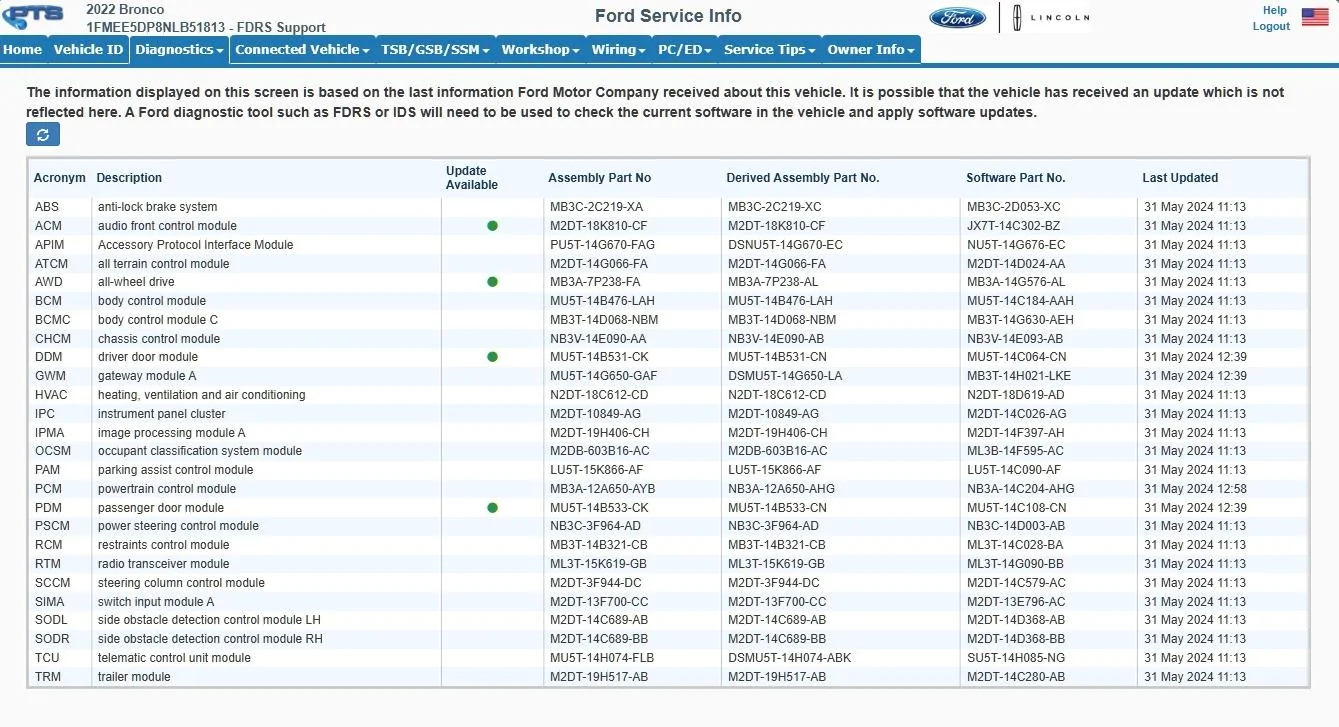
This is the same list I come up with when I use FDRS. I see no sod-cmc module present as well. However, I do see sod-LH and sod-RH. Now, using ForScan I am able to see the modules listed above and the sod-cmc module. If the sod-cmc module was present using FDRS I would just reprogram it and see if that resolves my error.
 
OP
OP
Jms1

Jms1

Badlands
Well-Known Member
First Name
John
Joined
Aug 5, 2020
Threads
19
Messages
153
Reaction score
125
Location
Oregon
Vehicle(s)
2022 Badlands
Your Bronco Model
Badlands
The "last update" date makes since, that was when we programed the Hoss 3.0 rack. When I had FDRS I made sure all the modules were updated. That list clearly does not show a sod-cmc module.
I am not sure why ForScan shows one and shows a DTC code P160A:00-2F associated with it. Everything still works on the vehicle correctly.
 

Sponsored
OP
OP
Jms1

Jms1

Badlands
Well-Known Member
First Name
John
Joined
Aug 5, 2020
Threads
19
Messages
153
Reaction score
125
Location
Oregon
Vehicle(s)
2022 Badlands
Your Bronco Model
Badlands
I do not follow exactly , The asbuilt data should have nothing to do with fdrs directly.
Meaning anyone can download any VIN number as build data, assuming they're not a robot and can correctly decipher three characters .

Out of curiosity, you say it's throwing codes in forscan? Can you take a screenshot or post the information related to that.
I have downloaded the as-built data, I just don't know what addresses are associated with what module without going through ForScan line for line. It is my understanding that the as-built file from the motorcraft site can not ne used in ForScan and the as-built file from ForScan can not be used in FDRS. The code that I have in ForScan is a DTC code P160A:00-2F, everything still works on the vehicle fine. No check engine light.
 

flip

Badlands
Well-Known Member
Base Sponsor (Level 1)
First Name
Phil
Joined
Jul 21, 2020
Threads
45
Messages
4,828
Reaction score
16,007
Location
IN
Website
www.ruxerparts.com
Vehicle(s)
Fords
Your Bronco Model
Badlands
Clubs
 
Let's start at the beginning. Not throwing a check engine light, no other driving concerns, correct? I'm looking at the VHR and that code, along with a couple others, has been in there since at least April 19. This is not the first I've seen with stuff in there which I call a relic due to the lack of an association with another problem AND doesn't have a diagnostic path that likely leads to a true issue.

Some of these, IMO, are probably due to a momentary network communications issue, software conflicts in coding or between modules or shit beyond my understanding. I can pull just about any bronco VHR and it will have some codes in the historical background. If the VHR has a code and TSB/SSM/GSB notation next to it, yea, maybe look it up and see what the publication says. Maybe there's a software update maybe just a message to ignore it if the vehicle doesn't exhibit an actual concern. If no concern is present, leave it be as a future OTA might come out to address it but I sure don't feel like this is a problem.
 
OP
OP
Jms1

Jms1

Badlands
Well-Known Member
First Name
John
Joined
Aug 5, 2020
Threads
19
Messages
153
Reaction score
125
Location
Oregon
Vehicle(s)
2022 Badlands
Your Bronco Model
Badlands
Let's start at the beginning. Not throwing a check engine light, no other driving concerns, correct? I'm looking at the VHR and that code, along with a couple others, has been in there since at least April 19. This is not the first I've seen with stuff in there which I call a relic due to the lack of an association with another problem AND doesn't have a diagnostic path that likely leads to a true issue.

Some of these, IMO, are probably due to a momentary network communications issue, software conflicts in coding or between modules or shit beyond my understanding. I can pull just about any bronco VHR and it will have some codes in the historical background. If the VHR has a code and TSB/SSM/GSB notation next to it, yea, maybe look it up and see what the publication says. Maybe there's a software update maybe just a message to ignore it if the vehicle doesn't exhibit an actual concern. If no concern is present, leave it be as a future OTA might come out to address it but I sure don't feel like this is a problem.
Correct, no check engine light and no driving concerns. Had I not logged in with ForScan I would have never seen the DTC code. When I pull the sod-cmc module up in ForScan I am not able to make any changes to it. Almost like it is not talking to it. So the next step would be to grab the as-built file we save in ForScan and send it to the module. However, like a complete dumb azz I did not have a copy of the as-built file is ForScan to try to write to it. I then tried to use the Motorcraft as-built file via ForScan to try to push the factory as-built to the sod-cmc module, but it would just lock up. I then learned that ForScan as-builts don't work with FDRS and Motorcraft as-builts don't work with ForScan. I figured no problem, I have a mongoose adapter so I will use FDRS to re-program the sod-cmc module. Using FDRS there is no sod-cmc module shown and as verified in the list of modules you provided. So this is the mystery, why does ForScan show a sod-cmc module but FDRS does not? I then started checking every Bronco I could to see if they had a sod-cmc module listed in ForScan. As of yet I have not found one. I thought if someone on here has one I could get a copy of the ForScan as-built file for that module and try to write it to mine.

Being that I am having no issue and any other DTC codes I should just leave well enough alone. My Hoss 3.0 has been perfect with no issues as well. I am just curious why the discrepancy between FDRS and ForScan and if we can solve the mystery.
 
OP
OP
Jms1

Jms1

Badlands
Well-Known Member
First Name
John
Joined
Aug 5, 2020
Threads
19
Messages
153
Reaction score
125
Location
Oregon
Vehicle(s)
2022 Badlands
Your Bronco Model
Badlands
Thank you to everyone for the help, I appreciate your time as well.
 

flip

Badlands
Well-Known Member
Base Sponsor (Level 1)
First Name
Phil
Joined
Jul 21, 2020
Threads
45
Messages
4,828
Reaction score
16,007
Location
IN
Website
www.ruxerparts.com
Vehicle(s)
Fords
Your Bronco Model
Badlands
Clubs
 
At most, make sure the FDRS is at the latest level. If not was not when the last programming was done there's an outside chance that was the cause. The pinpoint test for that specific code, assuming no other contributing factors, basically is circular. That means it says fix all other codes or faults first, make sure FDRS is up to date and try reprogramming the module (PCM) and hope it disappears.

By the history, I can't tell if you actually attempted the APIM update which requires a formatted flash drive to complete.
Sponsored


Top