
Sponsored

Kicker KEY500.1 sub amp initial settings?

box986

Heritage
Well-Known Member
First Name
Paul
Joined
Aug 7, 2024
Threads
17
Messages
196
Reaction score
113
Location
NNJ/NEPA
Vehicle(s)
23 GX460 22 Sport BB, 03 Caddy EXT PU, 96 Lincoln MarkVIII, 92 Toyota PU 4x4
Your Bronco Model
Heritage
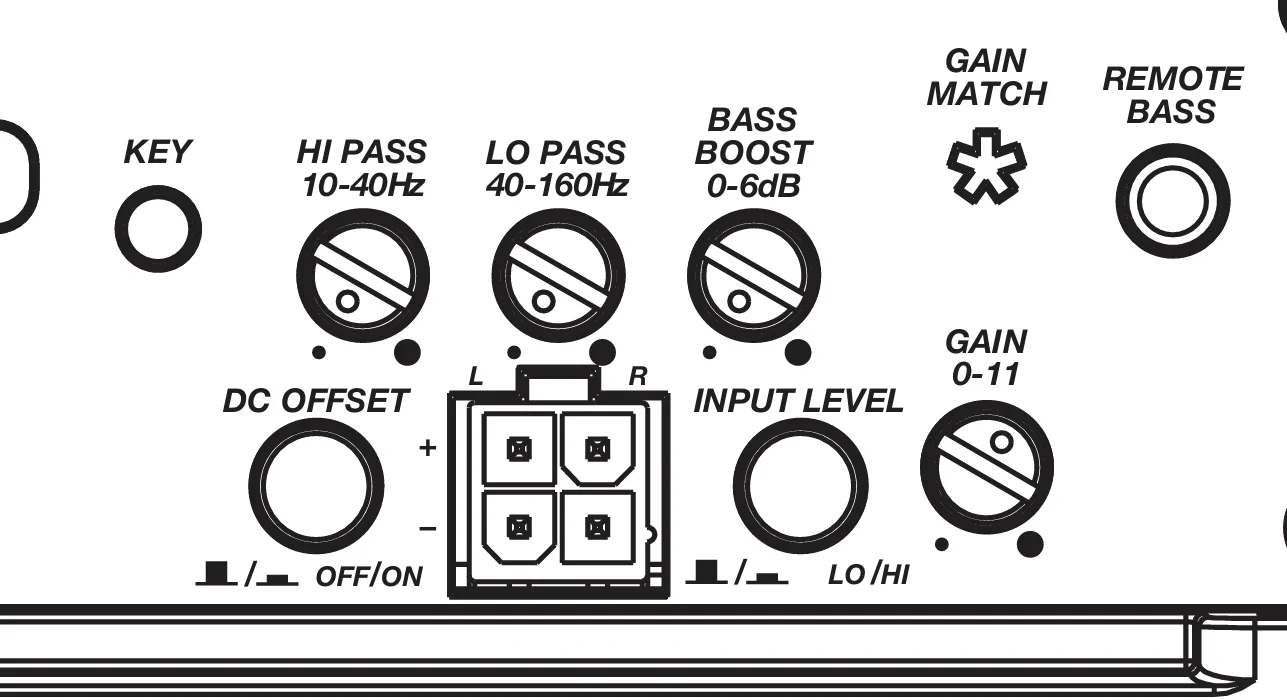
I have a '24 non-B&O system with the factory sub & amp swapped out for a Kicker 500.1 amp along with an 8" sub. Before I fire it up, just want to make sure the initial settings & 2 switches are good to go: I assume the input level switch should be set to "LO" (+ & - speaker input wires from the factory plug that fed the factory amp from the head unit are now plugged into the amp) & the DC Offset switch "off"? (I am not using any additional amps). Where should I start with lo & hi pass cutoffs? (my 6.5" Rockford rear pod speakers will be changed in Forscan to full, so they will be producing some bass). Bass boost & gain at 50%? (I do also have the remote knob gain control). Bass settings need to be changed from whatever the default is on the Sync audio settings? After all of that is complete, I will tackle the two KEY tuning settings with test tones which hopefully isn't that difficult to do? Thank you!

Ford Bronco Kicker KEY500.1 sub amp initial settings? am
Sponsored

 
Last edited:

RagnarKon

Badlands
Well-Known Member
First Name
Bryan
Joined
Aug 5, 2021
Threads
41
Messages
5,452
Reaction score
14,492
Location
New England
Vehicle(s)
Ford Bronco, Escape, Focus
Your Bronco Model
Badlands
Clubs
 
  • Input level: Low
  • Gain: 0 dB
  • High Pass: Default is probably fine, but ~25 Hz if you wanted to play it ultra safe.
  • Low Pass: Doesn't matter. 100 Hz is a good starter number.
  • Bass Boost 0 dB
  • DC Offset: Depends how you are triggering the on/off of the amplifier. If you are using the Remote line, it should be set to Off. If you are hoping the input signal turns it on, you should set it to On.
Note for the High/Low pass filter, you should open those up when you go to run the setup procedure on your 500.1. The setup procedure will guide you through the process to set the correct Gain value. If during the setup process the subwoofer flops around and start huffin' like a dying fish when playing lower frequencies, you can set that high-pass filter a little higher to avoid blowing the sub.

After the gain is set, you should set the high/low pass filters back to their appropriate values. For the high-pass filter, it'll probably be around 20-25 Hz, maybe as high as 30 Hz. For the low-pass filter, you can just do it by ear—whatever sounds the best.
 
Last edited:
OP
OP
box986

box986

Heritage
Well-Known Member
First Name
Paul
Joined
Aug 7, 2024
Threads
17
Messages
196
Reaction score
113
Location
NNJ/NEPA
Vehicle(s)
23 GX460 22 Sport BB, 03 Caddy EXT PU, 96 Lincoln MarkVIII, 92 Toyota PU 4x4
Your Bronco Model
Heritage
  • Input level: Low
  • Gain: 0 dB
  • High Pass: Default is probably fine, but ~25 Hz if you wanted to play it ultra safe.
  • Low Pass: Doesn't matter. 100 Hz is a good starter number.
  • Bass Boost 0 dB
  • DC Offset: Depends how you are triggering the on/off of the amplifier. If you are using the Remote line, it should be set to Off. If you are hoping the input signal turns it on, you should set it to On.
Note for the High/Low pass filter, you should open those up when you go to run the setup procedure on your 500.1. The setup procedure will guide you through the process to set the correct Gain value. If during the setup process the subwoofer flops around and start huffin' like a dying fish when playing lower frequencies, you can set that high-pass filter a little higher to avoid blowing the sub.

After the gain is set, you should set the high/low pass filters back to their appropriate values. For the high-pass filter, it'll probably be around 20-25 Hz, maybe as high as 30 Hz. For the low-pass filter, you can just do it by ear—whatever sounds the best.
Thank you for the great info!
Sponsored


Top