Sponsored

Can’t get trail app to work.

Phil B

Wildtrak
Well-Known Member
First Name
Phil
Joined
Jun 25, 2023
Threads
39
Messages
364
Reaction score
416
Location
Plano Texas
Vehicle(s)
2023 Bronco Wildtrak
Your Bronco Model
Wildtrak
Clubs
 
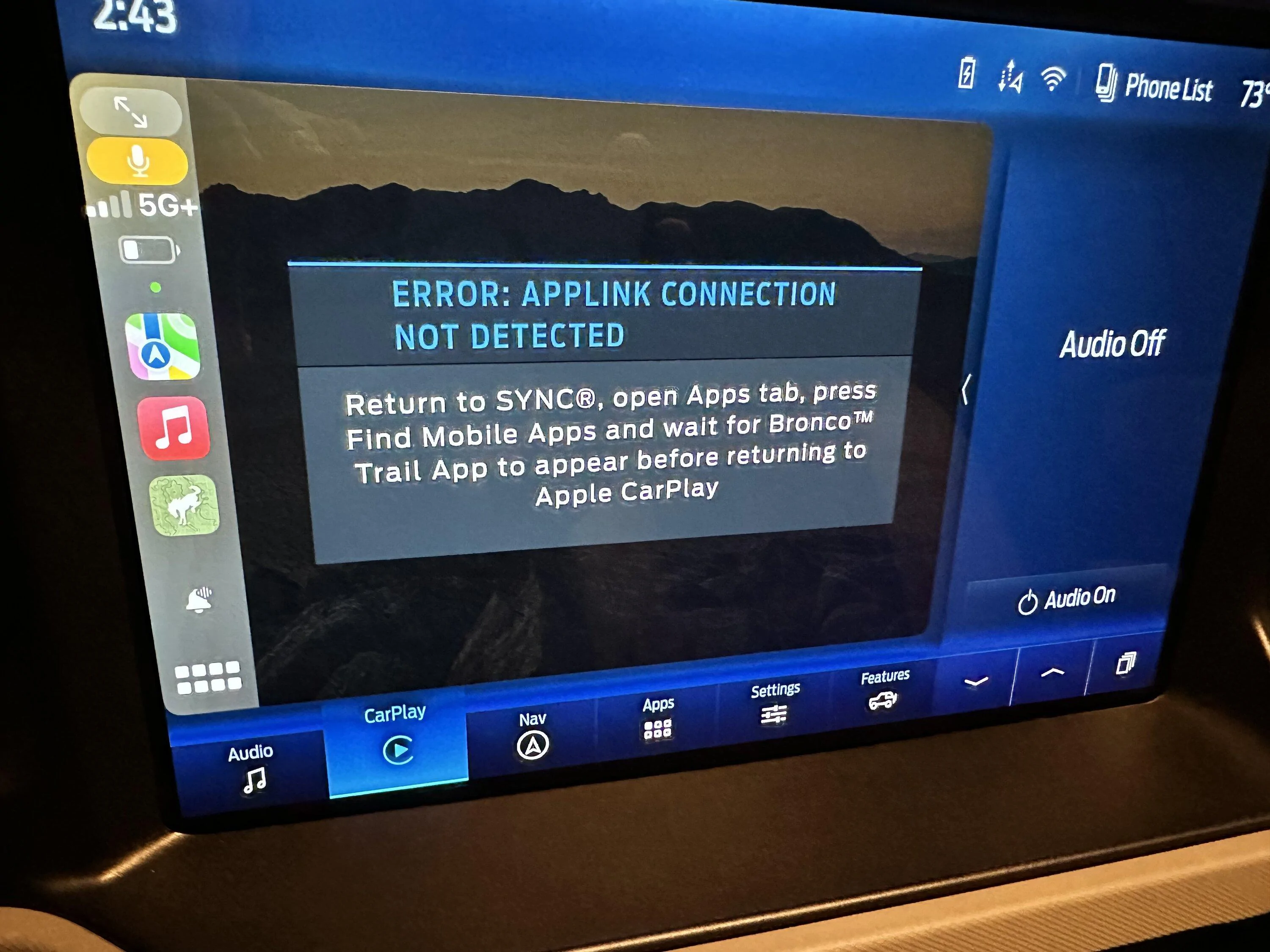
I cannot get the trail app to work. I’ve searched here, and it seems that I’m not alone, but I have not found a resolution. I reached out to Ford, and got a reply with troubleshooting steps. They did not fix the issue and I have not heard back from them. I have tried uninstalling and reinstalling both the trail app and Ford pass. The app worked for me when it first came out.


Ford Bronco Can’t get trail app to work. IMG_1805

This is the error message I get.

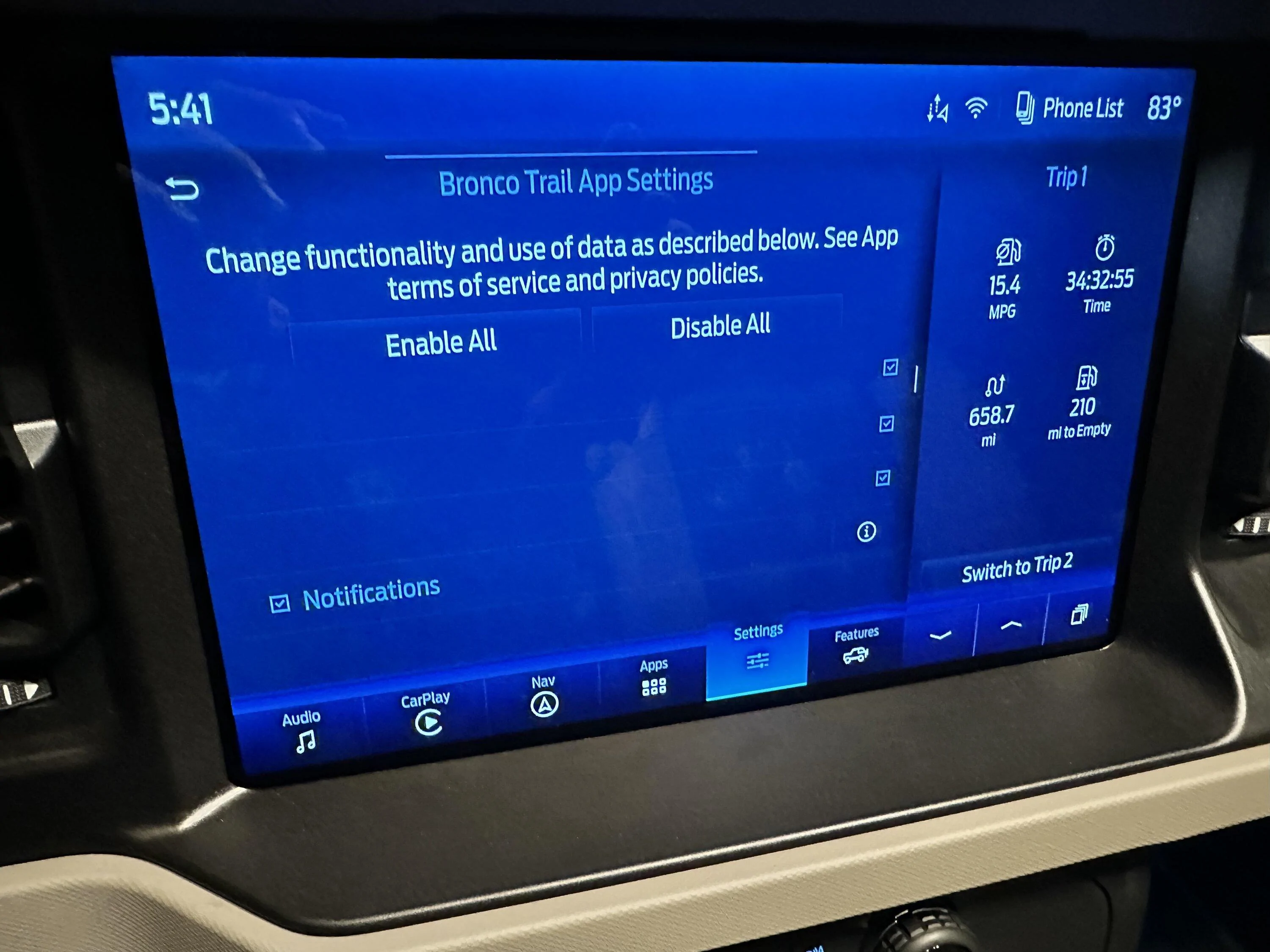
Below is the screen to enable/disable connectivity. It does not display correctly

Ford Bronco Can’t get trail app to work. IMG_1808
Sponsored


Taltyman

Raptor
Well-Known Member
First Name
Paul
Joined
Jul 19, 2020
Threads
13
Messages
435
Reaction score
506
Location
Forney tx
Vehicle(s)
Jeep wrangler Rubicon, Ford F350, Braptor
Your Bronco Model
Raptor
Clubs
 
I get an error trying to use the app on my iphone. Support said it was because I have a Raptor. Maybe it was the excuse of the day. I haven't tried it via sync.
 

OregonMike

Big Bend
Well-Known Member
First Name
Mike
Joined
Dec 2, 2021
Threads
6
Messages
180
Reaction score
357
Location
Gresham, OR
Vehicle(s)
2010 Fusion, 2021 Bronco
Your Bronco Model
Big Bend
Clubs
 
I haven't seen that second screen before. Odd.
I seem to be able to do everything except record video. I'm on v1.0.5 (iOS) of the app, Power-Up 4.2.3. Recording video used to work for me on 1.0.3. A buddy of mine was able to record video on 1.0.5 the other day, so I have no idea what's up.

I've found I rarely get that AppLink error if I'm using wired CarPlay. But it's not consistent. Sometimes the app will launch just fine via wireless CarPlay, but some of the controls will be disabled.

They still have a lot of work to do on this thing.
 

Brian_B

Big Bend
Well-Known Member
First Name
Brian
Joined
Sep 14, 2023
Threads
65
Messages
8,976
Reaction score
16,043
Location
Central CA
Vehicle(s)
'23 BB 4dr 7MT, '22 BSport OBX, '87 B-II XL
Your Bronco Model
Big Bend
Clubs
 
I get the OP's first error message occasionally when I'm out and shutdown and startup the Bronco occasionally. Sometimes force quitting the app on the phone will work. Once I got it to work by making it quit on Sync (on Sync go to Apps -> Bronco Trail App and like the only option there was something like "Quit the App Link"). Sometimes stopping and restarting the Bronco will work. Sometimes just letting it sit there a minute will work. Sometimes nothing works and it sucks.

When I went to Off-Roadeo a couple of weekends ago, I couldn't get it to work at all with the provided Bronco (same error you are having), but it worked just fine in my own Bronco when I got back to that. That said, I didn't exactly have a lot of time to fiddle with it in what amounts to a rental car, so I ended up using a free OnX account to keep an eye on the trail while we were out.

The second error message - the app needs a ton of permissions on your phone. You have to be on the phone to do it - it wants all your location/photos/camera/etc. I did see that once when I had deleted the app (I choked it trying to download too many offline maps at once) and re-installed it. On an iPhone you can go to Settings -> Bronco Trail App (down near the bottom) and turn on all the permissions.

I also will occasionally get the "You need to sign in" error out in the middle of nowhere when the phone gets 1 bar of service randomly then drops, and won't let me back in.

I've never tried to record video or anything. I hit the button on accident once and the app crashed - so I just left it at that. I chuckled at the tire pressure thing - the app says "Use this to air your tires down and up" and then elsewhere Ford explicitly says "DO NOT USE TPMS TO AIR UP YOUR TIRES", which is all the Trails app is doing. So .. yeah.

It's frustrating. I kinda like the app when it works, but I wouldn't depend on it, it's got issues like this. Most of the time the Trail App will still work on the phone even if it's not syncing to CarPlay, but not if it hits that "Sign in" error. All the other ones I've tried require some sort of subscription to work with Carplay/Android, but I haven't just jumped on them and subscribed.

OnX has a free 7-day trial (and if you are cheap or only go out once in a blue moon you can just cycle Gmail accounts). Trails Offroad will work on the phone for free but requires a sub for Carplay and offline maps. Gaia I think is similar to Trails Offroad but i haven't played with it too much. I did have some luck with OnX but haven't used it enough to get comfortable with it. Probably matters if you have people you go running out with, what app they like to use.

With the issue with the Off-Roadeo truck I had, and kinda looking around, I wonder if the app VIN-locks your vehicle to your account... so if you have bought a used Bronco and the original owner signed in, or if you trade in for another Bronco, does it screw you? I don't know that for sure, and it would be dumb, but there are a lot of dumb things about the way Ford has handled this app - which could be great.
Sponsored

 
Last edited:


Top