Sponsored
OP
OP
Superchips_Mktg

Superchips_Mktg

Well-Known Member
Squatch Sponsor (Level 3)
First Name
Jacob
Joined
Aug 26, 2021
Threads
28
Messages
256
Reaction score
456
Location
Sanford, FL
Website
www.holley.com
Vehicle(s)
2022 Bronco
Your Bronco Model
Undecided
Anyone that got the lovely check 4x4 wrench had any success yesterday with superchips support?
I have no reports of anyone calling in yet. We're here to help, and want to resolve any issues that are reported, but we need to communicate with anyone having issues to be able to help.
We can pull logs from your device, troubleshoot, check configs, etc.
407-585-7000 or [email protected]
Sponsored
 

Tybh88

Black Diamond
Well-Known Member
First Name
Tyler
Joined
Aug 12, 2025
Threads
2
Messages
172
Reaction score
219
Location
Virginia
Vehicle(s)
Bronco
Your Bronco Model
Black Diamond
I have no reports of anyone calling in yet. We're here to help, and want to resolve any issues that are reported, but we need to communicate with anyone having issues to be able to help.
We can pull logs from your device, troubleshoot, check configs, etc.
407-585-7000 or [email protected]
Hopefully i can get a chance during business hours. Might have to wait until i get a day off.
 

Hammerli22

Badlands
Well-Known Member
Joined
Oct 27, 2024
Threads
5
Messages
129
Reaction score
152
Location
California
Vehicle(s)
Isuzu Rodeo
Your Bronco Model
Badlands
If there's a feature or option that you don't see listed, but would love to have, we'd love to hear it!
1. Does this configure tow mode options if you installed a Ford OEM tow module and hitch.
2. Does this configure the bronco if you added a OEM winch?
Basically I'm asking does it do the same thing that I would have to pay the dealer to do after installing these things ?
 

Sponsored
First Name
GARY
Joined
Oct 15, 2023
Threads
1
Messages
24
Reaction score
17
Location
OVIEDO FLORIDA
Vehicle(s)
TR6(x10)TR4A(x2)SpitfireVOLVO245DLBMWE36M3RAM1500
Your Bronco Model
Badlands
Please feel free to email if that makes it easier. [email protected]
They'll want as much info as possible and may ask you to submit the bug report through the app.
Thanks for the response. Good idea. SuperChips shop on Airport Blvd Sanford is 10 miles down the 417 from my house in Oviedo. I remember visiting there years ago > I used to work at Grassroots Motorsports Magazine in Ormond Bch. Super Chips was an advertiser and project car sponsor. I'll send an Email soon with as much detail as i can think up to give the Tech guy the best chance to figure out my Front Fog don't work problem. If you need a Guinea pig 2023 Badlands 2.3L 7MT mine could be available. It's my toy not my daily driver. And YES please to add REAR FOG option when available.. Front and Rears are wired and installed. LET THERE BE LIGHT Cheers gary
 

BlueDewey

Badlands
Member
First Name
Dewey
Joined
Feb 20, 2026
Threads
1
Messages
6
Reaction score
5
Location
Georgia, USA
Vehicle(s)
Bronco Badlands
Your Bronco Model
Badlands
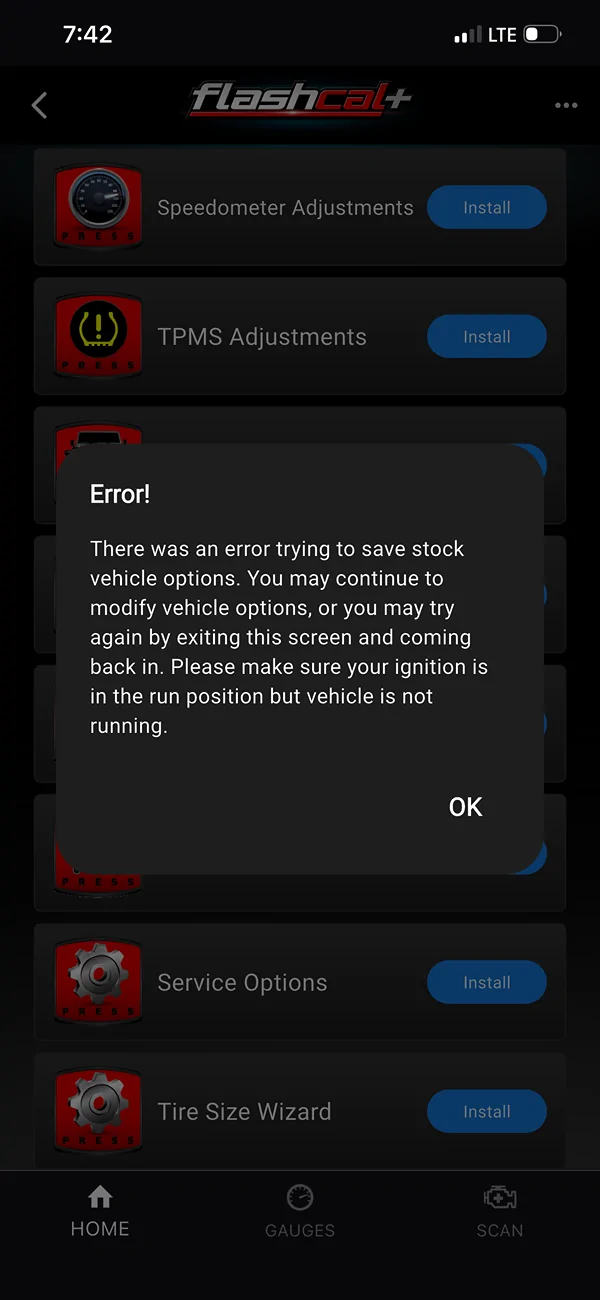
Received module, unable to upload data for Goat modes.
Says it's not allowed on my 25 Badlands.
In fact, it doesn't load up any GOAT modes, all say they are unavailable and not allowed.

Doesnt modify lights, nothing...

I do have the Ford Performance Procal in play.
2.7 auto

Ford Bronco NEW Flashcal+ Bronco Support! IMG_4162
 
Last edited:

RagnarKon

Badlands
Well-Known Member
First Name
Bryan
Joined
Aug 5, 2021
Threads
41
Messages
5,470
Reaction score
14,530
Location
New England
Vehicle(s)
Ford Bronco, Escape, Focus
Your Bronco Model
Badlands
Clubs
 
What is a "rear fog"?
It's a rear fog light—basically a chase light. Required in certain markets where the Bronco is sold.

Not required in North America, so it's not included in the American-spec Bronco, and therefore feature is disabled.

If you enable it you also need a new light switch panel and some wiring to make it actually work.
 

Sponsored

Nick72

Outer Banks
Well-Known Member
First Name
Nick
Joined
Nov 29, 2020
Threads
4
Messages
148
Reaction score
190
Location
North GA
Vehicle(s)
2021 Bronco Base(Traded), 2025 Bronco Outer Banks
Your Bronco Model
Outer Banks
Clubs
 
Received module, unable to upload data for Goat modes.
Says it's not allowed on my 25 Badlands.
In fact, it doesn't load up any GOAT modes, all say they are unavailable and not allowed.

Doesnt modify lights, nothing...

I do have the Ford Performance Procal in play.
2.7 auto

IMG_4162.webp
I got the same thing the first time I tried it.
I did closed the app, removed and reinstalled the module, turned ignition back on to run, opened app and updated the device.
I have not receive that message since.
 

Nick72

Outer Banks
Well-Known Member
First Name
Nick
Joined
Nov 29, 2020
Threads
4
Messages
148
Reaction score
190
Location
North GA
Vehicle(s)
2021 Bronco Base(Traded), 2025 Bronco Outer Banks
Your Bronco Model
Outer Banks
Clubs
 
Thanks for the response. Good idea. SuperChips shop on Airport Blvd Sanford is 10 miles down the 417 from my house in Oviedo. I remember visiting there years ago > I used to work at Grassroots Motorsports Magazine in Ormond Bch. Super Chips was an advertiser and project car sponsor. I'll send an Email soon with as much detail as i can think up to give the Tech guy the best chance to figure out my Front Fog don't work problem. If you need a Guinea pig 2023 Badlands 2.3L 7MT mine could be available. It's my toy not my daily driver. And YES please to add REAR FOG option when available.. Front and Rears are wired and installed. LET THERE BE LIGHT Cheers gary
What did you use and where did you mount the rear fog?
 

JiuJitsuJoe

Badlands
Well-Known Member
First Name
Joe
Joined
Jul 30, 2020
Threads
0
Messages
45
Reaction score
150
Location
Irvine, CA
Vehicle(s)
2025 Bronco Badlands
Your Bronco Model
Badlands
Hi y’all,
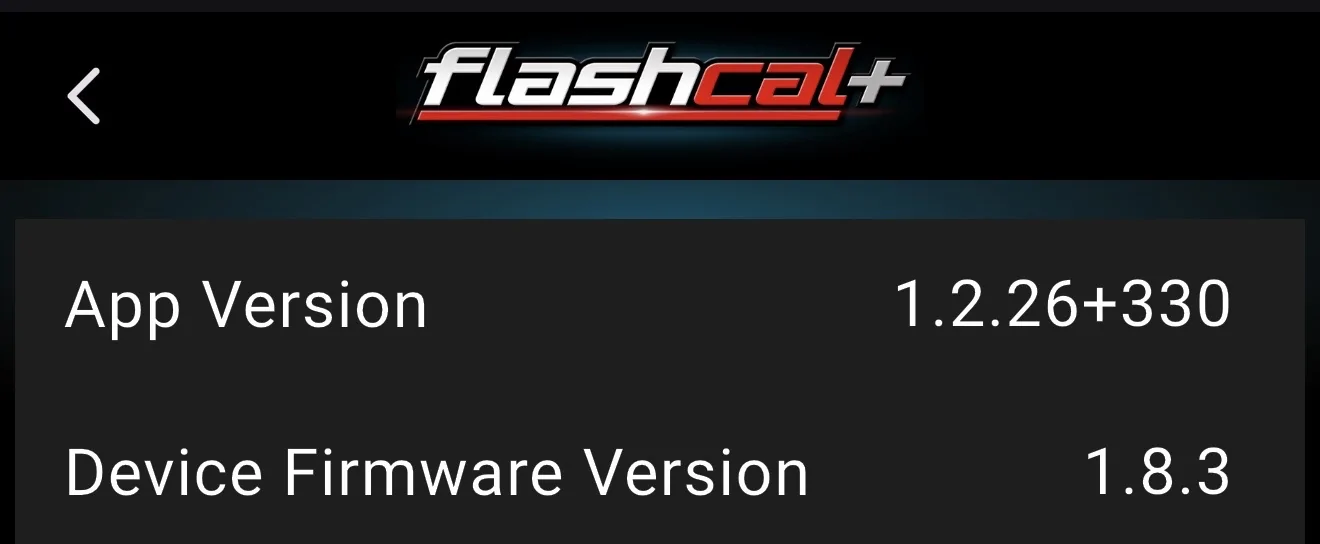
Is 1.8.3 the most updated version of the device firmware?
Ford Bronco NEW Flashcal+ Bronco Support! IMG_8763
 

CrystalRedTintCoat

Wildtrak
Well-Known Member
First Name
BertJ
Joined
Nov 14, 2022
Threads
16
Messages
306
Reaction score
283
Location
Bay Area
Vehicle(s)
‘22 Bronco Wildtrak; ‘13 Camaro 1LE
Your Bronco Model
Wildtrak
You can download the app, open it in Demo mode, and see all of these descriptions as well, if you'd like.
Only one it wont open is the GOAT mode menu as it wants to read the current modes from the Bronco before it displays anything.
AI to the rescue …

Audio Configuration

These control the factory audio system’s DSP (digital signal processing), noise management, and speaker configuration (useful after speaker upgrades, non-B&O systems, or when disabling synthetic sounds).

• Equalizer Assist – Enable/Disable: Turns on/off assisted/equalized audio processing that helps balance or optimize the sound across the speaker system (related to Ford’s audio management features).

• Fake Engine Noise – Enable/Disable: Controls Engine Sound Enhancement (ESE). When enabled, the system plays artificial/enhanced engine sounds through the cabin speakers (especially under load or acceleration) to make the EcoBoost engines sound more aggressive. Disabling it removes the synthetic noise so you mainly hear the real exhaust/engine.

• Active Noise Cancellation – Enable/Disable: Controls Active Noise Control/Cancellation (ANC). Microphones detect unwanted low-frequency engine, road, or wind noise and the speakers play opposing sound waves to cancel it, quieting the cabin. Disabling it turns off this processing.

• Front Door/Dash Speakers, Front Center Speaker, Rear Pod Speakers, Subwoofer Speaker (options like Speaker Only / Tweeter Only / Speaker and Tweeter / No Speaker / B&O Speakers, etc.): Tells the audio control module what speakers are actually installed and how to process/route the signal. This is commonly used after aftermarket speaker swaps or to match non-Bang & Olufsen systems so the amp/DSP behaves correctly and avoids issues or incorrect output.

GOAT Modes

These toggle the availability of individual G.O.A.T. (Goes Over Any Type of Terrain) drive modes in the vehicle’s selector. Enabling a mode that your trim/year supports (or that the programming allows) adds it to the available options; disabling removes it. The modes themselves adjust throttle response, transmission behavior, traction/stability control, steering, locking differentials (where equipped), and 4x4 settings for the described conditions. Notes in your list already cover year/engine limits.

• Sport Mode: Sharper/more aggressive throttle response and sportier steering/shift behavior for on-road driving.

• Rock Crawl Mode: Low-speed precision mode; often engages 4-Low and differential locks (where available) for controlled crawling over rocks/obstacles.

• Baja Mode: High-speed off-road oriented (less traction intervention, sharper response) suited to desert/sand running.

• Off-Road Mode: General off-road calibration (available on certain later/Raptor models).

• Slippery Mode: Reduced wheelspin and more conservative traction control for rain, ice, or slick surfaces.

• Tow Mode: Optimized for towing (throttle, shifts, cooling behavior).

• Eco Mode: Softer throttle and earlier upshifts for better fuel economy (mainly 2.3L/2.7L).

• Mud/Ruts Mode: Settings that help maintain momentum and manage traction in soft, rutted, or muddy terrain.

• Sand/Snow Mode: Calibrated for loose surfaces (sand or snow) to help with flotation and controlled wheelspin.


Lighting Configuration

• Daytime Running Lights – Enable/Disable: Turns DRLs on or off.

• Fog Lights – Enable/Disable: Controls fog light availability/behavior (often used with “Bambi Mode” style settings that allow fog lights with high beams on some setups).

• Lock Feedback Light – Enable/Disable: Controls whether exterior lights flash as confirmation when locking/unlocking.

• Headlamps Position – Auto Lamps / Last Known: Sets whether headlights return to Auto or stay at the last manual setting after the vehicle is turned off/restarted.

• Auto Lights Delay: How long the headlights stay on after you exit and lock the vehicle (0–120 seconds options).


Service Options

• Recalibrate Speedometer – Enable/Disable: Related to triggering or allowing a speedometer/odometer recalibration process (pairs with the tire size tools).


Speedometer Adjustments

• Tire Size (Imperial & Metric) – Height 28.25”–36.25” (with Aspect Ratio input): Manually enters new overall tire diameter (and related aspect ratio data) so the speedometer, odometer, and related systems (including some transmission/gear calculations) read accurately after larger tires.

TPMS Adjustments

• TPMS Alert Threshold Front / Rear (1–90): Sets the low-pressure warning thresholds (in psi) for front and rear tires independently.

• TPMS Enable/Disable: Turns the Tire Pressure Monitoring System on or off entirely.


Tire Size Wizard

• GPS Based Tire Size Wizard: Uses GPS speed data (while driving) to help calculate and set the correct tire size calibration automatically for more accurate speedometer results.


Vehicle Configuration

These are mostly convenience, security, and comfort settings:

• Auto Lock / Auto Relock / Auto Unlock: Control automatic door locking when driving, relocking after unlock if no door is opened, and unlocking behavior.

• Door Chime – Enable/Disable: Turns the door-open/ignition warning chime on or off.

• Engine Shutdown – Enable/Disable: Related to automatic engine-off behavior in certain conditions (often tied to key/fob or idle features).

• Global Windows Down / Up: Allows all power windows to open or close via the key fob (or similar remote command).

• Honk Warning – Enable/Disable: Disables the double-honk (or similar) warning when exiting with the engine running or other key-fob related alerts.

• Lock Feedback Light: (Also appears under Lighting) Exterior light flash on lock/unlock.

• Navigation in Motion – Enable/Disable: Allows or restricts full navigation input/operation while the vehicle is moving.

• Panic Alarm – Disable / Single Press / Double Press: Configures how the panic/alarm is triggered from the key fob.

• Power Point Timeout: How long 12V power outlets stay powered after the vehicle is turned off (or disables the timeout).

• Remote Start Duration: How long the engine runs on a remote start (or disables it).

• Remote Unlock – Driver’s Door / All Doors: Sets whether the first unlock only opens the driver’s door or all doors.

• Screen Config: Selects the display configuration/size profile the system expects (useful for certain screen swaps or software matching).

• Seat Belt Minder – Enable/Disable: Turns the seat-belt reminder chime/warning on or off.

• Silent Mode – Enable/Disable: Suppresses certain chimes/alerts.

• Startup Chimes – Enable/Disable: Turns the power-on/startup chime sequence on or off.

• Steering Wheel Temp (75°F–102°F): Sets the target temperature for the heated steering wheel.

• Turn Signal Volume Down – Enable/Disable: Reduces the volume of the turn-signal click.


Auto Start-Stop

• Auto Start-Stop – Enable/Disable: Permanently enables or disables the automatic engine stop/start system at idle (limited to earlier model years/engines as noted). When disabled via tools like this, it typically stays off across restarts.


These changes are stored in the vehicle’s modules (often BCM, ACM/DSP, etc.). Always follow the Flashcal+ app prompts, keep the battery healthy during programming, and note that some changes can be reversed.
 

BlueDewey

Badlands
Member
First Name
Dewey
Joined
Feb 20, 2026
Threads
1
Messages
6
Reaction score
5
Location
Georgia, USA
Vehicle(s)
Bronco Badlands
Your Bronco Model
Badlands
Edit from earlier post (last night) Had to download updates...took about 8-10 minutes with device plugged into vehicle. Then it worked.
Got out there at 5am, couldn't leave it alone.
Sport mode 'added' 25 badlands
Sponsored


Top