
Sponsored

Anybody able to enable Auto-Hold on Bronco 2026 OBX Lux?

bicho

Badlands
Member
First Name
diego
Joined
May 22, 2026
Threads
0
Messages
9
Reaction score
0
Location
argentina
Vehicle(s)
Ford Bronco 2026 Badlands
Your Bronco Model
Badlands
still waiting news. forscan update or something similar.
 
OP
OP
soloist

soloist

Outer Banks
Active Member
First Name
Franco
Joined
May 5, 2026
Threads
2
Messages
30
Reaction score
6
Location
The Woodlands, TX
Vehicle(s)
Ford Bronco Outer Banks 26'
Your Bronco Model
Outer Banks
Same here, I even signed in to the Beta software program and got invited.
 

rugedraw

Well-Known Member
First Name
Javier
Joined
Jan 9, 2024
Threads
0
Messages
405
Reaction score
339
Location
Miami, FL
Vehicle(s)
2021 Ford F150 Platinum FX4 EB/2023 Bronco Sport Badlands/1991 Mustang 5.0 coupe
Your Bronco Model
Undecided
@soloist

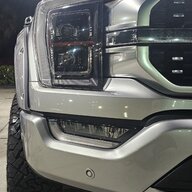
Ford Bronco Anybody able to enable Auto-Hold on Bronco 2026 OBX Lux? 1781649714809-41


x4xx xxxx xxxx

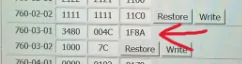
This means auto-hold is off. I assume you tried changing this to a C?
 
OP
OP
soloist

soloist

Outer Banks
Active Member
First Name
Franco
Joined
May 5, 2026
Threads
2
Messages
30
Reaction score
6
Location
The Woodlands, TX
Vehicle(s)
Ford Bronco Outer Banks 26'
Your Bronco Model
Outer Banks
@soloist

1781649714809-41.webp


x4xx xxxx xxxx

This means auto-hold is off. I assume you tried changing this to a C?
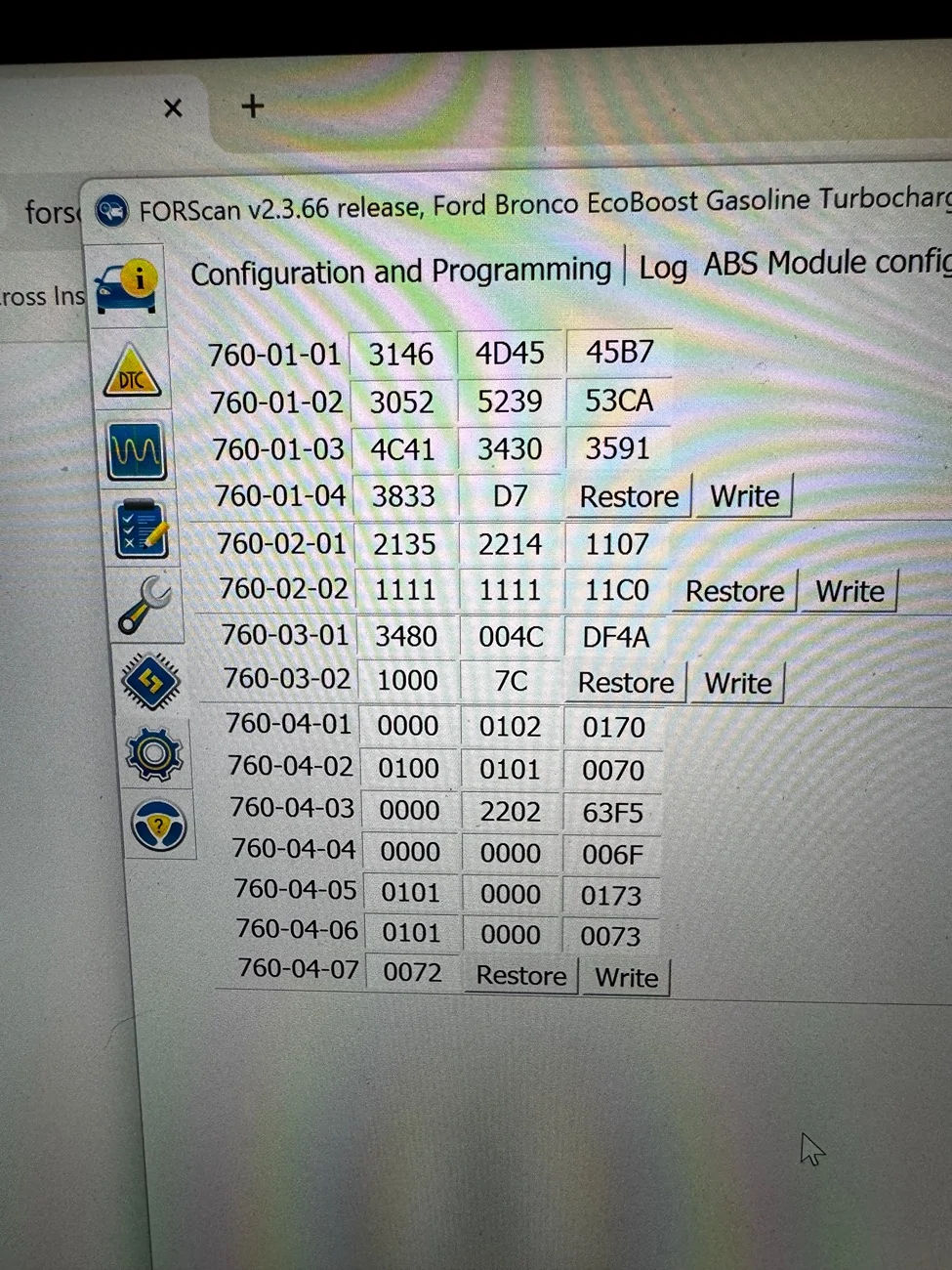
The thing is that on the pre-2025 MY that registry key 760-03-01 has only two fields, and ours have 3. I tried changing that one to a C and that didn't work unfortunately
 

Sponsored

rugedraw

Well-Known Member
First Name
Javier
Joined
Jan 9, 2024
Threads
0
Messages
405
Reaction score
339
Location
Miami, FL
Vehicle(s)
2021 Ford F150 Platinum FX4 EB/2023 Bronco Sport Badlands/1991 Mustang 5.0 coupe
Your Bronco Model
Undecided
The thing is that on the pre-2025 MY that registry key 760-03-01 has only two fields, and ours have 3. I tried changing that one to a C and that didn't work unfortunately
I getcha. I was going by the 25+ F150 sheet that shows this, but if you tried that and it didn't work, then I'm not sure.

Ford Bronco Anybody able to enable Auto-Hold on Bronco 2026 OBX Lux? 1781650628123-b0
 
OP
OP
soloist

soloist

Outer Banks
Active Member
First Name
Franco
Joined
May 5, 2026
Threads
2
Messages
30
Reaction score
6
Location
The Woodlands, TX
Vehicle(s)
Ford Bronco Outer Banks 26'
Your Bronco Model
Outer Banks
I getcha. I was going by the 25+ F150 sheet that shows this, but if you tried that and it didn't work, then I'm not sure.

1781650628123-b0.webp
Actually, now I'm hesitating so I went back on the other post I used to try this and it was saying to change the first value on the first box from B to F (Fxxx xxxx) so this you are sharing is different 😳
Right now I'm out of town but I'll definitely try it once I'm back, keep y'all posted. Thanks man!
 

bicho

Badlands
Member
First Name
diego
Joined
May 22, 2026
Threads
0
Messages
9
Reaction score
0
Location
argentina
Vehicle(s)
Ford Bronco 2026 Badlands
Your Bronco Model
Badlands
Actually, now I'm hesitating so I went back on the other post I used to try this and it was saying to change the first value on the first box from B to F (Fxxx xxxx) so this you are sharing is different 😳
Right now I'm out of town but I'll definitely try it once I'm back, keep y'all posted. Thanks man!
you can do it!
 

Skiman33

Outer Banks
Member
First Name
Bill
Joined
Jun 16, 2026
Threads
1
Messages
11
Reaction score
2
Location
atlanta
Vehicle(s)
2025 Bronco
Your Bronco Model
Outer Banks
Knowing that your current As-Built line reads 760-03-01 3480 004C 1F8A is incredibly helpful. This reveals exactly how your 2025/2026 Bronco is mapped and explains why the old guide won't work. [1]
The character you need to alter is the very first number of that sequence—the 3. [1]

The Hex Breakdown for Your Code
In Ford’s newer module architecture, that first digit controls the braking logic tier for driver assist features: [1]
  • 3 (Your current setting): Vehicle has standard cruise control.
  • B: Vehicle has Adaptive Cruise Control (ACC) but lacks stop-and-go automated braking logic.
  • F: Vehicle has Adaptive Cruise Control and Collision Mitigation/Stop-and-Go Braking active. [1]
Because Auto Hold relies on the stop-and-go electronic braking subroutines, the ABS module must be shifted to the highest braking tier to accept the command. [1, 2]

Your Exact As-Built Modification
When you connect your laptop, go to the ABS (As-Built Configuration) module and make this exact change:[1]
  • Original: 760-03-01 3480 004C 1F8A
  • Modified: 760-03-01 F480 004C 1F8A [1]
By changing that 3 to an F, you open up the electronic module channels required to hold brake pressure automatically. [1, 2]

The Rest of Your Checklist
Keep the rest of your original programming variables the same using the Plain Text / "Easy Mode" menus for the remaining modules: [1]
  1. BodyCM (Plain Text): Change Cruise Control to Adaptive Cruise Control, Stop and Go.
  2. APIM (Plain Text): Change Auto-Hold to Enabled.
  3. IPC (Plain Text): Change Auto-Hold to Enabled. [1]
Pro-Tip: Don't panic if your dashboard displays a "Pre-Collision Assist Unavailable" or "Brake System Malfunction" warning the second you write the new ABS code. This is normal because the ABS module needs to reset. Go to the "Wrench" icon tab in FORScan, trigger an ABS Module Reset, clear any stored DTC codes, and cycle your vehicle's physical ignition to make everything go back to green. [1, 2]


Haven’t tried it yet I’ll let you know if it works.
 

Deadpool392

Raptor
Well-Known Member
Joined
May 9, 2025
Threads
12
Messages
306
Reaction score
475
Location
New Bern, NC
Vehicle(s)
2025 Marsh Gray Bronco Raptor, 2020 Gator JTR (retired)
Your Bronco Model
Raptor
Clubs
 
Knowing that your current As-Built line reads 760-03-01 3480 004C 1F8A is incredibly helpful. This reveals exactly how your 2025/2026 Bronco is mapped and explains why the old guide won't work. [1]
The character you need to alter is the very first number of that sequence—the 3. [1]

The Hex Breakdown for Your Code
In Ford’s newer module architecture, that first digit controls the braking logic tier for driver assist features: [1]
  • 3 (Your current setting): Vehicle has standard cruise control.
  • B: Vehicle has Adaptive Cruise Control (ACC) but lacks stop-and-go automated braking logic.
  • F: Vehicle has Adaptive Cruise Control and Collision Mitigation/Stop-and-Go Braking active. [1]
Because Auto Hold relies on the stop-and-go electronic braking subroutines, the ABS module must be shifted to the highest braking tier to accept the command. [1, 2]

Your Exact As-Built Modification
When you connect your laptop, go to the ABS (As-Built Configuration) module and make this exact change:[1]
  • Original: 760-03-01 3480 004C 1F8A
  • Modified: 760-03-01 F480 004C 1F8A [1]
By changing that 3 to an F, you open up the electronic module channels required to hold brake pressure automatically. [1, 2]

The Rest of Your Checklist
Keep the rest of your original programming variables the same using the Plain Text / "Easy Mode" menus for the remaining modules: [1]
  1. BodyCM (Plain Text): Change Cruise Control to Adaptive Cruise Control, Stop and Go.
  2. APIM (Plain Text): Change Auto-Hold to Enabled.
  3. IPC (Plain Text): Change Auto-Hold to Enabled. [1]
Pro-Tip: Don't panic if your dashboard displays a "Pre-Collision Assist Unavailable" or "Brake System Malfunction" warning the second you write the new ABS code. This is normal because the ABS module needs to reset. Go to the "Wrench" icon tab in FORScan, trigger an ABS Module Reset, clear any stored DTC codes, and cycle your vehicle's physical ignition to make everything go back to green. [1, 2]


Haven’t tried it yet I’ll let you know if it works.
I am also looking to get this working on my ‘25 Bronco Raptor, do you think this will also work for mine? This is my as built, it doesn’t look like I would be able to change the values.
Ford Bronco Anybody able to enable Auto-Hold on Bronco 2026 OBX Lux? IMG_1444
 

Sponsored

Skiman33

Outer Banks
Member
First Name
Bill
Joined
Jun 16, 2026
Threads
1
Messages
11
Reaction score
2
Location
atlanta
Vehicle(s)
2025 Bronco
Your Bronco Model
Outer Banks
I’m thinking it’s different for the 2.3 than the 2.7 . I’ll look into it .
 

Skiman33

Outer Banks
Member
First Name
Bill
Joined
Jun 16, 2026
Threads
1
Messages
11
Reaction score
2
Location
atlanta
Vehicle(s)
2025 Bronco
Your Bronco Model
Outer Banks
That exact string confirms that even though you have a 2026 model, your underlying module architecture matches the standard cruise control / non-Lux trim package logic. [1]

The Hex Value Analysis
Your current configuration is 3480 004C DF4A.
  • The 3 at the very beginning dictates standard braking and standard cruise control logic.
  • The last block (DF4A) is simply a mathematical checksum calculated by FORScan based on the preceding data data-bytes. [1]
When you change the 3 to an F, the module recalculates the hex values, which opens up the electronic subroutines required for automated brake-holding and stop-and-go functions. [1, 2]

Your Exact As-Built Modification
When you connect to the vehicle, open the ABS (As-Built Configuration) module and make the following change to the first block:
  • Original Line: 760-03-01 3480 004C DF4A
  • Modified Line: 760-03-01 F480 004C DF4A

Key Steps to Complete the Flash
Once you input F480, click Write. Because your vehicle has standard cruise logic, the vehicle's engine and brake modules must be forced to relearn how to communicate with each other: [1, 2]
  1. Perform a PCM Relearn: Go to the Vehicle Functions tab (the wrench icon) in FORScan and run the PCM Initialization / Relearn service. This forces the Powertrain Control Module to accept the new electronic braking profile from the ABS unit without throwing permanent errors. [1, 2]
  2. Complete the Text Modules: Ensure you still navigate to the plain text (non-As-Built) menus for the BodyCM, APIM, and IPC to toggle Adaptive Cruise Control Stop & Go, Auto-Hold, and the Auto-Hold Dashboard Indicator to Enabled. [1]
  3. Clear Stored Fault Codes: Go to the DTC tab (the caution icon), read the codes triggered by the module resets, click Clear DTCs, and turn the physical ignition off and back on. [1]
Once the dashboard is clear of warning indicators, your seatbelt must be buckled and the driver's door completely closed for the Auto Hold menu toggle on your central screen to actively engage the brakes. [1]
 

Skiman33

Outer Banks
Member
First Name
Bill
Joined
Jun 16, 2026
Threads
1
Messages
11
Reaction score
2
Location
atlanta
Vehicle(s)
2025 Bronco
Your Bronco Model
Outer Banks
Found this let me know what you think. Wasn’t sure of the trim package your bronco has. This states you don’t have the lux package .
 

Skiman33

Outer Banks
Member
First Name
Bill
Joined
Jun 16, 2026
Threads
1
Messages
11
Reaction score
2
Location
atlanta
Vehicle(s)
2025 Bronco
Your Bronco Model
Outer Banks
The configuration rule remains identical for a 2025 Bronco Raptor sharing that exact same 3480 004C DF4Ablock chain. [1]
However, because you are dealing with a Raptor, there is a crucial warning regarding engine tunes that you must account for before performing this flash. [1]

The Hex Modification
Just like the 2026 2.3L EcoBoost model, you must change the initial tier value from 3 to F to enable the automated stop-and-go braking subroutines. [1]
The checksum block auto-adjusts based on the data bytes, resulting in this exact target line:
  • Original Line: 760-03-01 3480 004C DF4A
  • Modified Line: 760-03-01 F480 004C DF0A [1, 2]

⚠ Critical Raptor Step: Check Your Engine Tune
Many Bronco Raptor owners run the Ford Performance ProCal tune or an aftermarket engine calibration. [1]
  • The Risk: If you attempt to run the required PCM Initialization / Relearn service in FORScan while an active engine tune is loaded, the sequence will fail or potentially lock up the powertrain module.
  • The Fix: Before writing the ABS changes, use your ProCal or tuning handset to restore the truck's PCM back to the factory stock tune. [1]

The Raptor Flash Sequence
  1. Flash to Stock: Revert any active performance engine tune back to factory defaults. [1]
  2. Modify ABS As-Built: Open 760-03-01 in the ABS module, change the first digit to F (changing the checksum block automatically or manually to DF0A), and click Write. [1, 2]
  3. Run PCM Relearn: Go to the Service Functions (wrench icon) tab, select PCM Initialization / Relearn, and follow the on-screen configuration prompts. [1, 2]
  4. Complete the Text Modules: Flip the plain-text toggles for Adaptive Cruise Control Stop & Go in the BodyCM, Auto-Hold in the APIM, and Auto-Hold Indicator in the IPC to Enabled. [1]
  5. Clear DTCs & Cycle Ignition: Wipe out the temporary communication fault codes under the DTC tab, turn off the truck, cycle the doors, and turn it back on. [1]
  6. Reinstall Your Tune: Once the dashboard is clear and Auto Hold works, you can safely reload your ProCal or aftermarket performance tune back onto the Raptor. [1]
Are you running the Ford Performance ProCal tune on this Raptor, or is the powertrain entirely stock?

read this you might want to get more input before you attempt this mod change .
 
OP
OP
soloist

soloist

Outer Banks
Active Member
First Name
Franco
Joined
May 5, 2026
Threads
2
Messages
30
Reaction score
6
Location
The Woodlands, TX
Vehicle(s)
Ford Bronco Outer Banks 26'
Your Bronco Model
Outer Banks
That exact string confirms that even though you have a 2026 model, your underlying module architecture matches the standard cruise control / non-Lux trim package logic. [1]

The Hex Value Analysis
Your current configuration is 3480 004C DF4A.
  • The 3 at the very beginning dictates standard braking and standard cruise control logic.
  • The last block (DF4A) is simply a mathematical checksum calculated by FORScan based on the preceding data data-bytes. [1]
When you change the 3 to an F, the module recalculates the hex values, which opens up the electronic subroutines required for automated brake-holding and stop-and-go functions. [1, 2]

Your Exact As-Built Modification
When you connect to the vehicle, open the ABS (As-Built Configuration) module and make the following change to the first block:
  • Original Line: 760-03-01 3480 004C DF4A
  • Modified Line: 760-03-01 F480 004C DF4A

Key Steps to Complete the Flash
Once you input F480, click Write. Because your vehicle has standard cruise logic, the vehicle's engine and brake modules must be forced to relearn how to communicate with each other: [1, 2]
  1. Perform a PCM Relearn: Go to the Vehicle Functions tab (the wrench icon) in FORScan and run the PCM Initialization / Relearn service. This forces the Powertrain Control Module to accept the new electronic braking profile from the ABS unit without throwing permanent errors. [1, 2]
  2. Complete the Text Modules: Ensure you still navigate to the plain text (non-As-Built) menus for the BodyCM, APIM, and IPC to toggle Adaptive Cruise Control Stop & Go, Auto-Hold, and the Auto-Hold Dashboard Indicator to Enabled. [1]
  3. Clear Stored Fault Codes: Go to the DTC tab (the caution icon), read the codes triggered by the module resets, click Clear DTCs, and turn the physical ignition off and back on. [1]
Once the dashboard is clear of warning indicators, your seatbelt must be buckled and the driver's door completely closed for the Auto Hold menu toggle on your central screen to actively engage the brakes. [1]
Hey man, thanks a lot for the detailed info. Unfortunately these are the same steps the guides around there are proposing and it's intended for MY 24 and below, these have only two boxes on the 760-03-01 reg key, the MY25 are different (they have 3) and changing that B to F on won't do anything. I actually did it, followed the same steps you proposed for the BCM, APIM and IPC but it wouldn't work, it actually broke ACC and CC completely, had to restore everything back.
My Bronco by the way has ACC by default, it will just not stop completely, only up to 9MPH and then release itself.
I'll try changing the value proposed for the F150 25' that has the same values on the 760-03-01 and see how it goes.
Thanks!
Sponsored


Top