
Sponsored

Tucker417

Outer Banks
Well-Known Member
First Name
Garrett
Joined
Dec 1, 2023
Threads
7
Messages
107
Reaction score
106
Location
Ozark
Vehicle(s)
2023 Bronco Outer Banks
Your Bronco Model
Outer Banks
Clubs
 
I followed this thread and added the OEM wiring harness with module over the weekend and everything went great, no issues at all. Make sure to not select a vehicle profile if asked to on Forscan when you first connect. Do each module or section change one at at time and make sure to back up each module before writing with new data. Once each data point has been changed WRITE ALL then key cycle the ignition. Make sure to unlink from the module that was just programmed before moving onto the next. I think this may be whats giving some people issues.

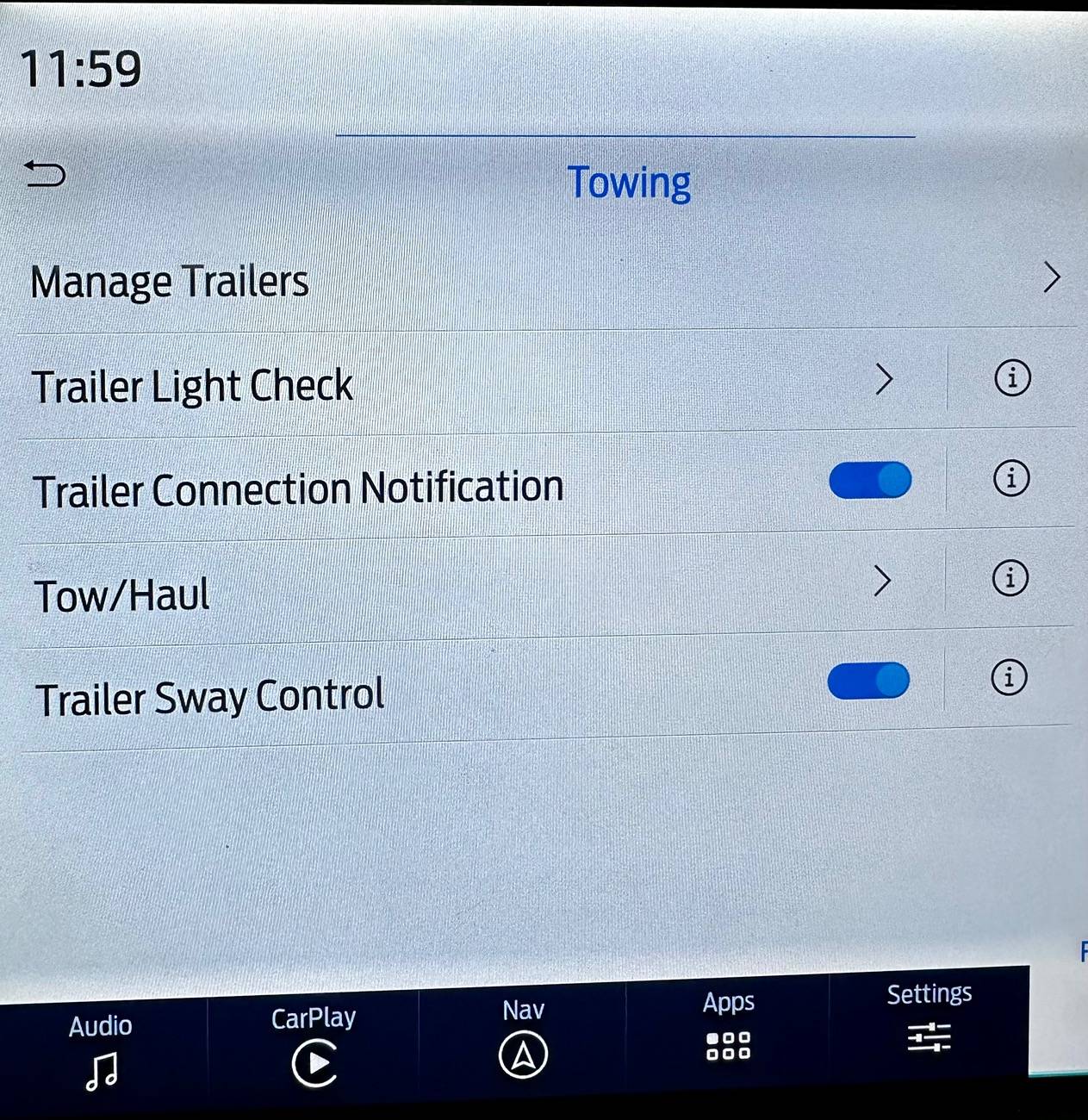
Once all is done, run a DTC check and you should have no errors of any kind and also have trailer sway control on your touchscreen now. :like:
Sponsored


Posidon67

Outer Banks
Member
First Name
Eric
Joined
May 10, 2023
Threads
0
Messages
5
Reaction score
10
Location
Evansville, IN
Vehicle(s)
2007 Silvarado, 2008 Saturn Sky, 2023 Bronco
Your Bronco Model
Outer Banks
First off,.. thank you @RoverDude for this thread. It's been a great help.

I've got the hitch & Ford wiring harness installed and I've done most of the FORScan programing, but when I get down to the last module my settings are totally different from what is shown.

RoverDude's recommendations:
Ford Bronco DIY Factory Tow Package using OEM parts with Forscan As-built Data (without error codes) Screenshot 2024-09-10 211732


My current settings:
Ford Bronco DIY Factory Tow Package using OEM parts with Forscan As-built Data (without error codes) Screenshot 2024-09-10 211903


So should I just change the red items or the whole set? I was worried that if I just change the red items, then the checksum would be invalid,.. or the differences might cause some other issue.

FYI - My rig is a 2023 OBx SAS w/ 2.7L
 
OP
OP
RoverDude

RoverDude

First Edition
Well-Known Member
Joined
Oct 28, 2021
Threads
10
Messages
315
Reaction score
371
Location
Maryland
Vehicle(s)
2021 Bronco (First Edition)
Your Bronco Model
First Edition
First off,.. thank you @RoverDude for this thread. It's been a great help.

I've got the hitch & Ford wiring harness installed and I've done most of the FORScan programing, but when I get down to the last module my settings are totally different from what is shown.

RoverDude's recommendations:
Screenshot 2024-09-10 211732.jpg


My current settings:
Screenshot 2024-09-10 211903.jpg


So should I just change the red items or the whole set? I was worried that if I just change the red items, then the checksum would be invalid,.. or the differences might cause some other issue.

FYI - My rig is a 2023 OBx SAS w/ 2.7L
For your current settings use below, and you should be good to go!

Accessory Protocol Interface Module​
7D0-01-03​
0205​
0004​
00E6​
Accessory Protocol Interface Module​
7D0-01-04​
0406​
0040​
4066​
Accessory Protocol Interface Module​
7D0-09-02​
C064​
5C00​
0567​


Let me know if you have any questions or issues
 

erreich

Wildtrak
New Member
Joined
Apr 19, 2024
Threads
1
Messages
4
Reaction score
1
Location
Oklahoma
Vehicle(s)
24 Bronco Wildtrack
Your Bronco Model
Wildtrak
@RoverDude
I am seeing differences of the APIM module as well for 2 of the lines in the table.. Thoughts?


Accessory Protocol Interface Module7D0-01-03004D00002E56
Accessory Protocol Interface Module7D0-01-0406E2010000C5
Accessory Protocol Interface Module7D0-09-02C06C5C000571

Eric Reich
24' Wildtrak
 
Last edited:

grubytuesday

Heritage
Active Member
Joined
Feb 15, 2024
Threads
7
Messages
26
Reaction score
33
Location
San Diego
Vehicle(s)
Bronco
Your Bronco Model
Heritage
Clubs
 
I've installed the trailer module into a '24 manual 2-door HE. I did the Forscan changes although mine doesn't quite match. My ICPM was different and my APIMs were different. I did the ICPM changes to match your final result (i.e. I changed more characters than you said should change). My APIMs matched jeffryedvm on page 11 so I followed his changes:

"I went ahead and changed the APIMs 7D0-01-03 to 0205 0004 00E2 and 7D0-09-02 to C064 5C00 05E7 (7D0-01-04 already had the correct value in the correct location for me) and that got me trailer sway control under the tow menu."

This failed checksum as expected but I wrote it anyways.

It seems.... almost functional? Trailer sway control shows up as an option. I've noticed that auto start stop is no longer working.

——EDIT—- After about 45min of driving, it started working again. Maybe I just got the battery a little low working with Forscan on accessory power? Beats me.

Thanks for the instructions on the thread!
 
Last edited:

Sponsored

Sojourner

Badlands
Well-Known Member
First Name
Michael
Joined
Jul 5, 2024
Threads
0
Messages
155
Reaction score
167
Location
Southern Maryland
Vehicle(s)
2024 Bronco Badlands
Your Bronco Model
Badlands
Clubs
 
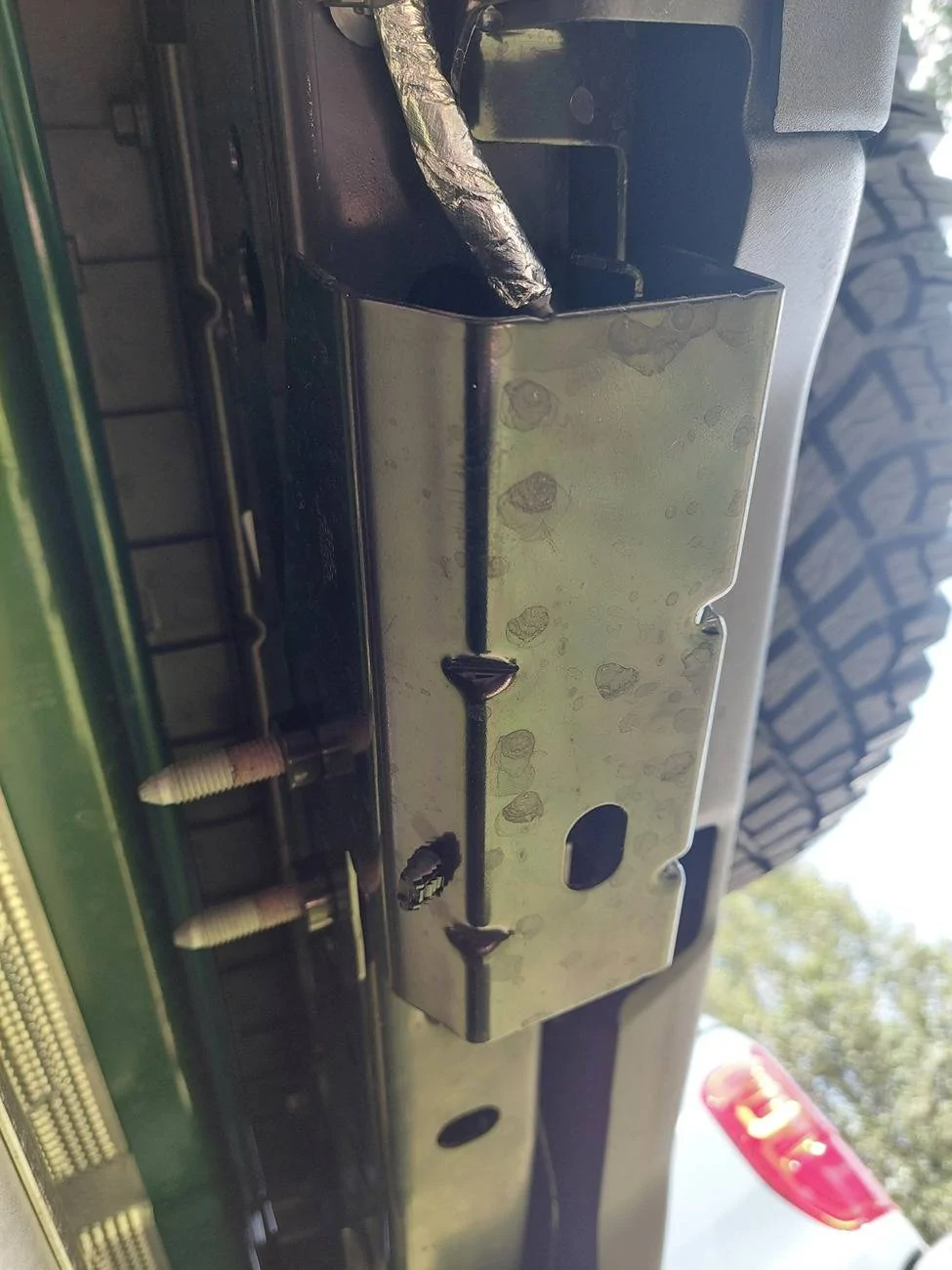
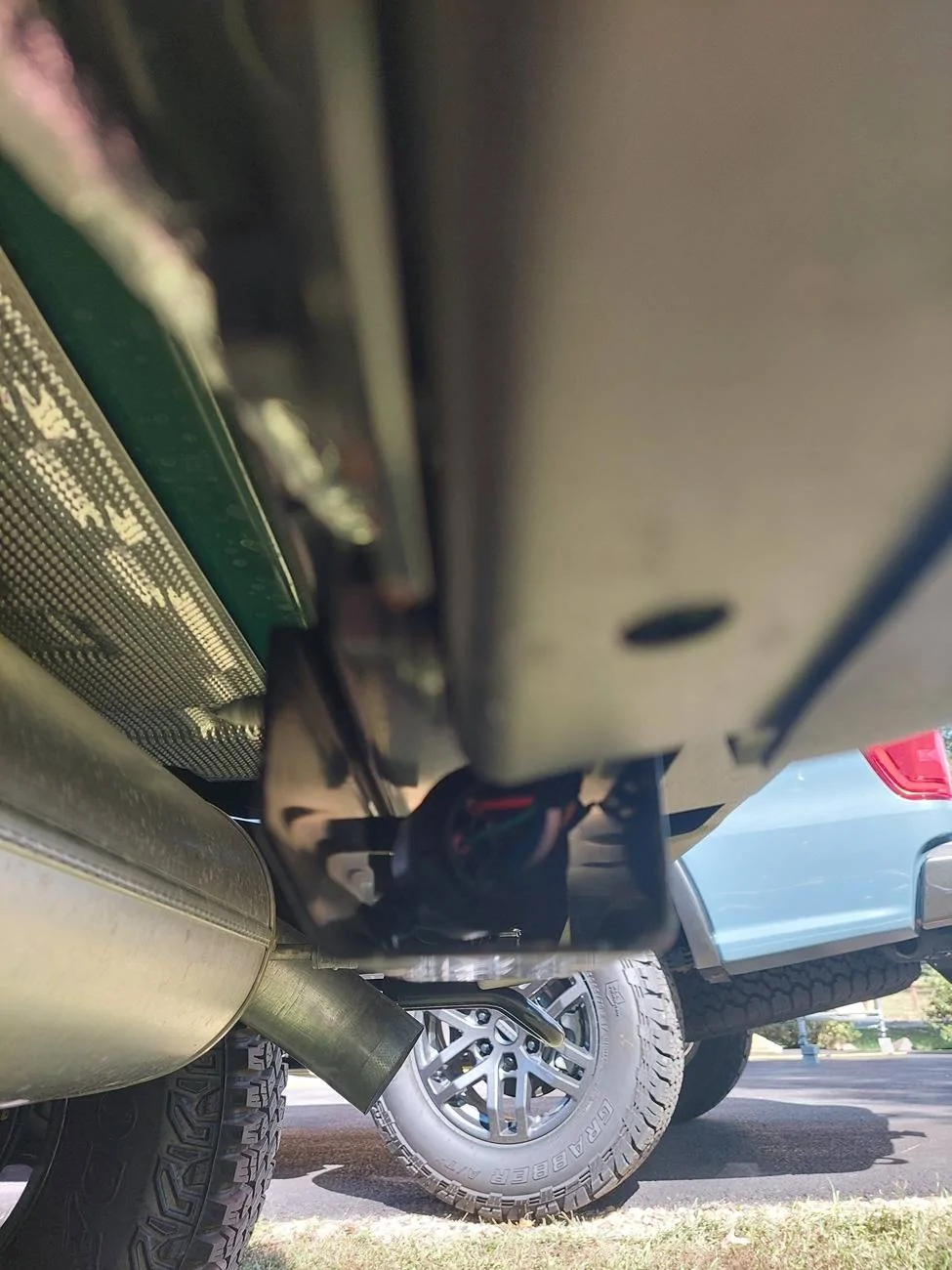
Getting ready to go on my hitch hookup journey when I did one final look-under and found this "cage" occupying the two right holes (looking from under toward the back) the hitch receiver would occupy. There's a terminated "can" inside this "cage" (a silver wrapped insulated cable goes to it from the left rear of the vehicle).

I've looked everywhere to try to find out what this is, can it be relocated, etc. and have come up short. Can anybody on the forum help me out? Can't even start until I sort this out. TIA!

(Apologies if this IS on the forum, but I used every search term I could think of and drew a blank.)

Ford Bronco DIY Factory Tow Package using OEM parts with Forscan As-built Data (without error codes) Bumper_002


Ford Bronco DIY Factory Tow Package using OEM parts with Forscan As-built Data (without error codes) Bumper_01
 
OP
OP
RoverDude

RoverDude

First Edition
Well-Known Member
Joined
Oct 28, 2021
Threads
10
Messages
315
Reaction score
371
Location
Maryland
Vehicle(s)
2021 Bronco (First Edition)
Your Bronco Model
First Edition
That is essentially your trailer hitch connection, that goes on the 4/7 pin receptacle.
I assumed by your posted picture you have a 2024+ model. As these have the wiring run, it looks exactly what you have.
If you look at the original Post in here, you will see a picture of me holding that that same thing in my hand.
Hope that helps
 

Sojourner

Badlands
Well-Known Member
First Name
Michael
Joined
Jul 5, 2024
Threads
0
Messages
155
Reaction score
167
Location
Southern Maryland
Vehicle(s)
2024 Bronco Badlands
Your Bronco Model
Badlands
Clubs
 
That is essentially your trailer hitch connection, that goes on the 4/7 pin receptacle.
I assumed by your posted picture you have a 2024+ model. As these have the wiring run, it looks exactly what you have.
If you look at the original Post in here, you will see a picture of me holding that that same thing in my hand.
Hope that helps
Wow! Thank you.

Yes, a 2024. I was confused because it looks (without uninstalling it) to be terminated. So while my first thought was 4/7-pin connector, my second thought was it can't be b/c it's terminated. But clearly, it's not terminated, it's capped.

Okay. Good. Again, wow. Thank you. And pardon my stupidity (annoyingly dumb on my part b/c it's not the first or second trailer hitch install I've done).

Cheers!
 

tgoat

Outer Banks
Active Member
First Name
Tdub
Joined
Sep 24, 2024
Threads
3
Messages
41
Reaction score
65
Location
canada
Vehicle(s)
bronco
Your Bronco Model
Outer Banks
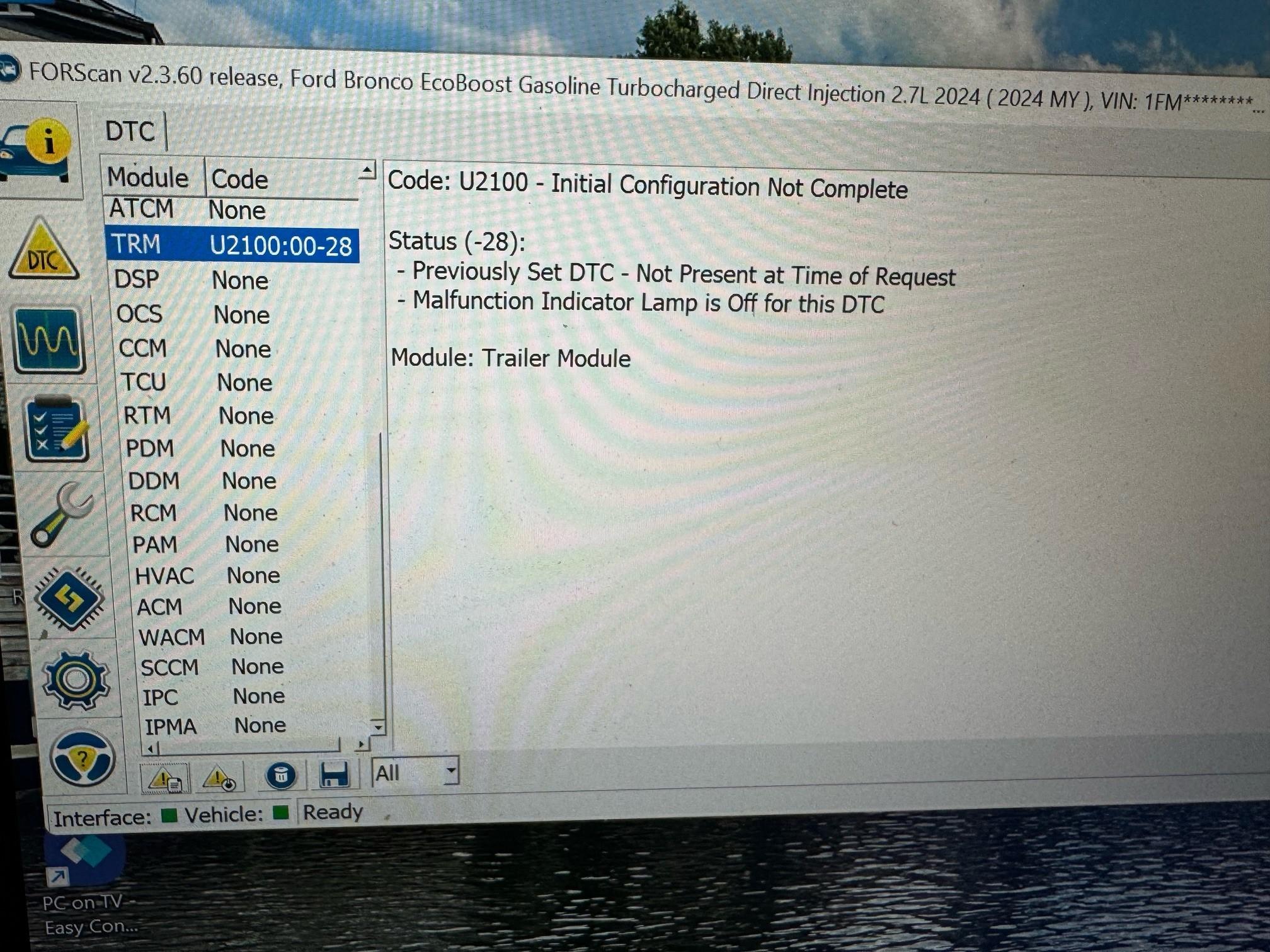
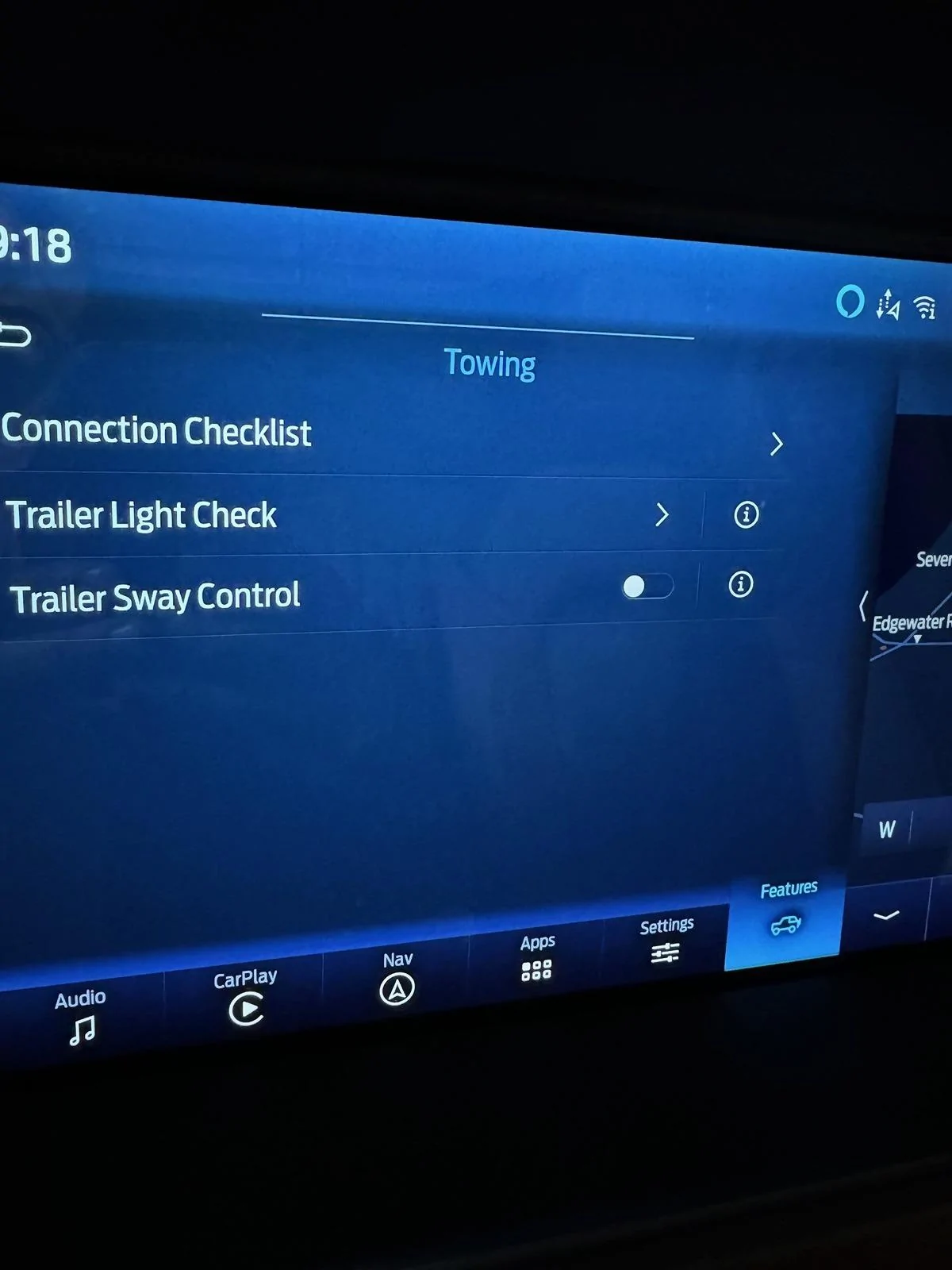
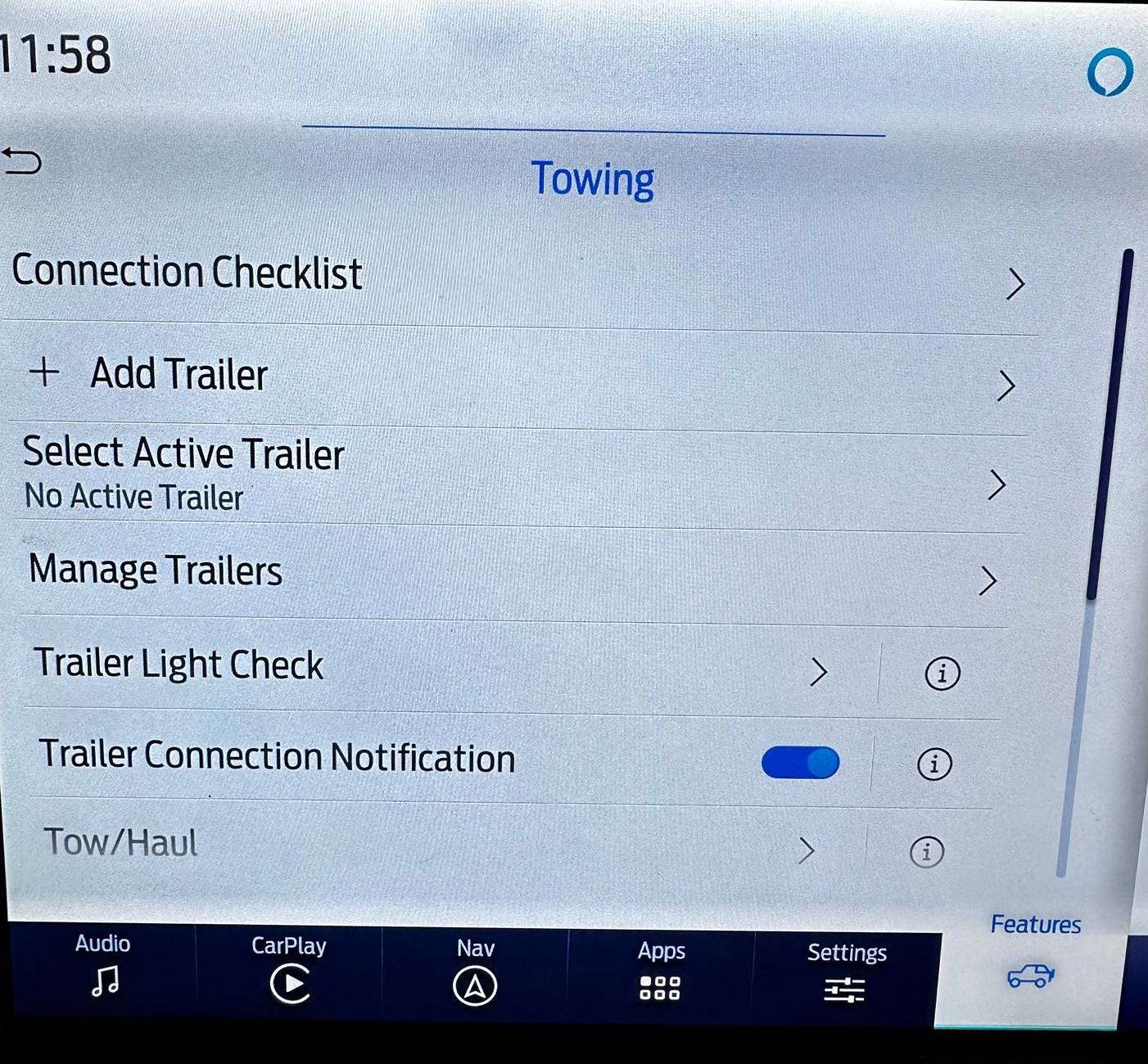
Quick report. On my MY24 Outer Banks I intsalled the Ford trailer hitch and associated trailer module. For My24, the wiring was already there so just plug and play module installation. I testing using a 4 pin tester and all lights worked without needing Forscan mods. I tried following RoverDude's guidance (Thank you! BTW) on Forscan programing above but found there were a few differences. This was my very first attempt at using Forscan. I backed-up all of the as-built modules and started making as many changes as I could find. The good news I now have a tow module under features that seems to look like its supposed to. The bad news I still seem to have a DTC error. There was one module I couldn't find ( IPCM ). I also added the trailer light check feature using easy menu. Sway control seems to be on by default. Is that normal?

edit:
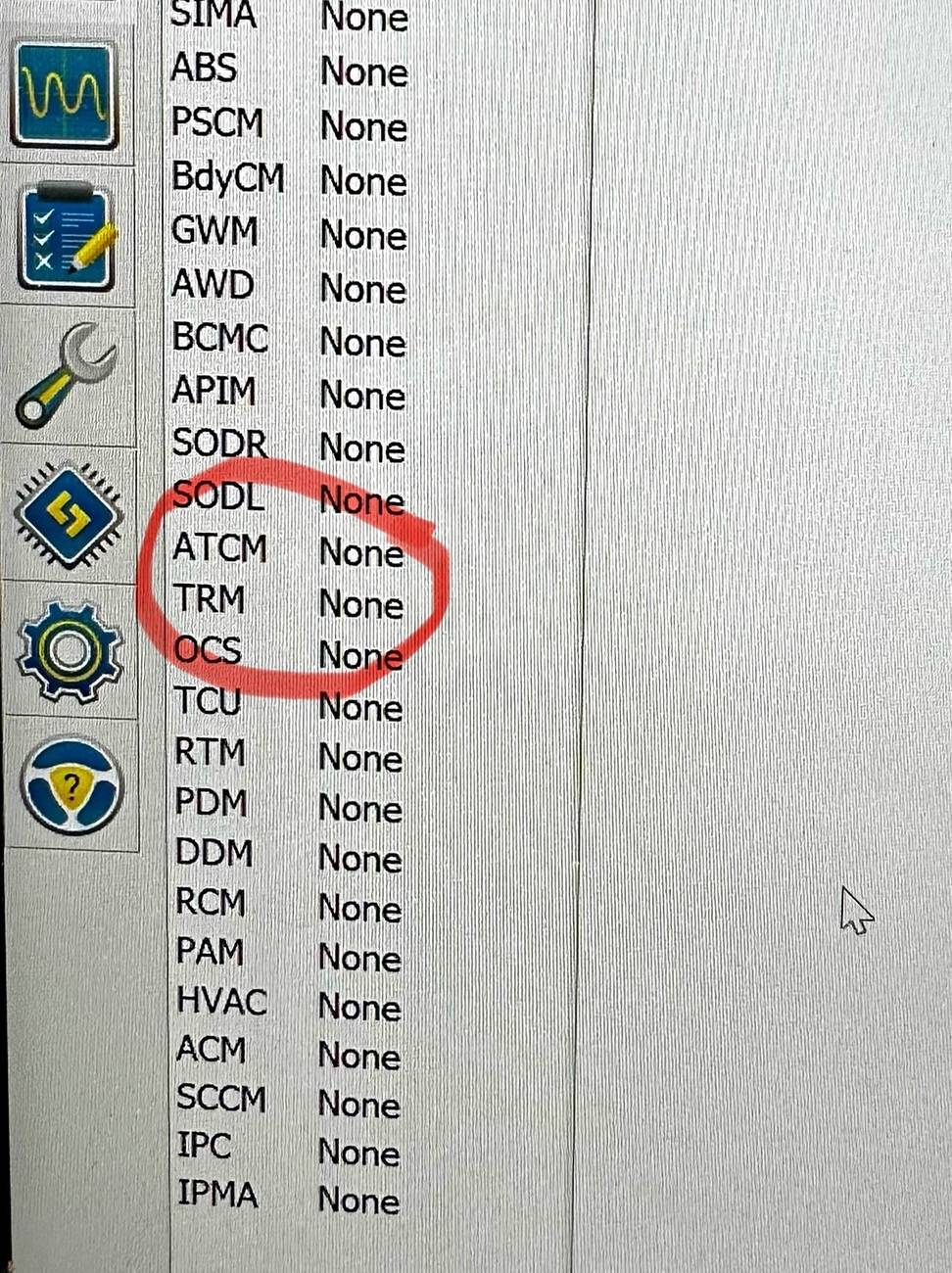
1986Bronco: seems you had the same error but not sure how you cleared it?
I see RoverDude mentioned try "write-all" in TRM module I may have just written the individual line.


error.jpg


towing.jpg
Thanks for this OBX update. I too have a 24' OBX non SAS 2.7. I've installed everything and can now see the TRM section. Many of my as built values don't match the OP's original values as well unfortunately. I've tried a few variations of changing the ones that did to the new values but left the ones that were different and tried changing those modules in the English config setting enable / disable. I end up getting the tow menu's in my Sync screen but still get the TRM module error showing even after rebooting the module. I may have to take it to the dealer and set it back to factory values but want to keep trying. For the OBX settings that worked, would you be able to publish the equivalent of the OP's new values? Willing to give this another shot and thanks to all for this incredible thread. I feel like I am one setting away from a clean TRM.
 
OP
OP
RoverDude

RoverDude

First Edition
Well-Known Member
Joined
Oct 28, 2021
Threads
10
Messages
315
Reaction score
371
Location
Maryland
Vehicle(s)
2021 Bronco (First Edition)
Your Bronco Model
First Edition
Thanks for this OBX update. I too have a 24' OBX non SAS 2.7. I've installed everything and can now see the TRM section. Many of my as built values don't match the OP's original values as well unfortunately. I've tried a few variations of changing the ones that did to the new values but left the ones that were different and tried changing those modules in the English config setting enable / disable. I end up getting the tow menu's in my Sync screen but still get the TRM module error showing even after rebooting the module. I may have to take it to the dealer and set it back to factory values but want to keep trying. For the OBX settings that worked, would you be able to publish the equivalent of the OP's new values? Willing to give this another shot and thanks to all for this incredible thread. I feel like I am one setting away from a clean TRM.
-Did you write all to the TRM MODULE.
-Then turn off the ignition.
-Lock the doors, so the screen and everything turns off.
- Wait like 15 seconds after everything is off.
- Then in forscan and stop programming the module.
- I'll reboot the module at that point, the trm module.

The big point there is make sure you write all values to the TRM module.
 

Sponsored

tgoat

Outer Banks
Active Member
First Name
Tdub
Joined
Sep 24, 2024
Threads
3
Messages
41
Reaction score
65
Location
canada
Vehicle(s)
bronco
Your Bronco Model
Outer Banks
Yes I did follow that to the letter for write all. I believe my issue may be the 6 values that are different and that I did not change but tried instead to change them in the config / enable section of the corresponding module. I've now restored everything back to the original settings and verified no DTC's other than the expected TRM config error and all of the Sync4 tow menus are now gone in the vehicle settings. I'm going to give it another whirl from scratch using the your original post settings and the additional ones you provided for the OBX above on the APIM module....


Accessory Protocol Interface Module7D0-01-030205000400E6
Accessory Protocol Interface Module7D0-01-04040600404066
Accessory Protocol Interface Module7D0-09-02C0645C000567

That sound about right?
 
Last edited:

maunman2

Badlands
Member
First Name
Philip
Joined
Sep 9, 2024
Threads
2
Messages
11
Reaction score
12
Location
Wilmore, KY
Vehicle(s)
2022 Bronco Badlands MT SAS, 2011 Toyota Tacoma, 2024 Land Rover Defender 90
Your Bronco Model
Badlands
Clubs
 
Hey folks, I just finished my install on my 2022 Badlands Sasquatch w/MT. It all went well. My couple of suggestions are:

Even with 35" tires, you don't need to remove the wheels but jacking up the driver's side helps a lot. Especially if you have the swaybar disconnect and you use it before you jack.

Also, when using the factory Lumen wiring kit with the '21-'22 wire leads, keep in mind that the butt connectors it comes with are not crimp connectors. They have a ring of low-melting-point solder that you just have to suspend your wire ends through and hit it with heat gun. It will shrink the heat shrink and melt the solder after a few seconds...hit it hard with the heat and watch to make sure the solder has completely melted and the shrink has shrunk all the way to the ends. (If you have a '23, you can discard the wire leads and use the connectors that are already attached to the loom. Oh - and especially if you have a '23, be sure to find the latest version of the instructions. They have updated these instructions several times to deal with inaccuracies for the '23-only steps. https://www.i-sheets.us/ford/broncomy21to23-trailer-harness-kit This is the best link because they should update this every time the instructions change.)

One last note: My Instrument Panel Control Module values were different to RoverDude's. I only changed the red values to RoverDude's and left the others. Everything is working flawlessly.
 

tgoat

Outer Banks
Active Member
First Name
Tdub
Joined
Sep 24, 2024
Threads
3
Messages
41
Reaction score
65
Location
canada
Vehicle(s)
bronco
Your Bronco Model
Outer Banks
Thanks to a DM followup from @RoverDude, I now have a TRM with no errors and all trailer menus available and seemingly working.

Ford Bronco DIY Factory Tow Package using OEM parts with Forscan As-built Data (without error codes) IMG_4937


Ford Bronco DIY Factory Tow Package using OEM parts with Forscan As-built Data (without error codes) IMG_4940


Ford Bronco DIY Factory Tow Package using OEM parts with Forscan As-built Data (without error codes) IMG_4939
 
Last edited:

erreich

Wildtrak
New Member
Joined
Apr 19, 2024
Threads
1
Messages
4
Reaction score
1
Location
Oklahoma
Vehicle(s)
24 Bronco Wildtrack
Your Bronco Model
Wildtrak
Can you share what you did? I have a 24 Wildtrak that I do not have errors in the TRM module.. I still cannot get the sync 4 to show those options on the trailering screen..
 

tgoat

Outer Banks
Active Member
First Name
Tdub
Joined
Sep 24, 2024
Threads
3
Messages
41
Reaction score
65
Location
canada
Vehicle(s)
bronco
Your Bronco Model
Outer Banks
Can you share what you did?
Yes. I used @RoverDude 's awesome TCM original settings in Forscan for the TCM module only. For the TCM, I did a write, a write all and a full shutdown and close the car door routine. Then I loaded forscan again, restarted and reloaded without selecting a profile. This gave me a clean TCM.

After that, I went into each module config (not as-built) but the easy mode config menu and enabled as many tow features as I could find. I went into
PAM, APIC, BCM and IPCM first and sorted on any parameter that had tow or hitch in it. I basically turned each one on per module and then saved and checked the tow settings. As I went through, if there was an issue, I backed out the change. In the end I'd say I have 80% of the tow settings in the menus now turned on. It was some trial and error but if you go module by module and turn on/off and check the settings you can track your changes and back out anything each time that isn't working. I need to go back in and disable things like neutral tow which I didn't realize is for towing your vehicle behind a motorhome
Sponsored

 
Last edited:


Top