
Sponsored

Hatman

Badlands
Well-Known Member
First Name
Jeff
Joined
Mar 23, 2021
Threads
0
Messages
218
Reaction score
307
Location
Argyle, Texas
Vehicle(s)
Badlands Sasquatch 2.7L
Your Bronco Model
Badlands
Clubs
 
I am currently trying to get the Auto Start Stop to stay off in Forscan. I keep getting the "Service procedure has been interupted" error and it stops loading at 56%. I've gotten rid of the double honk and added Sport mode with no issues. My first OBD Link was a switchable which I thought might be the issue so I ordered the OBDLinkEX and it does the same thing.
Anyone have an idea what is causing this? I have a '22 Badlands. Thanks.
Not sure if you have an answer yet, but when you connect to the vehicle, don’t load the profile you have saved previously. Create a new profile and try that.
Sponsored


AggressiveSl0th

Wildtrak
New Member
Joined
Dec 30, 2022
Threads
0
Messages
2
Reaction score
4
Location
Michigan
Vehicle(s)
2023 Bronco Wildtrak
Your Bronco Model
Wildtrak
For all the folks with 23’s. If you’re impatient, get an extended license with forscan ($12) and contact them to get support for your vehicle.

Forscan didn’t work for me and I contacted them and they asked for my VIN then they provided a beta version after I purchased an extended license.
 

Deano Bronc

Badlands
Well-Known Member
First Name
Dean
Joined
May 29, 2020
Threads
1
Messages
421
Reaction score
925
Location
Winona Lake, IN
Vehicle(s)
2022 Badlands
Your Bronco Model
Badlands
Clubs
 
Not sure if you have an answer yet, but when you connect to the vehicle, don’t load the profile you have saved previously. Create a new profile and try that.
Thanks for the reply. It ended up that I needed to install a newer version of Forscan. It worked like a charm after that.
 

switz

Raptor
Well-Known Member
First Name
Steve
Joined
Jul 24, 2020
Threads
3
Messages
53
Reaction score
48
Location
Nevada City, Ca
Vehicle(s)
2022 Bronco Raptor, 2022 Bronco Bad Lands
Your Bronco Model
Raptor
I have a 2022 Raptor. When the driving lights are on (the amber rings around the headlights) the 3 grill lights are off. Is there a setting to turn these grill lights on when using the amber driving lights? Thanks!
 

Hatman

Badlands
Well-Known Member
First Name
Jeff
Joined
Mar 23, 2021
Threads
0
Messages
218
Reaction score
307
Location
Argyle, Texas
Vehicle(s)
Badlands Sasquatch 2.7L
Your Bronco Model
Badlands
Clubs
 
Next item that drives me nuts: when you hit the ACC (hit the start button without the brake pedal) it engages the lights, AC, and radio. Most cars it only turns on the radio. Any idea of what module may handle that?
 

Sponsored

BigMeatsBronco

First Edition
Well-Known Member
First Name
Allan
Joined
Nov 25, 2021
Threads
52
Messages
3,401
Reaction score
10,531
Location
97301
Vehicle(s)
2021 FE 2 door
Your Bronco Model
First Edition
Clubs
 
Next item that drives me nuts: when you hit the ACC (hit the start button without the brake pedal) it engages the lights, AC, and radio. Most cars it only turns on the radio. Any idea of what module may handle that?
There is a setting in the easy mode of forscan to set the DRLs to "auto" or "last selected"... I changed mine so the lights stay off, at least if that's the last position they were in...I like it better.
 

Hatman

Badlands
Well-Known Member
First Name
Jeff
Joined
Mar 23, 2021
Threads
0
Messages
218
Reaction score
307
Location
Argyle, Texas
Vehicle(s)
Badlands Sasquatch 2.7L
Your Bronco Model
Badlands
Clubs
 
There is a setting in the easy mode of forscan to set the DRLs to "auto" or "last selected"... I changed mine so the lights stay off, at least if that's the last position they were in...I like it better.
I’m looking more towards having just the radio and power outlets come on with one press of the acc button. It’s that way on most cars. A second press would get all of the other things on like lights, AC blower, etc.
 

Sthomasson72

Badlands
Well-Known Member
First Name
Steve
Joined
Feb 14, 2022
Threads
7
Messages
112
Reaction score
41
Location
Chesapeake, VA
Vehicle(s)
F150
Your Bronco Model
Badlands
Clubs
 
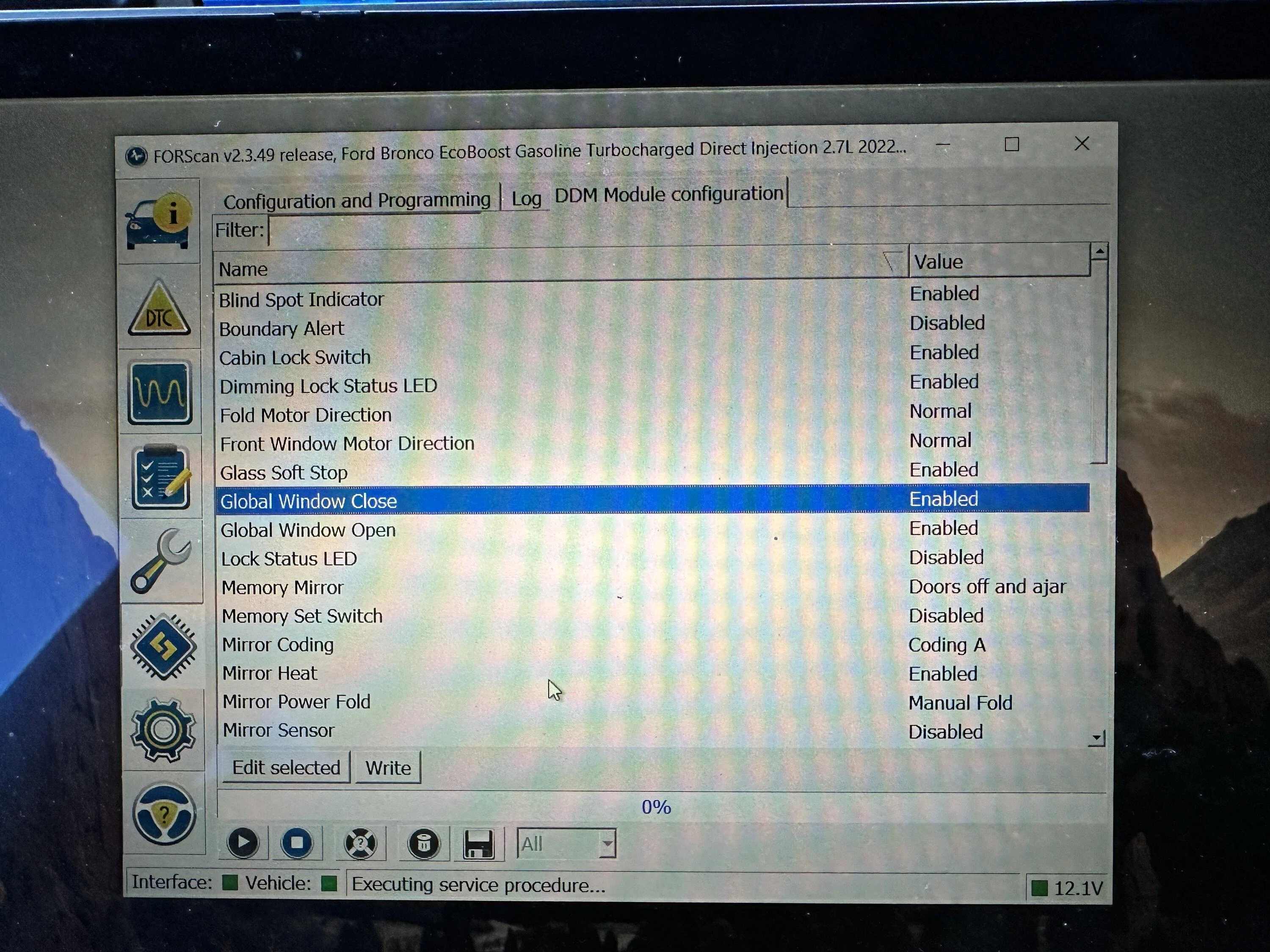
Does anyone have a video of changing the global window settings? Or screenshot of changes. Mine comes from the factory with global down but not global up.
 

BigMeatsBronco

First Edition
Well-Known Member
First Name
Allan
Joined
Nov 25, 2021
Threads
52
Messages
3,401
Reaction score
10,531
Location
97301
Vehicle(s)
2021 FE 2 door
Your Bronco Model
First Edition
Clubs
 
Does anyone have a video of changing the global window settings? Or screenshot of changes. Mine comes from the factory with global down but not global up.
Just follow the speardshhet accurately and write the changes.
 

Sponsored

Hatman

Badlands
Well-Known Member
First Name
Jeff
Joined
Mar 23, 2021
Threads
0
Messages
218
Reaction score
307
Location
Argyle, Texas
Vehicle(s)
Badlands Sasquatch 2.7L
Your Bronco Model
Badlands
Clubs
 
Does anyone have a video of changing the global window settings? Or screenshot of changes. Mine comes from the factory with global down but not global up.
The easiest way to do it is go to DDM and PDM, (not the AS BUILT but normal configuration,) and just enable the Global Close there. I’ve done it that way on a dozen Broncos. I only go to AS BUILT when I have to.
Ford Bronco FORScan Bronco Working Spreadsheet (double honk, sport mode, chimes, seatbelts, and more!) 048C817F-1D0B-4EF8-8485-F2D69E5F3B65
 

Sthomasson72

Badlands
Well-Known Member
First Name
Steve
Joined
Feb 14, 2022
Threads
7
Messages
112
Reaction score
41
Location
Chesapeake, VA
Vehicle(s)
F150
Your Bronco Model
Badlands
Clubs
 
The easiest way to do it is go to DDM and PDM, (not the AS BUILT but normal configuration,) and just enable the Global Close there. I’ve done it that way on a dozen Broncos. I only go to AS BUILT when I have to.
048C817F-1D0B-4EF8-8485-F2D69E5F3B65.jpeg
Give error message when writing
 

330SMG

Badlands
Well-Known Member
First Name
Dennis
Joined
Jul 13, 2020
Threads
3
Messages
286
Reaction score
517
Location
Hurricane Alley
Vehicle(s)
16 F150 ,89 325i and 72 Dodge Charger SE
Your Bronco Model
Badlands
The easiest way to do it is go to DDM and PDM, (not the AS BUILT but normal configuration,) and just enable the Global Close there. I’ve done it that way on a dozen Broncos. I only go to AS BUILT when I have to.
048C817F-1D0B-4EF8-8485-F2D69E5F3B65.jpeg
That does not work, well at least for me. Need to write in the module using the spreadsheet.
 

Hatman

Badlands
Well-Known Member
First Name
Jeff
Joined
Mar 23, 2021
Threads
0
Messages
218
Reaction score
307
Location
Argyle, Texas
Vehicle(s)
Badlands Sasquatch 2.7L
Your Bronco Model
Badlands
Clubs
 
That does not work, well at least for me. Need to write in the module using the spreadsheet.
Glad it worked one way or the other. I wonder if the difference is Forscan versions or package level…? It’s worked a dozen times for me but maybe on a previous FORScan version.
Sponsored


Top