
Sponsored

TX-Hans

First Edition
Well-Known Member
Joined
Dec 22, 2021
Threads
17
Messages
584
Reaction score
818
Location
Texas
Vehicle(s)
'21 Escalade, '13 Jeep Wrangler, '21 Bronco FE
Your Bronco Model
First Edition
Just an update... For global windows, you don't have to press and then press & hold...
Just holding the button works 👍🏻
you likely need to go into the PDM (Passenger door Module) module and turn on the feature. Sounds like the Driver was done but passenger may have a character wrong.


PDM741-06-02xxxxxxxx01--
PDM741-06-0301xxxxxxxx--

check these two areas. 741-06-02 is close and 741-06-03 is open
I attempted to activate Global Windows Up when holding the key fob button but had no success. I'm new to Forscan and not sure I was reading the spreadsheet correctly on what lines to change. Initially, I read the spreadsheet to change the BdyCM (as built) line 726-11-02- to the numbers indicated in the spreadsheet for Global windows open. That didn't work, and not sure if I need to make all changes in spreadsheet listed under Global Doors, so figure go back to original configuration and not worry about it. But, I forgot to write down the original values before changing that 726-11-02 line. Is there an easy way to change those values back to their original states, or does someone know what the default/original values should be for the ones changed? I suspect the answer is use 0 instead of 1, but not sure.
Sponsored


WuNgUn

Banned
Badlands
Banned
Banned
First Name
Eric
Joined
Jul 9, 2020
Threads
195
Messages
4,363
Reaction score
6,902
Location
Ontario Canada
Vehicle(s)
2 door Squatched
Your Bronco Model
Badlands
Clubs
 
I attempted to activate Global Windows Up when holding the key fob button but had no success. I'm new to Forscan and not sure I was reading the spreadsheet correctly on what lines to change. Initially, I read the spreadsheet to change the BdyCM (as built) line 726-11-02- to the numbers indicated in the spreadsheet for Global windows open. That didn't work, and not sure if I need to make all changes in spreadsheet listed under Global Doors, so figure go back to original configuration and not worry about it. But, I forgot to write down the original values before changing that 726-11-02 line. Is there an easy way to change those values back to their original states, or does someone know what the default/original values should be for the ones changed? I suspect the answer is use 0 instead of 1, but not sure.
Does you trim level give you express windows up/down?
 

TX-Hans

First Edition
Well-Known Member
Joined
Dec 22, 2021
Threads
17
Messages
584
Reaction score
818
Location
Texas
Vehicle(s)
'21 Escalade, '13 Jeep Wrangler, '21 Bronco FE
Your Bronco Model
First Edition
Does you trim level give you express windows up/down?
Yes, 4-door FE...which I guess has Lux pkg. Windows go up or down with 1 click using switches on center console.
 
Last edited:

WuNgUn

Banned
Badlands
Banned
Banned
First Name
Eric
Joined
Jul 9, 2020
Threads
195
Messages
4,363
Reaction score
6,902
Location
Ontario Canada
Vehicle(s)
2 door Squatched
Your Bronco Model
Badlands
Clubs
 
Yes, 4-door FE...which I guess has Lux pkg. Windows go up or down with 1 click using switches on center console.
So, I guess you didn't backup/save your module configuration before you made changes? Maybe check out the ForScan tutorial...
And yes, you have to make all the changes pertaining to global windows in the module.
I dunno if someone can provide the as-built original data... But you might as well finish what you started 🤷
 

TX-Hans

First Edition
Well-Known Member
Joined
Dec 22, 2021
Threads
17
Messages
584
Reaction score
818
Location
Texas
Vehicle(s)
'21 Escalade, '13 Jeep Wrangler, '21 Bronco FE
Your Bronco Model
First Edition
I attempted to activate Global Windows Up when holding the key fob button but had no success. I'm new to Forscan and not sure I was reading the spreadsheet correctly on what lines to change. Initially, I read the spreadsheet to change the BdyCM (as built) line 726-11-02- to the numbers indicated in the spreadsheet for Global windows open. That didn't work, and not sure if I need to make all changes in spreadsheet listed under Global Doors, so figure go back to original configuration and not worry about it. But, I forgot to write down the original values before changing that 726-11-02 line. Is there an easy way to change those values back to their original states, or does someone know what the default/original values should be for the ones changed? I suspect the answer is use 0 instead of 1, but not sure.
Follow up to my own post in case someone else ever needs to find what the original as-built values were for any lines in order to revert what you had done (without having to use your original backup copy of the entire module to restore it). Always a good idea to take a picture or write down the original before the making the change, but if you forget (as I did in this one instance), I found you can use this website from Ford and your VIN to get all the original as-built values for your Bronco. Go to the site (enter country and language first time) and then it will prompt you to enter your VIN. It will return every line of code with the as-built values.

https://www.motorcraftservice.com/AsBuilt
 

Sponsored

TX-Hans

First Edition
Well-Known Member
Joined
Dec 22, 2021
Threads
17
Messages
584
Reaction score
818
Location
Texas
Vehicle(s)
'21 Escalade, '13 Jeep Wrangler, '21 Bronco FE
Your Bronco Model
First Edition
So, I guess you didn't backup/save your module configuration before you made changes? Maybe check out the ForScan tutorial...
And yes, you have to make all the changes pertaining to global windows in the module.
I dunno if someone can provide the as-built original data... But you might as well finish what you started 🤷
Thanks. I usually take a before and after pic to record the changes but in this instance I forgot the before pic. I also made back ups of all original modules for restoring in the future if ever needed and that would definitely be an option, but wanted to avoid reversing other changes I had made earlier. I did find a nifty way to find all the as-built values per my post above so that you can know the original values for a particular line.

Thanks for the tip on the Global windows. Will give that a try to see if can get them to go Up via the key fob.
 

AK SNO RIDER

First Edition
Well-Known Member
First Name
Ty
Joined
Jul 11, 2020
Threads
20
Messages
2,888
Reaction score
10,253
Location
Alaska
Vehicle(s)
'19 GT350, '04 6.0, '76 High Boy
Your Bronco Model
First Edition
Why no mention of any plain-text changes?

Example, the spreadsheet has you changing a value in the as-built to disable the double honk on exit, but you can easily change that as a simple enabled/disabled option in the plain-text. I just confirmed it works.

There's a lot of plain-text stuff. Of course figuring out what works and doesn't is a challenge but for the stuff that does it makes it much simpler than modifying the as-built.
 

WuNgUn

Banned
Badlands
Banned
Banned
First Name
Eric
Joined
Jul 9, 2020
Threads
195
Messages
4,363
Reaction score
6,902
Location
Ontario Canada
Vehicle(s)
2 door Squatched
Your Bronco Model
Badlands
Clubs
 
Why no mention of any plain-text changes?

Example, the spreadsheet has you changing a value in the as-built to disable the double honk on exit, but you can easily change that as a simple enabled/disabled option in the plain-text. I just confirmed it works.

There's a lot of plain-text stuff. Of course figuring out what works and doesn't is a challenge but for the stuff that does it makes it much simpler than modifying the as-built.
This is the only way I messed with my Escape.
Where do we find the plain text options again??
 

AK SNO RIDER

First Edition
Well-Known Member
First Name
Ty
Joined
Jul 11, 2020
Threads
20
Messages
2,888
Reaction score
10,253
Location
Alaska
Vehicle(s)
'19 GT350, '04 6.0, '76 High Boy
Your Bronco Model
First Edition
This is the only way I messed with my Escape.
Where do we find the plain text options again??
You know how there's more than one of some modules? One has (as built) in the description and one doesn't. Open the one that doesn't to find the plain text settings. Not all modules have a plain text version though.

I couldn't find a way to add drive modes via plain text so you will need to modify the as built for that.

I did see some global windows settings but didn't try them yet.

I'm not usually one to experiment with unproven changes but I may play around in there some more at some point.
 
Last edited:

drew707

Badlands
Well-Known Member
Joined
Apr 9, 2020
Threads
1
Messages
875
Reaction score
1,444
Location
Michigan
Vehicle(s)
Ford Explorer
Your Bronco Model
Badlands
Why no mention of any plain-text changes?

Example, the spreadsheet has you changing a value in the as-built to disable the double honk on exit, but you can easily change that as a simple enabled/disabled option in the plain-text. I just confirmed it works.

There's a lot of plain-text stuff. Of course figuring out what works and doesn't is a challenge but for the stuff that does it makes it much simpler than modifying the as-built.
In the past plain text changes were hit or miss on new launches until forscan gets an update or two. I’m guessing this might have been avoided initially to guarantee function avoid someone saying the change didn’t work. Good to know they’re working though.

@TX-Hans

If you do go and enable all the settings in forscan for global up, don’t forget you have to actually turn the feature on in the SYNC menu to use it. At least when I added it to mine I did.
 

Sponsored

TX-Hans

First Edition
Well-Known Member
Joined
Dec 22, 2021
Threads
17
Messages
584
Reaction score
818
Location
Texas
Vehicle(s)
'21 Escalade, '13 Jeep Wrangler, '21 Bronco FE
Your Bronco Model
First Edition
@TX-Hans

If you do go and enable all the settings in forscan for global up, don’t forget you have to actually turn the feature on in the SYNC menu to use it. At least when I added it to mine I did.
Thanks. Got it working once I made all the line changes in the spreadsheet. I can see the windows up being a good, quick benefit in the summer after leaving the Bronco with windows down and a thunderstorm comes along.

Regarding the plain english settings, I used those for the Fog lights and found that approach worked well using former member D2DHanover's instructions. In fact, those had at least one optional change in plain english that is not on the code line spreadsheet - Fogs also remaining on with high beams.

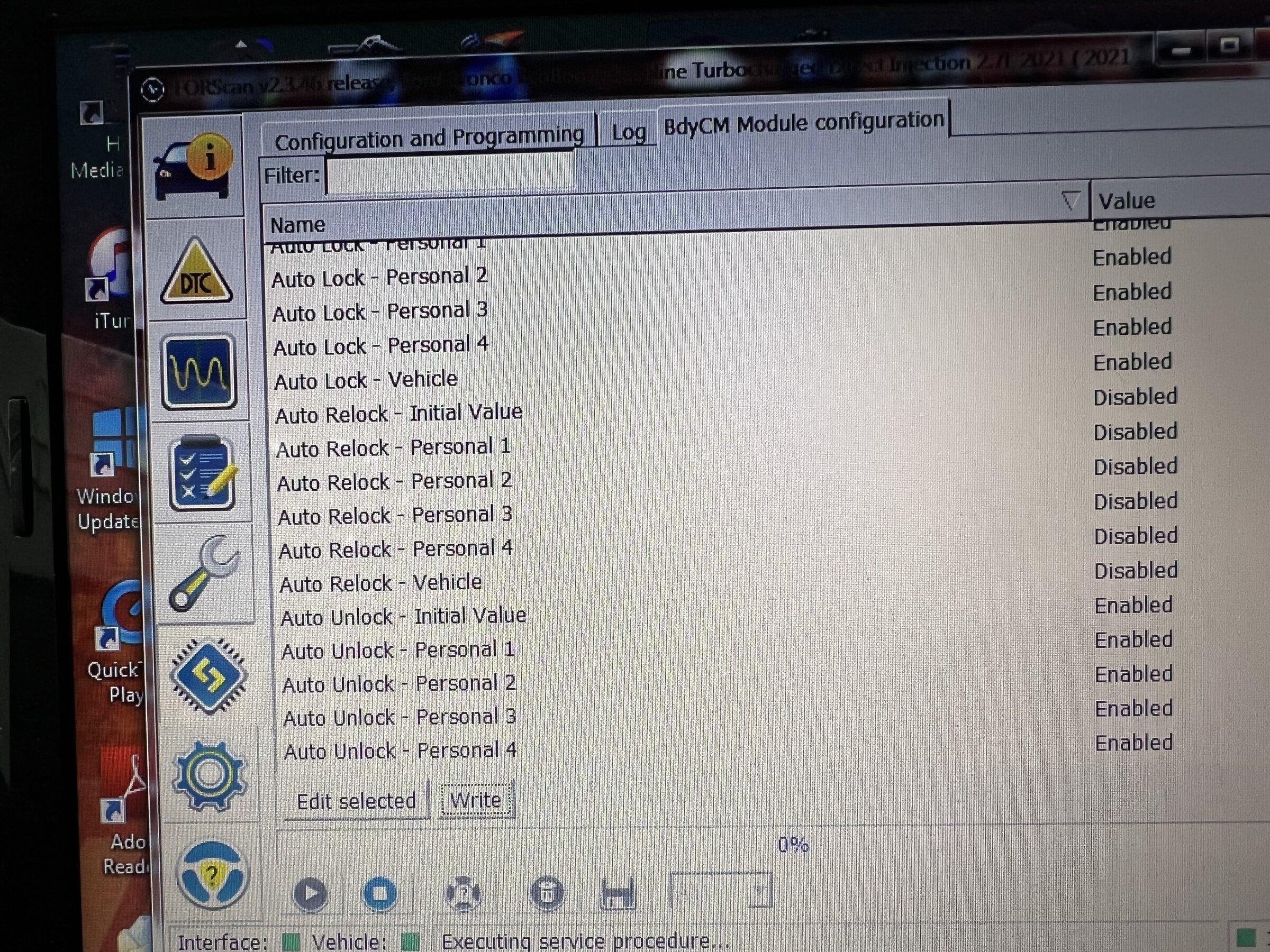
Like @AK SNO RIDER I saw a number of interesting plain english settings but am hesitant to do trial and error. Presumably, they are not options the Bronco is able to make use of. For instance, I found these settings about Auto Lock and Auto Relock. I'm on the fence whether I'd want those active with the Bronco but have it on another vehicle and it's often a nice feature.

Ford Bronco FORScan Bronco Working Spreadsheet (double honk, sport mode, chimes, seatbelts, and more!) IMG_9670


Perhaps, someone will build a spreadsheet of the plain english options that work and the plain english changes to make to activate a certain option/feature.
 

NewBroncoOwner

Base
Well-Known Member
Joined
Jun 4, 2021
Threads
66
Messages
1,205
Reaction score
2,661
Location
Good Ol USA!!!
Vehicle(s)
2021 Ford Bronco Base
Your Bronco Model
Base
Clubs
 
I am unable to find the TCM in FORSCAN. I can access PCM (no ability for relearn) But i was hoping for ability to access the TCM. Anyone else having trouble accessing that module as well?
 

WuNgUn

Banned
Badlands
Banned
Banned
First Name
Eric
Joined
Jul 9, 2020
Threads
195
Messages
4,363
Reaction score
6,902
Location
Ontario Canada
Vehicle(s)
2 door Squatched
Your Bronco Model
Badlands
Clubs
 
I am unable to find the TCM in FORSCAN. I can access PCM (no ability for relearn) But i was hoping for ability to access the TCM. Anyone else having trouble accessing that module as well?
Transmission module? Did you make a speedo calibration change?
It's a know issue that the TCM has trouble relearning.
 

NewBroncoOwner

Base
Well-Known Member
Joined
Jun 4, 2021
Threads
66
Messages
1,205
Reaction score
2,661
Location
Good Ol USA!!!
Vehicle(s)
2021 Ford Bronco Base
Your Bronco Model
Base
Clubs
 
Transmission module? Did you make a speedo calibration change?
It's a know issue that the TCM has trouble relearning.
Yes, the Transmission Control Module. I did an update for my speedo because of my tire size change. But i dont even have an option to choose TCM in the module listing.
 

NVCowboy

Big Bend
Well-Known Member
First Name
William
Joined
Jul 27, 2020
Threads
26
Messages
1,438
Reaction score
1,850
Location
Henderson, NV
Vehicle(s)
2002 F350. 2022 Big Bend (Sasquatch)
Your Bronco Model
Big Bend
That I don't know. I did however, change the PANIC button to a double press instead of a single one. You only need to lean on your keys once to change that...
This is a thing?!! My marriage might survive after all. Was gonna wait till delivery for the forscan tool. Tomorrow's not soon enough.
Sponsored


Top