Sponsored

Autostop eliminator

KRAKEN

Black Diamond
Well-Known Member
First Name
Andy
Joined
May 23, 2023
Threads
39
Messages
765
Reaction score
2,770
Location
North Alabama
Vehicle(s)
2023 2 DOOR BRONCO, 2014 F150 XLT, 2006 F150 FX4
Your Bronco Model
Black Diamond
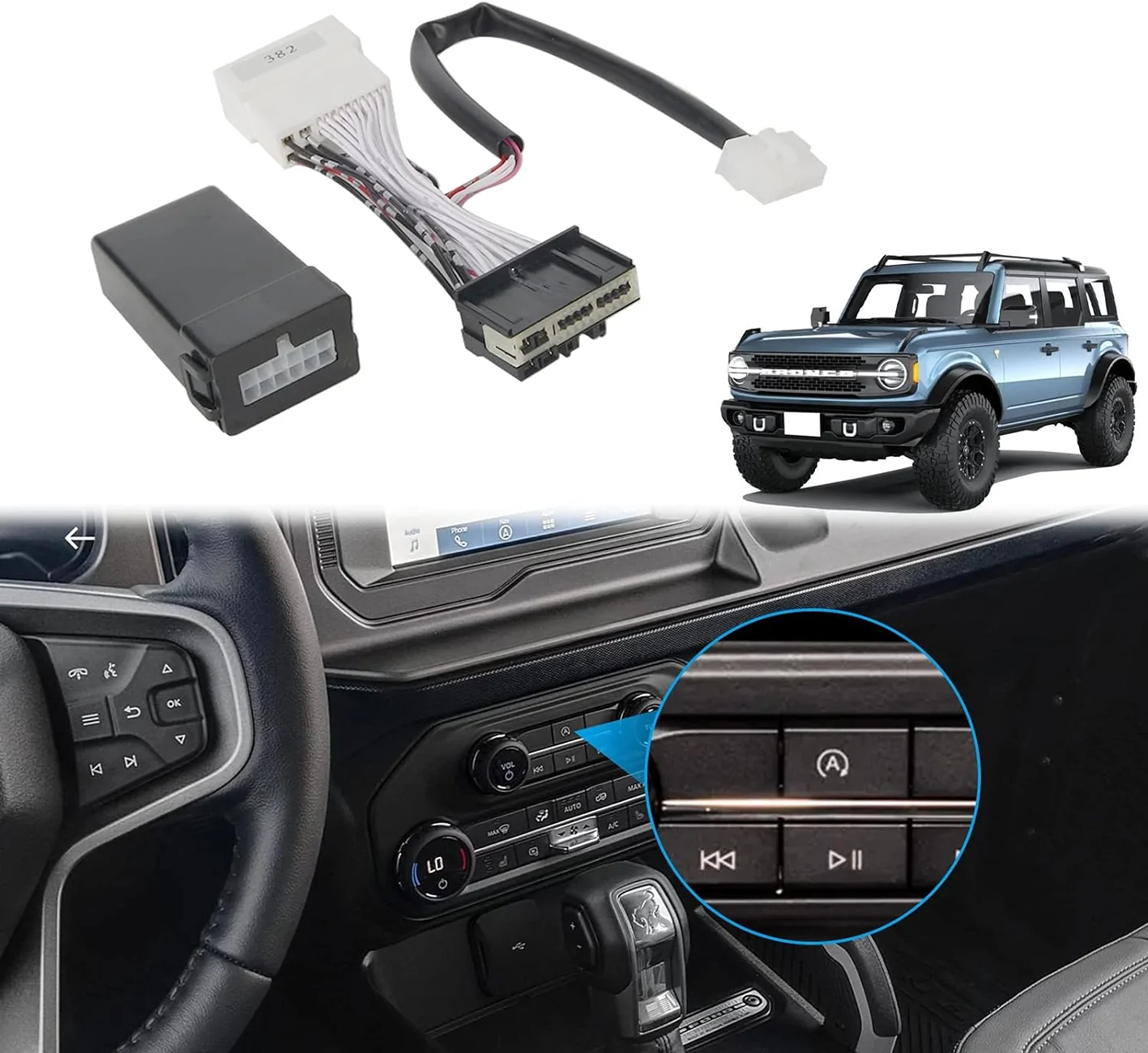
I installed a different one that installs in the driver footwell kick panel... no center panel removal at all.
Sponsored

 
Last edited:

Glade Runner

Everglades
Well-Known Member
Joined
Dec 31, 2023
Threads
11
Messages
775
Reaction score
1,821
Location
VA
Vehicle(s)
Yes
Your Bronco Model
Everglades
Clubs
 
Don’t you have to take apart part of the center stack to get it installed?
1. Remove the center console grab handle
2. Remove the small panel below the climate control area (this is the most difficult step due to the center console piece interfering a bit)
3. Loosen the center console top panel, lift and tilt to the side
4. follow instructions and plug into the occupied port
5. Reassemble everything.

*Pro-tip: if your trim doesn’t have usb power outlets on top of the dash, and you are thinking of installing the Mabett Dashboard USB Expansion Dock, do it at the same time since you have to get to the same area for both.
 

SHANUT

Badlands
Well-Known Member
First Name
Craig
Joined
Sep 10, 2023
Threads
13
Messages
548
Reaction score
1,049
Location
Hermann, MO
Vehicle(s)
Bronco
Your Bronco Model
Badlands
I’ve been avoiding installing mine for quite some time, but I just did it and it was a snap. I just did a little jiggling to make sure I didn’t break anything and everything went right back together with no issue.
 

Swallace

Outer Banks
Well-Known Member
First Name
Sean
Joined
Oct 4, 2021
Threads
4
Messages
125
Reaction score
86
Location
N. Andover Ma
Vehicle(s)
Toyota ,Gmc and Subaru
Your Bronco Model
Outer Banks
I installed a different one that installs in the driver footwell kick panel... no center panel removal at all.
Hey Kraken, do you have the product name and part number for the one you installed in the drivers footwell?
 

ssls6

Badlands
Well-Known Member
First Name
Richard
Joined
Jan 16, 2025
Threads
11
Messages
104
Reaction score
276
Location
FairPlay CO
Vehicle(s)
FJ Cruiser, Bronco, F-250
Your Bronco Model
Badlands
1. Remove the center console grab handle
2. Remove the small panel below the climate control area (this is the most difficult step due to the center console piece interfering a bit)
3. Loosen the center console top panel, lift and tilt to the side
4. follow instructions and plug into the occupied port
5. Reassemble everything.

*Pro-tip: if your trim doesn’t have usb power outlets on top of the dash, and you are thinking of installing the Mabett Dashboard USB Expansion Dock, do it at the same time since you have to get to the same area for both.
2a). remove 2 7mm bolts, one behind the lower panel of the steering wheel and one behind the glove box.
 

Sponsored

bucketdad

Wildtrak
Member
First Name
Larry
Joined
May 5, 2025
Threads
5
Messages
17
Reaction score
4
Location
Michigan
Vehicle(s)
2022 Bronco
Your Bronco Model
Wildtrak

KRAKEN

Black Diamond
Well-Known Member
First Name
Andy
Joined
May 23, 2023
Threads
39
Messages
765
Reaction score
2,770
Location
North Alabama
Vehicle(s)
2023 2 DOOR BRONCO, 2014 F150 XLT, 2006 F150 FX4
Your Bronco Model
Black Diamond
Hey Kraken, do you have the product name and part number for the one you installed in the drivers footwell?
I used the Amazon one listed above... easy peasy.
 

Danielsand

Banned
Outer Banks
Banned
Banned
First Name
Daniel
Joined
Apr 16, 2025
Threads
7
Messages
1,073
Reaction score
2,034
Location
Idaho
Vehicle(s)
'21 OBX SAS
Your Bronco Model
Outer Banks
I drive in "sport" mode exclusively (no ASS). I just wish the thing would remember to stay in sport, rather than asking me every time forcing me to click the OK button. I am not concerned about "gas mileage", but I noticed my gas mileage is "better" in sport than in "normal" (18.3mpg in "sport", vs. 18.2 mpg in "normal"). I never used "eco", or any other mode. Will try other modes in the winter.
 

Sponsored

larrydoran80

Wildtrak
New Member
First Name
Larry
Joined
Aug 9, 2025
Threads
0
Messages
4
Reaction score
6
Location
IL USA
Vehicle(s)
24 Bronco / 23 Demon 170 / 23 Challenger RedEye / 14 Mustang GTCS
Your Bronco Model
Wildtrak
Just installed this one on my 24. Worked flawlessly. Installs above drivers kick panel. Nothing to take apart.

https://a.co/d/ikGp19K
 

Rydfree

Badlands
Well-Known Member
First Name
Benny
Joined
Aug 12, 2020
Threads
15
Messages
2,021
Reaction score
5,724
Location
Alabama
Vehicle(s)
2007 Ford F-150 Supercrew 4WD King Ranch
Your Bronco Model
Badlands

BillTheCat

Big Bend
Well-Known Member
Joined
May 14, 2024
Threads
5
Messages
205
Reaction score
455
Location
Alaska
Vehicle(s)
4Runner; Bronco: BB/SAS/LUX/2DR
Your Bronco Model
Big Bend
Multiple threads about the Gremlins that popped up using the Kick-Panel version. YMMV.
I stuck to the original "AutoStart Eliminator". Best $100 upgrade on the Bronco. Eazy-Peazy.
(Push a button...ME?...Whaaaat?!)
 

indio22

Base
Well-Known Member
Joined
Aug 25, 2019
Threads
17
Messages
5,311
Reaction score
11,100
Location
Chicagoland, USA
Vehicle(s)
'72 Rover, '85 CJ7, '98 TJ, '14 BRZ, '23 Bronco
Your Bronco Model
Base
I drive in "sport" mode exclusively (no ASS). I just wish the thing would remember to stay in sport, rather than asking me every time forcing me to click the OK button. I am not concerned about "gas mileage", but I noticed my gas mileage is "better" in sport than in "normal" (18.3mpg in "sport", vs. 18.2 mpg in "normal"). I never used "eco", or any other mode. Will try other modes in the winter.
I'd pay good money for a mod that keeps Sport mode always active. Also I'd pay for a mod that activates brake actuated traction control in 4low, given Ford's failure to implement.
Sponsored


Top