
Sponsored
Search results
-

12/19/2022 build week group
Curious. Is the Tear Tag shown with the modules [app] are somewhere else?- friethmiller
- Post #268
- Forum: Ordering, Pricing, Production, Tracking, Delivery
-
12/19/2022 build week group
No worries! It's not our fault no matter what. 😆- friethmiller
- Post #263
- Forum: Ordering, Pricing, Production, Tracking, Delivery
-
12/19/2022 build week group
Feel free, if you haven't already, to update the 12/19 build sheet. Here's the link to help with reading the WS. https://www.bronco6g.com/forum/thre...ed-emails-delivery-date-estimates-more.24987/ Try this link for the 12/19 google spreadsheet.- friethmiller
- Post #257
- Forum: Ordering, Pricing, Production, Tracking, Delivery
-
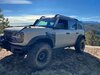
The Everglades Overland Build Has Started
Really like all your mods! Though, I'm not sure I could let go of the EG factory rims.- friethmiller
- Post #21
- Forum: Build / Rig Journals
-
12/19/2022 build week group
Well, once your Bronco is built, you can track that the modules are alive (link below) and check for a built email / photo. https://www.motorcraftservice.com/Home/SetCountry?returnUrl=/asbuilt- friethmiller
- Post #244
- Forum: Ordering, Pricing, Production, Tracking, Delivery
-
12/19/2022 build week group
Read this link. This should explain everything. Update the spreadsheet with your info. https://www.bronco6g.com/forum/threads/bronco-build-process-guide-window-sticker-blend-date-production-rotation-number-built-shipped-emails-delivery-date-estimates-more.24987/- friethmiller
- Post #242
- Forum: Ordering, Pricing, Production, Tracking, Delivery
-
12/19/2022 build week group
Yes!! I have several boxes that need to be wrapped and placed under the tree. I gave a box to each of my kids - to give to me. The rest are from Santa! It's going to be a "Bronco Christmas", dammit! 🎅🎄- friethmiller
- Post #235
- Forum: Ordering, Pricing, Production, Tracking, Delivery
-
12/19/2022 build week group
Here we go! Happy Build-Week y'all!! 🍻- friethmiller
- Post #234
- Forum: Ordering, Pricing, Production, Tracking, Delivery
-
2023MY Standard Audio (6-speaker) Subwoofer Delete Mandatory and Functional Amps Removed
I have a 12/21 blend date and can see the -250 credit. I think we, in the 12/19 build group, have determined that 12/21 is the date that the subwoofer delete goes into effect.- friethmiller
- Post #53
- Forum: Ordering, Pricing, Production, Tracking, Delivery
-
12/19/2022 build week group
It has nothing to do with you or any potential status change to your Bronco build. Basically, Ford's website is flaky AF!- friethmiller
- Post #203
- Forum: Ordering, Pricing, Production, Tracking, Delivery
-
12/19/2022 build week group
Have you tried this link with your vin added on? https://www.windowsticker.forddirect.com/windowsticker.pdf?vin=- friethmiller
- Post #198
- Forum: Ordering, Pricing, Production, Tracking, Delivery
-
12/19/2022 build week group
FYI, if you don’t have a window sticker yet, make sure you are using the following url with your vin added to the end. This is the one listed in Bronco6g’s Trackers Menu. I cannot get the ‘View Window Sticker’ link from the “pizza tracker” page to work but this link below does...- friethmiller
- Post #182
- Forum: Ordering, Pricing, Production, Tracking, Delivery
-
12/19/2022 build week group
Okay! My window sticker just showed up!! I have a 12/21 blend date. 🤞- friethmiller
- Post #175
- Forum: Ordering, Pricing, Production, Tracking, Delivery
-
12/19/2022 build week group
Use this link for the 12/19/22 google spreadsheet.- friethmiller
- Post #167
- Forum: Ordering, Pricing, Production, Tracking, Delivery
-
12/19/2022 build week group
Y'all make sure and update our 12/19/22 build tracking sheet. It'll be cool how it all unfolds with all of our input data. 👀- friethmiller
- Post #164
- Forum: Ordering, Pricing, Production, Tracking, Delivery
-
I bought these and don't know why... 😂
I put them in my Amazon Wishlist right next to the 3 wolf T-shirt that I obviously need to buy! -
12/19/2022 build week group
Yep! Same here. In production but no sticker yet. At least things are happening. I'm expecting end of January at the earliest.- friethmiller
- Post #161
- Forum: Ordering, Pricing, Production, Tracking, Delivery
-
12/19/2022 build week group
This is not good. Now when I go to check my vin (the same info I've been entering several times a day for a month), I now get this. WTF? Anyone else seeing the same issue? Update: It must have been a glitch in the Matrix. It's working now.- friethmiller
- Post #135
- Forum: Ordering, Pricing, Production, Tracking, Delivery
-
12/19/2022 build week group
You need to click on the Trackers menu at the top. While the Order Track app is no longer working, there are links to the Ford status and window sticker. Make sure you insert your vin in the appropriate spot (parameter) in the listed url. There's also a general info post that you should...- friethmiller
- Post #134
- Forum: Ordering, Pricing, Production, Tracking, Delivery
-
12/19/2022 build week group
Sounds like you are now! Welcome to the group!- friethmiller
- Post #133
- Forum: Ordering, Pricing, Production, Tracking, Delivery