

Columns shown in the spreadsheet represent what you'd see in the AS BUILT format. So for that you'd be changing the values of the first column of line 720-01-02 (0A27). Each "x" directly represents a character in that column (4 total). The last two of the final column (block) in a line will be automatically adjusted and are not necessary to change. An example would be "68" in the first line (720-01-01) or "AB" in the second line. I hope that's not too confusing.Ok... does the engine have to be running for this? It did for the 2 other things I've done. But I read a description of a change for something else and their instructions didn'n mention starting the engine. Also, there's "IPC Module Configuration (AS BUILT format)" and then "IPC Module Configuration". I went into the second one and there was just a setting to Enable or Disable. Tried to just select Disable. It didn't take. Go for the other one and change the number? Also, which block of characters gets changed? The 0A27 or 50AB?


Sorry for the newb questions. For previous changes I've made I followed a video step by step and had no problems.
Thanks!
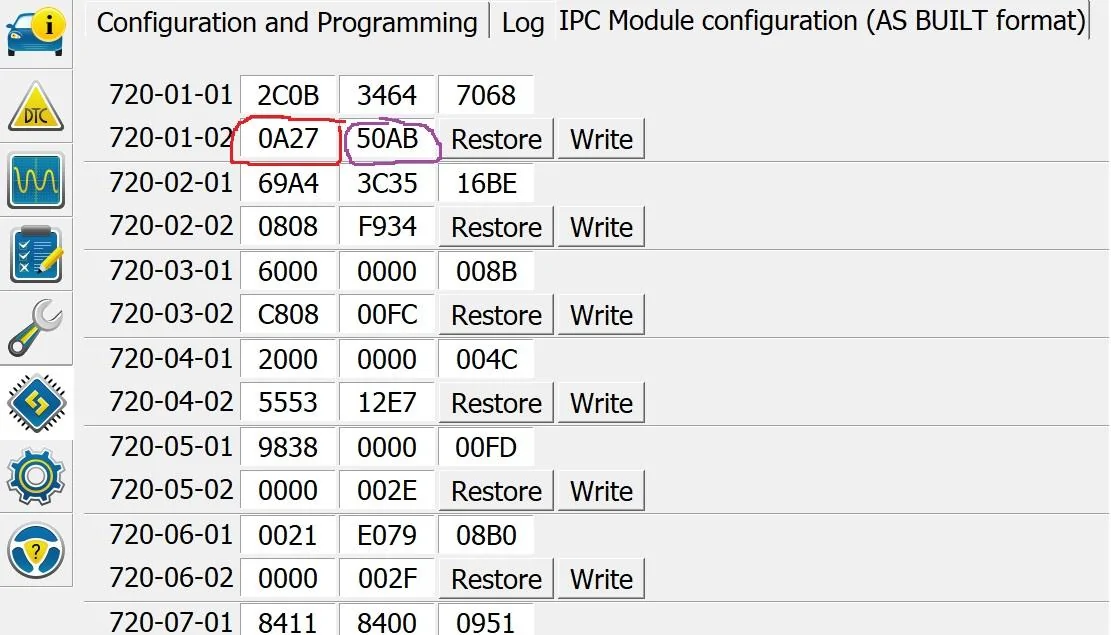

Basically it's like playing put the square peg in the square hole. You just match up where the asterisks (*) is and change the value to the one you want.
Also I do not recommend you flash with the engine running. This can cause problems in some modules and even corrupt them. Ignition on, not running is the recommended procedure (foot off brake and press the start button).
Sponsored