
Sponsored

Error loading saved BdyCM.abt file from Forscan

smonroe11

Badlands
Well-Known Member
First Name
Stephen
Joined
Oct 27, 2021
Threads
47
Messages
289
Reaction score
170
Location
Dallas
Vehicle(s)
Chevrolet Tahoe
Your Bronco Model
Badlands
Clubs
 
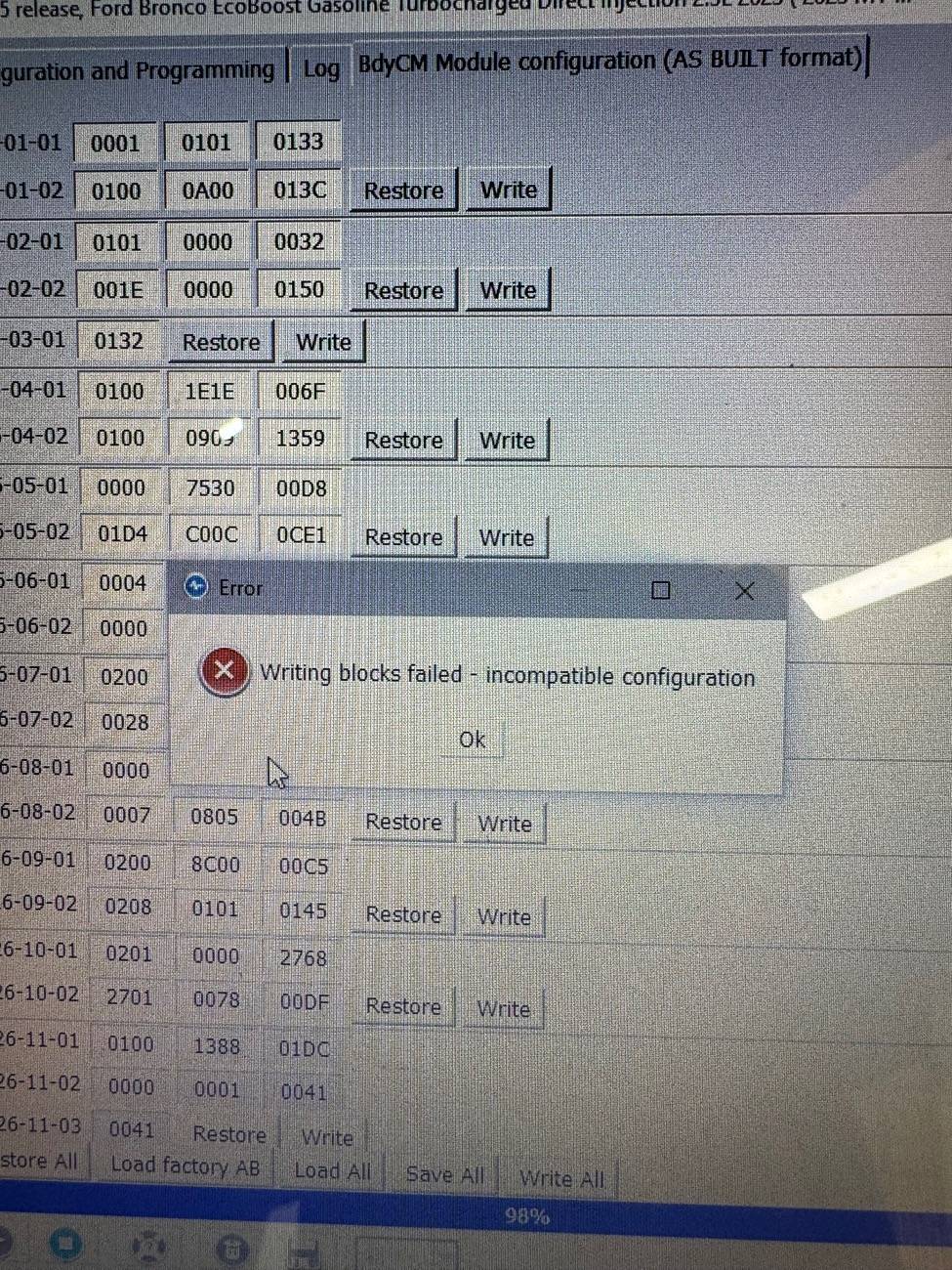
I’ve been messing with the lights in Forscan and have royally messed up the BdyCM module. I chose Configuration and Programming then BdyCM (AS BUILT format) then ran it. Then chose load all and selected a BdyCM.abt file I saved from 2023 when I first started messing with Forscan.

The error I received said “Writing Blocks Failed - incompatible configuration”
Ford Bronco Error loading saved BdyCM.abt file from Forscan IMG_7637


I’m looking for guidance or maybe even a clean BdyCM.abt file. I have a 2023 Badlands 2 door MT 2.3L

Thanks in advance!

-Steve
Sponsored

 

Brian_B

Big Bend
Well-Known Member
First Name
Brian
Joined
Sep 14, 2023
Threads
60
Messages
8,237
Reaction score
14,578
Location
Central CA
Vehicle(s)
'23 BB 4dr 7MT, '22 BSport OBX, '87 B-II XL
Your Bronco Model
Big Bend
Clubs
 
I saw this a few times a couple of weekends ago when I was fooling around.

In my case - it did correctly write the save file when I applied it. Verified by saving current config, loading the Alternate config, writing it, getting the error, then re-reading and saving current config.

The second save file matched the Alternate and values were different from the original save file.

So you could do that to see if you are getting the values to transfer appropriately or not.

Not sure what triggered the errors - I had 92 Blocks and same number of rows in the save file as the loaded configuration.

I can also say, from my adventure a couple of weekends ago - my orginial BdyCM file was from when I bought the Bronco. 2+ years and several mods later, restoring from it was a mistake. There were a lot of added things that affect it that I had to dig back in and fix manually: my winch/RCM/bumper config, the keypad, a new windshield/camera calibration, etc.
 

Brian_B

Big Bend
Well-Known Member
First Name
Brian
Joined
Sep 14, 2023
Threads
60
Messages
8,237
Reaction score
14,578
Location
Central CA
Vehicle(s)
'23 BB 4dr 7MT, '22 BSport OBX, '87 B-II XL
Your Bronco Model
Big Bend
Clubs
 
Also since you just did this - you can download a recent config file from Ford. The Load Factory AB button will download the latest save from Ford. It will be whatever version last updated from the cell modem / Update service and it updates every few days/weeks - so who knows how long until it updates to your current suspect config
 
OP
OP
smonroe11

smonroe11

Badlands
Well-Known Member
First Name
Stephen
Joined
Oct 27, 2021
Threads
47
Messages
289
Reaction score
170
Location
Dallas
Vehicle(s)
Chevrolet Tahoe
Your Bronco Model
Badlands
Clubs
 
Also since you just did this - you can download a recent config file from Ford. The Load Factory AB button will download the latest save from Ford. It will be whatever version last updated from the cell modem / Update service and it updates every few days/weeks - so who knows how long until it updates to your current suspect config
I got the current AB build. It’s been a long time since I messed with Forscan. How does the AB build break out into the modules with .abt extension? Or does it just know to pull that module?

Thanks

Steve
 

Brian_B

Big Bend
Well-Known Member
First Name
Brian
Joined
Sep 14, 2023
Threads
60
Messages
8,237
Reaction score
14,578
Location
Central CA
Vehicle(s)
'23 BB 4dr 7MT, '22 BSport OBX, '87 B-II XL
Your Bronco Model
Big Bend
Clubs
 
The ABT file is plain text - you can open it with Notepad (or whatever your favorite editor is). Forscan will create 1 ABT file per module usually, and there is a module identifier in the code (see below) to help keep from loading the wrong file into a module.

Besides that - copying the below from an older post:

To give some context: The Forscan worksheet, and the "AS BUILD" format, tends to go something like this:
726-01-01 xxxx-xxxx-xxxx
The first 3 are a module identifier -- All BdyCM entires will be 726, all IPC values will be 720, etc. The second pair are a "Block" (that's how they are labled in the text file from Forscan), and the third pair - I don't know what you call them, but if you open the saved text file, they will each be separate rows. So I'll call it a Row. And I'll call an individual values (the x's) inside the row Keys (it's a hexadecimal value, it's technically a half-byte, which is called a "nibble", seriously, but that sounds semi-ridiculous)
 
OP
OP
smonroe11

smonroe11

Badlands
Well-Known Member
First Name
Stephen
Joined
Oct 27, 2021
Threads
47
Messages
289
Reaction score
170
Location
Dallas
Vehicle(s)
Chevrolet Tahoe
Your Bronco Model
Badlands
Clubs
 
The ABT file is plain text - you can open it with Notepad (or whatever your favorite editor is). Forscan will create 1 ABT file per module usually, and there is a module identifier in the code (see below) to help keep from loading the wrong file into a module.

Besides that - copying the below from an older post:

To give some context: The Forscan worksheet, and the "AS BUILD" format, tends to go something like this:
726-01-01 xxxx-xxxx-xxxx
The first 3 are a module identifier -- All BdyCM entires will be 726, all IPC values will be 720, etc. The second pair are a "Block" (that's how they are labled in the text file from Forscan), and the third pair - I don't know what you call them, but if you open the saved text file, they will each be separate rows. So I'll call it a Row. And I'll call an individual values (the x's) inside the row Keys (it's a hexadecimal value, it's technically a half-byte, which is called a "nibble", seriously, but that sounds semi-ridiculous)
I found this app to compare files. Found the problem. Really helpful app. https://compulsivecode.com/Project_AsBuiltCompare.aspx
Sponsored


Top